
Sorry but your meter link does not show any “Real world” numbers, but the marketing spec’s from said devices…or I am not seeing where they actually did proper real world testing…
Also false…
you seem to go very dramatic in all of your claims just to try and enforce your own point…
I have 2 Dell T5820 towers running Xeon’s and they are whisper quiet…cost me $300 CAD each
I have an HP Z6 G4 with an intel xeon silver 10 core / 192Gb of ram - runs whisper quiet…
You do not need to buy 1U/2U servers, and on that note, there are plenty that are quiet pending on configurations…
Also plenty of used older SuperMicro mATX boards and such with integrated Xeon’s that work fine for TrueNAS…you can have a small build sitting on your desk if you wanted that has “enterprise quality” parts in it.
1 Like
Let’s just go with your figures for the argument’s sake:
Average LONG RANGE 6GHz speed: 1446Mbps, CLEARLY faster than 1Gbps wired.
It doesn’t say if they used 320GHz or 160GHz or smaller channels.
The IOT things do not matter, because that’s the whole point of multi-band WiFi7: low speed IoT ends up on the 2.4GHz spectrum, media streaming and consumer devices are put on the 5GHz band, while the computer LAN is put on the 6GHz net.
Furthermore, as I also said, “wired” in many homes means somthing like Develo ethernet over power line interfaces, because few people empty out their apartments, chisel new channels into brick walls, put new stucco and wall paper up, clean up the place, and move all their belongings back, just to run the kind of empty wire pipes required to run fiber or copper cables.
So we’re not comparing office space or data center wiring, we’re comparing ethernet over power line wiring vs. WiFi. And trust me, WiFi wins, by a large margin.
I went through three generations of these adapters, hoping that the next generation would be better, but I still get at best a few hunderd mbps over “superior wired connection”, and units that randomly hang themselves under high load, must be directly plugged into the outlet, meaning everything plugged in after must power down if you want to power cycle the unit if it causes trouble, and you need to be there to do it, because that means unplugging the damn things from the wall and plugging them back in.
Even if they were to perform at their max (which they don’t) they’d be 1.2Gbps devices, slower than the 1.4Gbps of your Interior Long Range test above.
Also, while WiFi6 is nice, it’s not WiFi6E nor is it WiFi7, both of which have significant incremental upgrades over regular WiFi6, so not what I’m talking about. Meanwhile it still is in the same range as ethernet over power lines, except a lot more reliable, particularly in a proper mesh setup.
As for no real world figures:
Wi-Fi 7 **reaches a theoretical max speed of 46 Gbps, but that number lives in lab conditions—**no interference, perfect alignment, and 16 spatial streams in play.
[…]
In enterprise deployments, 6 to 15 Gbps per access point is a more realistic range than the aforementioned 46 Gbps. That still puts it well ahead of what Wi-Fi 6 or 6E can deliver.
How fast is Wi-Fi 7 in real life?
Early field tests show 6 to 10 Gbps per access point, depending on the hardware, layout, and how much of the 6 GHz band is available.
At Meter, we’ve seen sustained throughput near 7 Gbps using Wi-Fi 7 access points and modern client devices in open office layouts. That’s real performance—not peak numbers, but day-to-day wireless speeds in production.
Now, I didn’t make these measurements. But to say they were talking about theoretical figures and not real world data, is disingenuous.
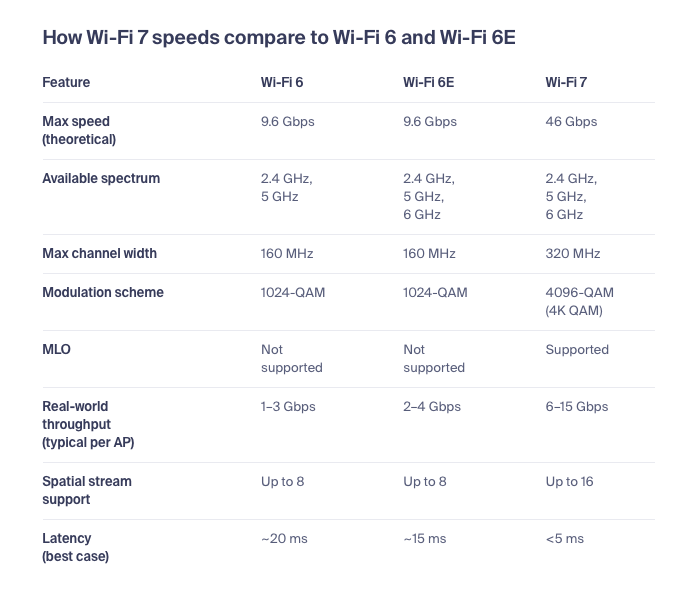
So, yes, there’s the theoretical max, but there’s also real world data.
Since these standards have a wide range of options, one must be weary of tests. e.g. a WiFi 6 Stick, that uses a narrow band is WiFi6, but it’s not the same as WiFi6 using wide band and MiMo, nor is it WiFi6E using 6GHz, nor is it WiFi7 with 320GHz bands, MLO, 4KQAM.
As far as TrueNAS is concerned, none of that matters, the Linux drivers take care of it, all that’s needed is a mans to set the SSID, encryption standard and the password.
It’s the user’s worry if their devices perform well, just as it’s the user’s worry what sort of cable or switch they buy, what sort of CPU they run, etc.
I mean, there we have people running TrueNAS on memory starved Atom chips, and that’s fine, but WiFi is a no-go, because wired ethernet might be faster. Might as well stop TrueNAS from booting on everything that doesn’t have ECC RAM and a Xeon-class CPU, if you follow that logic.
As is yours.
The OP’s question has long since been answered, and the continued argument here is pointless. See the feature request here: