
did you define that nas folder as /media inside container ?
Thank you for this guide!
As is now possible to directly use yaml in EE without dockge, is it possible to configure app from official catalog to use gluetun?
For example, I have gluetun configured with the compose.yaml provided here running on my truenas server and qbitorrent installed fro the catalog. Is it a way to change the qbitorrent configuration to route the connection by gluetun?
As is now possible to directly use yaml in EE without dockge, is it possible to configure app from official catalog to use gluetun?
As far as I can tell, no. Doing this in a regular docker-compose.yml file requires a line like “network_mode: container:gluetun”, but there doesn’t seem to be a way to add this with the apps in the official catalog. It probably wouldn’t be that hard to add, but it hasn’t been done for some reason.
For now, I’m just installing gluetun and qbit using the custom docker-compose functionality in EE, and it mostly works well, except it doesn’t start up correctly on reboot and I have to manually restart the containers in sequence. I tried using dockge before, and it worked just as well, but no better because it didn’t restart the containers at all on reboot.
1 Like
I have tried to add “network_mode: container:gluetun” in yml files of the official qbittorrent app but it doesn’t work.
So for the time being, I too am using the custom docker-compose functionality
As others have already noted, you can’t link to other docker networks using the offical TrueNAS apps, you must use a custom yaml deployment to access these options. There is a github issue open to allow direct binding to a specific IP address configured on the TrueNAS system where I commented that in addtion to that it would be nice to allow the network_mode options for just these situations.
1 Like
568:568 belongs to user “apps” if i remember correctly, give permissions in datasets perhaps ?
Thanks for the guide! It works perfect for me. If you are like me and have a WireGuard wg.conf file to set up your VPN, Gluetun supports this. You just have to mount it in the right place, as described in gluetun docs (look for wireguard for custom vpn provider).
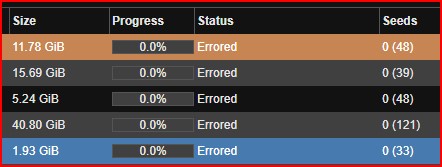
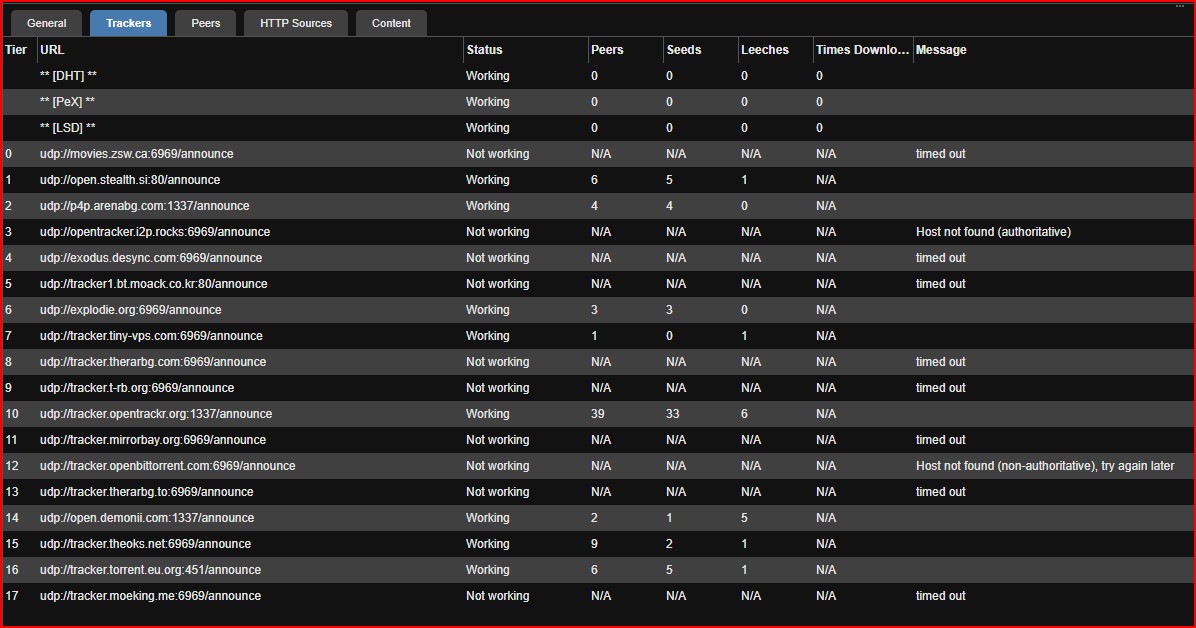
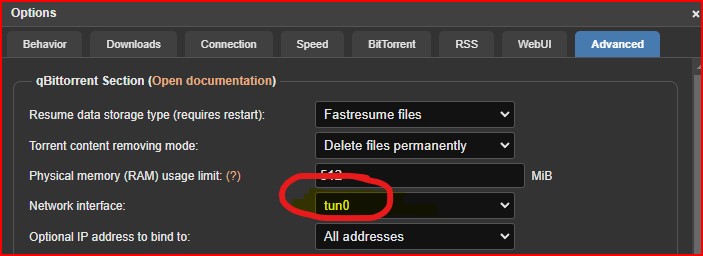
thanks for guide, i got the app working and tested for the ipleak, it is running with Wireguard and AirVPN. for some reason i am not able to download any files. all my downloads are failing with Status “Errored”.
config file used:
services:
gluetun:
cap_add:
- NET_ADMIN
container_name: gluetun
devices:
- /dev/net/tun:/dev/net/tun
environment:
- TZ=America/Chicago
- VPN_SERVICE_PROVIDER=custom
- VPN_TYPE=wireguard
- WIREGUARD_ENDPOINT_IP=redacted
- WIREGUARD_ENDPOINT_PORT=51820
- WIREGUARD_PUBLIC_KEY=redacted
- WIREGUARD_PRIVATE_KEY=redacted
- WIREGUARD_PRESHARED_KEY=redacted
- WIREGUARD_ADDRESSES=redacted
- FIREWALL_VPN_INPUT_PORTS=6881
- SERVER_COUNTRIES= #optional
- DNS_ADDRESS= redacted
image: qmcgaw/gluetun:latest
ports:
      - 8888:8888/tcp # HTTP proxy
      - 8388:8388/tcp # Shadowsocks
      - 8388:8388/udp # Shadowsocks
      - 8080:8080 #qbittorrent
      - 6881:6881 #qbittorrent
      - 6881:6881/udp #qbittorrent
restart: unless-stopped
qbittorrent:
container_name: qbittorrent2
depends_on:
- gluetun
environment:
- PUID=568
- PGID=568
- TZ=America/Chicago
- WEBUI_PORT=8080
image: linuxserver/qbittorrent:latest
network_mode: service:gluetun
restart: unless-stopped
volumes:
- /mnt/redacted:/config
- /media:/media
any suggestion to fix this is appreciated.
Thank you
1 Like
this is resolved, turns out to be an issue with the volume path for /media
1 Like
@jagadeeps What did you put as your mount path for the media? I have container set to “/mnt/Plugins/Media/media” and qbit downloads to “/media/downloads.” So far all of mine get the same error as you were before and know that it is my path, but not sure what I am doing wrong. Thanks!
here are my storage paths.

I forgot that the “:” was needed, but I got it now. Thanks!
I’m having a user permission issue, I’m not sure how to fix it, in the qbitorrent file permissions.
I get this error:
error: Permission denied
In my compose file I’ve got my env set properly and the file location (as far as I can tell):
    environment:
      - PUID=568
      - PGID=568
     # edited out others
    volumes:
      - /mnt/.ix-apps/app_config/qbittorrent:/config
      - /mnt/DataStore/share/media/downloads:/media
I’ve validated that I can see the files when I get a shell in the container and navigate to /media.
Checking the user inside the container, I can see that the user and the permissions on /media match:
root@4fa4d9721e21:/# ps -aux | grep /usr/bin/qbit
abc          145  0.6  0.0  72372 39060 ?        Ssl  10:57   0:04 /usr/bin/qbittorrent-nox --webui-port=8080 --torrenting-port=6881
root@4fa4d9721e21:/# ls -l | grep media
drwxrwxrwx+   2 abc  abc      3 Mar 16 10:45 media
When I look at my dataset (media/) the permissions seem to be set properly:
Owner: apps
Group: apps
I’m really not sure what else I can do to troubleshoot. Has anyone any ideas?
Ah, I figured out the issue. I’m an idiot.
Default download location in qbitorrent was /downloads and I’d mounted it as /media. Changing it to the correct default location did the trick.
If anyone wants to steal my config, here’s my protonvpn-based compose files.
I also added a Web UI button on qbittorrent (weirdly, you’ll get unauthorized unless you click the URL bar and hit enter, refresh doesn’t work).
qbittorrent:
services:
  qbittorrent:
    container_name: qbittorrent
    restart: unless-stopped
    environment:
      - PUID=568
      - PGID=568
      - TZ=<TZ HERE>
      - WEBUI_PORT=8080
      - TORRENTING_PORT=6881
    image: lscr.io/linuxserver/qbittorrent:latest
    network_mode: container:gluetun
    volumes:
      - /mnt/.ix-apps/app_config/qbittorrent:/config
      - <DATASET PATH HERE>:/downloads
x-portals:
  - host: <TRUENAS SCALE IP>
    name: Web UI
    path: /
    port: 8080
    scheme: http
and the gluetun compose file for protonvpn:
version: "3"
services:
  gluetun:
    image: qmcgaw/gluetun
    container_name: gluetun
    restart: unless-stopped
    cap_add:
      - NET_ADMIN
    ports:
      - 8888:8888/tcp # HTTP proxy
      - 8388:8388/tcp # Shadowsocks
      - 8388:8388/udp # Shadowsocks
      - 8080:8080 #qbittorrent
      - 6881:6881 #qbittorrent
      - 6881:6881/udp #qbittorrent
    volumes:
      - <YOUR MOUNT HERE>:/gluetun
    environment:
      - VPN_TYPE=wireguard
      - VPN_SERVICE_PROVIDER=protonvpn
      - WIREGUARD_PRIVATE_KEY=<PRIVATE KEY>
      - WIREGUARD_ADDRESSES=<WIREGUARD ADDRESS>
      - WIREGUARD_PUBLIC_KEY=<PUBLIC KEY>
      - WIREGUARD_ENDPOINT_IP=<ENDPOINT IP HERE>
This eventually got me to the finish line. I found some other similar write-ups, but this one finally got all the pieces fitted correctly.
This guide really helped me. I have a bit of an issue though. I’ve got qbittorrent setup and running, however I’m unable to change any of the settings in the web ui. I would like to set a username and password and change the amount of active torrents allowed. The settings are not saving and just return to default when I close the options menu.
Is there a way the settings can be changed?
Thanks again for this guide. Appreciate it.
I fixed my issue.
Turns out the most recent version of qbittorrent is little bit broken. At least at the time of this post.
I went to Releases · linuxserver/docker-qbittorrent · GitHub to pick a new version.
I changed the image to one from a few months ago and now it works just fine
image: lscr.io/linuxserver/qbittorrent:5.0.4-r0-ls384
I can now change all the settings in the webui and they save as they should.
ive got everything up but for some reason its randomly assigning me a vpn server even though in protonvpn’s website i set my server location to norway and copied the wireguard info it provided into the gluetun compose.yaml.
each time i restart the vpn compose in dockge, i get a new ip/server… which is fine in a way but i want the server i chose.
i found “servers.json” in the directory gluetun made and it has some list of wireguard servers, not sure if related to my issue. deleting the file didnt help.
edit: tried the yaml files from the user a few posts above but it didnt help my issue.
This is probably the best, and simplest guide but still too intimidating for me 
- I use portainers (no explicit docker compose etc) that comes with truenas scale, can’t figure out how that fits.
- do I just install qbitorrent package and gluetun packages, and then somewhere is an option to add the config provided?
I only know how to do this with “dockge”, which is an app available on TrueNAS Scale. Install it and in there you will add the gluetun configuration files as explained above. The gluetun configuration file will tell dockge to install openvpn or wireguard, depending on your configuration and the qbittorrent configuration file will install qbittorrent. I know this looks like magic, but what is happening is that dockge knows how to install applications, but it needs a little help knowing where to install the application and what settings to apply. That is the information we provide in the configuration file.
Do not install qbittorrent using the TrueNAS provided app as dockge will take care of this for you.