Cool. Thanks for the explanation!
Dang!
Cool. Thanks for the explanation!
Dang!
So much. I guess today pretty much every OS which can be used on PCs and servers with full functionalities is aware of the 4Kn and its a practice which is still being followed and the drives are still being shipped with 512e.
@winnielinnie I was reading an article and it says that 512e drives may have lower total storage capacity compared to 4Kn drives. I mean how is that possible? Is it the RAW capacity or the usable capacity. For example, a 16TB drive will always have 14.xTB as a usable space. I’m confused now ;(
Also, do you think i should change the sector to 4K on my drives. I checked the ashift and it shows as 12. My HBA is LSI 9400-16i (running in IT mode)
Secondly, should i really disable the EPC timer you mentioned about? Would there be more drives failure if i don’t disable the power savings?
It’s up to you. I do it anyway, since I figure “Why not?” There’s no data that will be lost on my new drives.
Up to you again.
It’s the only way to prevent the Exos from parking the heads, since they will ignore the power management settings in TrueNAS.
I disabled them, and I’ve been happy for it.
Yes, the drives are new. But will it help improving even the slight performance?
Cool. I think i’ll have to experiment and then check
BTW, so this machine can fit some SSDs and i wanted to check with you guys if it would be worth to install the metadata VDEV for faster directory traversing and search. I’ve been thinking of it as its all HDD based pool. Probably, an Intel 900/905P U.2 SSDs. I’m aware that if a metadrive is dead or is lost, the whole pool along with the data is lost so i plan to use 4 drives in mirror (2 drives each in mirror) . I’m not sure what drive would best fit. Any suggestions on this are welcome!
@winnielinnie Just tried to update the firmware to SN04 and also changed the sector size to 4096 as well. Interestingly, when i used the latest version of SeaChest, it always resulted in error couldn’t find file (the firmware). So, i used what came with the firmware bundle and boom! it was able to find the firmware. My question is, these tools should be the latest when performing these risky operations on the drive. I saw the documentation and these tools have changelog as well. But the weird thing is the latest version doesn’t recognize the firmware at all. I tried to rename the file but no luck whatsoever.
Also, i was reading a lot and i came across a few threads talking about high head cycle count which reminded me of the EPC shit you mentioned the other day:
As per the EXOS X16 datasheet, it says the drive supports 600,000 load-unload cycles. So, if i’m not wrong, beyond that value, considering other parameters are not disturbed (such as CRC_error count and such), the drive will become dead or inoperable?
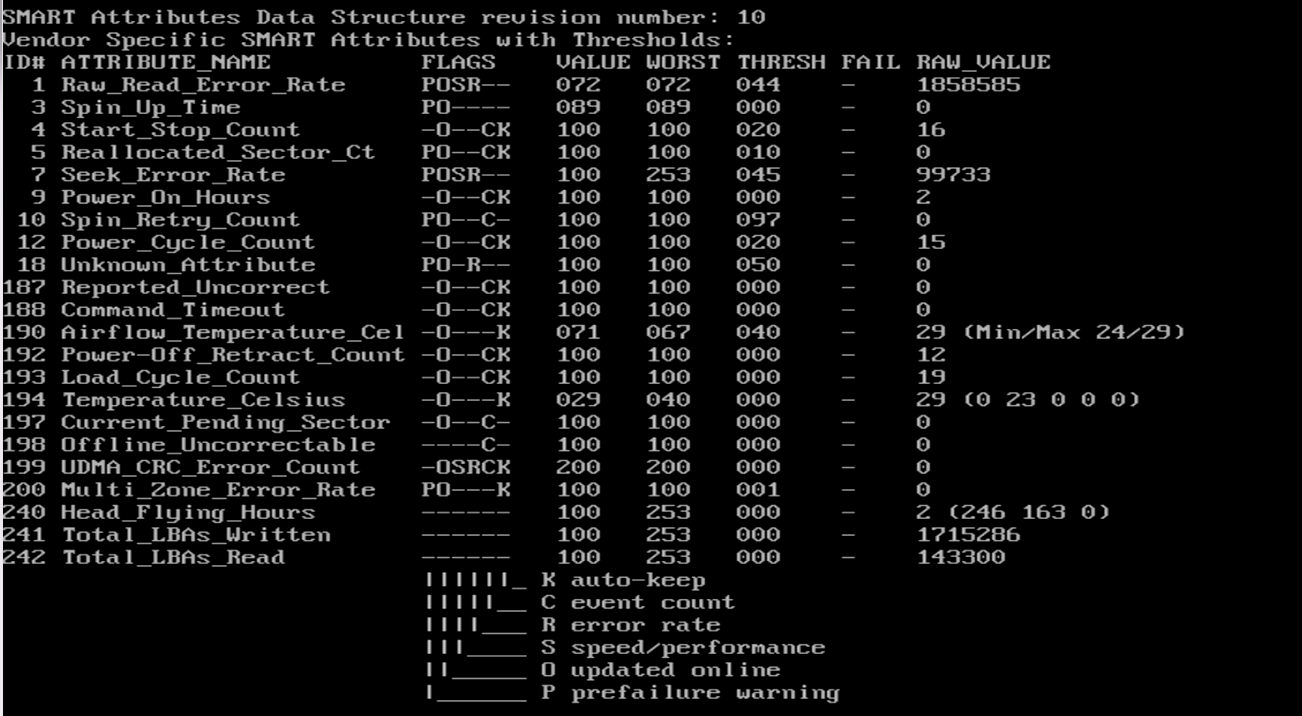
Before i could disable the Power Saving Modes which you recommended to have low head cycle count and always ON for faster access, i thought to check the SMART info using smartctl. But i’m clueless. Could you guide me through that, please?
No, the drive won’t automatically die because it goes over 600k. But if that happens, you may find it gets trickier to process a warranty claim, should you need to.
Gotcha. Thanks for the explanation!
Here’s a good starting point for you TocDoc – smartmontools
Thanks man!
I’ll see and report!
I don’t care what they say, for the same reason I lost trust in WD trying to gaslight their users about their “NAS” drives which used SMR writing technology.
Seagate’s rationale for parking the heads so often by default is because of “eco” reasons, not because of performance or longevity reasons.
Wonder why that is? When I did it, it worked fine with the firmware file downloaded from Seagate’s website. I used the latest version of SeaChest at the time.
You don’t do it through SMART. The Exos do not use APM. They use EPC. That’s why you need to disable the timers (a, b, and c) with SeaChest. There’s nothing you can do about it in TrueNAS.
Still dealing with PIC, APIC, XPIC and X2PIC, dating back to the PIC in the original x86.
Advanced, Extended, Extended Again etc.
Just one example.
What about the “AT” in ATX.
Dang shit. I trust you on this matter!
I have always found the NAS drives more as a marketing gimmic than the robustness/quality. Last year, i had 10 Seagate IronWolf and IronWolf Pro 16TB and it was all new, from different batches, yet when i used them in TrueNAS, after a few read/writes, the drives started to have CRC errors and then so much bad sectors would come that reading/writing off that drives were nearly possible. Interestingly, in the same NAS box, same Onboard SATA and same TrueNAS install, the other EXOS worked pretty fine so this definitely tells a lot how are the NAS drives. xD
Umm, no idea friend. When i used the latest SeaChest bootable and copied the LOD file to the root of the USB, it was unable to find the firmware. I also tried to rename the firmware to a shorter name but no luck either. So, i made the USB again with the actual firmware bundle and it worked fine!
I know i know. I asked for the SMART help so that i could see the Load/Unload cycles as one of the thread i read, it said that after doing firmware update, sector change to 4096 and doing burn in tests, the cycle count went to 300 which really sounds absurd so wanted to check mine cycle count.
Mine SMART report is attached here after the firmware update+sector change to 4096:
Does everything looks good here?
It would be interesting to see how much is the load cycle count on my existing drives which is being used in TrueNAS.
After doing the firmware update and sector change to 4096, i thought to check the disk properly using SeaTools and HD Sentinel and seems like something is wrong.
Could have my drive been affected due to the procedure? Cause i saw a thread where a 18TB EXOS was rendered as 14GB disk!
https://www.reddit.com/r/DataHoarder/comments/1310us6/update_firmware_for_mdd_oos1400g_to_exos_x18/
Also, this OP seems to be flashing the OEM firmware to a retail one which is definitely not recommended for HDDs/SSDs. I’ve done it for the boards and they worked fine 
No need for the bootable. You can grab the latest version (available as a ZIP archive file), and run it from an Ubuntu live ISO. As a matter of fact, you can just boot into the latest Ubuntu live ISO, and you should have working internet out of the box. From there, just download the latest SeaChest Utilities (CLI) zip file.
Well, that’s exactly what i used. That’s the exact file i downloaded. xD
BTW, i edited the post. Was looking for the reddit thread. Can you tell me why there is change in LBA and the usable capacity? I’ve also attached the SMART info.
What does SMART report about the total bytes?
smartctl -x /dev/<drive> | grep Capacity
Where to check that info? I’ve attached the reports in the today’s post!
Will send that shortly. Please hold. I’ll have to boot the system!
Here you go friend:

Let me know if you need any additional info to diagnose.
That looks about right for a 16T drive.
Yes, but the usable capacity reported under SeaTools, diskpart, Disk Management and HD Tune Pro, HD Sentinel, they all show 14599.0GB instead of 14902.0GB ;(
The LBA changed as well from 31251759102 (512e different drive, same model) to 3827040254 (4K sector change+firmware update).
Could have my drive been affected due to the procedure?
Some people have all the luck!
Do you have another X16 that you hadn’t updated the firmware or formatted the sector size to compare SMART info with?