
That’s what made me freak. This would just mean, the bigger the array/pool, the bigger the loss of space. For example, i’m having 16x16TB disks and if i convert it to 4K, then i loose 500GB per drive of 16TB capacity which means for 16x16TB, i loose a total of 8TB of space. This is so much loss of usable space and i’m still not sure what benefits do i get for switching to 4K.
From the output of smartctl the 4096 seems to have worked perfectly so I wouldn’t worry about that.
Umm, so you want me to change the sector size to 4096 on another new disk but not the firmware update to SN04 and then check for the behavior?
Yeah, but then why loss of 500GB usable space?
No. It’s your choice but if you want to get to the bottom of the change in disk size then you would need to update the firmware on another drive BUT NOT update to 4096. Then compare the output to see if it’s changed. If it has then the firmware update is causing it. If not then (somehow) changing to 4096 is.
The firmware has most likely been updated for some reason. One would hope to improve reliability. If Seagate has gone to the trouble of updating the FW one would assume they know best. It’s your call but the point is I can’t see any reason why you would lose space by switching to 4096. All the info Winnie has given you has been sound.
Hmm. Makes sense.
Also, i was looking for some info online and i found this:
As per this info, it means that 14.55TB is the correct usable capacity. I dunno. Will try to do what you said
Exactly, i also don’t know and really curious why there is a loss of usable space when switching to 4096. Either firmware is reserving more space like you mentioned or changing to 4K is. But if the latter is the case, its so weird. Isn’t it?
I don’t have 16TB from any other brand to compare with. But one of a member told me that there was weird issue with X16 16TB with SN03 and drives also died after 3yrs of usage. Dell also notified of this issue somewhere, probably. Need to check resources.
@Johnny_Fartpants So, i was looking at some of the old pictures first and i found several EXOS X18 16TB running SN04 firmware and it also has 14902.0GB usable space. So, this means, this is not the SN04 but changing the sector size to 4096.
However, i’ll test the X16 16 TB and let you know the results.
1 Like
I don’t think you lost any space. This is possibly a reporting issue that occurs (or is “fixed”) after doing a firmware upgrade and/or a sector format.
The overhead is higher with 512e, due to the padding and ECC for each emulated 512-byte sector.
I can only speak for Exos X20s, not the X16. Seagate might even be able to explain why you see this “change” in capacity. This is assuming the output from SMART is accurated.
For what it’s worth, gpart and smartctl both report that my Exos X20 18-TB is 16.3-TiB total capacity. (This is correct.)
Other tools can also report the size of the block device (in this case, the whole HDD).
That’s an entirely different topic, which should be in its own thread.
I’ll summarize my opinion: Not worth it, unless you understand the risks, and you’ve already ruled out increasing your system’s RAM as well as adjusting the arc.meta_balance tunable. If you can keep filesystem metadata in ARC, it will do more for perceivable performance than anything an L2ARC or special vdev can offer.
The special vdev will need redundancy (preferably as much as your main data vdevs), since losing it will lose the entire pool, which you already know. It also introduces complexities, such as a non-mirror special vdev which cannot be removed at a later date, and recovery can get really confusing.
I do for sure my friend. I’ve been checking that disk twice a day and the space reported is same. As you were not available, @Johnny_Fartpants stepped in for help and also asked me for the smartctl which i provided:
Seagate EXOS 16TB (Factory firmware SN03 and factory defaults sector size 512e):
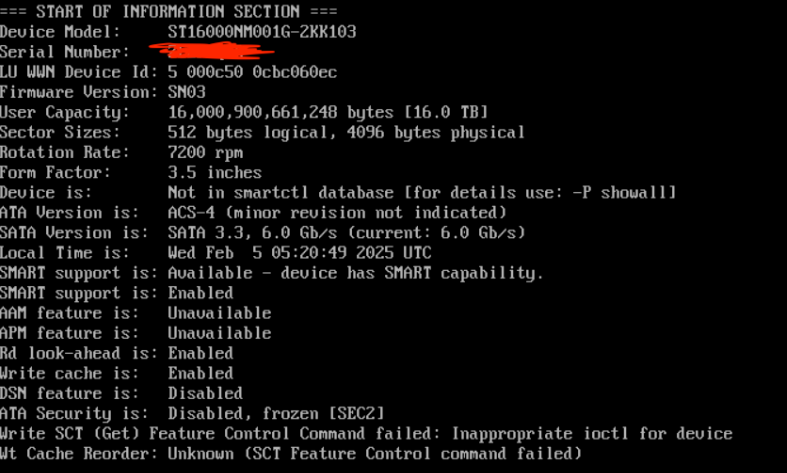
Seagate EXOS 16TB (Firmware update to SN04 from SN03 using SeaChest Bootable and sector size changed to 4096):
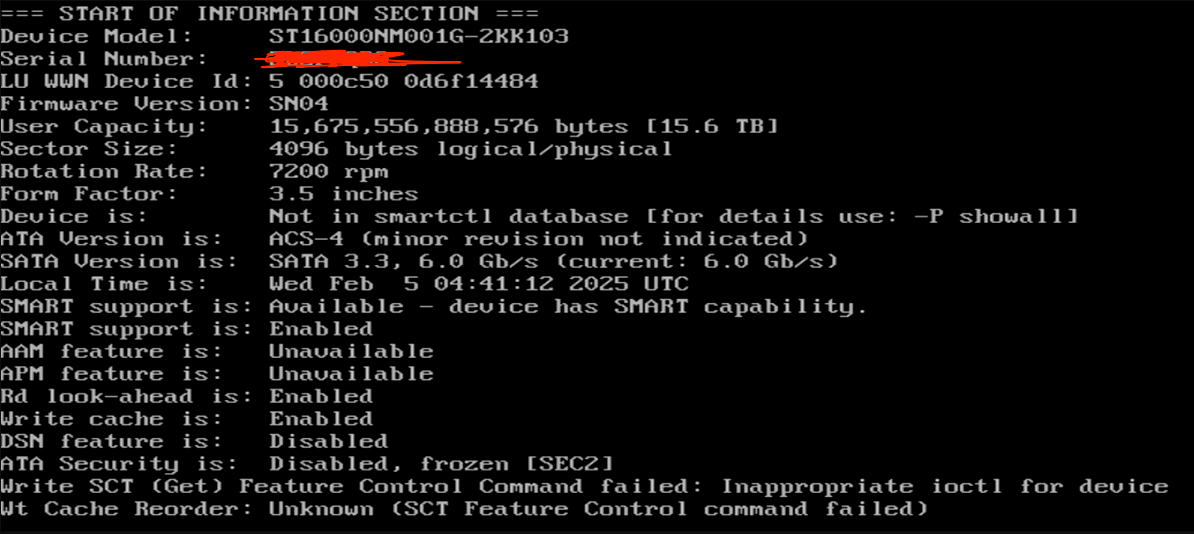
Umm, what does overhead means here? To understand it simple, does the ECC is less on 512e and more on 4K?
Yes, i checked several times and its the same ;(
That’s probably correct. I do not have any 18TB ;(
this is sort of a dumb question but… did you wipe the partition tables after doing the 4kn conversion?
if you don’t, you end up with a “15TB protective partition” that can screw with the size of the disk when using conventional tools otherwise.
(this goes for any capacity, the post 4kn protective partition is always 15TB due to the way the newly scrambled data is interpreted)
and no, I’m not seeing this on my 4kn converted Exos x16 16TB disks… they report 16,000,900,661,248 Bytes, 3,906,469,888 sectors
I agree. I’ll create a separate thread with the questions i have.
I understand this about the L2ARC or SLOG. But my question is about the special metadata VDEV.
Yes, i do understand this. Thanks to other forum members for guiding me on this.
I’ll create a separate thread to discuss more about this in details. Thanks
The disks were new (unallocated partition) and i did firmware upgrade+change sector size to 4K and i’ve lost like 500GB approx of usable space
Hmm. How can i fix it?
Can you post your smartctl, please?
that particular disk is on a windows system, admittedly doesn’t have the newest firmware…
I’ll mess with it tonight… I’ll stick it in a linux box before and after firmware update.
regarding your disk I still would write a new GPT anyways… simply having a GPT (or the leftovers of one) can create some seriously screwy results as it interprets the now scrambled data as an MBR disk with messed up geometry. this also goes both ways, a 12TB disk gets messed up in the other direction.
Adding a drive to a vdev in TrueNAS should automatically create a new partition table.
Sounds good. Please post the before and after results.
Well, like i mentioned, these were totally brand new disks so no partitions were created. I’m not sure what i’m supposed to do now.
Any way to create it manually on Windows?
run diskpart
lis dis to list the disk
sel dis x to select the corrrect disk (if it is a protective partition the capacity reported here will be wrong, double check in task manager and the disk management UI that it is the correct disk!)
cle to clean the partition table
con gpt to write a new blank gpt partition table