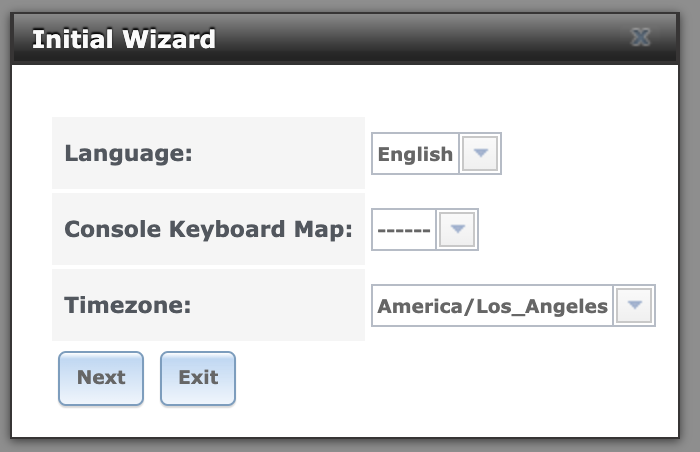
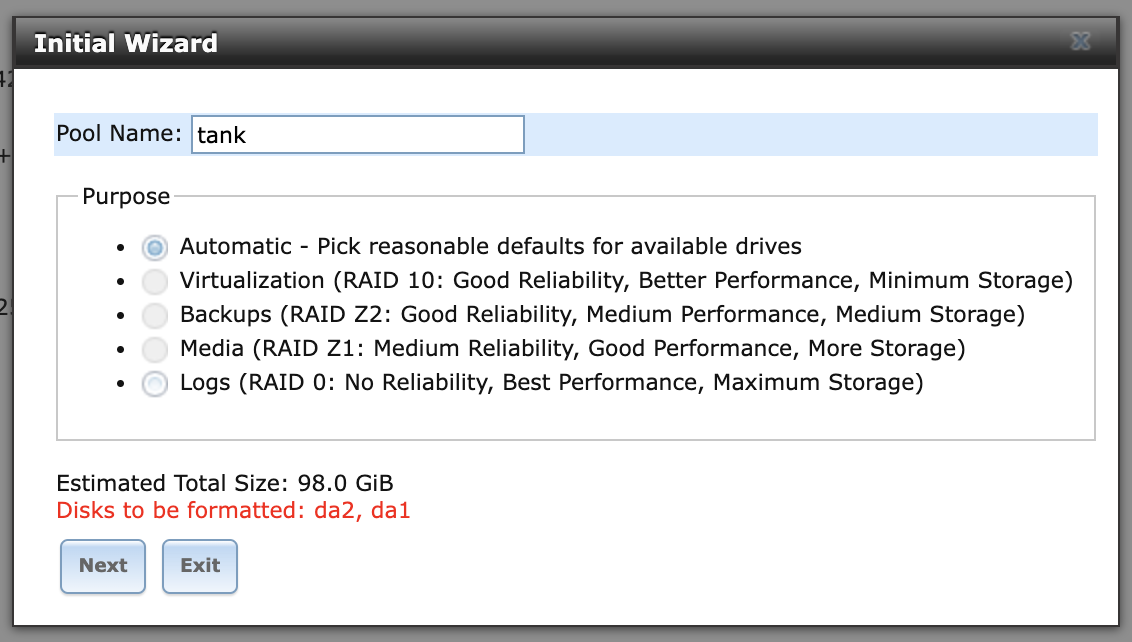
…and FreeNAS used to have such a wizard too. It went away, IIRC, with the introduction of the “new UI” in the FreeNAS 11 series. As I recall, it was pretty limited, but included some basic system configuration (e.g., time zone), creation of a pool, a share, and probably a user.
Wait a moment, I have a FreeNAS 9.10 ISO on my Proxmox host; let’s take a look.
Since napp-it cs (= a quite nice web UI/frontend for storage management, that supports multiple instances, various platforms etc.) exists there is no reason to avoid proxmox, if virtualisation is required. They keep OpenZFS modules current too. For pure storage … well … it depends … probably Core/zVault.
I care less about looks and more about the underlying functionality. Ie is the OpenZFS stack current, is the OS current, does it have drivers for whatever cards, peripherals, motherboards, and CPUs I’m contemplating putting in?
I was perfectly content with the UI from FreeNAS 11. But I don’t think freenas 11 supported sVDEVs, for example. Thanks to you, I even had a SSL protected GUI in 12 or 13?
Sorry what ?!!
I just installed truenas for the first time a few month ago, and used the container mode to create some for Network services and nextcloud. You are saying they are switching the system again even though LXC is standard ?!
Can you share the details of how you deal with ACLs?
I’m planning on migration as well, and doing some test in virtual machines, ACL is the biggest trouble so far.
I don’t really need ACL, it’s a personal NAS.
Hello again. Yes this is what I did also. Fought with ACLs for a while, got frustrated, went back to standard Unix permissions, all is well. You need to read the documentation and understand how create mask and directory mask works in Samba, and think about your users and groups, but after that it’s straightforward and everything predictable and consistent.
My NAS continues to tick along nicely including S.M.A.R.T monitoring and reporting and scheduled tests (yes I’m following that discussion from the sidelines ).
Thanks for reply, I did mean to use Unix permissions.
I’m asking for some details about that:
Do I just change the ZFS aclmode and run chmod 777 -R /path/to/pool?
Will recursive chmod take a long time for a lot of files on some spinning rust?
Is there a better way to do it? (minus I probably shouldn’t use 777)
I reverted from 25.10.0(.1) to 25.04.2.6 twice, one because the ix samba fork bug, and then because the new way of disk monitoring is causing trouble.
Now (actually, 2 days ago) I’ve decided to migrate.
Right so what I did to reset all ACL stuff was 1) clear ACL (setfacl -Rbn mydirectory), 2) set ZFS acl properties back to default values: aclinherit=restricted and aclmode=discard. Bear in mind that once you do this TrueNAS will likely be unhappy if you try to go back (never had any reason to test that).
Regarding permissions, you need to think through what you’re trying to achieve and then design for it. Shared folder writeable by anyone, writeable by member of a group and readable to others, private to a particular user and not readable by anyone else, etc. Design your users and groups and permissions around this.
Chmod will set your permissions accordingly as a one-shot operation but more importantly you need to configure Samba (or whatever you are using) to set the correct permissions also on new or amended files going forward. By combining options like “create mask”, “force create mode”, “force user” and “force group” you can solve for most scenarios. Read up on it - not rocket science by any means but beyond the scope of this thread.
And yes, seems like I dodged the bullet on both data-destroying Samba fork bugs and disk monitoring (lack of). While, at the same time, I’m actually on a more recent ZFS version (2.3.5 currently).
I’m currently exploring this option, as I move from a one server solution to separate NAS and virtualization servers (driven by environmental issues in the home).
One question, if anyone has an opinion: Truenas works fine booting from small sata SSD, but would moving to stock Debian benefit from A) larger drives, and B) NVMe drives? Assuming that in either case the boot drives remain mirrored.
If you have a SSD, then all things being equal, a larger drive should give you a longer life as the various logs get written, deleted, etc. and gradually the drive will reach its wear limit.
That’s true for Debian, truenas, whatever, and may explain why my 64GB SATADOMs have been trouble-free all these years when the industry has apparently abandoned the concept due to premature failures. My TrueNAS XL shipped with a 16GB module, for example.
I doubt NVME Vs. SATA Vs. whatever will make a tremendous difference as long as the SSD is data center ready. Not garbage with a fast cache up front and a slow flash block in the rear, etc. but a drive that can handle sustained writes without dropping out like a SMR drive dumping its CMR cache into a SMR sector.



 is what I did also. Fought with ACLs for a while, got frustrated, went back to standard Unix permissions, all is well. You need to read the documentation and understand how create mask and directory mask works in Samba, and think about your users and groups, but after that it’s straightforward and everything predictable and consistent.
 ).
).