Hey there,
a few years back i got myself an Supermicro SC846 which i modded to be silent.
But the loss of the Jet-Engine-Noiselevels came along with the loss of Jet-Engine-Airflow.
I remember that during testing i got read errors galore after a few hours of heavy io.
The LSI2008, and both expander chips on the backplane, were almost too hot to touch.
Ever since installing some 40mm fans onto the heatsinks everything was fine.
Since heat accelerates the degradation of the silicone i think it might be possible that you slowly cooked your HBA untill it was (well)done :o/
Unless you have some sort of direct airflow over the HBA’s heatsink I’d highly reccomend attaching any cheap fan to(or near) it to help it stay cool.
‘Normal’ Cases just do not have the airflow of a rackmount ‘Server’, which theses cards are designed for.
@whirpool Thanks for the response. The interesting part is, I saw these errors on 1st boot after assembling the computer. The card didn’t have time to get hot. I’m wondering as well…if the card is working, as it seems to be at this very moment, and then gets hot while the computer is on, wouldn’t the heat begin to make the system unstable somehow?
Ok, so I received the new HBA card (Amazon: B0DY78R3HG). Before I install this new HBA card, what fan would you recommend I purchase to keep it cool? My Amazon searches aren’t returning anything to me that looks remotely possible. Please keep in mind I don’t have a lot of room in the case to add a fan to this card as it’s very close to the top of my computer very near the water cooler radiator; it could be that the radiator fans are pulling heat away from the card as close as they are. I’ve done a lot of things with computers over the years but I’ve never attached a fan to a card’s heatsink before. How would the fan get power except from running power from the PSU? I don’t see any pin/power headers on this new HBA card. Any suggestions would be great. Thanks.
@TrueNAS_newb I have to admit that i’m not knowledgeable enough to interpret the shared error messages in any meanigfull way.
I’ve seen hardware fail in so many funky ways that i would not even surprised if someone says its DNS and be right about it as well…
It just reminded me of similar experiences with a failed HBA and my testing of the modded case.
I#m just fuzzy on the details… The case-mod was about 5years ago and the HBA failure was when sas2 harware just came out…
maybe your HBA isn’t even at fault and the new one shows the same errors… honestly interested in how this turns out.
As for the fan(s)… There ought to be some DIY… Depending on how much/little space you got.
Had a look at your card and it’s heatsink is way larger than the one on my LSI2008 card.
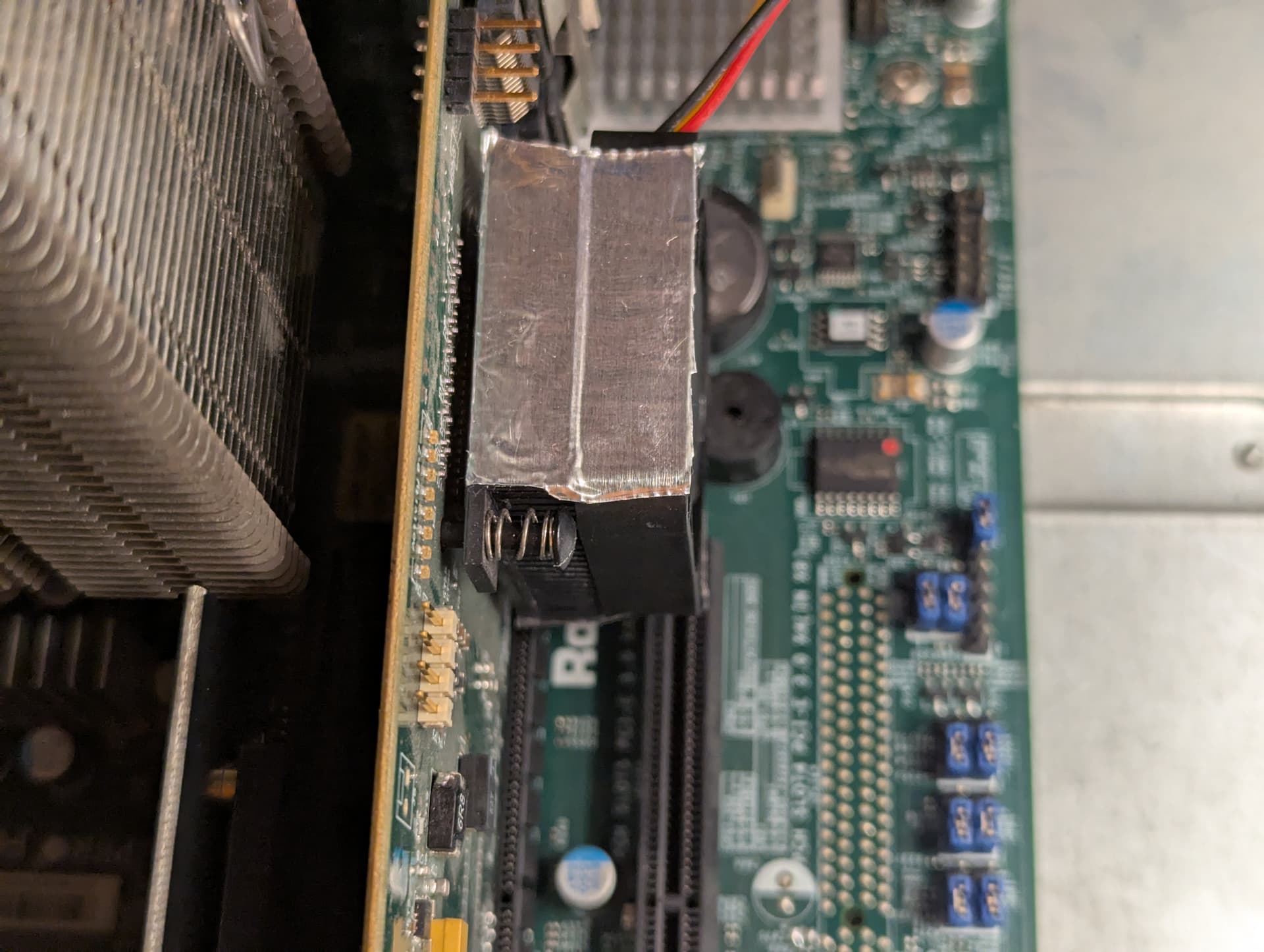
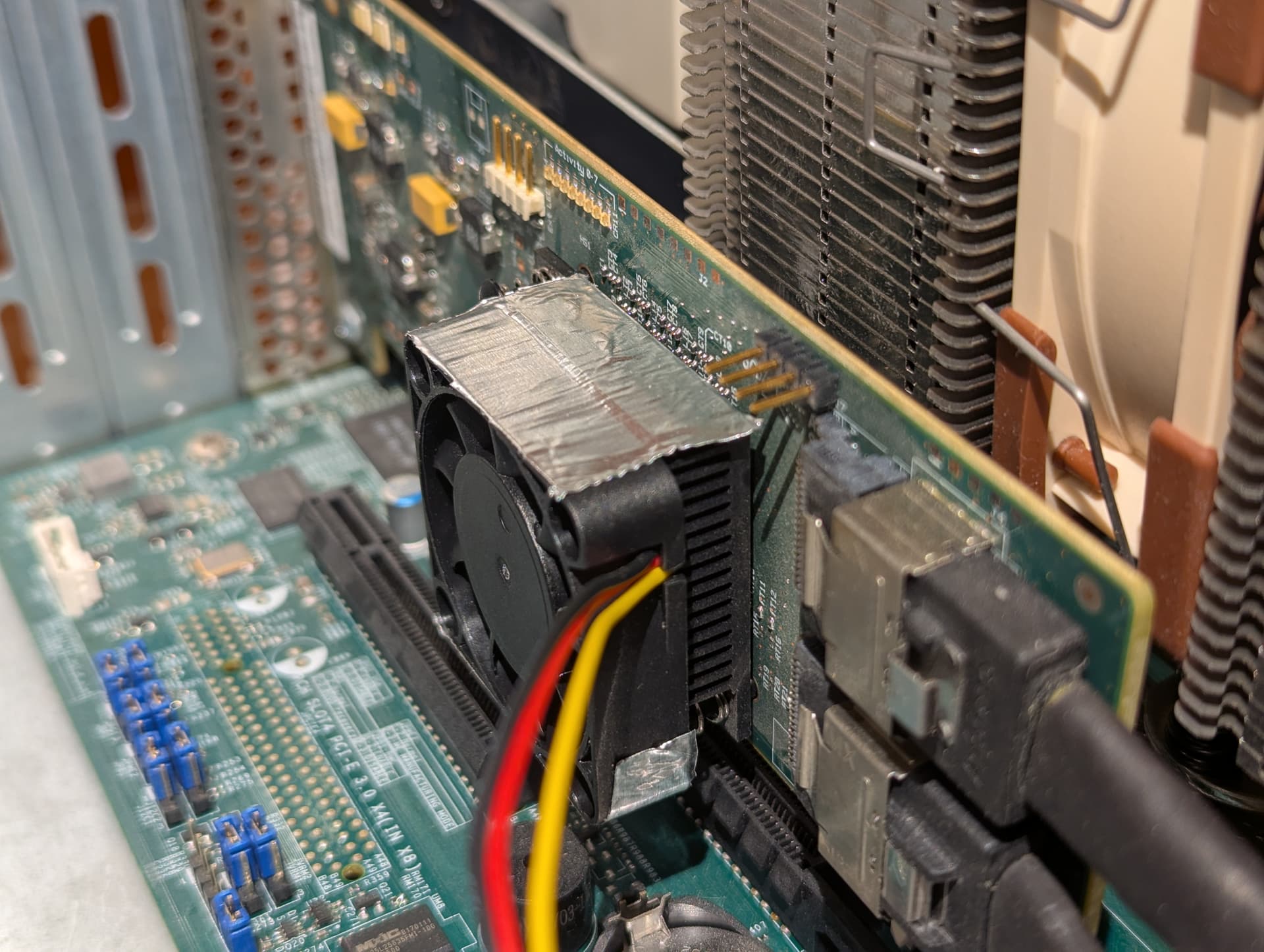
I have a 40x40mm heatsink on my card and just attached a 40x40mm fan with Alu-Tape to it, so it was pretty easy…
attached some pics…
You could attach some fans like i did or have it zip-tied at the end to blow over it.
Just be creative and work with what materials and space you’ve got.
I like Noctua-Fans for stuff that is running all the time… but they are pricy…
Since this is my backup-server that runs once or twice a week i grabed some cheap fans i had lying around.
These cards are meant for high airflow cases and do not have fan-headers.
For Power you can either grab an adapter from molex/sata to 2/3-pin or DIY it with stuff you have… depends on how comortable you are with soldering, crimping and what materials and tools you have.
@whirpool Noctua for the win. I’ve been using them for years, replacing stock fans of computing items I purchase, mostly cases. By the way, great DIY fan job! I wish I had that much room in my case.
Anyway…this is going to take a few days to complete. I need to document some settings I have before I perform the swaptronics. Standby to standby.
As for adding a fan to the HBA, anything goes: Tape, zipties, 3D-printed fan holder (Thingiverse probably has a few options…).
And a fan header from the motherboard, or direct 12V/5V power from the PSU.
@etorix Yes, a water cooler is not typical NAS hardware, however, I have a Core i9, i9-14900K, Intel processor in this thing. It runs Hotttttttttttt! I needed something to keep it cool and out of all of the searching I did, I couldn’t find a fan cooler that would keep it cool. This is a beast of a machine that I tried to future proof hoping for about 10 years.
I had looked at Thingiverse for something that might work. Thanks. Fan headers on the motherboard are all occupied at the moment so I figured running power off of the PSU might be the way to go. This new HBA card doesn’t seem to be running as hot as the old HBA card.
UPDATE…The new HBA is installed. There were no errors on boot at all. And guess what, this is fascinating, all of the data is there and accessible as I originally copied it over; I don’t need to start all over with a fresh install - at least at present. I’ll give it a few days but I’m a little impressed at the moment.
Opening a shell -
$ sudo dmesg | grep -i 10b5:8724
This search didn’t return any results at all whereas before you can see what I previously posted above with the old HBA card.
$ sudo dmesg | grep -i error
This search found 2 entries:
RAS: Correctable Errors collector initialized.
Error: Driver ‘pcspkr’ is already registered, aborting…
I’m not sure how these messages will affect TrueNAS but I at least wanted to report them in the event someone else, or the TrueNAS developers, have seen these.
Great to see your new HBA card words as intended, just make sure the chipset/heatsink on that card always has plenty of airflow and it should run no problems for a long time.
The scheduled pool scrubs will put plenty of pressure on your HBA/drives for data throughput so that’s when things will most likely get toastier than usual for a home lab.
Even the older SAS2 chipsets get hot just like the SAS3 ones…
I wonder how hot the SAS4 chipset’s get, I’m guessing the surface of sun hot
ZFS + TrueNAS gotta love it, much better than having a proprietary QNAP/Synology where one day the hardware will die and you cant move the drives to a new system easily…


 not typical NAS hardware…
