TreuNAS Scale - Pool randomly corrupted after 24.10.1 update

Seeing as the system halts before it manages to print a stack trace I’d say you probably won’t have much luck with logs, /var/log/kern.log might have something of interest if you are lucky.

I’d try importing the pool readonly first thing and getting that extra data you mentioned copied off, then we can look at rebuilding the pool and replicating data back from backup.

Ok. So just so I have an idea of what to expect when I import read only - is this a one shot deal where once I leave there is no way to get the data back?

No, not at all. Just importing the pool read only should not cause any issues.

This is more so you can get the data off of the pool. Once that’s done I’d like to suggest we enable recovery and see exactly what the issue is, from there we can figure out whether it’s an easy fix or if the pool needs a rebuild.

Update - new LSI HBA showed up so I reinstalled TrueNAS and swapped cards after removing and replacing the thermal paste and putting a fan to the HBA to mitigate cooling issues.

Same outcome, unfortunately. I was able to get into TrueNAS and I see my pool as (exported) but when I try to import, it runs for about a minute and then resets. I can boot back to the TN environment, but no luck getting my pool imported.

I will be adding a drive or two and booting into ShredOS to work in read/write 0s, but my assumption is that all will be well at this point.

So far I have tried

Swapped HBA card
Fresh TrueNAS bare metal instance instead of Proxmox VE to rule out lack of blacklist

No change in outcome.
Only hardware stuff left is the motherboard/RAM

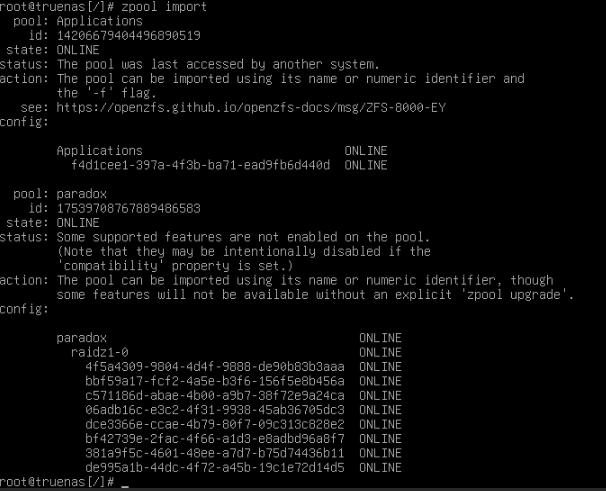
zpool import
Test to show pool Paradox is recognized as online

Finally, I can upload stuff. I’ve been tinkering and not really sure where else to go without potentially corrupting data. I’ve uploaded the content of my /var/log/messages in a .txt format. It is long, but I do see the point where the drives are acknowledged, but it seems like there is a status miscommunication.

Within CLI, [zpool status] does not see any pool but [zpool import] does see .

When attempting to import from the CLI, it runs shortly, freezes, and then causes a reboot situation. Upon reboot, the middlewared portion hangs indefinitely.

When attempting import from GUI, it runs shortly, causes a reboot, but will boot fully to the GUI.

I figure maybe the CLI thinks PARADOX is still mounted/imported, but the disks aren’t, so it’s causing an issue. I would consider exporting them, but I don’t want to jettison my data off to space to never be found again.

I did attempt “zpool import -fn paradox” but it was unsuccessful and says there is no pool by that name to be imported.

Before I do any forcing/read only, I am trying to understand what the situation will be as best I can. Do I need to have additional drives set up to copy data immediately? Will this need to be done in CLI? If I power off, will I be able to run the same command again, or is it a one-shot deal?

If I could make a 1:1 replica of the drive, could I recreate the pool and then copy the data from A>A, B>B, C>C and so on? Then reinstall the new disks and run that pool? Or will the data copy screw up the ZFS/parity setup?

I also have a bunch of other documentation regarding my setup from CLI commands if it will help.

sudo var.log.messages.txt (232.0 KB)

Here are the other commands I ran for information. I am scanning through them all but don’t see anything that stands out.

I will also note that I was hoping to see some kind of crash logged during the attempt to import the pools, but there is none. The activity
truenas cli information commands.txt (15.1 KB)
was as follows:

1624 GUI Import Attempt
1625 Crash/Reboot
1625 Boot
1644 “zpool import paradox” CLI

Importing readonly is an option, it’s something that can be toggled on or off at will. Not one-shot, you also won’t necessarily need disks set up to copy data off straight away (though I would recommend it to make sure your backups are up to date in the event you need to rebuild the pool, will save you time). As for powering off, off the top of my head I cannot be absolutely certain that TrueNAS won’t try to import the pool in r/w as I cannot remember the exact process - I believe it should leave it exported though assuming middleware is not aware of the pool.

Importing readonly is a good opportunity to get data copied off before we explore more ‘potentially destructive’ options (i.e. importing the pool with zfs_recover enabled to suppress any panics, which could totally bork the pool and require a full rebuild). Will also give us some more context if it does import without crashing when not writable.

Just be aware, rebooting can change the drives around. You will have to keep current lists of the serial numbers to where they are reported by the os. SDA could be SDB for the same drive after a reboot.

You might have to protect the boot device from Proxmox also.

Virtualize TrueNAS