Check here : Solved - Nut 2.8.0 - generic ups - blazer_usb - Can't claim USB device | The FreeBSD Forums
Maybe same ?
Check here : Solved - Nut 2.8.0 - generic ups - blazer_usb - Can't claim USB device | The FreeBSD Forums
Maybe same ?
Can’t hurt to try another USB cable to rule that out. Hard to believe on a unit that’s only a few days old but I’ve been around long enough to have seen stranger things. 
EDIT: I gave it a go but I got the same result.
Well, I’ve been waiting for Electric Eel for a long time in hope my UPS problem would be solved but unfortunately it’s the same 
Same here. I just realized I put dragonfish in my post above, but I’ve been using Electric Eel since the start in this new build.
Same issue here, my ups don’t shutdown.
Tested no succes with Scale 24.0.2.5 and Scale 24.10.0.2
My ups is a eaton 650 Ellipse Pro usb
But work fine with core 13.3-U1
Anybody from Scale dev team, please? Too many people have issues with it. At least can anybody tell us what to expect?
apparently, i have just find a way to bypass this bug, i have tested on my “NAS of test” on ElectricEel-24.10.1 (src of this command unknow on the web, i have dont’ keep them…) Maybe this hint is not recommended … any suggestions are welcome.
Scale issue (any version) : checkbox “force stop ups” in ups service tab don’t work for me. UPS don’t stop after nas shutdown. (but work fine with Core)
solution :
go to : system / advanced settings / init shutdown scripts
and add new command
description : ups off
type : command
command : /lib/nut/usbhid-ups -a ups -k
when : shutdown
check enabled
timeout : 10
in system / service / ups :
ups mode : master
my driver : “usbhid-ups”
Shutdown Mode : ups goes on battery
Shutdown timer : 15
anyway, i leave checkbox “force stop ups” : checked
that work for me ! When my nas shutdown i wait approximately 20sec and my UPS auto go off !
I’ pleased, i can now migrate my core to scale soon 
Sorry for my english, i’m french
This does indeed work for me too! For my setup, I also had to add the recommended values for CPS of 60 and 120 for offdelay and ondelay respectively in ups.conf as called out in USBHID-UPS(8).
I think the only downside I see with @rawat suggestion is that the -k flag will get invoked with everyone shutdown of the machine and not just when the UPS via NUT invokes the shutdown.
Finally, @rawat your English is pretty good! It’s definitely better than my French.
So another interesting development… I tried to put a qualifier on the shutdown to command to check for file /etc/killpower which is supposed to be the trigger to power down (or not) the UPS at shutdown. This way TrueNAS doesn’t kill power on a normal shutdown. However, when I changed the command to [ -f /etc/killpower ] && /lib/nut/usbhid-ups -a UPSNAME -k, the UPS stopped turning off.
I added some checks to the shutdown command and found out that /etc/killpower didn’t exist at that point. I assumed it was probably permission related so I added user = root to ups.conf to see if that would help. Sure enough, UPS powered off successfully.
Adding root = user alone was not enough earlier to fix the problem so maybe two issues at play here? One being the missing ‘-k’ before shutdown and the other is the default account for upsmon can’t create the power down flag.
EDIT: Turns out the user = root situation was a coincidence. I did more tests and observed that UPS shutdown was intermittent. I most recently added a sleep 10 to the shutdown command (listed below) and that seems to be bringing consistency now. Don’t forget to also set the timeout value in TrueNAS to higher value such as 20.
[ -f /etc/killpower ] && { /bin/sleep 10; /lib/nut/usbhid-ups -a UPSNAME -k; } || { /usr/bin/date >> /root/killpower.result; /usr/bin/echo "/etc/killpower not found" >> /root/killpower.result; }
same here, i have observed that UPS shutdown was intermittent too…
(6 test ok and 4 wrong…)
I don’t have modified any delay at this step, but i was test this way too of add differents delay at different location, when i will have time 
There is no ondelay/offdelay fields in the output of the upsc ups command. Can you show a screenshot of your configuration at the UPS service page? Seems like my UPS parameter names are different than in USBHID link you provided.
The on and off delay I’m setting via ups.conf in the “Auxiliary Parameter” section in the TrueNAS UI. I also ended up setting ondelay = 0 so that the Cyber Power UPS stays off until power is restored. A positive value will have the UPS always turn back on after that time in seconds (even if main power is still off). A negative value will keep the UPS off indefinitely until manually turned back on.
ondelay = 0
        offdelay = 90
        vendorid = 0764
        productid = 0501

pollinterval = 5
If you use the upsc then the values for my CPS UPS are as follows and set via the config above:
ups.delay.shutdown: 90
ups.delay.start: 0
One other observation I noticed through all this. NUT would not communicate to the UPS via localhost IPV4. It would bind instead to IPV6 but I think that caused me some issues because I disabled IPV6 on my TrueNAS instance. I was able to get IPV4 working by adding the main IP address and port to the upsd.conf in the TrueNAS UI.
LISTEN 10.X.X.X 3493
Interestingly, I can’t see ups.delay.start field in the list, but I think that’s not important as I know my ups will start itself anyway in case of wall power return.
I’d like to know what negative value means in this setting by the way, I can’t find any docs regarding negative value for this setting. I know that positive value means UPS will wait X seconds on battery before going off.
ups.timer.shutdown
In my case this is set to -1. Do I have to have this value positive?
EDIT
BTW Where exactly did you put those values, Auxiliary Parameter (ups.conf) or Auxiliary Parameter (upsd.conf)?
OMG THIS WORKED!!!
Inseterd shutdown command as rewat suggested
Entered these values in auxility (ups.conf) as rymandle05 said:
ondelay = 0
offdelay = 90
pollinterval = 5
Thank you Thank you Thank you Thank you ALL!
Now what’s interesting is that after long waited solution UPS finally turned off thanks to you guys, but it didn’t turn back on power restore. I went to BIOS and the power setting was set to “Last State”. Well, as I remember correctly I didn’t change this after truenas installation and I remember system was starting automatically when there was Synology OS installed. I have changed this setting to “Power ON” and voila!
Interesting what could happen if the power would come back in this 90 second period?
I have these two values on my UPS as well but they are set to -60.
ups.timer.shutdown: -60
ups.timer.start: -60
That said, I haven’t had to touch these at all. I was thinking of heading down that path when I got this all “working” myself.
I actually found reference to the negative values for CPS units in USBHID-UPS(8).
For many Cyberpower UPSs, offdelay must be set to 0 for normal behavior (the load is restored when AC power returns). Setting offdelay above 0 will restart the UPS load regardless of whether or not power has returned, and setting offdelay below 0 will disable the auto-power-on function of the UPS, keeping the load off even when power returns.
Now I know the documentation references offdelay as it has to do more with the ondelay functionality. I thought it couldn’t hurt to try these settings with ondelay and it worked. This is either a typo int he documentation or, CPS changed which parameter controlled this feature at some point along the way.
I guess you’re just a little bit excited! 
The UPS should still power off but turn itself back on after a few seconds. You want this behavior because once the shutdown of TrueNAS starts you need the momentary lost of power to get the NAS to boot back up via the BIOS setting you mentioned above.
Ok, to recap, the work around for this problem is as follows for CPS units:
Description:
Power Down UPS
Type: Command
Command:[ -f /etc/killpower ] && { /bin/sleep 10; /lib/nut/usbhid-ups -a UPSNAME -k; }
When: Shutdown
Enabled: Check this box
Timeout:20
UPS Mode: Master
Driver: usbhid-ups
Power Off UPS: Check this Box
Auxiliary Parameters (ups.conf):
ondelay = 0
offdelay = 90
NOTE: For other brands of UPS, the Drive and Auxiliary Parameters (ups.conf) sections may very well differ to support each manufacture unique implementations.
I would also suggest the following in this same section:
Shutdown Command:
/bin/midclt call system.shutdown
This should ensure TrueNAS shuts down properly and was recently talked about the TrueNAS Tech Talk Podcast.
UPS should now operate as expected with UPS shutting down after 90 seconds and powering back on when power is restored.
this works for me as well, on an Eaton ellipse ECO usb (usb-hid driver) ups. Might also need to tweak the timers a bit for the desired result, but this does point to some kind of timing issue or the like…
Great to hear! Would you be able to try a few further items? I’d do this myself but I deployed the system I was testing with to my brothers house this past weekend as an off-site backup. That makes it a little more difficult for me to play around.
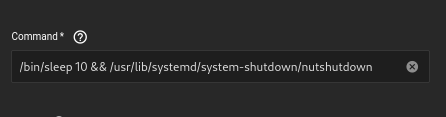
Assuming you’re able and willing, I’ve been wondering if instead of calling the driver directly, we would deploy the Shutdown Script like we have been but with the sleep and the nutshutdown systemd hook script.
I think this should then work for the command: /bin/sleep 10 && /usr/lib/systemd/system-shutdown/nutshutdown
Should nutshutdown work with the sleep, that would be be a more robust work around. The Shutdown Script should not be necessary so there’s still a root cause to be found here.