25.04.1 Kerberos Issues with Active Directory

First time posting, hoping to reach out to the community. I have actually been a long time user of TrueNas, I had been successfully running Trunas core for almost five years now without an issue. I have only used my nas for storage, iscsi and SMB services, nothing complex like jails or anything.

After upgrade from core to scale, I cannot get the Active Directory integration to work at all.

The error from Scale:
gssapi.raw.exceptions.MissingCredentialsError: Major (458752): No credentials were supplied, or the credentials were unavailable or inaccessible, Minor (2529638926): KDC has no support for encryption type

I can see it makes it to the Windows Domain controller successfully but it is failing with the same error just in Microsoft syntax:
Kerberos pre-authentication failed.

Account Information:
Security ID: <truenasNameRedacted>$
Account Name: $

Service Information:
Service Name: krbtgt/

Network Information:
Client Address:
Client Port: 58960

Additional Information:
Ticket Options: 0x40010010
Failure Code: 0xE
Pre-Authentication Type: 0

An 0xE means: KDC_ERR_ETYPE_NOSUPP KDC has no support for encryption type

For all of my other lab servers I see the KDC is working just fine, the KDC is issuing tickets on AES 128, AES 256.

The time is in sync with the nas and the domain, they are only maybe 1 to 2 seconds max apart in time. I have also tried adding the encryption types to my “Libdefaults Auxiliary Parameters” with no success, values below.
permitted_enctypes = aes256-cts-hmac-sha1-96 aes128-cts-hmac-sha1-96
default_tgs_enctypes = aes256-cts-hmac-sha1-96 aes128-cts-hmac-sha1-96
default_tkt_enctypes = aes256-cts-hmac-sha1-96 aes128-cts-hmac-sha1-96

To me it seems like the nas isn’t listening to the stronger encryption types and maybe is still trying something not supported by the KDC. I am at a loss of how to ‘force’ it to use the accepted types, all my research suggests it should just use this. I have also tried purging the config but its always the same error.

AD Forest is 2025, all latest updates are deployed to the DCs.

Hopefully someone knows what I need to do to resolve it.
Hi and welcome to the forums.

I personally can’t assist you with this but I’m commenting in the hope others can. We’ve seen an increase in AD issues since SCALE/TC and personally I’m keen to understand why.

This may very well be a separate issue but nevertheless I think it needs further investigation.

Thanks for raising.

Feel free to raise a bug ticket above and attach a debug file for the devs to take a closer look. Please update this thread with any outcome.

1 Like

Thanks, at this point I am inclined to believe that its a TrueNas Scale issue. I’ve gone as far as formatting the OS today and reinstalling TrueNas Scale for a fresh installation. I have also temporarily enabled the RC4 cipher for the KDC. Sadly I was met with the same error about the KDC cipher support. I am trying to keep this post updated with all the steps I have gone through so far.

TrueNas Scale error:
middlewared.service_exception.ValidationError: [EINVAL] activedirectory.bindpw: [KRB5KDC_ERR_ETYPE_NOSUPP] Major (458752): No credentials were supplied, or the credentials were unavailable or inaccessible, Minor (2529638926): KDC has no support for encryption type

Domain Controller KDC event log:
Additional Information:
Ticket Options: 0x40000010
Failure Code: 0xE
Pre-Authentication Type: 0

If you create a bug ticket please add it to this thread so others can follow. Thank you.

Adding the Jira Bug report I submitted:
https://ixsystems.atlassian.net/browse/NAS-136417

1 Like

Adding an update here, My ticket was closed in Jira stating its a duplicate of another item. This other linked Item I cannot view due to lack of access, maybe in their Enterprise portal or something.

The notes read as follows:
Duplicate of Jira. This is caused by non-default AD kerberos settings.

I have asked them for clarity as I am unsure what they mean by “non-default AD Kerberos settings”. I’ve tried enabling legacy ciphers such as RC4 and TrueNas wouldn’t connect. I also reminded them that this was working successfully in TrueNas Core, I made no KDC changes after, during, or immediately before the upgrade except enabling weaker ciphers to see if that’s what Scale wanted.

1 Like

This thread sounds similar with fix coming soon [KRB5KDC_ERR_PREAUTH_FAILED] Errors on AD quite often - #15 by Johnny_Fartpants

2 Likes

As of the latest version 25.04.2, the issue still persists. I am going to open another ticket. There was no change in any error messages. TrueNas errors out with “KRB5KDC_ERR_ETYPE_NOSUPP] Major (458752): No credentials were supplied, or the credentials were unavailable or inaccessible, Minor (2529638926): KDC has no support for encryption type” and the Domain answers

Ticket Options: 0x40000010
Failure Code: 0xE
Pre-Authentication Type: 0

A 0XE code means “0xe KDC_ERR_ETYPE_NOSUPP KDC has no support for encryption type”

The domain encryption types supported are aes256-cts-hmac-sha1-96 and aes128-cts-hmac-sha1-96 where I see the KDC successfully handing out tickets to all other clients on the stronger ciphers. Only TrueNas seems to be having an issue with a Windows 2025 AD Forest.

1 Like

New ticket opened.
https://ixsystems.atlassian.net/browse/NAS-136970

1 Like

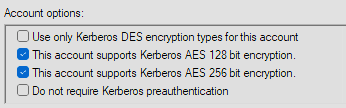
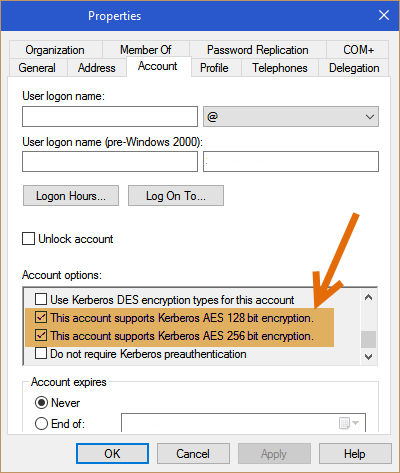
Is the TrueNAS account enabled for AES in Active Directory?

1 Like

Yes it is, thanks for pointing that out cause it would be easy to miss.

1 Like

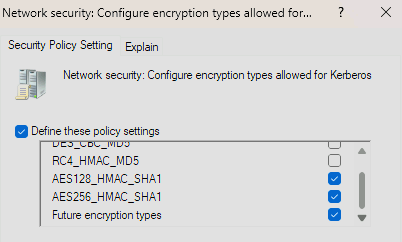
Follow up with a couple more config items that would need to be set in AD, in case anyone else might know of something that I missed.

DC are set to 0x18 which allows AES 128 and 256:
image

and Network security is set:

The only other thing I can think of is that after setting AES on the account the password needs to be changed to generate an AES key, but if AES was the default then I wouldn’t expect to need to do this twice.

Yeah, I also did a couple out of band password rotations on the kerb account spaced out by a day to ensure I didn’t run into replication issues (I normally do this on a schedule). Then I changed the password on the account being used a couple times a well.

When that didn’t work I tried a new user account with rights to join the device and I received the exact same error.

Sorry, I am not sure then. I have not tried joining TrueNAS to AD but I have joined to MIT Kerberos and it just worked”.

The ticket refers to an earlier ticket that I can’t open mentioning a non-default AD config but not explaining what it was. Other than improving encryption types do you know what else has been changed for Kerberos from defaults?

The only other things that changed were.

I went to a server 2025 forest by upgrading.

Which truenas was working fine, this issue only came up after I upgraded truenas. I was on truenas core and it seemed to be heading towards EoL so I performed their documented migration. Afterwards it could never talk to the domain again, so I did a fresh install, same issue.

I can pull the old details, but yeah the old ticket was closed quickly saying it was non-default changes but all AD domains shouldn’t be allowing RC4. It was also closed as a duplicate citing another ticket but those issues were people who had to leave and rejoin their domain every so often, however they didn’t have issues joining the domain.

I finally moved all my data and did an iscsi attached drive so I can keep things working. This has been down for over 30 days now.

As I had mentioned before, everything in the AD Domain is healthy, even tried a rhel server and it joined AD just fine from the same vlan truenas is in. I verified from the truenas shell all ports were open with nothing blocked.

I really don’t know what else it could be at this point, it seems so strange.

**Edit
I realized what you were saying, this new ticket was closed the exact same way. Duplicate of a private ticket. I wish I could get more info, something basic like what the cause is or if I could help test in anyway.

@ABain are you able to help in this situation? Would be good for @cory1768 to understand why the AD join is failing on SCALE and TC when it worked on CORE. Would also be great for this thread to at least understand why this is happening.

1 Like

The linked bug security level has been adjusted, so the details should now be accessible.

2 Likes

Thats really helpful thank you :pray:

Thank you this helps tremendously, reviewing the case notes and I can perform some testing.