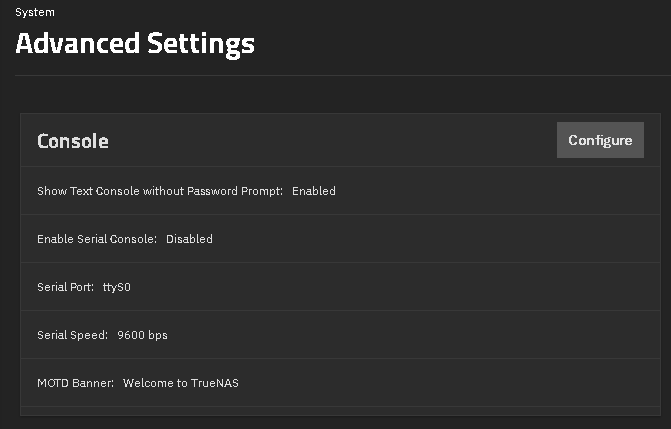
I am totally new to TrueNAS and managed to set up a pool, datasheets, Users etc.
My concern is that if I access the system directly via screen connected to my NAS I‘ve got the Option with typing 4) to change the truenas_admin password. You just can change it without giving the old password. I am concerned that in case of the stolen NAS (which is just a ITX-PC) anyone can change the password very easily and access to the system and data. Is it possible to change this behaviour?
Sorry if that is a nebie question but via searching in the net I only found answers related to the admin account in the GUI.
You can require a password to access the console screen. You would have to set up passphrase encryption if you want to protect your data in the case of physical theft of the entire system. Please see the documentation for your version of TrueNAS.
Where to change to require password for console access. You would have to learn how to call up the console menu manually after doing this.
If someone wants to access your files they can already do so by just pulling the drives and attaching them to their own device if you do not have encryption enabled.
Thank you very much. No, they are not encrypted yet as I don‘t want/need encryption for every folder or file. I hope I can manage that later. I just stumbled over the option and seem to just overlooked the advanced options. I had only installed the bare system yesterday and tried a few things, but that wouldn‘t let me have a peaceful mind.
If a password will be needed for console access this will be perfect so I can reach it via SSH etc.
These two things are completely unrelated. You’ll always need to authenticate (whether via password or via public/private key, with the latter being recommended) to connect via SSH, regardless of whether you password-protect the console menu.
But if an attacker gains physical access to your NAS, there are few security measures that would be helpful.