Advice on replacing HDD's in my Backup NAS

I need a bit of advice here

When i rebuild my SuperMicro Primary NAS with 4 x 16TB IronWolf-Pro, i decided to build a “New EPYC MJ11” Backup NAS.
The Backup NAS inherited the old drives - 5 x WD Red Plus 4TB (CMR) drives + a new 4TB WD-Purple from the drawer.
Both are Raid-Z2, running latest FT.

These “Old ladies has seen” around 35K “On” hours, but much less “Load hours” , and all passes extended smart.
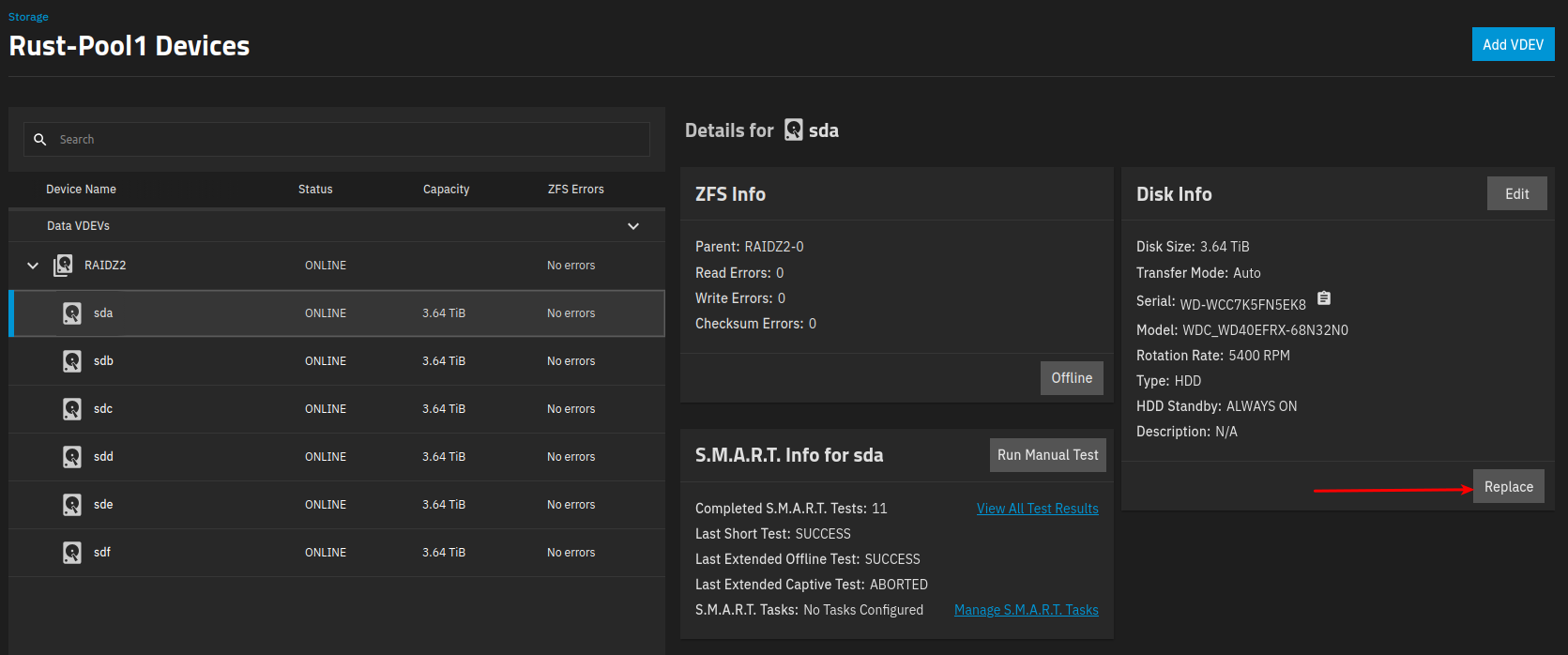
*** sdb..sdf = 35K hour - WD Red Plus 4TB

Both NAS’es are used purely for backup, Primary pulls backup data , and then “snapshots” to Backup. And they get around 12..24h “on time” once a week.

None of the NAS’es have any APP’s (Container or VM’s).
I have “done the naugty” thing … My NVME boot contains both Boot and “IX APP”.
Meaning the “Rust pools” should contain just “Backup data”

I can get 4 x 12TB WD120EFBX (Red Plus - Helium) new in sealed bag, for $220/pcs.
I think that’s a fair price in EU or is it ??
I am considering it …

Questions :

Q1:
With my current usage (12..24h a week) - Should i go for the WD120EFBX, or “save up more $$” and get “some” Pro’s ?

Q2:
I have “all current data” on my Primary NAS, as the Backup NAS is just a “snapshot” of my Primary.
Is it worth trying to move data ?
If i don’t all i’ll loose is the older snapshots.
I tend do say no … Especially because all my “disk slots are filled w. the old 4TB” drives.

Q3:
What is the esiest way to - Remove the 6 x 4TB Raid-Z2 pool, and create a new “same layot” 4 x 12TB - Rais-Z2 pool ?

Any hints/recommendations

Edit:
Well the disks has been sold to someone else :hushed:
But i’m still considering … And would like some advice

/Bingo

$ is not a fair monetary unit in Europe. Thaler was, some centuries ago.
If this was an offer on eBay, outside of the EU and priced in foreign currency, you need to add customs, making it too expensive and, above all, I would NOT trust these are genuine new drives.

Q1. I do not see a point for any particular drive line over another as long as it’s CMR.
Q2. Part of the point of a backup if to have these older snapshots, just in case.
Q3. MJ11-EC0 provides 8 SATA ports, 2 more than you use. So install two new drives in one of the holders, somehow plug in the two old drives you removed—it doesn’t matter if they are outside of the half-open case, powered by Y-cables—, and proceed to “Replace”. Rince and repeat.

1 Like

Point taken … $220 ≃ €189

They were on the DK - “Craigslist”
And from a seller i have bought new sealed drives from before.
Pict - Showed sealed bag - Manuf: Thailand - Jan-2025

But they’re gone now … :disappointed_relieved:

I’ll see what Black Friday brings up

Still working on replacement disks, for my 6 x old 4TB, 15K hour WD-red’s, in my Backup NAS.

I got 4 new sealed 8TB WD-RED-PRO (WD8005FFBX) for €114/pcs, and have an 8TB Tosh N300 in the drawer.

So the plan is to replace the 6 x 4TB (Raid-Z2) with 5 x 8TB (Raid-Z2).

My MJ11 MoBo has 8 Sata ports, so i have two free.

@etorix (My resident “oracle” :+1:) Mentioned above in the answer to my Q3 :
Q3. MJ11-EC0 provides 8 SATA ports, 2 more than you use. So install two new drives in one of the holders, somehow plug in the two old drives you removed—it doesn’t matter if they are outside of the half-open case, powered by Y-cables—, and proceed to “Replace”. Rince and repeat.

But i’m not sure i “get it” ..

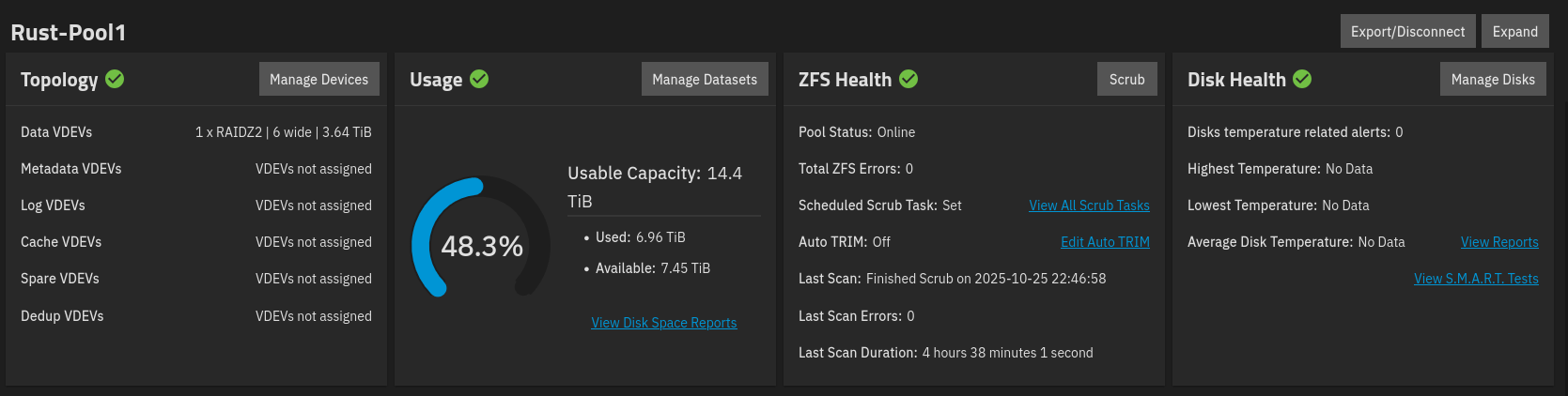
I currently use around 7.5T on the Backup NAS, and since i snapshot replicate from mt Primary to my Backup. I expect all data to be on my primary too.

My “Rust” pools on both machines are named : Rust-Pool1

Here’s the info from my Backup NAS.

I have never used Replace yet ……

But i suppose it’s here

Do i replace the 4TB’s with 8TB’s , one at a time ?

Or do i replace two at a time ?

I’m going from 6x 4TB to 5x 8TB.

How do i handle the last 4TB , that has no replacement ?

I mean won’t TrueNas/ZFS be “angry” about a missing VDEV DRIVE ?

How do i tell the system that there’s just 5 devices in the pool now ?

Any idea - How long will this approx. take per disk ?

If i have to “Frankenstein” two disks “on top of the” chassis, then i’d need to put the disassembled NAS on our dining table. We all know that causes “Severe EAR-PAIN” from SWMBO, if it takes a long time :zipper_mouth_face:

If i do it this way … Extend the pool.

Won’t i be hit by the “Faulty free space” bug ?

TIA

/Bingo

Ahem, I had missed that “detail”… You can’t. You can now increase the width of raidz vdevs, but you can NOT shrink.
(And this is a drive, not a vdev.)
6*4 TB to 6*8 TB, you replace one at a time. Or several at a time, as suits you.

6-wide to 5-wide, you build the new pool and replicate from the old pool to the new pool. That means 11 drives plugged in at the same time—in the same NAS or in two different systems.

If you have only this MJ11, unplug the old pool, plug in the new drives to create the new pool, then unplug one ot two drives in this new pool, plug back four or five drives of the old pool and replicate from your (degraded) old pool to the (degraded) new pool. When it’s done, remove the old pool, put back the missing 8 TB drives and let ZFS resilver.

1 Like

Ahh ..

So a VDEV is a “Cluster of drives” ==> Virtual Device ?

That’s a lot of shuffling …

When i installed (a year ago), I did the “naughty” , and splitted my boot drive into two partitions.
Boot/System on 1’st part. , and IX-APP’s on the 2’nd part. (this was on DF i think).
So I expect to just have “data” on the RUST1-Pool , on both NAS’es, as i have no apps or containers.

Can i just “delete/destroy” Rust-Pool1 on the Backup NAS.
Then remove the 6x 4TB, add the 5x 8TB and recreate Rust-Pool1 ?
Then i could make a “Full snapshot” from the primary.

Btw:
How about encryption ?
Do you guyzz use it ?
To keep it simple, I did not enable encryption, when installing & creating my Rust-pool.
The encryption would primarily be to protect the data, if returning a drive under warranty.

If i’m to enable encryption it prob. have to be now.
The Primary still has room to make a “Full clone” of the Rust-Pool1.
The Backup … I guess should just “Recursive Inherit” the properties from the Primary .. Correct ?

I suppose in order to get existing data encrypted on the Primary i somehow have to copy the dataset(s) to another [s]pool[/s] dataset(s) , then enable encryption on the Rust-Pool1 , and copy the dataset(s) back to the Rust-Pool1 or ?

Btw: Thank you for helping me out again :+1:

I’d say less than replacing six drives one by one.
If you have a backup, then of course you can just destroy and restore.

1 Like

My Backup NAS just contains snapshots from the Primary NAS.

I do have an extra MJ11 MoBo w. 64GB Ram , both passed a Full “memtest86”.

But doesn’t have a chassis that can contain 5 or 6 disks.

Any thoughts/advice on enabling encryption ?
I mean an “Auto Unlock on boot” setup.

Is the “risk” worth it ? … (Read is it “quite uncomplicated” for a beginner to implement”)

I have a “Family album pict” in mind :wink: