
My issues started when I went to update and the installer crashed on grub install. Ever since any install requires me to manually import my boot pool. There seems to be a bit of flaky kernel stuff right before it “tainted kernel” but I don’t think this has anything to do with it.
My problem pretty much mirrors this post, but after 12 hours of trying I can’t figure out what commands I need to run to straighten the boot pool import issue at boot time.
root@truenas[~]# lsblk
NAME   MAJ:MIN RM   SIZE RO TYPE MOUNTPOINTS
sda      8:0    0 279.4G  0 disk
├─sda1   8:1    0     1M  0 part
├─sda2   8:2    0   512M  0 part
└─sda3   8:3    0 278.9G  0 part
sdb      8:16   0   3.6T  0 disk
├─sdb1   8:17   0     2G  0 part
└─sdb2   8:18   0   3.6T  0 part
sdc      8:32   0   3.6T  0 disk
├─sdc1   8:33   0     2G  0 part
└─sdc2   8:34   0   3.6T  0 part
sdd      8:48   0   3.6T  0 disk
├─sdd1   8:49   0     2G  0 part
└─sdd2   8:50   0   3.6T  0 part
sde      8:64   0   3.6T  0 disk
├─sde1   8:65   0     2G  0 part
└─sde2   8:66   0   3.6T  0 part
sdf      8:80   0   3.6T  0 disk
├─sdf1   8:81   0     2G  0 part
└─sdf2   8:82   0   3.6T  0 part
sdg      8:96   0 279.4G  0 disk
├─sdg1   8:97   0     1M  0 part
├─sdg2   8:98   0   512M  0 part
└─sdg3   8:99   0 278.9G  0 part
sdh      8:112  0   3.6T  0 disk
├─sdh1   8:113  0     2G  0 part
└─sdh2   8:114  0   3.6T  0 part
sdi      8:128  0   3.6T  0 disk
├─sdi1   8:129  0     2G  0 part
└─sdi2   8:130  0   3.6T  0 part
sdj      8:144  0   3.6T  0 disk
├─sdj1   8:145  0     2G  0 part
└─sdj2   8:146  0   3.6T  0 part
sdk      8:160  0   3.6T  0 disk
└─sdk1   8:161  0   3.6T  0 part
sdl      8:176  0   3.6T  0 disk
├─sdl1   8:177  0     2G  0 part
└─sdl2   8:178  0   3.6T  0 part
sdm      8:192  0   3.6T  0 disk
├─sdm1   8:193  0     2G  0 part
└─sdm2   8:194  0   3.6T  0 part
sdn      8:208  0   3.6T  0 disk
├─sdn1   8:209  0     2G  0 part
└─sdn2   8:210  0   3.6T  0 part
zd0    230:0    0     6T  0 disk
zd16   230:16   0   400G  0 disk
root@truenas[~]# sudo grep -i import /var/log/middlewared.log
[2025/12/21 17:44:17] (DEBUG) PoolService.import_on_boot():474 - Creating '/data/zfs' (if it doesnt already exist)
[2025/12/21 17:44:17] (DEBUG) PoolService.import_on_boot():481 - Creating '/data/zfs/zpool.cache' (if it doesnt already exist)
[2025/12/21 17:44:17] (DEBUG) PoolService.import_on_boot():509 - Calling pool.post_import
[2025/12/21 17:44:22] (DEBUG) PoolService.import_on_boot():511 - Finished calling pool.post_import
[2025/12/21 20:59:23] (DEBUG) PoolService.import_on_boot():474 - Creating '/data/zfs' (if it doesnt already exist)
[2025/12/21 20:59:23] (DEBUG) PoolService.import_on_boot():481 - Creating '/data/zfs/zpool.cache' (if it doesnt already exist)
[2025/12/21 20:59:23] (DEBUG) PoolService.import_on_boot_impl():316 - Importing 'tank01' with guid: '2181697046397539470'
[2025/12/21 20:59:33] (DEBUG) PoolService.import_on_boot_impl():328 - Done importing 'tank01' with guid '2181697046397539470'
[2025/12/21 20:59:39] (DEBUG) PoolService.import_on_boot_impl():316 - Importing 'tank02' with guid: '5306718830756100272'
[2025/12/21 20:59:44] (DEBUG) PoolService.import_on_boot_impl():328 - Done importing 'tank02' with guid '5306718830756100272'
[2025/12/21 20:59:46] (DEBUG) PoolService.import_on_boot():509 - Calling pool.post_import
[2025/12/21 20:59:54] (DEBUG) PoolService.import_on_boot():511 - Finished calling pool.post_import
[2025/12/21 21:23:23] (DEBUG) PoolService.import_on_boot():449 - Creating '/data/zfs' (if it doesnt already exist)
[2025/12/21 21:23:23] (DEBUG) PoolService.import_on_boot():456 - Creating '/data/zfs/zpool.cache' (if it doesnt already exist)
[2025/12/21 21:23:23] (DEBUG) PoolService.import_on_boot_impl():291 - Importing 'tank01' with guid: '2181697046397539470'
[2025/12/21 21:23:35] (DEBUG) PoolService.import_on_boot_impl():303 - Done importing 'tank01' with guid '2181697046397539470'
[2025/12/21 21:23:37] (DEBUG) PoolService.import_on_boot_impl():291 - Importing 'tank02' with guid: '5306718830756100272'
[2025/12/21 21:23:41] (DEBUG) PoolService.import_on_boot_impl():303 - Done importing 'tank02' with guid '5306718830756100272'
[2025/12/21 21:23:43] (DEBUG) PoolService.import_on_boot():484 - Calling pool.post_import
[2025/12/21 21:23:54] (DEBUG) PoolService.import_on_boot():486 - Finished calling pool.post_import
root@truenas[~]# blkid
/dev/sdf2: LABEL="tank02" UUID="5306718830756100272" UUID_SUB="17799103521383573371" BLOCK_SIZE="4096" TYPE="zfs_member" PARTUUID="3bdd7718-cd0b-11ef-a6bc-ecf4bbc5e69c"
/dev/sdd2: LABEL="tank02" UUID="5306718830756100272" UUID_SUB="568537629472314381" BLOCK_SIZE="4096" TYPE="zfs_member" PARTUUID="3cb57d42-cd0b-11ef-a6bc-ecf4bbc5e69c"
/dev/sdm2: LABEL="tank01" UUID="2181697046397539470" UUID_SUB="16690850299477514372" BLOCK_SIZE="4096" TYPE="zfs_member" PARTUUID="1827be23-cd0b-11ef-a6bc-ecf4bbc5e69c"
/dev/sdb2: LABEL="tank02" UUID="5306718830756100272" UUID_SUB="2008273000518643155" BLOCK_SIZE="4096" TYPE="zfs_member" PARTUUID="3c94cfd8-cd0b-11ef-a6bc-ecf4bbc5e69c"
/dev/sdk1: LABEL="tank02" UUID="5306718830756100272" UUID_SUB="12091096426078504891" BLOCK_SIZE="4096" TYPE="zfs_member" PARTLABEL="data" PARTUUID="257c160e-2867-46b8-af8d-7ee0bbe571d1"
/dev/sdi2: LABEL="tank02" UUID="5306718830756100272" UUID_SUB="4732197840267897671" BLOCK_SIZE="4096" TYPE="zfs_member" PARTUUID="3c89cd11-cd0b-11ef-a6bc-ecf4bbc5e69c"
/dev/sdg3: UUID="d174d662-edfe-ce1f-3cd0-5c21e368d921" UUID_SUB="d2f03ee6-a7bd-4beb-90dd-b746ee29d604" LABEL="swap0" TYPE="linux_raid_member" PARTUUID="da22f7e5-892d-4748-a63d-a73d2af7bfae"
/dev/sdg2: LABEL_FATBOOT="EFI" LABEL="EFI" UUID="96F0-618C" BLOCK_SIZE="512" TYPE="vfat" PARTUUID="cb903344-106a-4fb4-b9e7-14f9cadde5fd"
/dev/sde2: LABEL="tank02" UUID="5306718830756100272" UUID_SUB="3875394343833234486" BLOCK_SIZE="4096" TYPE="zfs_member" PARTUUID="3ca78b79-cd0b-11ef-a6bc-ecf4bbc5e69c"
/dev/sdn2: LABEL="tank01" UUID="2181697046397539470" UUID_SUB="10077732973717801839" BLOCK_SIZE="4096" TYPE="zfs_member" PARTUUID="1793344e-cd0b-11ef-a6bc-ecf4bbc5e69c"
/dev/sdc2: LABEL="tank01" UUID="2181697046397539470" UUID_SUB="11057746715972587053" BLOCK_SIZE="4096" TYPE="zfs_member" PARTUUID="183062b0-cd0b-11ef-a6bc-ecf4bbc5e69c"
/dev/sdl2: LABEL="tank01" UUID="2181697046397539470" UUID_SUB="18422170760817614343" BLOCK_SIZE="4096" TYPE="zfs_member" PARTUUID="15f4d860-cd0b-11ef-a6bc-ecf4bbc5e69c"
/dev/sda2: LABEL_FATBOOT="EFI" LABEL="EFI" UUID="9667-FD34" BLOCK_SIZE="512" TYPE="vfat" PARTUUID="70416374-6afb-4928-8b6f-810d04321064"
/dev/sda3: UUID="d174d662-edfe-ce1f-3cd0-5c21e368d921" UUID_SUB="d2f03ee6-a7bd-4beb-90dd-b746ee29d604" LABEL="swap0" TYPE="linux_raid_member" PARTUUID="4178e45f-570b-458a-9776-2c85c43b9d6e"
/dev/sdj2: LABEL="tank01" UUID="2181697046397539470" UUID_SUB="10192918936713283090" BLOCK_SIZE="4096" TYPE="zfs_member" PARTUUID="184d74f1-cd0b-11ef-a6bc-ecf4bbc5e69c"
/dev/sdh2: LABEL="tank01" UUID="2181697046397539470" UUID_SUB="4970885891270444678" BLOCK_SIZE="4096" TYPE="zfs_member" PARTUUID="18437ebd-cd0b-11ef-a6bc-ecf4bbc5e69c"
/dev/sdf1: PARTUUID="3bcb9fcc-cd0b-11ef-a6bc-ecf4bbc5e69c"
/dev/sdd1: PARTUUID="3c7d0e3a-cd0b-11ef-a6bc-ecf4bbc5e69c"
/dev/sdm1: PARTUUID="17ede026-cd0b-11ef-a6bc-ecf4bbc5e69c"
/dev/sdb1: PARTUUID="3c63446a-cd0b-11ef-a6bc-ecf4bbc5e69c"
/dev/zd0: PTUUID="c46c3341-43dd-4a18-903e-3708ff67e795" PTTYPE="gpt"
/dev/sdi1: PARTUUID="3c484843-cd0b-11ef-a6bc-ecf4bbc5e69c"
/dev/sdg1: PARTUUID="9ce91960-4bbd-42df-9575-413abc12d1c8"
/dev/sde1: PARTUUID="3c566418-cd0b-11ef-a6bc-ecf4bbc5e69c"
/dev/zd16: PTUUID="e19ee14b-c2af-46c5-8084-67ac5239cf42" PTTYPE="gpt"
/dev/sdn1: PARTUUID="1781a96b-cd0b-11ef-a6bc-ecf4bbc5e69c"
/dev/sdc1: PARTUUID="17fa3c7b-cd0b-11ef-a6bc-ecf4bbc5e69c"
/dev/sdl1: PARTUUID="15e4ad2c-cd0b-11ef-a6bc-ecf4bbc5e69c"
/dev/sda1: PARTUUID="9b8c4435-75dd-4761-b944-1b1ccf514bee"
/dev/sdj1: PARTUUID="180d5b25-cd0b-11ef-a6bc-ecf4bbc5e69c"
/dev/sdh1: PARTUUID="181609a1-cd0b-11ef-a6bc-ecf4bbc5e69c"
Below is what I see when I reboot and have to manually import the boot-pool, I am using two 300GB 10K drives for the boot/OS install. They are the two 2279.4GB drives above. “sda” and “sdg.”
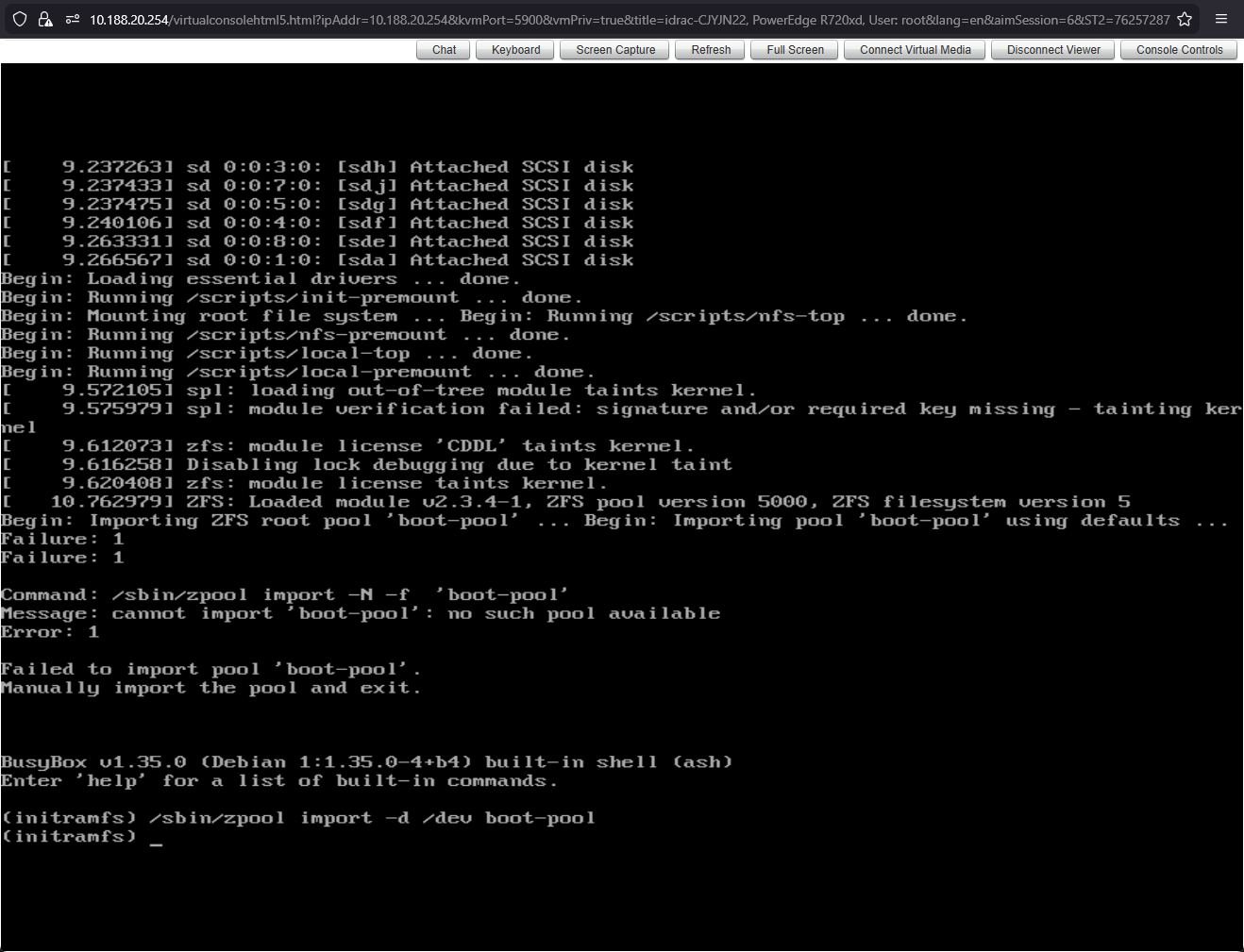
I have tried everything but follow the directions exactly in the other post because I don’t know what to fill in where that gentleman has his SAMSUNG DRIVES.
Oh, and here is this as well. Hope any of this helps.
root@truenas[~]# zpool list -v
NAME                                       SIZE  ALLOC   FREE  CKPOINT  EXPANDSZ   FRAG    CAP  DEDUP    HEALTH  ALTROOT
boot-pool                                  278G  6.43G   272G        -         -     0%     2%  1.00x    ONLINE  -
  mirror-0                                 278G  6.43G   272G        -         -     0%  2.31%      -    ONLINE
    sda3                                   279G      -      -        -         -      -      -      -    ONLINE
    sdg3                                   279G      -      -        -         -      -      -      -    ONLINE
tank01                                    21.8T  6.22T  15.6T        -         -    34%    28%  1.00x    ONLINE  /mnt
  raidz2-0                                21.8T  6.22T  15.6T        -         -    34%  28.5%      -    ONLINE
    sdl2                                  3.64T      -      -        -         -      -      -      -    ONLINE
    sdn2                                  3.64T      -      -        -         -      -      -      -    ONLINE
    sdh2                                  3.64T      -      -        -         -      -      -      -    ONLINE
    sdm2                                  3.64T      -      -        -         -      -      -      -    ONLINE
    sdc2                                  3.64T      -      -        -         -      -      -      -    ONLINE
    sdj2                                  3.64T      -      -        -         -      -      -      -    ONLINE
tank02                                    21.8T  12.3T  9.55T        -         -     0%    56%  1.00x    ONLINE  /mnt
  raidz2-0                                21.8T  12.3T  9.55T        -         -     0%  56.2%      -    ONLINE
    sdf2                                  3.64T      -      -        -         -      -      -      -    ONLINE
    sde2                                  3.64T      -      -        -         -      -      -      -    ONLINE
    sdi2                                  3.64T      -      -        -         -      -      -      -    ONLINE
    sdb2                                  3.64T      -      -        -         -      -      -      -    ONLINE
    sdd2                                  3.64T      -      -        -         -      -      -      -    ONLINE
    257c160e-2867-46b8-af8d-7ee0bbe571d1  3.64T      -      -        -         -      -      -      -    ONLINE
root@truenas[~]# zpool status -v
  pool: boot-pool
 state: ONLINE
config:

        NAME        STATE     READ WRITE CKSUM
        boot-pool   ONLINE       0     0     0
          mirror-0  ONLINE       0     0     0
            sda3    ONLINE       0     0     0
            sdg3    ONLINE       0     0     0

errors: No known data errors

  pool: tank01
 state: ONLINE
  scan: scrub repaired 0B in 04:52:55 with 0 errors on Wed Nov 26 04:53:06 2025
config:

        NAME        STATE     READ WRITE CKSUM
        tank01      ONLINE       0     0     0
          raidz2-0  ONLINE       0     0     0
            sdl2    ONLINE       0     0     0
            sdn2    ONLINE       0     0     0
            sdh2    ONLINE       0     0     0
            sdm2    ONLINE       0     0     0
            sdc2    ONLINE       0     0     0
            sdj2    ONLINE       0     0     0

errors: No known data errors

  pool: tank02
 state: ONLINE
  scan: scrub repaired 0B in 05:25:19 with 0 errors on Tue Dec 16 05:25:21 2025
config:

        NAME                                      STATE     READ WRITE CKSUM
        tank02                                    ONLINE       0     0     0
          raidz2-0                                ONLINE       0     0     0
            sdf2                                  ONLINE       0     0     0
            sde2                                  ONLINE       0     0     0
            sdi2                                  ONLINE       0     0     0
            sdb2                                  ONLINE       0     0     0
            sdd2                                  ONLINE       0     0     0
            257c160e-2867-46b8-af8d-7ee0bbe571d1  ONLINE       0     0     0

errors: No known data errors