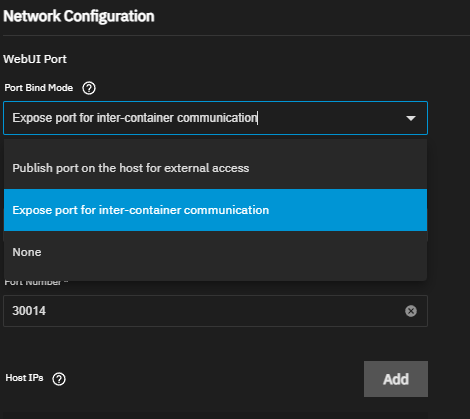
I am trying to get a simple reverse proxy setup working with Nginx Proxy Manager (installed as an app from the catalog) to proxy requests to other catalog-installed apps.
I can get this working by forcing the other apps to expose a port on the host, and pointing NPM to the host IP and that port.
However, I would ideally like to use the “Expose port for inter-container communication” networking option for the other apps, so that NPM can communicate directly with the other apps over the docker network and I don’t have to expose the ports on the host IP to my LAN.
This seems like an incredibly common use case, yet I cannot for the life of me figure out how to do this. Is this possible? If so, what hostname or IP do I use (in NPM) for this case?
I do not use the buildin apps (only for testing purpuses when someone needs help when installing an app) but i know there’s an option to change for expose ports for app communication from a drop down menu
Can’t say for truenas apps, but docker containers can communicate with each other as far as they are connected to the same docker network (no port mappings required). However, to be resolved by hostname the network must be user-defined.
i know there’s an option to change for expose ports for app communication from a drop down menu
Yep - that’s the one I’m trying to use (“Expose port for inter-container communication”)! But it’s unclear how to actually use it (what hostname/IP to use to access that internal port) - I’ve tried all variations of localhost/loopback, and I’ve tried the app name as a hostname, but nothing seems to work.
Can’t say for truenas apps, but docker containers can communicate with each other as far as they are connected to the same docker network (no port mappings required).
Exactly - I was expecting some version of that to work here. E.g. you have an app called ‘app-one’ and other apps could talk to it using the ‘app-one’ hostname and the internally-exposed port.
I’ve seen an old thread about this for Electric Eel (I can’t include links in my posts, but the title is “Inter-app communication in 24.10 Electric Eel”), which is closed as “addressed”, but all I see is a hacky workaround script and I can’t see any clear resolution or a description about how to actually do this in Fangtooth.
This is one of the reasons i opted out of the buildin apps and deploy my own compose stacks via portainer. There’s way more options exposed in portainer.
To support @LarsR reason: there are a bunch of solutions for running/managing your docker containers (even on truenas). And usually those solutions don’t screw their users every other major release. Because it’s their bread and butter.
IMO, truenas apps are for people who can/wanna only press Next → Next → Next → Done. If you are advanced enough to crave inter-container networking, you shouldn’t consider built-in apps as your platform. Because it will always be behind the competitors. Or better said, it will always target a less tech-savvy audience. As a plus, those solutions are not vendor-locked to truenas so you would be able to run them on any other OS.
Thanks for the answers @LarsR and @swc-phil - this might be the final push needed to get me to migrate to a different solution like portainer.
What is your preferred way of running portainer on TrueNAS SCALE nowadays? Directly on the host? Inside a VM? As an app? Using the experimental “containers” feature? Something else?
However, if I were really serious about running docker containers on truenas, I would probably deploy portainer agent or portainer edge agent (in a VM or as a custom app) and would manage other apps via my main portainer instance, which is used for managing almost all my docker nodes.
Speaking of this, I never tried it (with truenas), but I don’t see any reason why it wouldn’t work. And it may not be the solution you are searching for.
Hi @thearrow ! You describe my exact use case. What I figured so far (using forgejo as running example):
sudo docker ps lists the containers which truenas’ apps did setup. The main app container you want to target is ix-forgejo-forgejo-1.
sudo docker network ls lists networks. You find ix-forgejo_default there.
sudo docker network inspect ix-forgejo_default let gives you detailed information about the network of the app.
As soon as I invoked sudo docker network connect ix-forgejo_default ix-ngins-proxy-manager-npm-1 my npm could use the forgejo in the backend. By ipv4 address. By ipv6 address. And by name ix-forgejo-forgejo-1 too.
I did not figure yet, how one can persist that call with triggers like “app xyz started, now make that call”.
I do not understand why that request was closed, there is obviously nothing implemented about it, “Expose port for inter-container communication” does nothing as far as I can see.
If you use custom docker compose, you can just set the list of desired networks for the container (aka app). This would allow proper inter-container communication.