I am seeing an average 70% packet loss during extended pings (5-10 minutes). I’ve tried pinging both www.google.com and 8.8.8.8. No difference in patterns and packet loss percentage when using IP or DNS.
I can’t see an exact pattern to the outages, but there is a definite peak/valley going on. I’d say on average 5-10 seconds of good consecutive pings, followed by 30-40 seconds of failed pings. It repeats this rough pattern as long as I run the pings.
I am pretty sure this is a TrueNAS issue and not hardware. I’ve booted my server twice with Fedora Linux on a USB drive and issued the same pings as above. Near zero packet loss.
This has been happening for several months now. I’m not sure exactly when it started, but maybe it was after a certain TrueNAS version.
I’m using a Supermicro X11SSL-cf, and have tried both the NICs on the board. Both exhibit the same problem. So I don’t believe it’s a NIC issue.
I’m currently on 25.04.2.6, but the same issue exists with 25.10.1. (I had to roll back to 25.04 as I experience a hard crash while creating a VM in 25.10.1.)
I have several docker containers, so I tried disabling the docker service to see if that was the issue. Didn’t seem to make a difference; pings showed a packet loss of roughly 70% again.
Does anyone have any ideas of what else I can do to diagnose this? It’s beyond frustrating!
Change the port on the switch you are using AND change the network cable.
You need to find out where you are losing the packets. Run a traceroute to 8.8.8.8 and then run pings to each address on the way - see if that indicates anything.
Thanks for the suggestions so far. Unfortunately I haven’t uncovered anything new.
I swapped out the ethernet cable, and moved it to a different port on my main switch (Ubiquiti Pro Max 16, which is then plugged into my UCG Max). There doesn’t seem to be any difference.
Running a ping to my gateway (192.168.50.1) for 4 hours produced zero packet loss. Similarly pinging my personal PC (50.100) for an hour produced zero packet loss.
It appears that it’s only packets destined for the internet that are getting lost.
When the connection is working, a traceroute to 8.8.8.8 almost instantly gets there over 7-8 hops.
When the connection is down, there are no hops whatsoever. Just several rows of three asterisks.
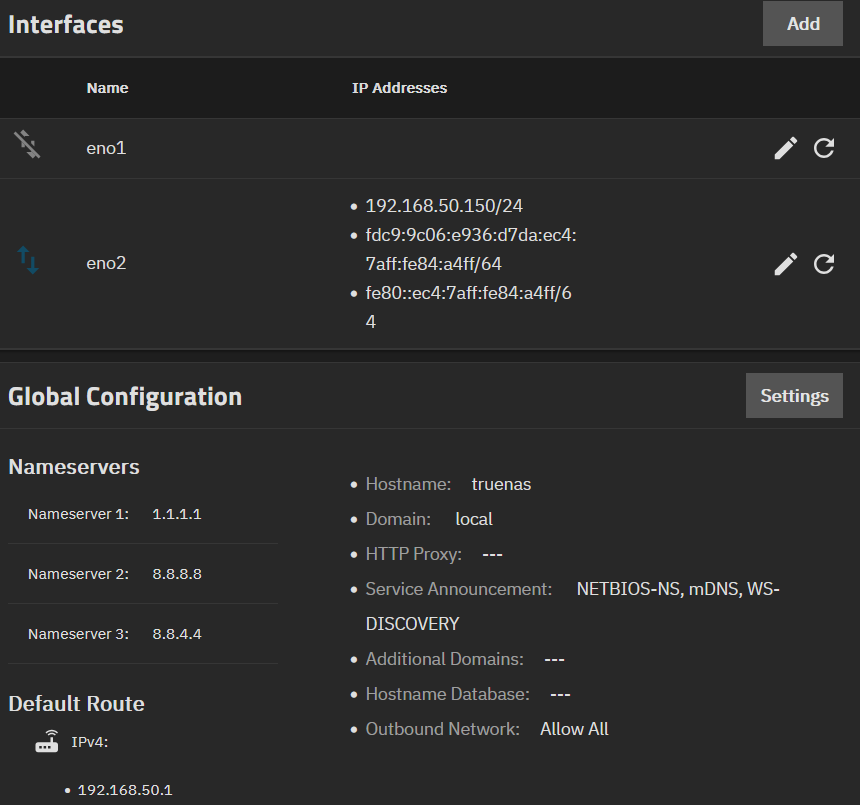
Have I made some silly mistake in my TrueNAS network configuration? Here’s what mine looks like:
My networking and server knowledge is intermediate at best, so I’m trying my best to follow what you’re saying.
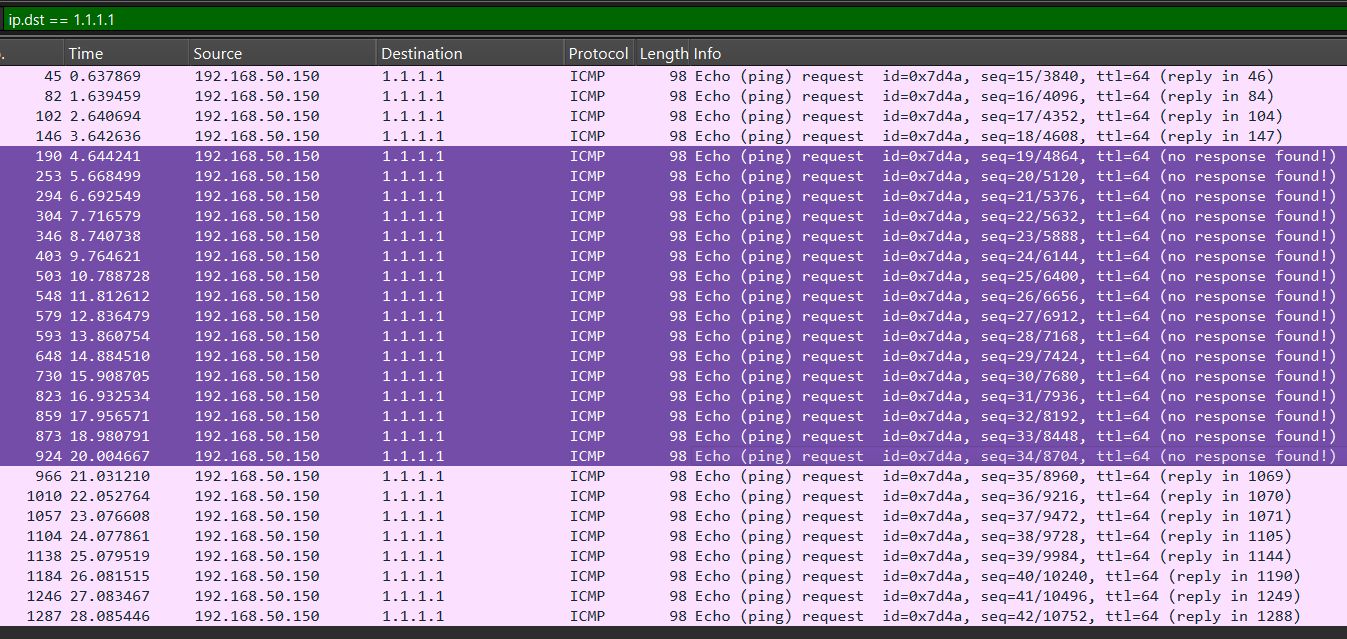
I used the built-in Packet Capture tool on my Ubiquiti device to log 30 seconds of traffic. I downloaded the file, then imported the captured data into Wireshark.
While the capture was running, I ran a ping to 1.1.1.1 (Cloudflare) for the full 30 seconds.
Here’s the result from TrueNAS. If I’m reading this correctly, I believe the request is not making it about half the time (failed requests in purple).
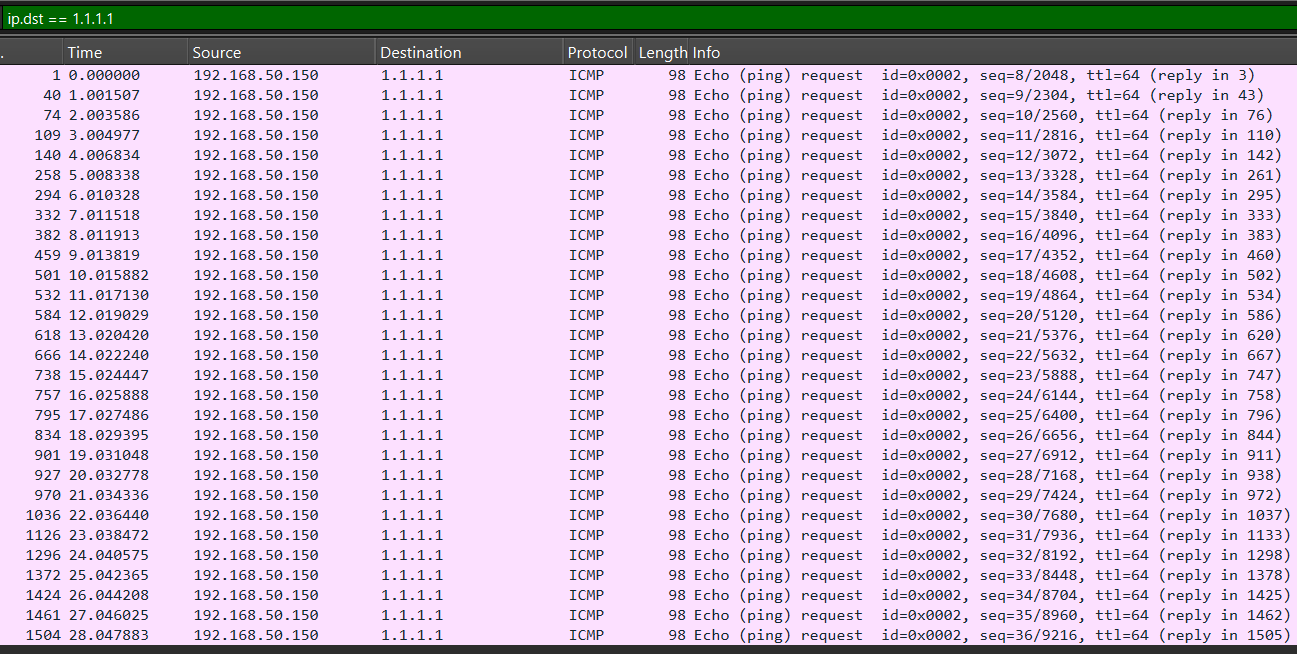
I don’t fully understand what this tells me, but I find it very odd that Fedora works fine, and TrueNAS does not on the same hardware. What am I missing?
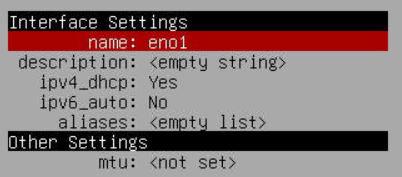
I cleared out the hard-coded network settings in the command-line setup menu (menu option 1). I then turned DHCP on (previously I had 192.168.50.150 in here) and also disabled ipv6 as I’m not using it anywhere.
I didn’t want random IPs every time I rebooted the server, so in the Ubiquiti UI, I assigned 192.168.50.200 to the port in which the cable attached to my server is plugged.
After two reboots, it’s grabbing 50.200, so I know the DHCP reservation is holding.
I’ve now been pinging www.google.com successfully for several minutes!!
I have absolutely no idea what the specific issue is/was, or if this fix is permanent (I’ll leave it pinging for a while), but it’s looking good so far…
Update after 45 minutes of pings: 0.36% loss. Hoping that’s just internet reliability issues, and now my hardware. Way better than 70% loss!
Well scratch that … issues going to the internet again. I’m losing 70-80% just like before.
The only thing I knowingly did is start up all my docker containers again. Maybe docker is messing with things? I’ll down the docker service and see if things settle down again.
Starting up your dockers is basically like starting up a whole bunch of extra devices all with their own network quirks, including routing and all that comes with that.
Try going turning all the apps off and then start them up one by one, give each app enough time to be sure if the problem reappears.
Then rebooted the server. I proceed to run a ping test to 1.1.1.1 for 10 minutes. 0.5% packet loss. (Again I’m hoping to attribute the small loss to general internet issues.)
You could go halfway - get a temporary boot drive (even a USB will do for temporary use) & test to see if it makes a difference. No need to overwrite, just disconnect the current boot.
Thank you for that suggestion. Unfortunately I seem to be seeing the same issue.
I installed TN 25.04.2.6 (same as my original install) on a 32GB USB drive. Pings to 1.1.1.1 were successful for several minutes.
But then I imported my pool, and brought up a Docker container (Jellyfin again). Within a couple minutes, pings started exhibiting ~70% loss again.
I think I need to dig into how to 100% reset all the docker data and clear out the /mnt/.ix-apps directory and at least start the Docker subsystem from scratch. I’m assuming when I imported the pool, Docker just went back to the old data stores.
Following up my last post with some (so far) success. Thank you to all who replied in an effort to help!
I now understand that this was likely not a TrueNAS issue, but a Docker issue. Not sure if it was an issue with the way TrueNAS implemented it, or an issue that could’ve happened with any Docker implementation.
Here’s a non-technical series of steps I took to start over:
disabled/stopped all docker services
unset app pool
deleted everything in /mnt/.ix-apps
created app pool
enabled/started all docker services
rebooted
Pinging 1.1.1.1 for several minutes resulted in >99% success.
I installed Jellyfin in Docker, and let it run for several minutes. Followed up with another ping for several minutes and >99% success again.
So I then went for broke and installed 5 other Docker containers I use often. With all up and running for several minutes, another ping session went for over 20 minutes. >99% success again!
I’ve been doing a few series of pings over the past few hours, and continue to see nearly 100% success.
I have no idea what screwed up my Docker, but I’m hoping everything holds…