Bad SMB write/read performance with 4 drives in 2x mirror configuration (RAID10)

No. The main usage is exactly copying large files like that. This NAS is not home use.
I mostly care about:

  • Moving large files to the NAS quickly (to get them quickly off SSD storage on host machines, which record new data quickly after again and should not have its resources occupied/busy for too long)
  • Large files are typically in the range of 2 - 30 GB, but can also be as big as 250 GB or more sometimes. Again, the important point is to get these moved away quickly from the host’s SSD storage.
  • These files are mostly random looking data btw, so basically aren’t compressible.
  • Being able to read the files from the NAS at reasonably quick speeds if needed (some of the files might be archived for a while, but some files also need to be read by another application from the NAS. So read speed matters, too.)
  • I have several XCP-NG hosts on the 10Gbit/s network running several VM’s. Those do daily backups to the NAS. The daily backup files are typically several GB up to 100 GB’s in size. When full backups are made these can be several 100GBs per file. These backups should write reasonably quickly to the NAS and be read reasonably quickly from the NAS in case a backup restore is needed.

So no, this is not a typical home user setup. For my use case the write (and read) speed for large files does matter.

To better quantify the performance, I took the leap and spent the whole day deleting my pool, setting up different STRIPE/MIRROR/RAID/RAIDZ configurations and testing read/write performance via SMB.

For the tests I used a large 195 GB file which should mostly contain random contents (so is likely mostly incompressible). I copied this file to/from the NAS to the same Windows10 VM via SMB as described earlier and taking notes of the duration it takes to copy with an empty, new pool. From that I calculated average read/write speeds.

The results are quite interesting, see below:

Read/Write speed tests via SMB to TrueNAS SCALE bare metal server for different pool/disk configurations.
Note: the 195 GB file should have near random contents, so is likely mostly uncompressible.

WRITE speed tests TO NAS using 195 GB file (from Windows 10 VM on NVMe via SMB, via 10 Gbit/s network, standard SMB config, pool encrypted)
Config									Time				Calc. avg. speed	Comments
- 1 disk STRIPE							~15 min, 48 sec		~206 MB/s			NAS pool used space 0%. Disk used: sda
- 2 disks STRIPE						7 min, 50 sec		~415 MB/s			NAS pool used space 0%. Disks used: sda, sdb
- 4 disks STRIPE						7 min, 42 sec		~422 MB/s			NAS pool used space 0%. Disks used: sda, sdb, sdc, sdd

- 2 disks MIRROR						15 min, 21 sec		~212 MB/s			NAS pool used space 0%. Disks used: sda, sdb
- 4 disks MIRROR						~22 min, 47 sec		~143 MB/s			NAS pool used space 0%. Disks used: sda, sdb, sdc, sdd

- 4 disks RAIDZ2						~18 min, 2 sec		~180 MB/s			NAS pool used space 0%. Disks used: sda, sdb, sdc, sdd
- 4 disks RAID10 (striped mirrors) 		17 min, 20 sec		~187 MB/s			NAS pool used space 44%. Disk pairs used: Mirror1: sdb, sdd | Mirror2: sda, sdc. This is the config I had yesterday still.
- 4 disks RAID10 (striped mirrors)		~11 min, 30 sec		~282 MB/s			NAS pool used space 0%. Disk pairs used: Mirror1: sda, sdb | Mirror2: sdc, sdd. This is same layout but on newly created, empty pool today, and disks ordered differently in the pools.


READ speed tests FROM NAS using 195 GB file (to Windows 10 VM on NVMe via SMB, via 10 Gbit/s network, standard SMB config, pool encrypted):
Config									Time				Calc. avg. speed	Comments
- 1 disk STRIPE							~13 min, 21 sec		~243 MB/s			NAS pool used space 0%. Disk used: sda
- 2 disks STRIPE						7 min, 3 sec		~461 MB/s			NAS pool used space 0%. Disks used: sda, sdb
- 4 disks STRIPE						5 min, 7 sec		~635 MB/s			NAS pool used space 0%. Disks used: sda, sdb, sdc, sdd

- 2 disks MIRROR						11 min, 15 sec		~289 MB/s			NAS pool used space 0%. Disks used: sda, sdb
- 4 disks MIRROR						6 min, 22 sec		~510 MB/s			NAS pool used space 0%. Disks used: sda, sdb, sdc, sdd

- 4 disks RAIDZ2						7 min, 24 sec		~439 MB/s			NAS pool used space 0%. Disks used: sda, sdb, sdc, sdd
- 4 disks RAID10 (striped mirrors) 		8 min, 28 sec		~384 MB/s			NAS pool used space 45%. Disk pairs used: Mirror1: sdb, sdd | Mirror2: sda, sdc. This is the config I had yesterday still.
- 4 disks RAID10 (striped mirrors)		6 min, 26 sec		~505 MB/s			NAS pool used space 0%. Disk pairs used: Mirror1: sda, sdb | Mirror2: sdc, sdd. This is same layout but on newly created, empty pool today, and disks ordered differently in the pools.

Does this look as expected to you?

A few things that seem noteworthy to me (no expert, though):

  • With 4 disk STRIPE, I was able to get a sustained ~635 MB/s read and ~422 MB/s write speed. That should mean that my network can handle at least up to that speed fine. I don’t expect the network to be the issue for any lower speeds therefore. (It might possibly be the bottleneck above these high speeds, but that’s not the main concern at the moment)
  • When I did the first test this morning (with the configuration I had when I started this thread) the RAID10 performance was 187 MB/s write and 384 MB/s read. After I deleted the pool and created a new, empty pool in RAID10 again it has gone up significantly to 282 MB/s write and 505 MB/s read. I am not completely sure why this is, the only difference seems to be that before the pool was 44% full, now it was 0% full. And that I now had the four drives in a different combination in each mirror pool.
  • My RAID10 reaches only about 45% / 68% of the write speed that the 2 disk STRIPE reaches. 2 disks STRIPE has great write (415 MB/s) and read (461 MB/s) speeds. RAID10 speeds are (187/282 MB/s) write and (384/505 MB/s) read. I would expect the RAID10 write speed to be roughly similar to the 2 disk STRIPE write speed, or not? (and read speed, theoretically, even double that)
  • 4 disk STRIPE write speed is the same as on 2 disk STRIPE. That seems unexpected to me. Normally 4 disk STRIPE write speed should approach 200% of the 2 disk STRIPE, right? (The read speed with 4 disk STRIPE is 137% of the 2 disk STRIPE. That’s better, but shouldn’t that also normally approach more towards 200%?)
  • Mirroring more disks seems to decrease write speed. I was a bit surprised that it went as low as 143 MB/s sustained write speed when mirroring 4 disks.

In the end what matters for me is RAID10 performance. Curious what you all think! If this looks reasonable and my expectation on speeds is off let me know too :wink:

1 Like

Hi, the screenshot I sent of the iperf3 performance was a test with just one single stream. I’ve tried multiple streams with the parameter -P 2 and -P 3 and that saturated near the entire 10GBit link. Not sure though if thats “a good sign” or single stream performance is what matters for SMB.

Please see my post above this one for some extensive SMB benchmark tests I did yesterday using a large 195GB file. I’ve done these tests for many different pool configs.

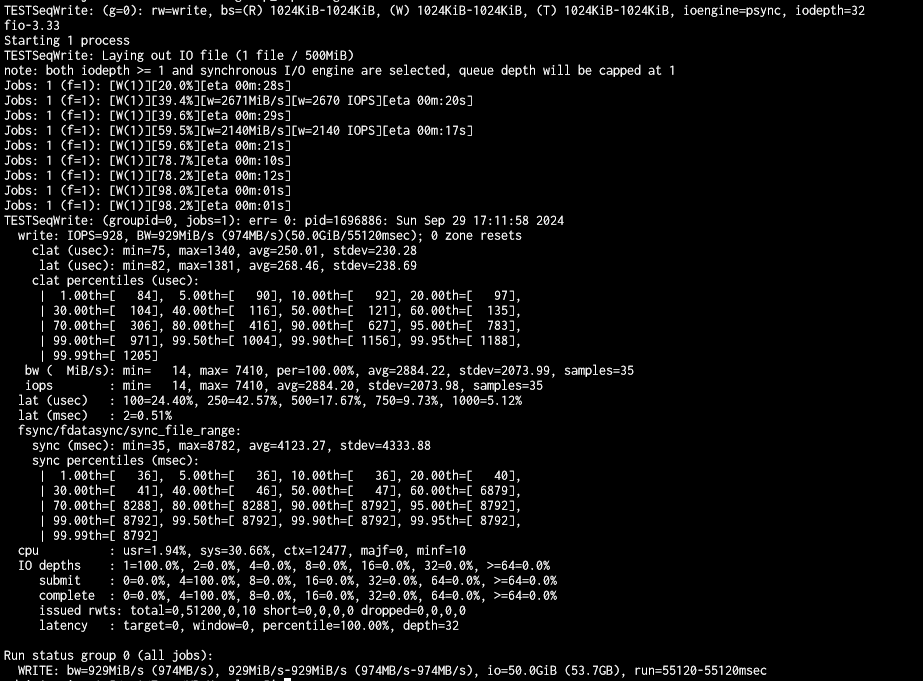
I’ve also looked into testing the pools directly using the fio command, but to be honest it seems tricky to find some clear documentation on how to best test pool performance with it. I’ve now done the following tests on a new test dataset called “benchmark_test_pool”. I hope the commands make sense. During dataset creation I selected SMB usage case as I did with my other datasets. I’ve left everything else at defaults.

cd /mnt/nas_data1/benchmark_test_pool

fio --name TESTSeqWrite --eta-newline=5s --filename=fio-tempfile-WSeq.dat --rw=write --size=500m --io_size=50g --blocksize=1024k --fsync=10000 --iodepth=32 --direct=1 --numjobs=1 --runtime=60 --group_reporting
WRITE: bw=310MiB/s (325MB/s), 310MiB/s-310MiB/s (325MB/s-325MB/s), io=19.5GiB (21.0GB), run=64620-64620msec

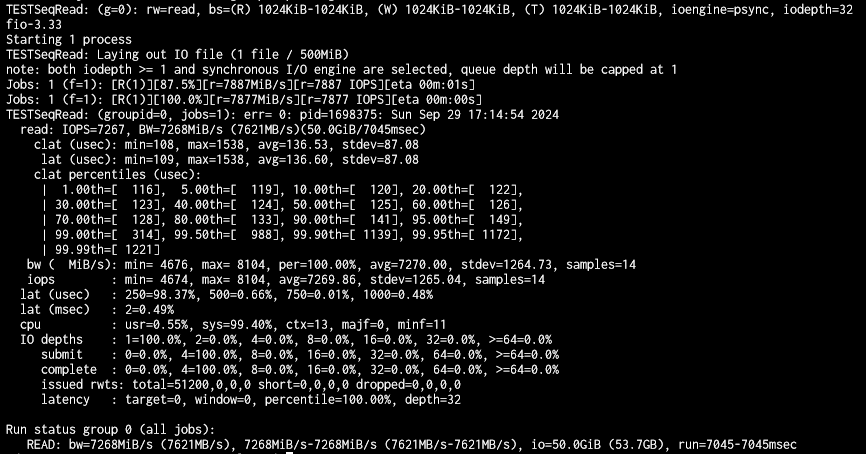
fio --name TESTSeqRead --eta-newline=5s --filename=fio-tempfile-RSeq1.dat --rw=read --size=500m --io_size=50g --blocksize=1024k --fsync=10000 --iodepth=32 --direct=1 --numjobs=1 --runtime=60 --group_reporting
READ: bw=4596MiB/s (4819MB/s), 4596MiB/s-4596MiB/s (4819MB/s-4819MB/s), io=50.0GiB (53.7GB), run=11141-11141msec

Let me know if I should try any other fio commands.

If I understand correctly, the ZIL is only used with sync writes. As SMB by default doesn’t use sync writes the ZIL should not be used in this case and not result in decreased performance. I think that also means that adding a SLOG would not help in this case (as its async SMB).
Please correct me if I am wrong though!

1 Like

I could see the same behavior on my system as well. But it seems there is not really an interest in solving the problem. Sometimes time helps, next releases will hopefully have a solution (not sure) I’m a little tired from reading all hints how to measure right, it’s your network… and so on. I’m really happy to see your post here trying to remove the fog.

1 Like

I will try to think about what you wrote and get back. It appears that your network is not the issue.

Just to compare, here are my FIO results (8x Exos18 raidz2 pool), exact copy&paste of your parameters:

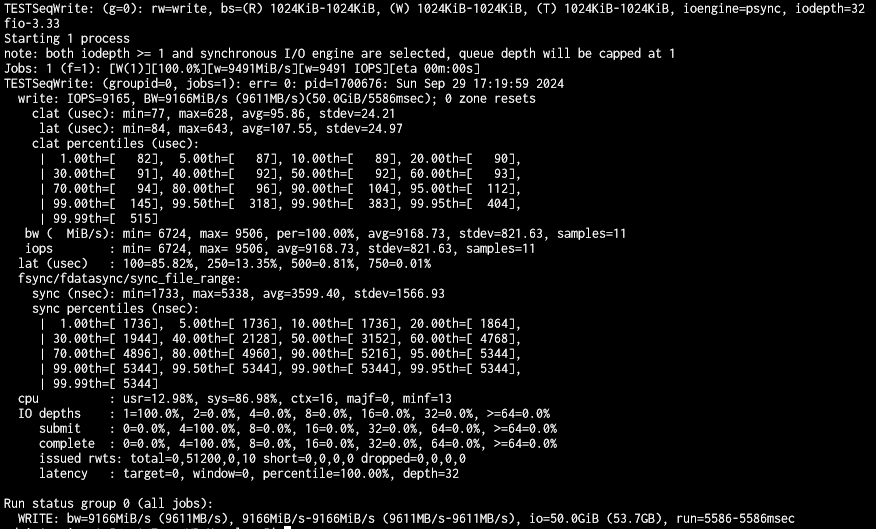
Just for the fun of it, I forced disabled sync in my dataset settings (it was se to Inherit (STANDARD)):

Now, the interesting thing is that if you look at the screenshot you will see that FIO reports synchronuos io engine is selected, but obviously there is completely different result. Maybe try with disabled sync and see what happens?

One more idea, something I just read on old community forums (will check later if this same thing repeats on newer scale versions):

Particulary this part:

So I’ve been able to conclusively identify “Multi-protocol (NFSv4/SMB) shares” as the culprit in my situation. If I remove that setting from my big videowork share, the performance goes up more than 10x.

Thanks, good ideas.

I’ve just tried setting the following on a child-dataset and restarted the SMB service after each change, then ran read/write copy tests (15 files, total of 30GB) via SMB:

  • Original settings (Sync: Inherit (STANDARD), ACL type: SMB/NFSv4, ACL Mode: Restricted)
  • Sync: Inherit (STANDARD), ACL type: Off (had to set my SMB permissions for this recursively again as I couldn’t access the SMB share otherwise)
  • Sync: Inherit (STANDARD), ACL type: Inherit (meaning it should be POSIX)
  • Sync: Disabled, ACL type: Inherit (meaning it should be POSIX)
  • Sync: Disabled, ACL type: SMB/NFSv4, ACL mode: Restricted

These all didn’t seem to have really any impact on read/write speed unfortunately. I measured for all these tests the appx. following average speeds (calculated from time it took to transfer): Write: ~300 MB/s, Read: ~435 MB/s.

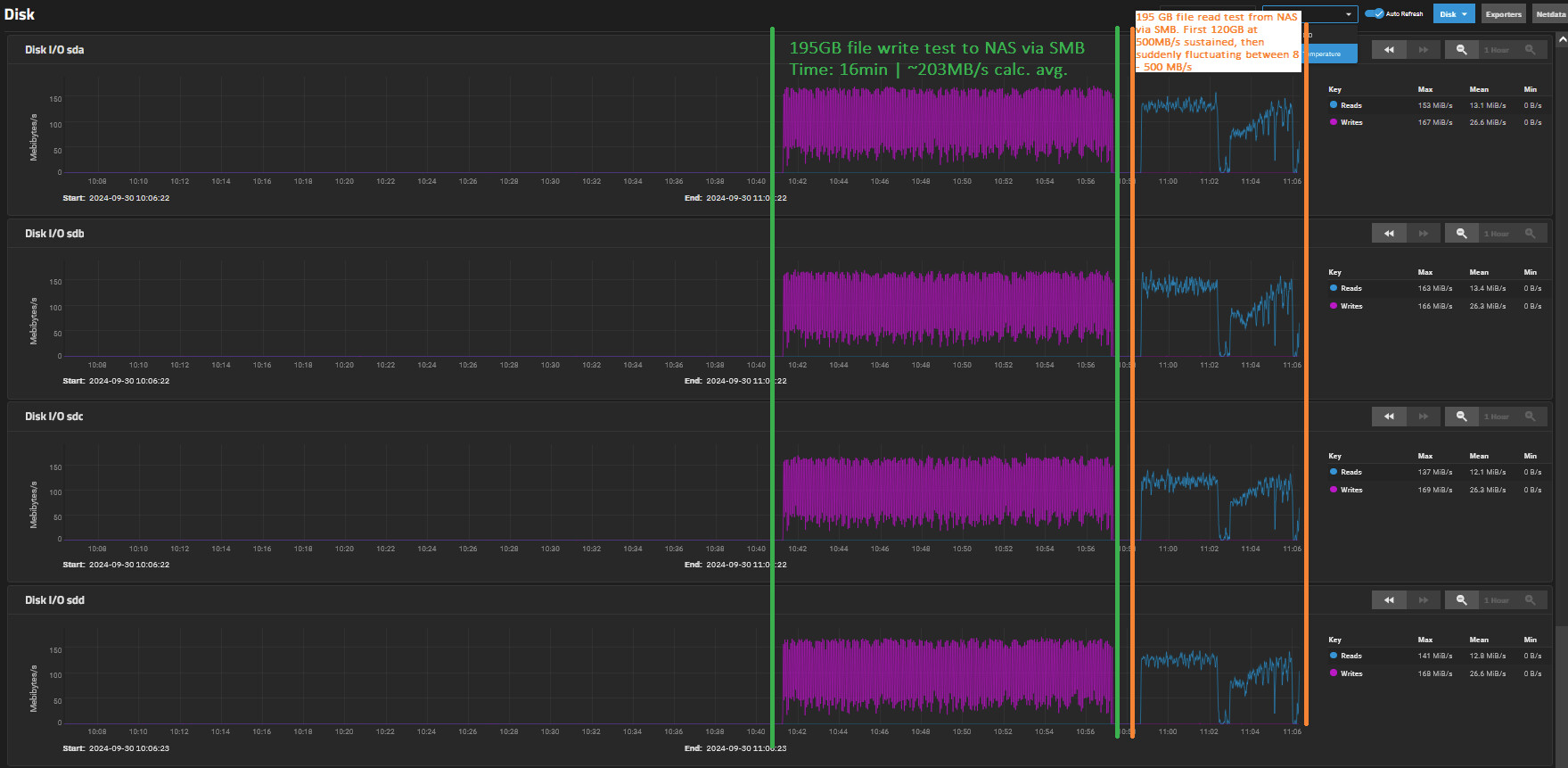
So, strange developments this morning. Did the 195 GB read/write test again as previously. Write speed has plummeted back to ~203 MB/s calc. average. Read speed ran at 500MB/s fine for the first 120GB, then suddenly started heavily fluctuating between 8 - 500 MB/s. I have no idea why. Only difference I see is that the pool is now again ~7% full.

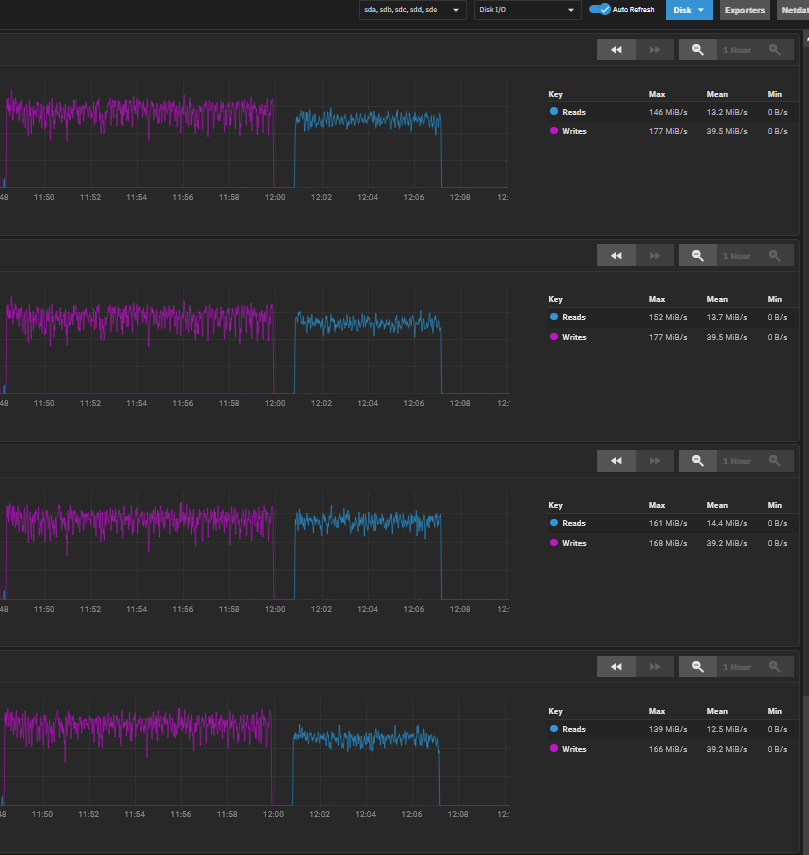
The disk performance graphs are interesting, and I would say the constantly fluctuating write performance may be a sign of an issue/bottleneck here. Those graphs should normally not have these fluctuations I think and be flat for the sequential write we are doing of this kind of large file. (correct me if I’m wrong)
The read graph has “good” flat performance for the first 120GB at 500MB/s and then the weird fluctuations kick in today. Performance looks certainly fishy.

^Above was the test result I got yesterday evening still with the 30GB test files. I have changed nothing since (only XCP-NG ran some delta backups over night, that’s it). This morning running the same test, also this has now plummeted in performance down to Write: ~197 MB/s, Read: ~395 MB/s. :exploding_head:

Rebooted TrueNAS (SCALE). Surprisingly, that seems to result in the higher speeds again. Something in the TrueNAS back-end possibly crappi** itself that needs a reboot?

Now getting again the higher speeds (and without the strange fluctuations):
30GB file tests: Write ~312 MB/s, Read: ~441 MB/s
195 GB file test: Write ~286 MB/s, Read: ~514 MB/s

Here same graph from after the reboot:

This seems to become my new full-time job…

Upgraded to TrueNAS SCALE BETA (ElectricEel-24.10-BETA.1):

  • Getting appx. same read/write speeds as on TrueNAS STABLE before.
  • 30GB files test: Write ~297 MB/s, Read: ~441 MB/s
  • 195GB file test: Write ~282 MB/s, Read: ~515 MB/s

Going to re-install TrueNAS CORE STABLE next from iso again and do some testing there. Will report back.

On a side note: The mainboard (being old) seems to only support SATA2 (3 Gbit/s). I don’t expect this to be an issue though, right? (3 Gbit/s = 375 MB/s, which is still above what a single HDD can do)

2 Likes

Is it possible you were running smart tests or a scrub etc while benchmarking?

These will slow disk performance. And smart tests get cancelled when you reboot.

1 Like

Correct. SATA3 is only relevant for SSDs.

Unlikely. There should only have been a short SMART test on sunday, but that should not have taken that long all the way into monday morning.

Could you reinstall Core? Please share the result.

Did lots of testing yesterday. Apologies already for the wall of text, feel free to pick out what is interesting. Below speeds are the SMB transfer test speeds as done previously, on the same machine.

  • First started with changing a few things in BIOS, like: Enable I/OAT, Disable Enhanced Idle Power State. (BTW: NUMA Optimization is enabled, that’s fine?)
    Results RAID10, TrueNAS SCALE BETA:
    30 GB: Write: 329 MB/s, Read: 423 MB/s
    195 GB: pretty much identical as seen previously= Write: ~282 MB/s, Read: ~515 MB/s
    → No significant change in speed.

  • After taking out two RAM modules (so 16GB less) and re-seating them for “performance channel mode”, and breaking off RAM SLOT 1C’s clips on both sides.
    Results RAID10, TrueNAS SCALE BETA:
    30 GB: Write: 319 MB/s, Read: 428 MB/s
    195 GB: Write: 285 MB/s, Read: 505 MB/s
    → No significant change in speed.

  • Put all RAM modules back in as it was (back to full 64 GB RAM), moved 10GBit PCIe card from (PCIe 2.0) x4 slot to x8 slot.
    Results RAID10, TrueNAS SCALE BETA:
    30 GB: Write: 309 MB/s, Read: 435 MB/s
    195 GB: Write: 284 MB/s, Read: 503 MB/s
    → No significant change in speed.

  • Now installed fresh TrueNAS CORE STABLE. Configured all 4 drives in RAID10 again, configured same datasets/users etc as before and tested with empty pool (other settings left at defaults).
    Results RAID10, TrueNAS CORE STABLE:
    30 GB: Write: 333 MB/s, Read: 455 MB/s
    195 GB: Write: 328 MB/s, Read: 508 MB/s
    → Write speeds are higher. Read speeds are about the same/slightly higher.

As this didn’t quite show the significant improvements I was hoping for, I decided to take the 4x 20TB drives + SSD OS drive out and put it into the most powerful machine I have. That machine has the following spec:
CPU: Ryzen 9 5950X
RAM: 128 GB (4x 32GB, 3200 MHz CL16)
Network: Same 10Gbit NIC as on the previous machine, in the same 10Gbit network
SATA: SATA3 6 Gbit/s (to 4x HDD and 1x SSD for these tests)

Results, using this “high-spec” server:

  • Did a fresh install of TrueNAS CORE STABLE from ISO again. Configured all drives in RAID10 again, same datasets/users etc as before and tested with empty pool (other settings left at defaults).
    Results RAID10, TrueNAS CORE STABLE:
    30 GB: Write: 428 MB/s, Read: 714 MB/s
    195 GB: Write: 420 MB/s, Read: 543 MB/s
    → Read/write speeds are higher than seen on the previous HW server.

  • Tried the same transfer test once to a different Win10 VM in the same network (also on XCP-NG, but on a different server).
    Results RAID10, TrueNAS CORE STABLE:
    30 GB: Write: 345 MB/s, Read: 638 MB/s
    195 GB: Write: 433 MB/s, Read: 545 MB/s
    → Not sure what happened during the 30GB test, but anyway for the 195GB test the speeds are in line with the previous test.

  • Destroyed pool and created a new 2 DISK STRIPE. Also back to testing with the original Win10 VM I normally use.
    Results 2 disk STRIPE, TrueNAS CORE STABLE:
    30 GB: Write: 361 MB/s, Read: 588 MB/s
    195 GB: Write: 442 MB/s, Read: 485 MB/s

  • Destroyed pool and created a new 4 DISK STRIPE.
    Results 4 disk STRIPE, TrueNAS CORE STABLE:
    30 GB: Write: 428 MB/s, Read: 714 MB/s
    195 GB: Write: 441 MB/s, Read: 796 MB/s

  • Destroyed pool and created a single disk STRIPE:
    Results single disk STRIPE, TrueNAS CORE STABLE:
    30 GB: Write: 286 MB/s, Read: 714 MB/s
    195 GB: Write: 277 MB/s, Read: 251 MB/s
    → These speeds for the 195GB file are probably a good benchmark for single disk sequential read/write performance. Note that the high 714 MB/s read speed for the smaller 30 GB file test speed indicates that cache must be at work here, as a single HDD can’t reach that speed. So take these values with a grain of salt. Remember also that this system has double the RAM of the previous system and much quicker RAM.

  • Now installed TrueNAS SCALE STABLE from iso on this system. Tested RAID10 config again.
    Results RAID10, TrueNAS SCALE STABLE:
    30 GB: Write: 294 MB/s, Read: 882 MB/s
    195 GB: Write: 309 MB/s, Read: 560 MB/s
    → Significantly lower write speeds than on CORE on the same system. Similar read speeds. (the higher read speed for 30GB files is probably due to caching)

That’s as far as I got right now. Did not have time to interpret a lot into this yet. Some early conclusions below (based on RAID10 and 195GB file SMB transfer tests so far):

  • CORE appears to have significantly better write speeds than SCALE.
  • Low-spec server: CORE vs SCALE: +15% write speed on CORE
  • High-spec server: CORE vs SCALE: +36% write speed on CORE
  • Assuming both systems on CORE: Low-spec vs High-spec server: +30% write speed for high-spec server
  • Assuming both systems on SCALE: Low-spec vs High-spec server: +9.6% write speed for high-spec server

When it comes to SCALE, I am tempted to say something is broken in SCALE. CORE on the high-spec HW has more reasonable write-speeds in RAID10 now I guess. Read-speeds are still a bit weird, and I think read/write speeds are still not quite there (for example: why is 4 disk STRIPE still same write speed as 2 disk STRIPE…) but this might require more in depth fio testing at this point. If anyone has good commands for me to try please let me know. I could still do some testing on both HW systems today/tomorrow, after that I need to bring the powerful machine back into normal operations. I could also still give CORE 13.3 a try in case thats worth it.

1 Like

If I am summarising the evidence so far:

  1. This seems to be a difference between FreeBSD plus the specific performance settings of Network ports, SMB / ZFS in Core VS. the same in Debian and Scale.

  2. We have not yet been able to identify any performance tweak differences between these two environments that would account for this, but it could be a setting somewhere or it could be something very low level in Debian or the network drivers or ZFS or SMB and not a performance tweak.

If I have this wrong and we have eliminated the network drivers through iperf measurements, please say so.

If there is anything in the measurements which anyone thinks points to which subsystem might be the issue then please say so.

Otherwise, the next step would seem to be to narrow this down in some way to a single subsystem.

For example, if we do SMB writes for (say) just under 4GB of data to a system with a lot of memory so we don’t hit the point of ZFS slowing things down because it is getting close to the max write data it can hold in memory, and yet we can still see the difference in performance, then because these writes are all to memory we can eliminate the whole part of the O/S & drivers responsible for writing the data from memory to disk.

Alternatively if we do this to a system that has (say) 6GB of memory i.e. almost zero memory for caching writes, so that ZFS immediately goes into a slow-down state, perhaps we can see some other sort of performance difference that points to disk drivers being the issue.

Hopefully you get my drift here.

The other difficulty is that if we can’t point to a specific performance tweak difference between Core and Scale (even if it is down to different defaults in FreeBSD and Debian which iX can then override), that would suggest that we are into persuading Linus Torvalds or the Debian maintainers or similar that there is a Linux or Debian issue here. And IME that can be a VERY hard sell to people who effectively won’t immediately believe that such a performance issues could have gone unnoticed for so many years.

1 Like

Hi, yes, my feeling would be it could make sense to take say SMB and networking out of the equation for now and focus on performing read/writes directly to the pool/drives using fio. If the issues are already there we don’t have to bother with SMB/network for now.
I don’t know enough about ZFS to comment on your ideas regarding ZFS testing unfortunately.

I am quite curious what performance we can get on i.e. the high-spec machine from a standard CORE/SCALE install for say: single stripe/2 disk stripe/4 disk stripe/RAID10 having eliminated any possible network bottleneck. I.e. how close to theory/expected speeds can we get. One thing I find particularly interesting is how 2 stripe and 4 stripe have the exact same write speed. Something I have also seen during testing a few days back already.

If anyone has anything particular to test I can try to plan that.

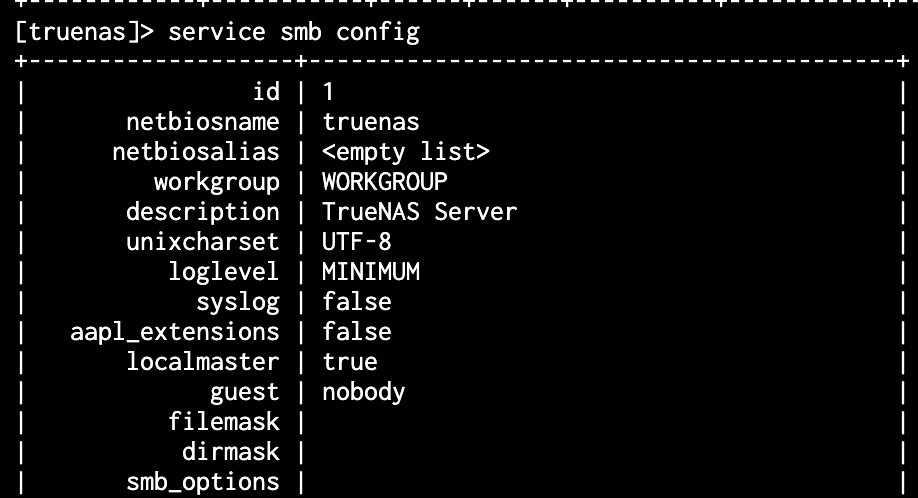
smb_options actually empty on fresh install of SCALE 24.04.2

so service smb update smb_options="" is the default

Did some dd / fio benchmark testing still.

  • High-speed machine
  • 4 disk RAID10 config
  • TrueNAS SCALE STABLE
  • Compression set to OFF in dataset used for testing.

dd results:

# WRITE TEST:
dd if=/dev/zero of=/mnt/nas_data1/benchmark_test_pool/tmp.dat bs=1024k count=195k
199680+0 records in
199680+0 records out
209379655680 bytes (209 GB, 195 GiB) copied, 451.746 s, 463 MB/s

# READ TEST:
 dd if=/mnt/nas_data1/benchmark_test_pool/tmp.dat of=/dev/null bs=1024k count=195k
199680+0 records in
199680+0 records out
209379655680 bytes (209 GB, 195 GiB) copied, 369.673 s, 566 MB/s

fio results (high results as usual, I guess due to caching, so I tend to trust the dd results more):

# WRITE TEST:
fio --name TESTSeqWrite --eta-newline=5s --filename=fio-tempfile-WSeq.dat --rw=write --size=500m --io_size=195g --blocksize=1024k --fsync=10000 --iodepth=32 --direct=1 --numjobs=1 --runtime=60 --group_reporting
WRITE: bw=1278MiB/s (1340MB/s), 1278MiB/s-1278MiB/s (1340MB/s-1340MB/s), io=87.9GiB (94.4GB), run=70450-70450msec

# READ TEST:
fio --name TESTSeqRead --eta-newline=5s --filename=fio-tempfile-RSeq1.dat --rw=read --size=500m --io_size=195g --blocksize=1024k --fsync=10000 --iodepth=32 --direct=1 --numjobs=1 --runtime=60 --group_reporting
READ: bw=7126MiB/s (7472MB/s), 7126MiB/s-7126MiB/s (7472MB/s-7472MB/s), io=195GiB (209GB), run=28021-28021msec

So, looks like, considering the dd test results:

  • We can’t get more than 463 MB/s write speed for this filesize from the RAID10 pool. I guess that’s kinda OK though (maybe expected a bit higher, but at least not too far off).
  • We can’t get more than 566 MB/s read speed for this filesize from the RAID10 pool for some reason. I had expected around 800 MB/s+. Not sure why.
  • Through SMB we get about Write: 309 MB/s and Read: 560 MB/s. So Read is the same. But Write speed through SMB with this TrueNAS SCALE STABLE is significantly less, even though dd benchmarks it at 463 MB/s. No idea why. As we did get close to the dd write speed value with SMB using TrueNAS CORE, I am even more inclined to say: something in SCALE is reducing SMB write speed. (and its not the OS)

Same tests, now for 4 disk STRIPE (as that should give us an indication of the highest read and write speeds that are possible with 4 disks).

  • High-speed machine
  • 4 disk STRIPE config
  • TrueNAS SCALE STABLE
  • Compression set to OFF in dataset used for testing.

dd results:

# WRITE TEST:
dd if=/dev/zero of=/mnt/nas_data1/benchmark_test_pool/tmp.dat bs=1024k count=195k
199680+0 records in
199680+0 records out
209379655680 bytes (209 GB, 195 GiB) copied, 197.769 s, 1.1 GB/s

# READ test:
dd if=/mnt/nas_data1/benchmark_test_pool/tmp.dat of=/dev/null bs=1024k count=195k
199680+0 records in
199680+0 records out
209379655680 bytes (209 GB, 195 GiB) copied, 186.518 s, 1.1 GB/s

fio results (just for archiving purposes, they are high as usual, prob. due to caching, so I trust the above dd test results more):

# WRITE TEST:
fio --name TESTSeqWrite --eta-newline=5s --filename=fio-tempfile-WSeq.dat --rw=write --size=500m --io_size=195g --blocksize=1024k --fsync=10000 --iodepth=32 --direct=1 --numjobs=1 --runtime=60 --group_reporting
WRITE: bw=4324MiB/s (4534MB/s), 4324MiB/s-4324MiB/s (4534MB/s-4534MB/s), io=195GiB (209GB), run=46182-46182msec

# READ TEST:
fio --name TESTSeqRead --eta-newline=5s --filename=fio-tempfile-RSeq1.dat --rw=read --size=500m --io_size=195g --blocksize=1024k --fsync=10000 --iodepth=32 --direct=1 --numjobs=1 --runtime=60 --group_reporting
READ: bw=19.8GiB/s (21.2GB/s), 19.8GiB/s-19.8GiB/s (21.2GB/s-21.2GB/s), io=195GiB (209GB), run=9857-9857msec

Again, considering dd results:

  • BOOM. 1.1 GB/s read AND write speeds to a 4 disk STRIPE. Out of the book what it should be. The highest write speed I have ever seen on TrueNAS Core and SCALE using SMB was ~440 MB/s. And also the read speeds never reached to that. So where is that bottleneck? In SMB/TrueNAS itself, or in the network/client machine?
    - That raises some serious questions IMO why a RAID10 config only reaches 566 MB/s read speed. It should be close to what we just proved is possible in 4 disk STRIPE (1.1 GB/s).
1 Like