Borked my Nextcloud permission

I was troubleshooting my dataset permissions for another applications and I am pretty sure I set my /Applications dataset that houses all application datasets to something and did it recursively…

I have been trying to follow the TrueNAS documentation like I had done before to get this application working. Except I cannot get the app to update after editing it. If I try to just start the application, the application crashes and won’t boot up .Error logs all mention permission errors…

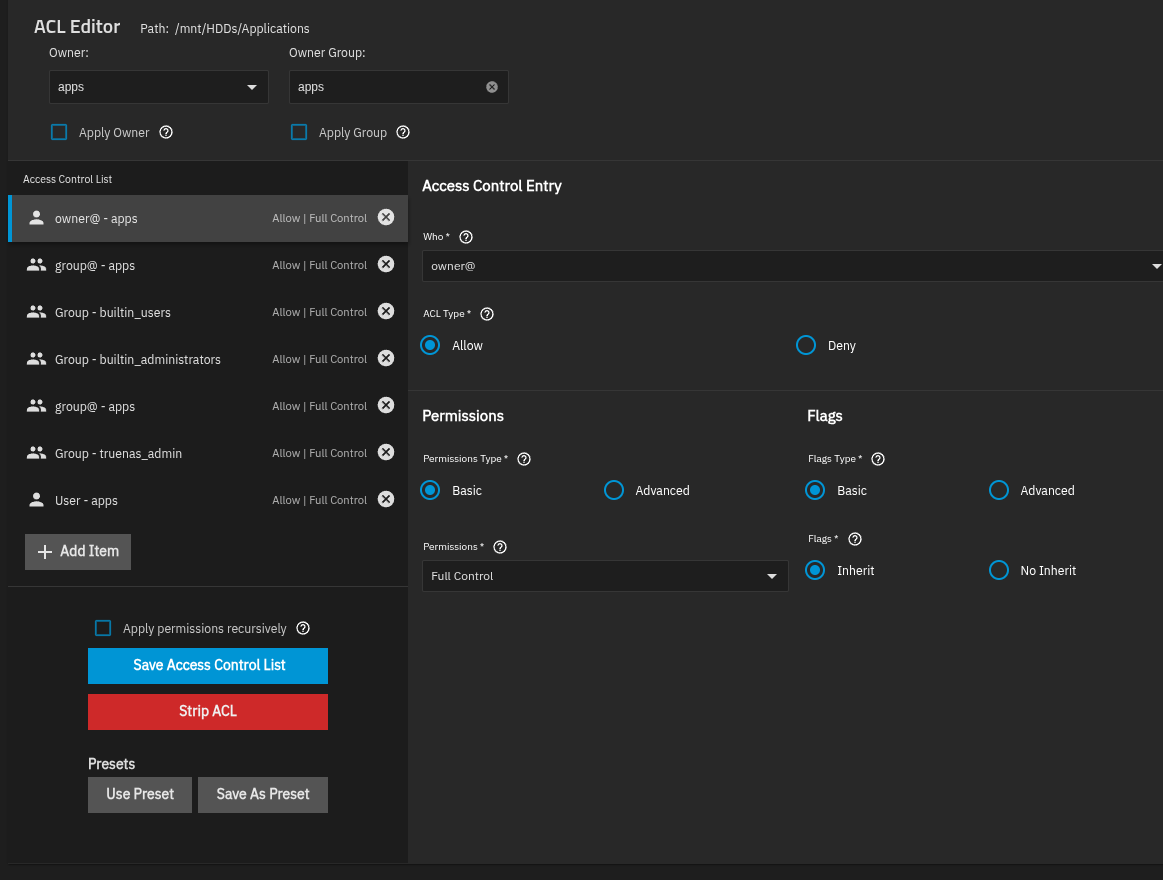
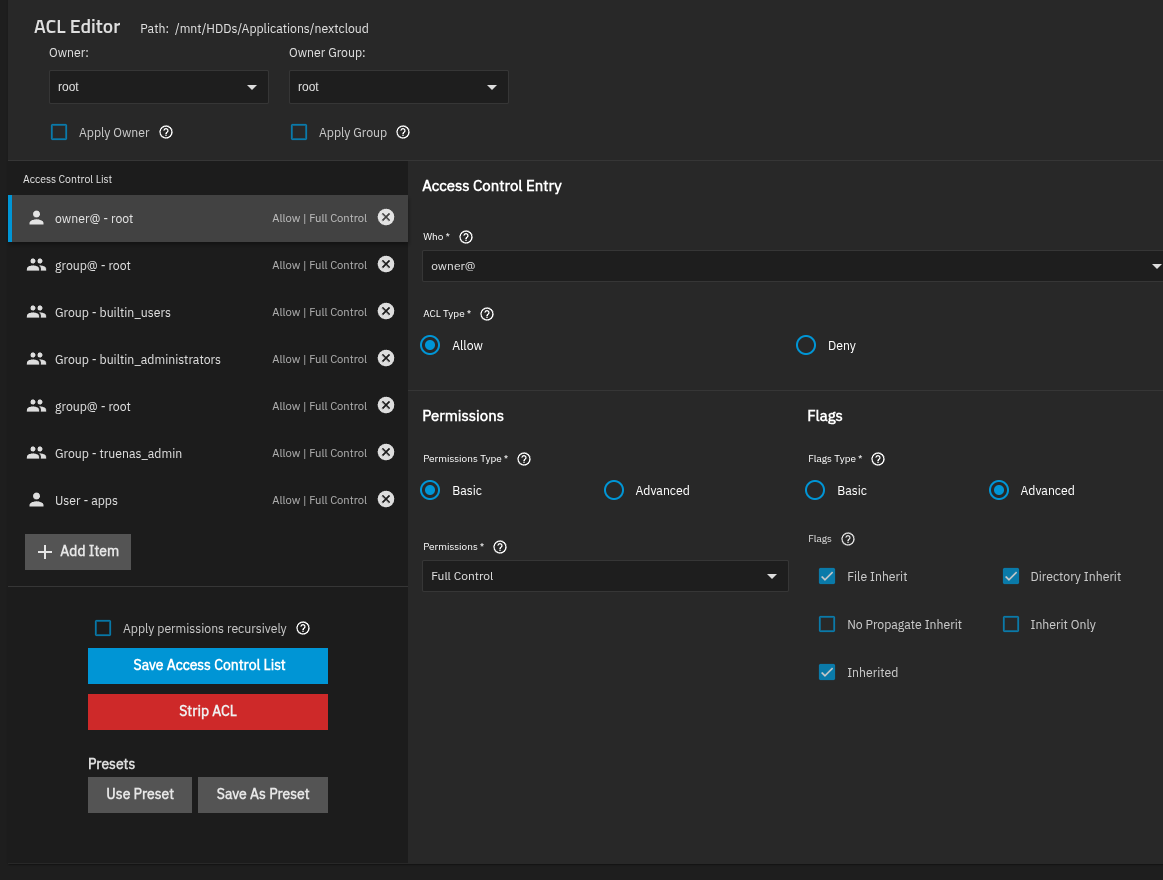
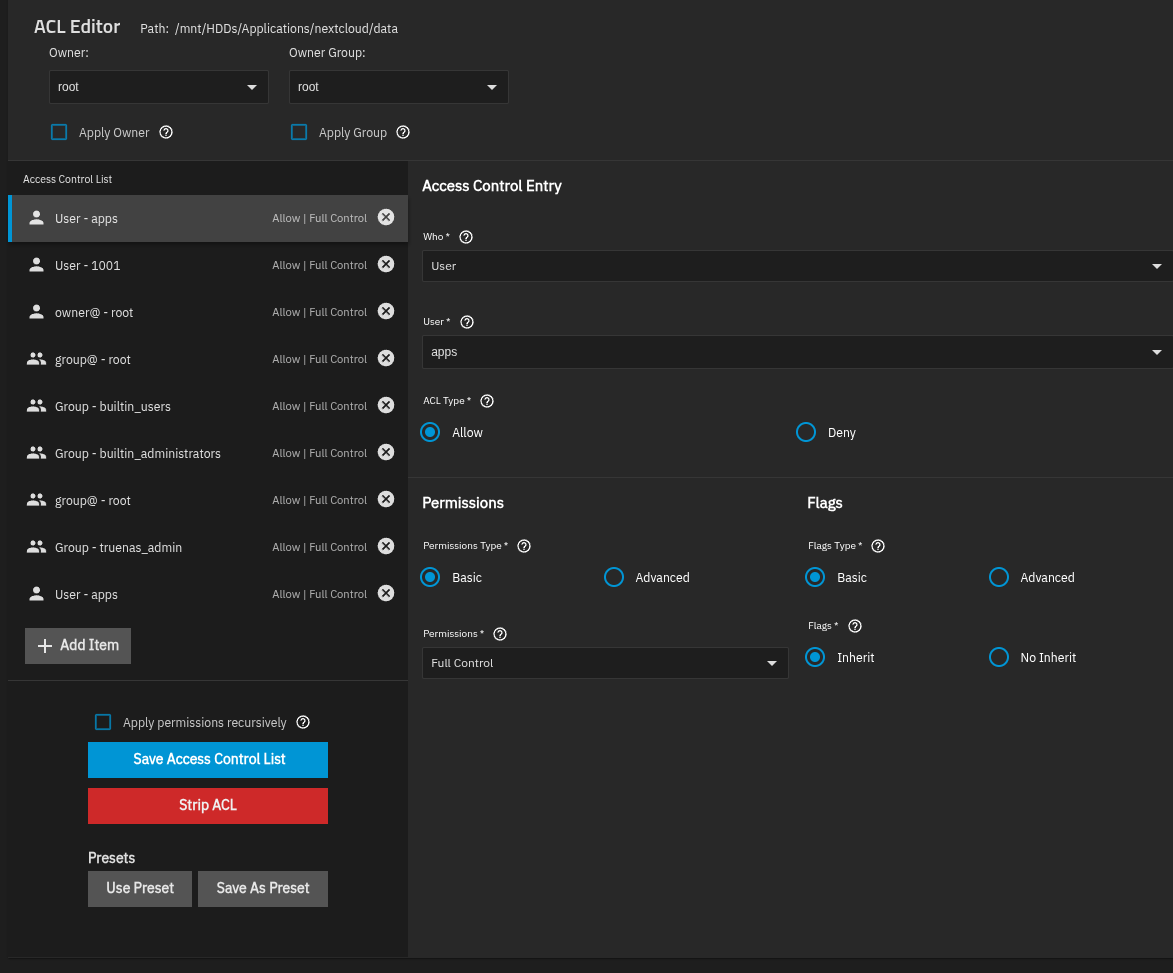
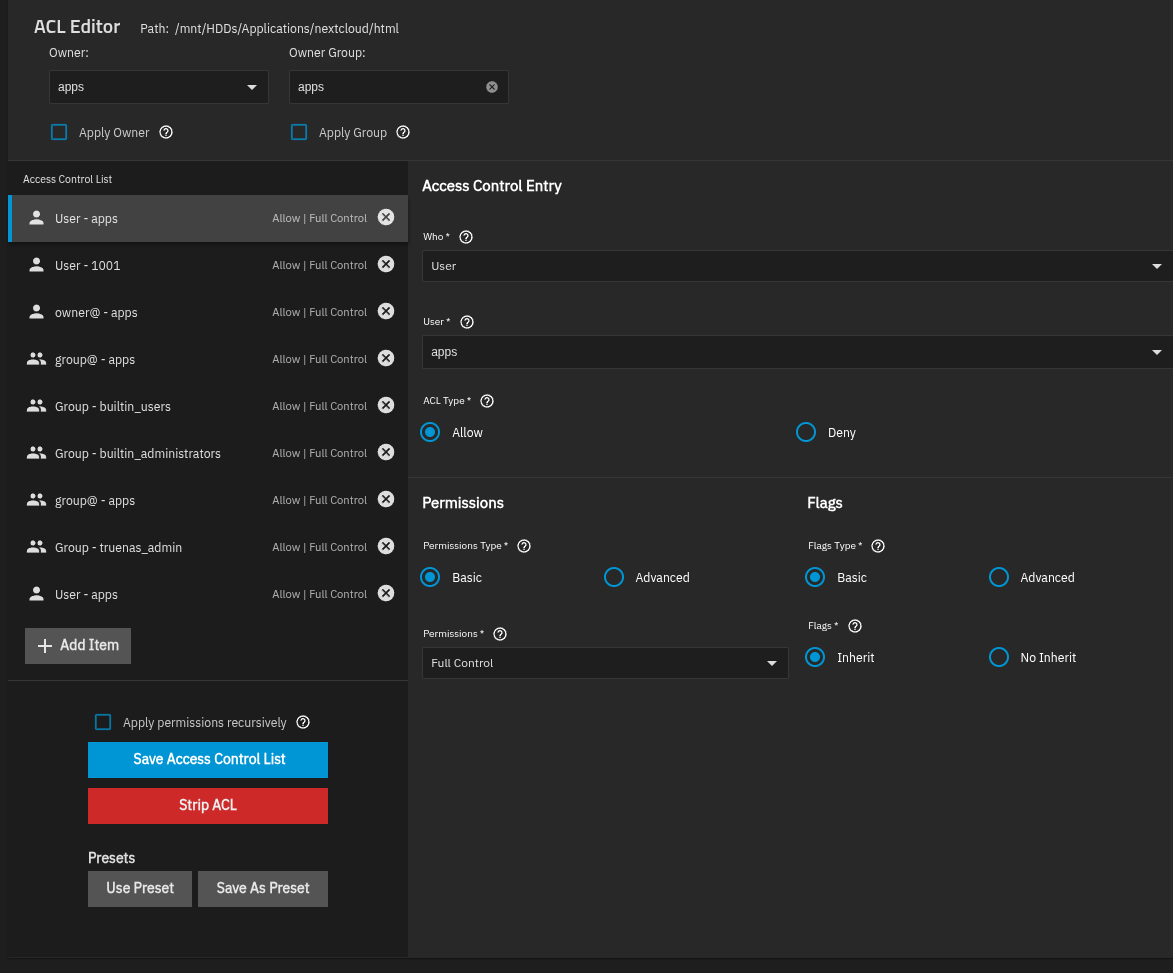
Please see below for the permissions for the application dataset tree.

/mnt/HDDs/Applications

/Applications/nextcloud

/Applications/nextcloud/data

/Applications/nextcloud/html

/Applications/nextcloud/postgres_data

In case this helps…here is the /var/log/app_lifecycle.log file that is referenced when the edit to the app fails.

[2026/02/10 11:31:36] (ERROR) app_lifecycle.compose_action():56 - Failed ‘up’ action for ‘nextcloud’ app: Network ix-nextcloud_default
Creating\n Network ix-nextcloud_default
Created\n Container ix-nextcloud-permissions-1
Creating\n Container ix-nextcloud-imaginary-1
Created\n Container ix-nextcloud-permissions-1
Created\n Container ix-nextcloud-redis-1
Creating\n Container ix-nextcloud-postgres_upgrade-1
Creating\n Container ix-nextcloud-redis-1
Created\n Container ix-nextcloud-postgres_upgrade-1
Created\n Container ix-nextcloud-postgres-1
Creating\n Container ix-nextcloud-postgres-1
Created\n Container ix-nextcloud-nextcloud-1
Creating\n Container ix-nextcloud-nextcloud-1
Created\n Container ix-nextcloud-nginx-1
Creating\n Container ix-nextcloud-cron-1
Creating\n Container ix-nextcloud-nginx-1
Created\n Container ix-nextcloud-cron-1
Created\n Container ix-nextcloud-permissions-1
Starting\n Container ix-nextcloud-imaginary-1
Starting\n Container ix-nextcloud-permissions-1
Started\n Container ix-nextcloud-permissions-1
Waiting\n Container ix-nextcloud-permissions-1
Waiting\n Container ix-nextcloud-imaginary-1
Started\n Container ix-nextcloud-permissions-1
Exited\n Container ix-nextcloud-postgres_upgrade-1
Starting\n Container ix-nextcloud-permissions-1
Exited\n Container ix-nextcloud-redis-1
Starting\n Container ix-nextcloud-postgres_upgrade-1
Started\n Container ix-nextcloud-postgres_upgrade-1
Waiting\n Container ix-nextcloud-permissions-1
Waiting\n Container ix-nextcloud-redis-1
Started\n Container ix-nextcloud-permissions-1
Exited\n Container ix-nextcloud-postgres_upgrade-1 service “postgres_upgrade” didn’t complete successfully: exit 1\nservice “postgres_upgrade” didn’t complete successfully: exit 1\n

In moments like this I bless the Lord that I decided to use docker directly and avoid the built-in Apps feature.

You may give Portainer a shot and install Nextcloud AIO.

As I’ve been getting more experience with TrueNAS Scale and Docker containers, that might be the better way to go. Just annoying haha.

1 Like

Postgres need different user/group then apps, you have to change into netdata

1 Like

So I made data2, html2, & postgres2 datasets, and copied all files from data/html/postgres into their respective datasets. Then I fully deleted Nextcloud and reinstalled. It reinstalled and started fine, but after copying all the files back into the datasets, it’s borked again.

If this dataset has still apps as user/group nothing will change :smile:

The re-created postgres dataset has the netdata as the owner and docker as the group.

Edit: just changed the group to netdata as well, and still doesn’t seem to want to work.

another thing to check: netdata user and group both need traverse permission of your nextcloud dataset.
If neither this is enough, give another look into logs to see if a different error is raised (and not a permission error anymore)

I am not sure where to look for the traverse permission. netdata is owner/group and “User”/”Group” have read/write/execute permissions. “Other” has no permissions.

Here’s the latest log entry in /var/log/app_lifecycle.log

[2026/02/13 06:32:16] (ERROR) app_lifecycle.compose_action():56 - Failed ‘up’ action for ‘nextcloud’ app: Network ix-nextcloud_default
Creating\n Network ix-nextcloud_default
Created\n Container ix-nextcloud-permissions-1
Creating\n Container ix-nextcloud-imaginary-1
Created\n Container ix-nextcloud-permissions-1
Created\n Container ix-nextcloud-redis-1
Creating\n Container ix-nextcloud-postgres_upgrade-1
Creating\n Container ix-nextcloud-redis-1
Created\n Container ix-nextcloud-postgres_upgrade-1
Created\n Container ix-nextcloud-postgres-1
Creating\n Container ix-nextcloud-postgres-1
Created\n Container ix-nextcloud-nextcloud-1
Creating\n Container ix-nextcloud-nextcloud-1
Created\n Container ix-nextcloud-cron-1
Creating\n Container ix-nextcloud-cron-1
Created\n Container ix-nextcloud-imaginary-1
Starting\n Container ix-nextcloud-permissions-1
Started\n Container ix-nextcloud-permissions-1
Waiting\n Container ix-nextcloud-permissions-1
Waiting\n Container ix-nextcloud-imaginary-1
Started\n Container ix-nextcloud-permissions-1
Exited\n Container ix-nextcloud-postgres_upgrade-1
Starting\n Container ix-nextcloud-permissions-1
Exited\n Container ix-nextcloud-redis-1
Starting\n Container ix-nextcloud-postgres_upgrade-1
Started\n Container ix-nextcloud-postgres_upgrade-1
Waiting\n Container ix-nextcloud-permissions-1
Waiting\n Container ix-nextcloud-redis-1
Started\n Container ix-nextcloud-permissions-1
Exited\n Container ix-nextcloud-postgres_upgrade-1
Exited\n Container ix-nextcloud-postgres-1
Starting\n Container ix-nextcloud-postgres-1
Started\n Container ix-nextcloud-postgres-1
Waiting\n Container ix-nextcloud-redis-1
Waiting\n Container ix-nextcloud-permissions-1
Exited\n Container ix-nextcloud-redis-1
Healthy\n Container ix-nextcloud-postgres-1
Healthy\n Container ix-nextcloud-nextcloud-1
Starting\n Container ix-nextcloud-nextcloud-1
Started\n Container ix-nextcloud-nextcloud-1
Waiting\n Container ix-nextcloud-nextcloud-1
Error\ndependency failed to start: container ix-nextcloud-nextcloud-1 is unhealthy\n

Searching through the interwebz and found a github post mentioning checking the permissions inside the data set. See below:

truenas_admin@HexOS[/mnt/HDDs/Applications/nextcloud]$ ls -la data
total 3656
drwxrwx— 8 www-data www-data 12 Feb 13 09:09 .
drwxrwx— 8 apps apps 8 Feb 12 13:27 ..
-rwxrwx— 1 www-data www-data 542 Feb 12 13:28 .htaccess
-rwxrwx— 1 www-data www-data 52 Feb 12 13:28 .ncdata
drwxrwx— 3 root www-data 3 Feb 12 13:30 __groupfolders
drwxrwx— 4 www-data www-data 4 Feb 12 13:40 admin
drwxrwx— 5 www-data www-data 5 Feb 12 13:30 appdata_ock0dt8yw52m
drwxrwx— 12 root www-data 12 Feb 12 13:41 appdata_octsy9qsrbxr
drwxrwx— 3 root www-data 3 Feb 12 13:41 userfolder1
-rwxrwx— 1 www-data www-data 0 Feb 12 13:41 index.html
drwxrwx— 5 root www-data 5 Feb 12 13:41 userfolder2
-rwxrwx— 1 www-data www-data 9384176 Feb 12 13:41 nextcloud.log
truenas_admin@HexOS[/mnt/HDDs/Applications/nextcloud]$ ls -la html
total 763
drwxrwx— 15 www-data www-data 35 Feb 12 13:27 .
drwxrwx— 8 apps apps 8 Feb 12 13:27 ..
-rwxrwx— 1 www-data www-data 5605 Feb 12 13:28 .htaccess
-rwxrwx— 1 www-data www-data 306 Feb 12 13:27 .user.ini
drwxrwx— 42 www-data www-data 47 Feb 12 13:27 3rdparty
-rwxrwx— 1 www-data www-data 26395 Feb 12 13:41 AUTHORS
-rwxrwx— 1 www-data www-data 34520 Feb 12 13:41 COPYING
drwxrwx— 2 www-data www-data 32 Feb 12 13:27 LICENSES
-rwxrwx— 1 www-data www-data 36503 Feb 12 13:41 REUSE.toml
drwxrwx— 55 www-data www-data 55 Feb 12 13:27 apps
-rwxrwx— 1 www-data www-data 2470 Feb 12 13:41 composer.json
-rwxrwx— 1 www-data www-data 3409 Feb 12 13:41 composer.lock
drwxrwx— 2 www-data www-data 15 Feb 12 13:28 config
-rwxrwx— 1 www-data www-data 3814 Feb 12 13:41 console.php
drwxrwx— 25 www-data www-data 40 Feb 12 13:27 core
-rwxrwx— 1 www-data www-data 8233 Feb 12 13:41 cron.php
drwxrwx— 5 www-data www-data 5 Feb 12 13:41 custom_apps
drwxrwx— 2 root root 2 Feb 12 13:27 data
drwxrwx— 2 www-data www-data 494 Feb 12 13:42 dist
-rwxrwx— 1 www-data www-data 331 Feb 12 13:42 index.html
-rwxrwx— 1 www-data www-data 3695 Feb 12 13:42 index.php
drwxrwx— 7 www-data www-data 9 Feb 12 13:27 lib
-rwxrwx— 1 root root 0 Feb 13 09:05 nextcloud-init-sync.lock
-rwxrwx— 1 www-data www-data 596 Feb 12 13:42 occ
drwxrwx— 2 www-data www-data 4 Feb 12 13:27 ocs
drwxrwx— 2 www-data www-data 3 Feb 12 13:27 ocs-provider
-rwxrwx— 1 www-data www-data 1026897 Feb 12 13:42 package-lock.json
-rwxrwx— 1 www-data www-data 7123 Feb 12 13:42 package.json
-rwxrwx— 1 www-data www-data 3059 Feb 12 13:42 public.php
-rwxrwx— 1 www-data www-data 4760 Feb 12 13:42 remote.php
drwxrwx— 4 www-data www-data 9 Feb 12 13:27 resources
-rwxrwx— 1 www-data www-data 26 Feb 12 13:42 robots.txt
-rwxrwx— 1 www-data www-data 1490 Feb 12 13:42 status.php
drwxrwx— 3 www-data www-data 4 Feb 12 13:27 themes
-rwxrwx— 1 www-data www-data 446 Feb 12 13:42 version.php

The solution from the github post was to chown the data & html datasets to force www-data to the be owners. TrueNAS GUI was showing that it was the owner, but it wasn’t showing it across all files.

Anways, I followed those steps and that didn’t work haha.

well those ACL were not good for sure.
Do you have set permission using the GUI or with command?
When i deploied Nextcloud on Scale i have also struggle with permissions, at the end for me was literally the execute permission on top datasets that prevent other user to reach the path.
I would suggest you to try strip all ACL via GUI and repeat the process:

  • stop everything

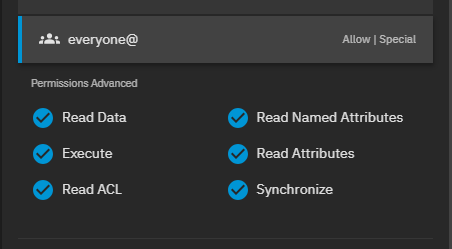
  • on top datasets Application grant special permission, i have put

  • on top datasets and Nextcloud grant special permission to other

root@truenas[/mnt/SSDPool/Docker/NextCloud]# ls -la
total 26
drwxrwx--x  4 root     root       4 Nov  1  2024 .
drwxr-xr-x 39 root     root      39 Jan 26 07:54 ..
drwxrwxr-x 16 www-data www-data  35 May 31  2025 data
drwxrwxr-x  6 netdata  netdata  111 Dec  3 10:00 db

  • www-data is correct for html and data, set owner-group → grant everyone the special execute permission → apply recursively
  • netdata is correct for postgres dataset, same here, set owner-group → grant everyone the special execute permission → apply recursively

is probably a mess :smile: but is working!

Welp, now postgres_data is the unhealthy container haha. Verified the netdata/docker permissions with the ls -la command.

Edit: Tinkered around more…back to nextcloud-nexcloud-1 container being unhealthy…