My woes transitioning from Core to Scale continue. I am now finding myself not being able to access SMB shares from a VM setup on TrueNAS. On Core this just works. On Scale I read some complicated scheme of creating a bridge. Before I go down this route, I would appreciate some advice.
TrueNAS is running on an older Supermicro server with two physical network connections. In the past I have bonded these together. I understand that I can undo this bond and assign one of the NICs to VMs. But this routes all traffic out of the machine, through the switch and back. So I am wondering if there is a more direct way. For example can I create a bridge and use it with the bonded connection I already have?
I am quickly getting out of my league here. Core was really easy to work. But now I made the one way step to Scale and need to figure out how to make this work.
Yes, a bridge is necessary for VMs to access SMB shares. Just add your existing bond interface as a bridge member. Then in the VM NIC device, attach the NIC to the bridge interface.
To add, you’d also move your IPs over from the interface(s) to the bridge
Thank you for the responses. What do you mean with moving the IPs from the interfaces to the bridge. Currently I have Failover bond0 with address 192.168.1.50/24. I thought for the bridge I need a different IP range such 10.0.50.0/24. Clarification appreciated.
No IPs set on members of a bridge, only bridge gets the IPs. So if 10.0.0.2 is interface A & bridge B is created with A as member, remove IP from A & set it on bridge B.
How do I combine this with bonding? Interfaces A and B are bonded together. So neither the Interfaces nor the Bond gets an IP, just the Bridge that is assigned to the Bond?
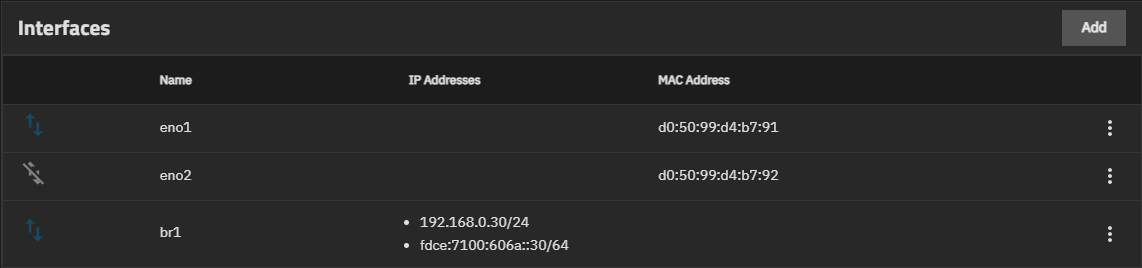
Always good to look at a working example. Here’s my system:
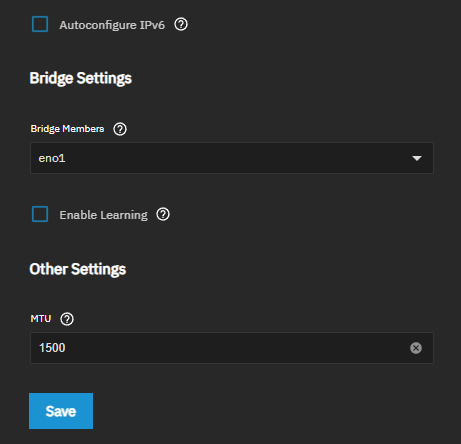
Then, in the VM NIC device:
Yeah, honestly I’m 75% sure you’d just assign the bond as a member of the bridge & then bridge gets the IP
It may be easier to set all this up from the console menu, instead of via the web UI. No risk of disconnecting yourself while you’re making the changes.
Yes I am working from the console but having trouble. Need to work through feedback so far before asking more questions.
ok, trouble is that I am unable to define a bond from the console. for each interface, I set dhcp for ipv4 and ipv6 to No and leave alias list empty. Then I create a new network interface, type link aggregation, call it bond1, set lag protocol to failover, lag_ports show “no items available”, and there is no save button. So I cannot even recreate what I had before.
alright figured this out. my problem was that I manipulated the hardware interfaces prior to bonding and that does not work. They need to be reset and then the bond needs to be set up without IP address. After that the bridge can be set up with the original IP address just as you described. So far so good, fingers crossed that all is good now.
This Core to Scale migration has been a good two days of work so far.