
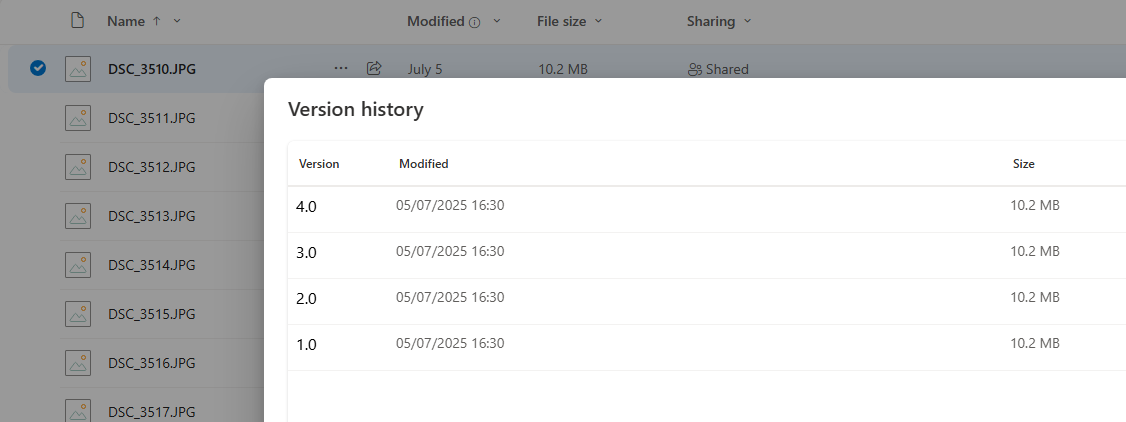
Hi. I’ve been arguing with Microsoft for the last month or so over why I can’t upload to my onedrive despite me having only used just over half of my 1TB allowance. For ages they had me creating logs until finally they worked out that all my files had 100 versions of them stored. They said it doesn’t show against my allowance, but I’d hit some kind of upper limit. One of my folders was taking 24Tb. As I store everything on my NAS and sync copy to Onedrive, I decided to delete the whole folder that was taking 24TB (it should only take 325Gb). It uploaded overnight and Onedrive reported it only using 325Gb of space. I thought my issue was resolved, however, the next day when the sync re-ran (nothing to update as no files had changed), but this time the files on onedrive had 2 versions. A few days later and I now have 4 versions of all the files. Soon Onedrive will stop working again. Anyone know how this can be resolved ?
Are you 'sync’ing or 'copy’ing?
I am Push Syncing. If I remove a file from my NAS I want it to be removed from Onedrive as well.
Sorry just realised I put copying in original message, that was wrong.
OK I’ve done some testing using rclone direct and it’s because of the time difference between onedrive and my local timezone. If I run rclone direct it also creates versions, I did think it was strange how onedrive insisted I’d edited the file recently. Anyway, if I run with --time-window 1s I then dont get a new version each time.
So question is, can we modify the default rclone config that Truenas uses so all my syncs use the 1s window ?
OK I finally solved this issue, have to say though I am quite disappointed with the response from these forums. I had to search the depths of old forums to find my solution and I hope that if someone else has a similar issue that this post helps them.
Seems you can store extra arguments that are passed to rclone when the task runs. These do seem to persist when the task is modified, but I will have to check if they still persist if the truenas version is updated.
Anyway. running this from the shell will store the “–modify-window 1s” against the task.
midclt call cloudsync.update 1 '{ "args": "--modify-window 1s" }'
Where the 1 is the task number. You can get a list of tasks with
midclt call cloudsync.query
You can store multiple arguments with something like
midclt call cloudsync.update 1 '{ "args": "--modify-window 1s --verbose" }'