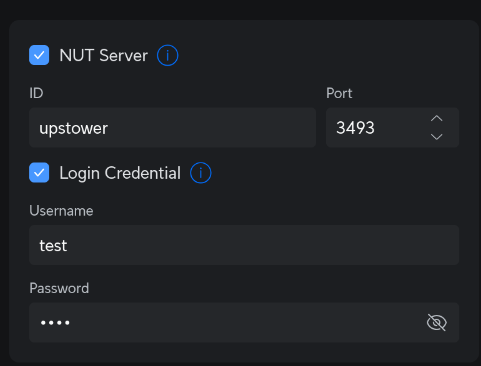
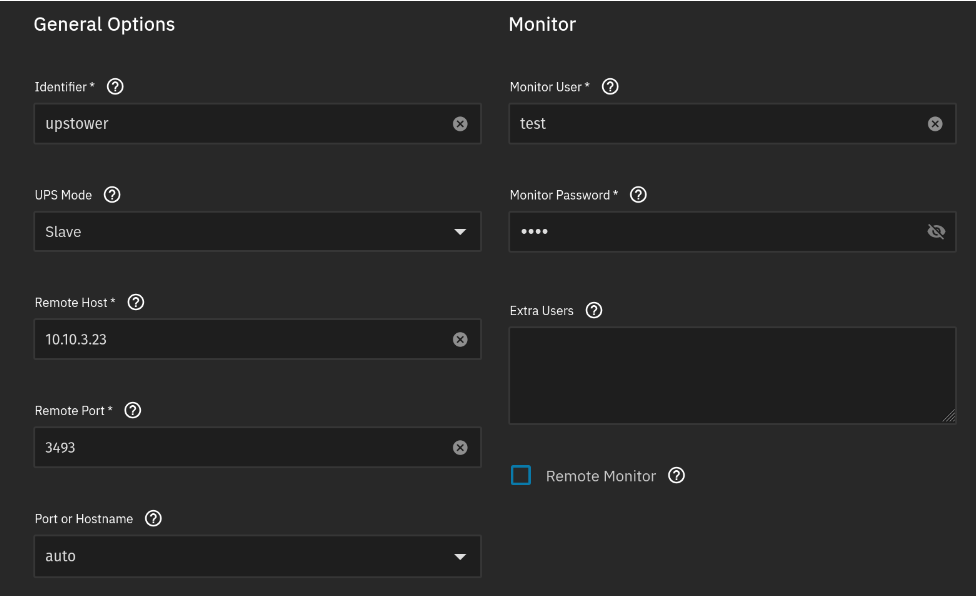
I just got the new Unifi UPS tower and I’m trying to configure my TrueNAS Scale 25.04 NAS to use it. Previously I’ve had a UPS connected to the NAS over USB but with the Unifi UPS I will have to connect over the network.
Just got this working last night - be sure to update to Unifi Network version 10.0.160, which should allow you to configure the UPS’ IP settings. I did the exact same things that you did, just that I used a static IP for my UPS. As long as you set the remote host under the UPS service in TrueNAS to the UPS static IP, this should work.
Once that’s set, TrueNAS should automatically try to connect to your Unifi NUT server and return an error in your alerts within ten seconds of saving (if it didn’t work). If it’s working, you should see the a blue lightning symbol next to your TrueNAS line item in Client Devices and under Status, with a tooltip that says “Power Protected by UPS.”