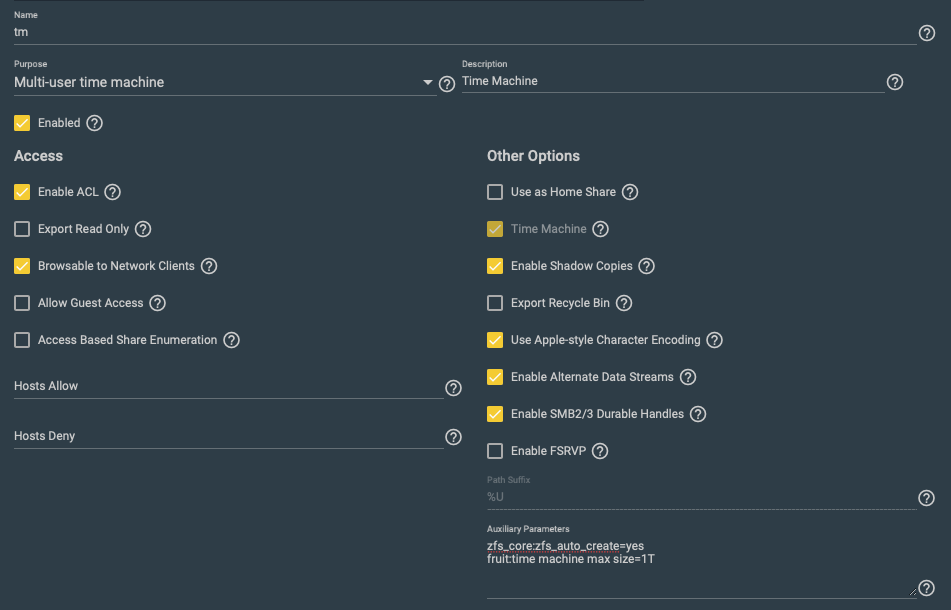
I have two internal CORE systems that serve as time machine targets for all my colleagues. They have been in use for a couple of years without any incident and it seems that just about now the first users hit their assigned storage space limit.
The system itself is connected to our Active Directory for authentication. As you can see from the auxiliary parameters I used the fruit:time machine max size parameter combined with auto creation to set the space limit.
Each user automatically gets their own dataset. Snapshots after time machine completion etc. work well.
But when the 1 TB limit is reached, time machine on the Mac in question does not delete old backups but instead just complains about a lack of space and refuses to perform another run.
So what can I do about this? Setting ZFS quota won’t be available when the datasets are created automatically, right? That’s why I picked that auxliiary parameter.
Any fix greatly appreciated. An upgrade to CE would be possible provided that multi user time machine with AD authentication works in CE. Does it?
I guess I’ll try to create a cron job that simply sets a ZFS quota for all datasets below <pool>/share/tm - that’s trivial. And a new colleague will not fill their 1 TB on the first day before the cron job runs.
IIRC in core I have some logic to auto-set a ZFS quota, but that would run into same problems as builtin option. If MacOS isn’t properly handling low-space on disk then adding a ZFS quota won’t work.
I hope a hard ZFS limit will be more robust than the Samba option? The former was how I ran TM at home when I still did that. That was only a single dataset so that part was easy. Never had a problem.
For one colleague backups somehow caught up and the error message has not reappeared, since. Macs. Weird.
Old thread, but I’m also having issues with Sequoia (15.7.9) clients not being able to prune the backups after hitting the quota. The quota was only set on the client side and there is no quota set on the TrueNAS 25.10.6 server.
I’m still not quite sure what is the correct procedure to set quotas for Time Machine. Do I need to set the quotas just on the client side or do I need to set it in the dataset for TrueNAS as well?
I’m using a multi-user time machine setting with a parent TM dataset shared via SMB and child datasets being created every time a new user points their client machine to TrueNAS to use as target. All default settings.
Yeah, I wrote that feature quite a few years ago (maybe 2019). It’s a bit of a cat-and-mouse game. I’m relying on analyzing MacOS client behavior to generate a signal that it’s done with the backup and we should snapshot. Generally the clients handle quotas better if you set them client-side rather than trying to enforce server-side. Pure server-side relies on vagaries of MacOS SMB client behavior in low-space situations vis-a-vis time machine backups.
Thank you for clarifying it. Do I need to set the quota on the server as well? If that’s case, do I need to set it on the SMB share, or the ZFS dataset?
I personally prefer to handle this entirely client-side, but there are different preferences on how to admin a server. If pushed, I’d say start with client-only controls and proceed to server-side ones if you notice they are failing to handle space usage properly. Pushing up to / hitting dataset quota limits can be painful. Once you start mixing server and client-side controls at the same time, behavior can be harder to predict so there’s a price to pay for a “belt and suspenders approach”.
How can you trust a man who wears both a belt and suspenders? The man can’t even trust his own pants.