Hi everyone,
I am building a new TrueNAS Scale home server using a used Dell PowerEdge T150. My goal is a “simple, boring, and reliable” storage appliance. I plan to use a “Split Architecture” where this T150 handles pure storage (ZFS), and apps run on a separate compute node later.
Current Hardware:
* Server: Dell PowerEdge T150 (Tower)
* CPU: Intel Xeon E-2314
* RAM: 96GB ECC
* HBA: PERC H355 (Confirmed in HBA/Non-RAID mode via iDRAC)
* Data Drives: 4x 12TB HDDs (connected to the H355)
* Network: Intel X520 10GbE (SFP+) + Onboard 1GbE
* Boot Drive: None yet (Current dilemma)
The Problem:
This server does not have the Dell BOSS-S1 card. I want to install TrueNAS Scale (likely 25.04 or current stable) on a dedicated SSD, avoiding the 3.5" data bays. I think that I am comfortable with a single boot drive (and automated config backups) if mirroring is too difficult to cable, though mirroring would be nice.
I have opened the case and inspected my options. I see three paths and need advice on which is the most reliable/feasible:
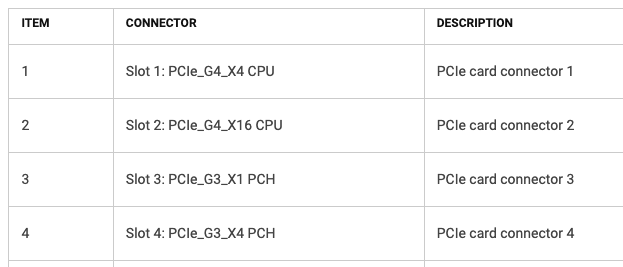
Option 1: PCIe NVMe Adapter (Slot 1)
* Slot 1 is a PCIe Gen4 x4 slot. It is electrically perfect for a generic NVMe adapter.
* Concern: This slot is located immediately below the PERC H355 (Slot 2). The clearance is very tight. I am worried about “sandwiching” the hot HBA card with an NVMe adapter.
* Question: Has anyone populated Slot 1 in a T150 while Slot 2 is occupied? Is airflow sufficient?
Option 2: SATA SSD (Optical Drive Bay)
* There is a `SATA_ODD` port on the motherboard for data.
* Power Issue: There are no standard SATA power connectors coming from the PSU. There is a blue shrouded header on the motherboard near the ODD port. I suspect I need the specific Dell ODD Power Cable.
* Mystery Cable: The breakout cable coming from the H355 HBA has strands going to the 4 HDDs, but there is one loose connector left over. It is a small two-wire connector.
Is this for an LED/Sideband (SGPIO), or could this possibly be usable? (I assume SGPIO and not for a drive).
Option 3: Internal USB 3.0
* I found a vertical USB Type-A port directly on the motherboard.
* Plan: Use a high-quality 2.5" SATA SSD with a USB-to-SATA adapter plugged into this internal port, velcroed inside the case.
* Question: Is this internal port USB 3.0? Is booting Scale via a USB-to-SATA adapter considered stable enough for a “boring/reliable” build these days?
Summary of Questions:
- Which boot method is preferred given the tight PCIe spacing and lack of standard SATA power?
- Can anyone identify the “two-wire” connector on the H355 cable bundle?
- Is the internal USB port on the T150 confirmed as USB 3.0?
I have photos but do not understand how I can attach them or point to a url here.
Thanks for the help!