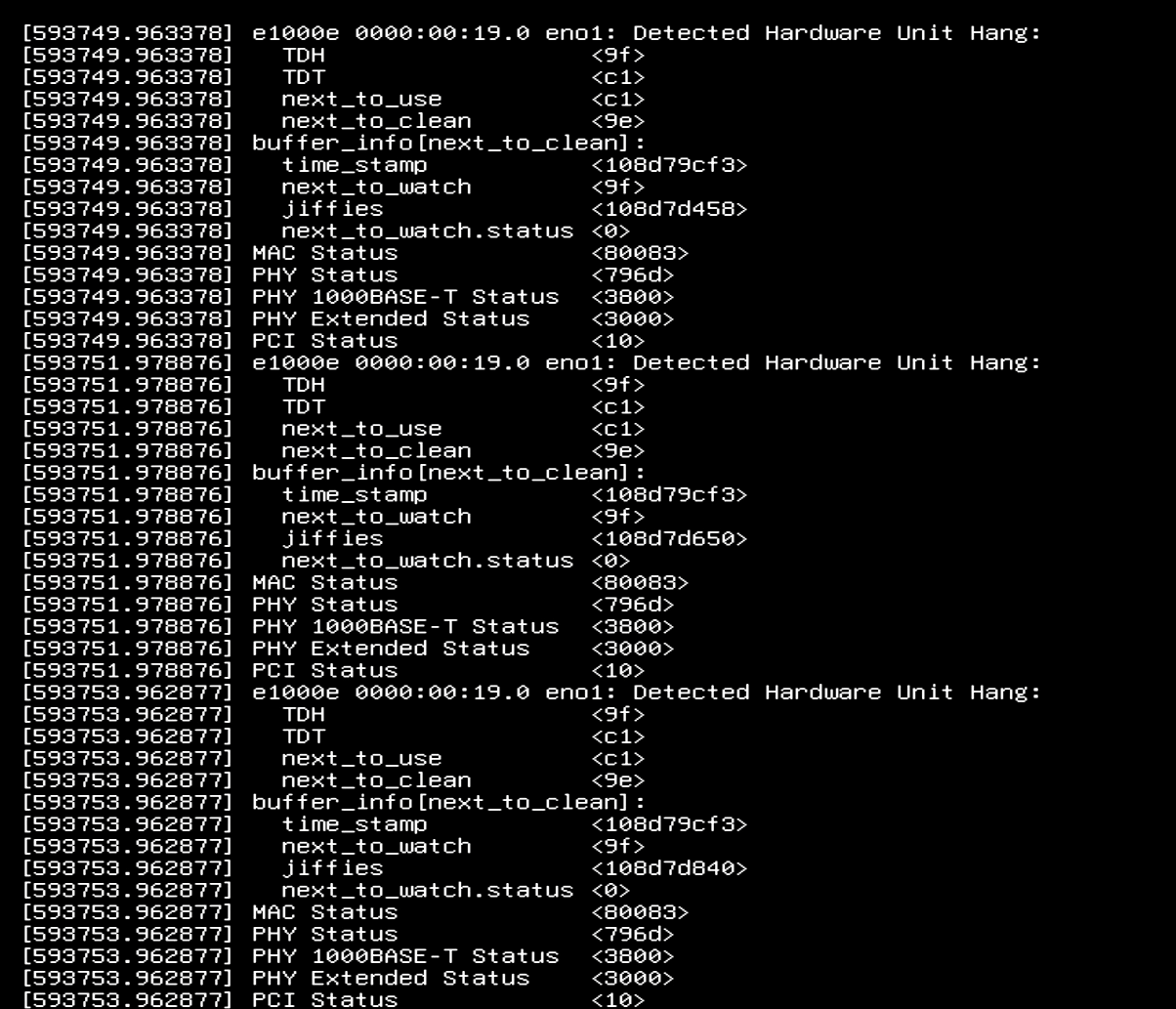
Ever since updating to Fangtooth and setting up my ethernet bridge I’ve had this weird error that happens a couple times a week that leaves my server in an unusable state.
I keep having this error happen.
“eno1: Detected Hardware Unit Hang”
Bare metal, and it’s running on a GA-X99-UD4.
I didn’t have this issue before Fangtooth and I’ve been forgetting to post about it as it usually happens when I’m out of the house and have to remotely restart using my KVM.
I’m sorry to say, but if you had a hardware failure causing system crash, then options now are to try & experiment and see if replacing parts.
If it is your ethernet adapter and it isn’t built-it, then I’d slap a different one into a PCIe slot and test. If it is built-in to the motherboard, I’d try to disable it in BIOS and slap a different card into a PCIE slot.
I’m not sure what else to recommend other than maybe rolling back to a previous version if it was stable.
something else to keep in mind is that motherboard Ethernet on non-server boards is notorious for improperly being cooled (ie, not at all).
yes, even modern gigabit chipsets w/ all their cost reduction can overheat with sustained workloads. though it only got worse in the 2.5Gbe generation where even moderate workloads would overheat and crash NICs.
I wanted to post saying I was having the same issues. Thanks to OP for starting this thread as it helped me understand the issue is likely related to this specific (or family) Intel NICs and how they are implemented in Fangtooth.
I have a small NAS that has been using TrueNAS scale for over a year now. It had been operating without issues for that entire duration. After upgrade to Fangtooth I setup a VM for an Ubuntu host for Minecraft for my kids. I also had a pre-existing Plex App setup that was working fine. We started to notice that we would lose network connectivity to the TrueNAS host. Initially I thought it was a bad network wire as unplugging and replugging in the network cable would resolve the issue. The issue remained after swapping network cables and even trying different ports on the switch as well as a different switch. I finally broke down and connected a monitor and keyboard to the host (which was running headless) and saw a stream of errors identical to those from the OP. What was interesting is that while the errors were showing up every few seconds, the moment I unplugged the network cable, the error stopped and when I plugged it back in, the system was available! This is some type of hang state that resolves itself when the connection is interrupted.
My host is using an Asus Z690M-ITX/ax which has two integrated network adaptors. The first is a Realtek 2.5G and the second is an Intel 1G. I was using the Intel 1G for two reasons. First my own bias towards the strength/maturity of support for Intel adapters and secondly that my network is currently 1G only. The Intel adapter on that motherboard is the I219V and TrueNAS is using the e1000e driver (same as OP and others on this thread).
I switched TrueNAS over to the Realtek 2.5G adapter and the problem has gone away. It has been over two days without issue so far and this issue would happen within 24 hrs on the Intel adapter.
I don’t think this is something like a cooling issue (as the same setup worked fine for months and prior to Fangtooth upgrade). Especially as I can get it out of the hang state by just unplugging the cable from the adapter. I believe this is something in Fangtooth (likely the underlying Intel NIC driver?) that is causing this.
I hope this helps anyone else in the same situation.
Oh, one extra bit of information I forgot to mention. I don’t think it is crashing TrueNAS, but just stopping network traffic in/out. When I would disconnect/reconnect the network cable and it would recover, if you looked at the TrueNAS dashboard, it would show it was still up and had not restarted. I also have backup jobs to push data to Backblaze and it would log errors of not being able to do that while the network was unavailable to TrueNAS.
Same issue. The exact hardware that worked reliably for years prior to 25.04.2 crashes every day now. I reverted to 24.10.2.2 and it works fine again.
If I have to spend $30 on a new card, I can do it, but that’s really annoying.
Interestingly, I’d been running on 25.04.0 to 25.04.1 since mid April without issue. On August 1st I upgraded to 25.04.2 and started experiencing the intermittent hanging 2 days later.
My hardware is now ancient, but for 11 years (from FreeNAS to now) I’d never had a hardware issue. Its a testament to the ixsystems crew.
ASUS H87I-PLUS LGA 1150 Intel H87 Mini ITX with an onboard Intel I217 controller.
In any event, its time to upgrade. But, before doing so it would be great to understand if there is a quick patch on the horizon. In which case I’ll revert back to whatever version makes me stable and wait for a wholesale upgrade of the hardware until this fall (as I would rather save up a few more duckets )
Also just registered to report this issue. eno1: Detected Hardware Unit Hang randomly after ~2 days uptime with Home Assistant running in VM. Changed nothing and waiting to see if it happens again.

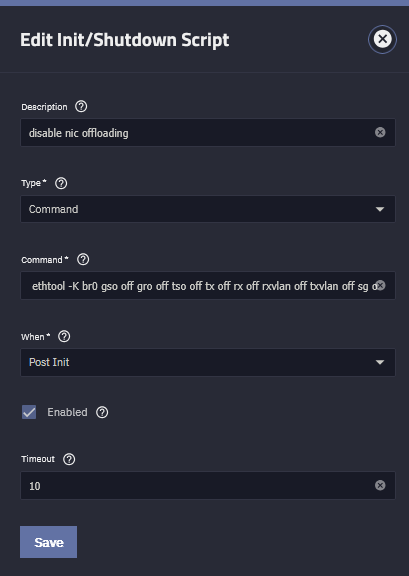
 )
)