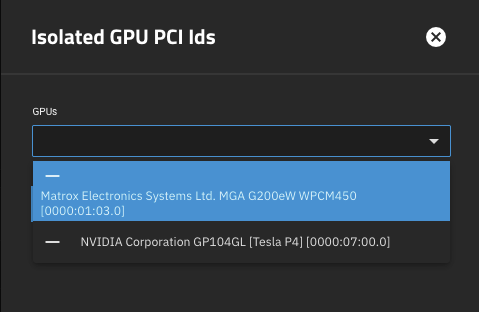
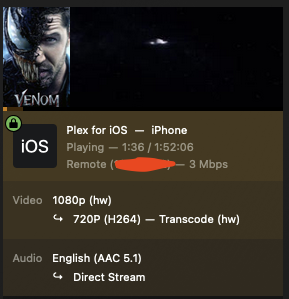
Okay, need some help here from the community. I researched and found that Electric Eel supports jailmaker and jails would move over however it seems that my Plex jail is complaining that the nVidia drivers are no longer included by default as expected according to the release notes. Has anyone gotten around this? I’ve tried going into the new apps configuration and checking the box for the Nvidia drivers. It says it’s installed and there despite getting an error about them not being compiled correctly. Has anyone gotten jailmaker jails to work with nVidia pass through again after upgrading to Electric Eel?
Install error:
Traceback (most recent call last):
File “/usr/lib/python3/dist-packages/middlewared/job.py”, line 488, in run
await self.future
File “/usr/lib/python3/dist-packages/middlewared/job.py”, line 535, in __run_body
rv = await self.middleware.run_in_thread(self.method, *args)
^^^^^^^^^^^^^^^^^^^^^^^^^^^^^^^^^^^^^^^^^^^^^^^^^^^^^^^
File “/usr/lib/python3/dist-packages/middlewared/main.py”, line 1364, in run_in_thread
return await self.run_in_executor(io_thread_pool_executor, method, *args, **kwargs)
^^^^^^^^^^^^^^^^^^^^^^^^^^^^^^^^^^^^^^^^^^^^^^^^^^^^^^^^^^^^^^^^^^^^^^^^^^^^
File “/usr/lib/python3/dist-packages/middlewared/main.py”, line 1361, in run_in_executor
return await loop.run_in_executor(pool, functools.partial(method, *args, **kwargs))
^^^^^^^^^^^^^^^^^^^^^^^^^^^^^^^^^^^^^^^^^^^^^^^^^^^^^^^^^^^^^^^^^^^^^^^^^^^^
File “/usr/lib/python3.11/concurrent/futures/thread.py”, line 58, in run
result = self.fn(*self.args, **self.kwargs)
^^^^^^^^^^^^^^^^^^^^^^^^^^^^^^^^^^
File “/usr/lib/python3/dist-packages/middlewared/plugins/nvidia.py”, line 65, in install
self._install_driver(job, td, path)
File “/usr/lib/python3/dist-packages/middlewared/plugins/nvidia.py”, line 133, in _install_driver
subprocess.run([path, “–tmpdir”, td, “-s”], capture_output=True, check=True, text=True)
File “/usr/lib/python3.11/subprocess.py”, line 571, in run
raise CalledProcessError(retcode, process.args,
subprocess.CalledProcessError: Command ‘[’/root/tmpbwr1mlcn/NVIDIA-Linux-x86_64-550.127.05-no-compat32.run’, ‘–tmpdir’, ‘/root/tmpbwr1mlcn’, ‘-s’]’ returned non-zero exit status 1.
During handling of the above exception, another exception occurred:
Traceback (most recent call last):
File “/usr/lib/python3/dist-packages/middlewared/job.py”, line 488, in run
await self.future
File “/usr/lib/python3/dist-packages/middlewared/job.py”, line 533, in __run_body
rv = await self.method(*args)
^^^^^^^^^^^^^^^^^^^^^^^^
File “/usr/lib/python3/dist-packages/middlewared/schema/processor.py”, line 49, in nf
res = await f(*args, **kwargs)
^^^^^^^^^^^^^^^^^^^^^^^^
File “/usr/lib/python3/dist-packages/middlewared/schema/processor.py”, line 179, in nf
return await func(*args, **kwargs)
^^^^^^^^^^^^^^^^^^^^^^^^^^^
File “/usr/lib/python3/dist-packages/middlewared/plugins/docker/update.py”, line 106, in do_update
await (
File “/usr/lib/python3/dist-packages/middlewared/job.py”, line 436, in wait
raise self.exc_info[1]
File “/usr/lib/python3/dist-packages/middlewared/job.py”, line 492, in run
raise handled
middlewared.service_exception.CallError: [EFAULT] Command /root/tmpbwr1mlcn/NVIDIA-Linux-x86_64-550.127.05-no-compat32.run --tmpdir /root/tmpbwr1mlcn -s failed (code 1):
Verifying archive integrity… OK
Uncompressing NVIDIA Accelerated Graphics Driver for Linux-x86_64 550.127.05…
ERROR: Unable to load the kernel module ‘nvidia.ko’. This happens most frequently when this kernel module was built against the wrong or improperly configured kernel sources, with a version of gcc that differs from the one used to build the target kernel, or if another driver, such as nouveau, is present and prevents the NVIDIA kernel module from obtaining ownership of the NVIDIA device(s), or no NVIDIA device installed in this system is supported by this NVIDIA Linux graphics driver release.
Please see the log entries ‘Kernel module load error’ and ‘Kernel messages’ at the end of the file ‘/var/log/nvidia-installer.log’ for more information.
ERROR: Installation has failed. Please see the file ‘/var/log/nvidia-installer.log’ for details. You may find suggestions on fixing installation problems in the README available on the Linux driver download page at www.nvidia.com.