
Hello,
I have two TrueNAS systems: one main (TrueNAS Core 13.0-U6.2) and a backup (TrueNAS Core 13.0-U6.7).
I have a replications tasks on the backup system to get the data from the main to the backup system.
The root dataset on the main system is encrypted and I have the encryption key. On the backup system, the root dataset is not encrypted.
On the replication task, I have the option “Include Dataset Properties” set. On the destination side, the “Encryption” check box is not set.
When I run the replication task I then get my dataset on the backup system. This dataset is encrypted as expected (with the “Include dataset properties” option), under a root dataset that is not encrypted.
So far so good.  That is exactly what I expect and want.
Then I thought, I’d unlock the dataset, so I use the key from the main system and unlock it and I can see the data. Perfect.
Now I restart the system and I still see the dataset unlocked and I can’t lock it.
I would have expect to see it locked and having to provide the key to unlock it again. Instead, it is unlocked and it seems that I can’t lock it.
As you can see on the picture:
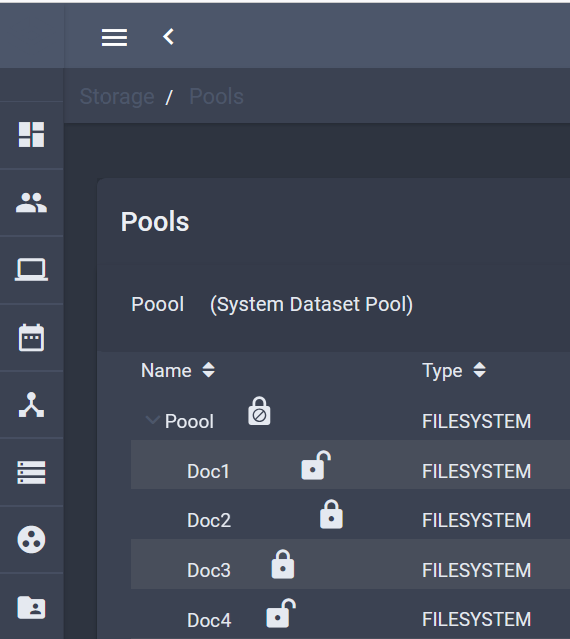
The root dataset “Poool” is unecrypted.
The “Doc1” dataset is encrypted and unlocked.
The “Doc2” dataset is encrypted and locked, and so on.
For the unlocked dataset, I see the option to unlock it in the “Encryption actions” but for the unlocked one, I have “Encryption options” and “Export key” but no “Lock” option (or as I would have expected it to be in lock state at system restart).
When I select “Export key”, the key I get is the same as the one from the main system (makes sense).
But then, why can’t I lock the dataset? Any idea what I’m missing here?
Thanks.