So this is new and has happened twice in a row. The backup task has been working fine without any issue for over 8 months and now its doing this. It’s also only effecting one dataset
Error logs below
 Error: 2025/04/27 22:00:01 INFO  : Starting bandwidth limiter at 2Mi Byte/s
2025/04/27 22:00:03 INFO  :
Transferred:   	          0 B / 0 B, -, 0 B/s, ETA -
Checks:                 8 / 8, 100%
Transferred:            0 / 1, 0%
Elapsed time:         1.8s
Transferring:
 *                                     .filename redacted: transferring

2025/04/27 22:00:04 INFO  : .filename redacted: Copied (replaced existing)
... 6028 more lines ...
    "@type": "type.googleapis.com/google.rpc.Help",
    "links": [
      {
        "description": "Request a higher quota limit.",
        "url": "https://cloud.google.com/docs/quotas/help/request_increase"
      }
    ]
  }
]
, rateLimitExceeded
Seems to be an issue with your Google project quota, not necessarily a TrueNAS issue. What is different about the one dataset being affected? Is it particularly large? Does it have a large number of small files?
yes, I have the same project_number. I suspected that it was using some sort of a default project here
Have you had luck creating a project for yourself and connecting it? I have done it with rclone in the past, I imagine that could be referenced to see the process (I am going to attempt this shortly)
I attempted to reuse the project that I have made for rclone on another machine, but was not able to get it to work due to the access token not being generated using the client id & secret that I provided. When I enter my client id & secret, then attempt to login, it overwrites those values with the default project values.
I tried to enter a blank json object in the access code section - this didn’t work, but the error message in the log showed that it is rclone under the hatch, so I think we might be able to achieve this by using the shell somehow, if we can find where the rclone configs are
I’ve followed the “rclone org slash drive” guide (making-your-own-client-id section) and copied the generated credentials to the TrueNAS webui. Confirmed it working by checking the quota usage on the new google project. Aparently I can run 20 simultaneous backups with the same api Hahah
very nice, I did the same and configured an rclone remote config on my desktop computer, then copied the access token that was generated into the Truenas Cloud Credential config screen. now it is working great!
I followed the instructions mentioned for making your own id, and I downloaded a json file with a key in it. But I don’t see an access token in there. When I use the rclone config command on my terminal to create a config, it just looks like this in the rclone.conf file…
[remote-name]
type = drive
scope = drive
service_account_file = path-to-the-json-file.json
How did you derive an auth token to paste into TrueNAS from the .json key file?
I have the same issue, surely if everyone using TrueNas for Google Drive backups is using the same id “projects/332449661223” this is a pretty big problem.
yep, mentioned here in the thread by user “Rafael_Soares” on June 11th. just needs a bit of substituting text for special characters because the link likely isn’t allowed directly.
Thanks! Yes, I did follow that too. But while I was able to complete the instructions for creating a Google client id, but I got hung up on entering the credentials in the TrueNAS GUI. Are you able to shed some light on exactly what bit of info you copied to what field in the GUI, or address my question from my earlier post?
Any assistance would be greatly appreciated!
If I can get this completed, I will post a complete tutorial for the benefit of others.
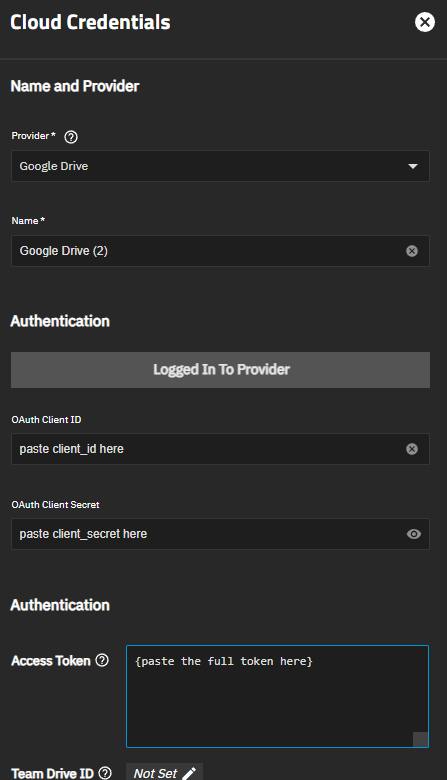
note those down. after this, create a new google drive credential but instead of clicking the authorize button you just fill in the info manually.
you need client_id, client_secret and the full token field (from { until }) and just paste them in. save the new credentials and use them in your existing google drive task.
step by step (after you got your credentials from the shell):
credentials → backup credentials
cloud credentials → add
select Google Drive from the dropdown
click on “configure manually” below “Login to Provider”
paste values as shown in screenshot
I have been getting this for ages, and didnt know how to resolve it. I have a couple of questions if I may. You mentioned getting an access token from rclone (cant see any instructions), but i am using cloud sync tasks. The rclone docs mention keeping it in test mode, and refreshing grants. Did you choose to publish yours, or do you have to do this grant refresh thing, and if so, do you know how to do that? Any help would be very appreciated.
the problem is that TrueNAS in the GUI doesn’t support Service Accounts. At least not to my knowledge.
So we need to use OAuth credentials. However, even though the Access token has a field for “expirey” so far it’s been working fine for me. This is my current one (just reinstalled, so it’s still “fresh”):
[…]“expiry”:“2025-11-08T02:59:41.727324485+01:00”,“expires_in”:3599} which should have expired this morning, but is still working fine as of now (it’s 9am UTC+1)
Surely overall though this is a truenas issue? If they have created something that is used as a part of the system, its for them to fix it? right? If we all try to work around issues, they will never fix them.
probably fair assumption yeah.
there are reports on Jira about this issue as well, they’ve been all closed if i saw correctly (haven’t searched thoroughly). Seems like they negotiated a rate increase with google in the past, so that will probably be their angle this time as well.
But feel free to open a bug report for this issue, I am fine with the workaround.