
I have, will try this weekend, probably tomorrow.
I have now tested the 25.10 nightly.
It booted up much faster again - 1m49s @Captain_Morgan .
Not quite as fast as 24.10 but it was also the first boot on this version so… all absolutely fine.
Also ix-vendor.service started fine on this version.
Just to be sure I also generated another debug file as TPF-6975.
I couldn’t link it to my bug ticket though as that is still closed as a duplicate.
CPU load is absolutely fine again - about 0.67 before booting the Windows VM - which by the way worked just fine.
CPU load after it booted was at about 0.9 which is also right where I would’ve expected it.
so @kris : everything working absolutely fine on the linked 25.10 nightly. I am nearly tempted to stay on it but I think I’ll be reasonable and move back to 24.10 until you hopefully fix this issue for 25.04.1 (please  ).
).
I’ll keep the boot environment around for the forseeable future though, if you need any more tests.
If you need any logs that might not be included in the debug file I can get you those too of course…
Edit: the only thing that was weird were a few errors shown right at the start of the boot process, one for each thread #:
cpufreq: cpufreq_online: Failed to initialize policy for cpu: # (
-524)
(Yes, the line break is intentional, although for the last two threads it broke before the ( ).
I don’t think that error was there on 25.04.
Excellent! Thanks for confirming. So likely it’s a transient kernel bug in the version we’re using on 25.04, probably specific to your hardware. The BETA for 25.10 will be dropping later this month, I’d suggest rolling back for the moment, but plan on updating to that when it lands and you should be clear to run that through RC1 and then Release.
Do you mean the BETA for 25.10?
I’d really like to stay on stable though 
I have the same issue. UI is dog slow, pretty much unusable. So slow that I can barely login and change settings. Apps and everything else run fine, I think it’s just the TrueNAS middleware that’s slow.
2367 root 20 0 4573636 578304 33940 S 108.6 0.2 32:52.45 asyncio_loop
Seems like middleware is doing a whole lot of something all the time.
I am going to roll back. Happy to open a separate thread if needed.
Rolled back to 25.04.1. Runs fine now.
Middleware is still busy, but not pegged.
2371 root 20 0 3770440 514720 30932 S 79.4 0.2 10:47.34 asyncio_loop
In that case your issue is likely different.
The OP had this issue in 25.04.0 and 25.04.1 as well.
I might have spoken too soon. After checking again, it seems like it’s pegged on 25.04.1
2371 root 20 0 3911472 518416 30788 S 107.6 0.2 18:28.33 asyncio_loop
It’s still more usable than 25.04.2 but is pretty slow. Sadly, I cleaned up my old boot environments a few days ago. I think I will just tough it out until another 25.04 unless there’s another option. Thank you.
Yea, sorry, meant 25.10 BETA. Release will be in Oct if you prefer to wait for that
OK totally not related but I think I found the root cause and might be a bug or at least worth sharing. Turns out the runaway middleware process seemed to be the TrueNAS client checking for container updates over and over.
etrieved\nfuture: <Task finished name='Task-554' coro=<Middleware.call() done, defined at /usr/lib/python3/dist-packages/middlewared/main.py:990> exception=RuntimeError('Connection closed.')> @cee:{"TNLOG": {"exception": "Traceback (most recent call last):\n File \"/usr/lib/python3/dist-packages/middlewared/main.py\", line 1000, in call\n return await self._call(\n ^^^^^^^^^^^^^^^^^\n File \"/usr/lib/python3/dist-packages/middlewared/main.py\", line 715, in _call\n return await methodobj(*prepared_call.args)\n ^^^^^^^^^^^^^^^^^^^^^^^^^^^^^^^^^^^^\n File \"/usr/lib/python3/dist-packages/middlewared/plugins/apps_images/update_alerts.py\", line 35, in check_update\n await self.check_update_for_image(tag, image)\n File \"/usr/lib/python3/dist-packages/middlewared/plugins/apps_images/update_alerts.py\", line 54, in check_update_for_image\n self.IMAGE_CACHE[tag] = await self.compare_id_digests(\n ^^^^^^^^^^^^^^^^^^^^^^^^^^^^^^\n File \"/usr/lib/python3/dist-packages/middlewared/plugins/apps_images/update_alerts.py\", line 68, in compare_id_digests\n digest = await self._get_repo_digest(registry, image_str, tag_str)\n ^^^^^^^^^^^^^^^^^^^^^^^^^^^^^^^^^^^^^^^^^^^^^^^^^^^^^^^^^\n File \"/usr/lib/python3/dist-packages/middlewared/plugins/apps_images/client.py\", line 92, in _get_repo_digest\n response = await self._get_manifest_response(\n ^^^^^^^^^^^^^^^^^^^^^^^^^^^^^^^^^^\n File \"/usr/lib/python3/dist-packages/middlewared/plugins/apps_images/client.py\", line 76, in _get_manifest_response\n response = await self._api_call(manifest_url, headers=headers, mode=mode)\n ^^^^^^^^^^^^^^^^^^^^^^^^^^^^^^^^^^^^^^^^^^^^^^^^^^^^^^^^^^^^^^\n File \"/usr/lib/python3/dist-packages/middlewared/plugins/apps_images/client.py\", line 46, in _api_call\n response['response'] = await req.json()\n ^^^^^^^^^^^^^^^^\n File \"/usr/lib/python3/dist-packages/aiohttp/client_reqrep.py\", line 1272, in json\n await self.read()\n File \"/usr/lib/python3/dist-packages/aiohttp/client_reqrep.py\", line 1214, in read\n self._body = await self.content.read()\n ^^^^^^^^^^^^^^^^^^^^^^^^^\n File \"/usr/lib/python3/dist-packages/aiohttp/streams.py\", line 386, in read\n block = await self.readany()\n ^^^^^^^^^^^^^^^^^^^^\n File \"/usr/lib/python3/dist-packages/aiohttp/streams.py\", line 408, in readany\n await self._wait(\"readany\")\n File \"/usr/lib/python3/dist-packages/aiohttp/streams.py\", line 300, in _wait\n raise RuntimeError(\"Connection closed.\")\nRuntimeError: Connection closed.", "type": "PYTHON_EXCEPTION", "time": "2025-08-02 18:24:15.356113"}}
This was the image in question:
ghcr.io/open-webui/open-webui:main.
This app was running but for some reason TrueNAS was trying over and over to connect to GitHub container registry and failing. After stopping this container, cleaning up all image unused images and starting it again it’s fine and the CPU is back to normal.
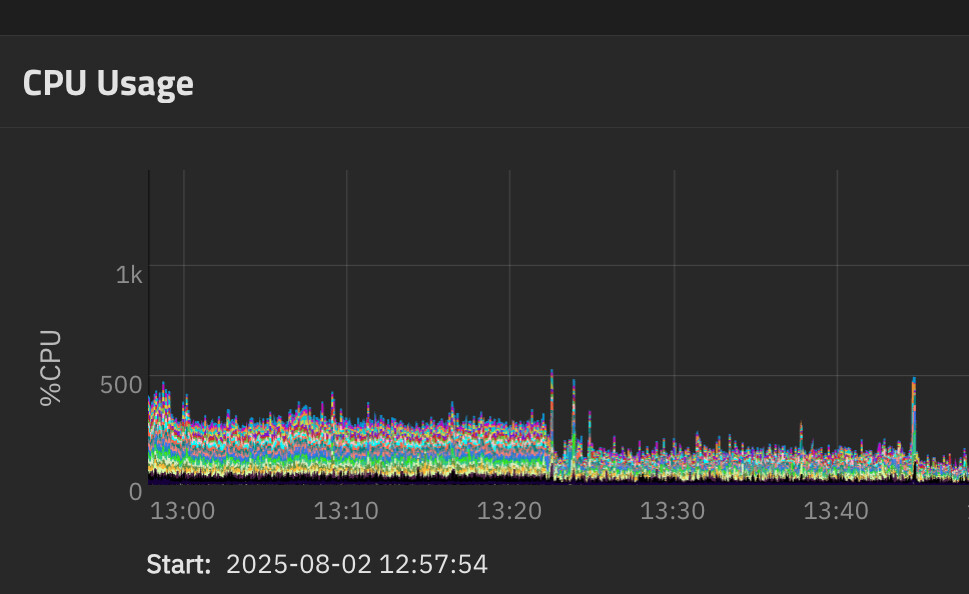
Looks to me as if the check for the container image fails, it doesn’t fail gracefully and backoff and retry. I don’t have registry credentials set up for ghcr but I don’t think that would apply to this manifest API call.
After all of this was settled (still not sure what actually fixed it unless GitHub was throwing errors for making too many calls) I was able to update to 25.04.2 again and all is fine.
Anyway, sorry to post on this thread, hope this helps someone.
EDIT: It’s happening again with other ghcr images so might be a bug in the aiohttp call that is throwing. I turned off update checks for now.
Thanks for the analysis… really helpful.
Could you report this as a separate bug so we have the debugging data you have collected.
@TheColin21 Does this correlate with your problems?
I don’t think so. I do have two apps running - portainer and scrutiny - but I didn’t see especially high CPU usage by middlewared.
Thank you! I created one here
I did try the 25.10 BETA now after waiting a few days and looking at the known errors.
Everything working fine now 