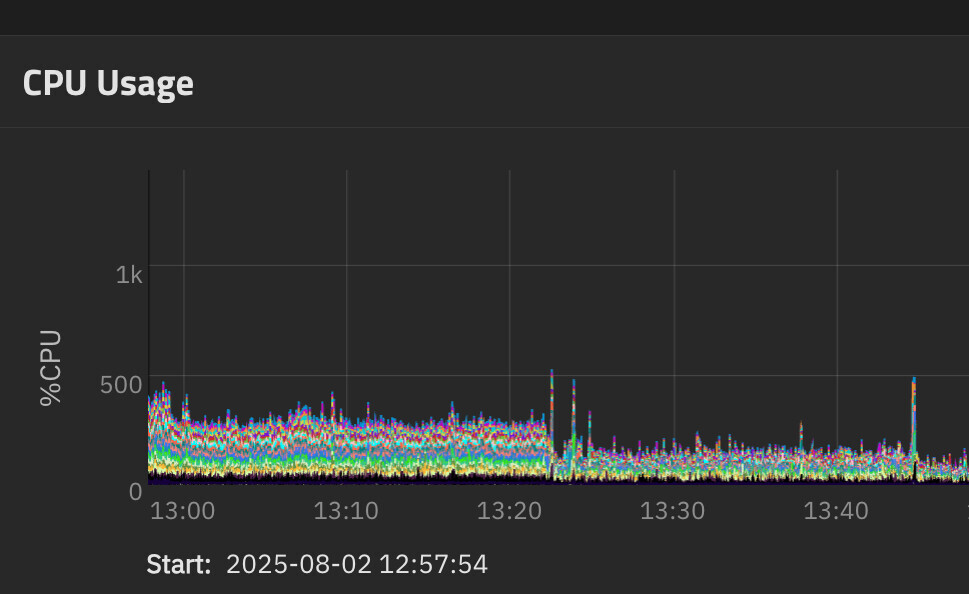
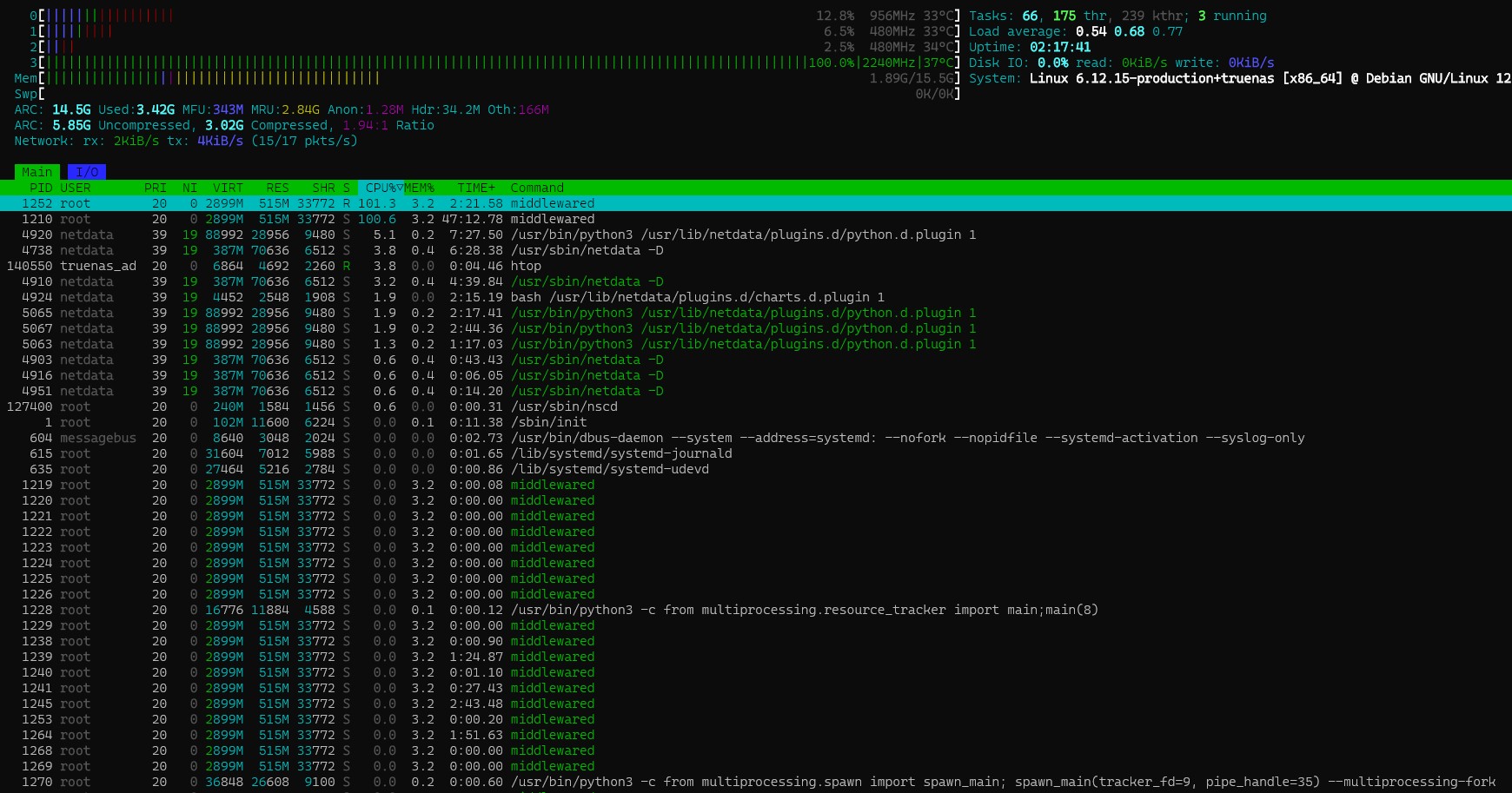
It seems like when making this call it does not fail gracefully and looks like it keeps retrying. I’m assuming at some point they just block my IP but hard to tell since the call is not logged in the aiohttp calls. Seems like we need pattern to fail gracefully, and backoff and retry.
I have also added my GHCR creds/PAT in the registry credentials section but I am not sure if that applies to this call, maybe only pulls? And maybe that’s the bug?
Ah, sorry, thought you meant create it as a thread. The image I am using is linked in in this thread and it’s the official way to run open web ui. I will report a bug here soon!
Thank you very much @technotim it seems that I’m facing the same error, I just started investigating. For several weeks now, I have noticed that my cpu temperature keeps rising until I restart the NAS, which is why I suspected a runaway process. Unfortunately, I haven’t had time to look into the problem in detail yet, but the middlewared.log logs similar to yours.
I also wrote two custom apps “caddy” and “mmc-utils” for checking the health of my emmc storage.
I have not. I am using a standard image from open-webui. I think this image is just a red herring though however and it’s the underlying process that’s the issue. Possibly something to do with non Docker registries or custom apps in general.
I don’t want to call victory too soon but after patching with 25.04.2.1asyncio_loop is in check, never going above ~20% CPU (except when actively using the TrueNAS UI). Before patching last night it was still over 110% making everything sluggish to the point where I had to cycle the middlewared service every time I wanted to use it. I don’t see any related “notable” changes in the release notes, so I am hoping there was an “unnotable” change that fixed it, otherwise it’s just a odd coincidence.
I’m seeing asyncio_loop spiking over 100% in 25.04.2.1 and generally my cpu compared to 25.04 is higher (10-20%) on a lower powered older 4-core celeron cpu. Middlewared is also spiking over 100%. This newly built server (an older QNAP) is bare metal with a single VM installed in 25.04 (pbs). Not sure any of that matters.
Stopping the VM so there is nothing by TrueNAS running, this is a snapshot of what I’m seeing.
Edit: I rolled back to 25.04 and the CPU stayed high (as with 25.04.2.1), so started looking around and in var/log/middlewared.log I found this error seemingly related to ipv6 (apologize for the mess but this is how it was displayed).
[2025/08/08 15:18:39] (INFO) RouteService.sync():83 - Adding IPv4 default route to 172.20.100.1
[2025/08/08 15:18:39] (INFO) RouteService.sync():129 - Adding IPv6 default route to fe80::ae16:2dff:fea2:6e44
[2025/08/08 15:18:39] (INFO) InterfaceService.sync():1799 - Failed to sync routes @cee:{“TNLOG”: {“exception”: “Traceback (most recent call last):\n File "/usr/lib/python3/dist-packages/middlewared/plugins/network.py", line 1797, in sync\n await self.middleware.call(‘route.sync’)\n File "/usr/lib/python3/dist-packages/middlewared/main.py", line 1005, in call\n return await self._call(\n ^^^^^^^^^^^^^^^^^\n File "/usr/lib/python3/dist-packages/middlewared/main.py", line 720, in call\n return await methodobj(*prepared_call.args)\n ^^^^^^^^^^^^^^^^^^^^^^^^^^^^^^^^^^^^\n File "/usr/lib/python3/dist-packages/middlewared/plugins/network/route.py", line 130, in sync\n routing_table.add(ipv6_gateway)\n File "/usr/lib/python3/dist-packages/middlewared/plugins/interface/netif_linux/routing.py", line 201, in add\n self._op("add", route)\n File "/usr/lib/python3/dist-packages/middlewared/plugins/interface/netif_linux/routing.py", line 245, in _op\n ip.route(op, **kwargs)\n File "/usr/lib/python3/dist-packages/pyroute2/iproute/linux.py", line 2334, in route\n ret = self.nlm_request(\n ^^^^^^^^^^^^^^^^^\n File "/usr/lib/python3/dist-packages/pyroute2/netlink/nlsocket.py", line 870, in nlm_request\n return tuple(self._genlm_request(*argv, **kwarg))\n ^^^^^^^^^^^^^^^^^^^^^^^^^^^^^^^^^^^^^^^^^^\n File "/usr/lib/python3/dist-packages/pyroute2/netlink/nlsocket.py", line 1214, in nlm_request\n for msg in self.get(\n ^^^^^^^^^\n File "/usr/lib/python3/dist-packages/pyroute2/netlink/nlsocket.py", line 873, in get\n return tuple(self._genlm_get(*argv, **kwarg))\n ^^^^^^^^^^^^^^^^^^^^^^^^^^^^^^^^^^^^^^\n File "/usr/lib/python3/dist-packages/pyroute2/netlink/nlsocket.py", line 550, in get\n raise msg[‘header’][‘error’]\npyroute2.netlink.exceptions.NetlinkError: (22, ‘Invalid argument’)”, “type”: “PYTHON_EXCEPTION”, “time”: “2025-08-08 19:18:40.013620”}}
Since ipv6 is really not important for this server, I added a sysctl entry “net.ipv6.conf.all.disable_ipv6=1” to disable ipv6 and the CPU dropped and middlewared (which was spiking over 100% for seconds at a time is now more often 10-30% peak). As for the asyncio process…I don’t even see it anymore. Footnote, I’m no expert so this could be a coincidence.
Just throwing in what I’ve noticed suffering the same cpu usage with asyncio_loop , if I restart the middlewared service but never go back in the truenas webui everything behaves normally, cpu doesn’t run wild. As soon as I access the webui asyncio_loop starts acting up and never stops until I restart middlewared again.
When things are in a bad state are you able to run the commands: midclt call core.threads_stacks | jq and midclt call core.get_tasks | jq to get an idea of what the middlewared process is busy with? (WARNING: don’t blindly post these on the internet). You can PM them to me if you can get the info, but I can’t promise when I’ll be able to look at it.
Saw an increase in CPU usage again over the course of the last 14 days. For me, the problem builds up slowly over time. Is it the same for you guys?
I’ve now created the following ticket.
I am experiencing the same problem: the CPU usage of the middlewared asyncio_loop initially idles at 0.0%, but its idle usage gradually increases. I restart the middleware service twice a week now to keep the CPU usage low.
I don’t use the app at the OP, and middlewared.log show nothing out of the ordinary.
My Ticket is closed with the comment that my problem does not appear to be an error in TrueNAS code or regression in functionality.
So no general TrueNAS bug which is a good thing. Is it realated to custom docker container perhaps?
Just a final word to my post above (unable to edit it) where I thought incorrectly that disabling ipv6 was somehow related but was not. I observed middlewared uses excessive cpu, but restarting the service “appears” to resolve it. Apologies for muddying the thread.
I don’t have a custom app created via GUI, but there is a cron-job, which creates a docker container temporarily. It is “gilleslamiral/imapsync” aiming to synchronize email.
Strangely, this “imapsync” cron job runs every couple of minutes. But cron-job for “multi-report” fails after a couple of days.
I will pause running this docker command for a couple of days, then see.