[GUIDE] Nextcloud Assistant (Context Chat) on TrueNAS SCALE - Docker setup (No K3s)

Body: Hi everyone, I’ve successfully integrated Nextcloud Assistant with local embeddings on TrueNAS SCALE (Docker-only). Since SCALE is moving away from K8s, I wanted to share a working setup for AppAPI and Context Chat.

1. Prerequisites in Nextcloud Install these apps: AppAPI, Context Chat, Context Chat Backend, and Context Agent.

2. Setup docker-socket-proxy Create a Custom App with image tecnativa/docker-socket-proxy:latest.

Mount: /var/run/docker.sock to /var/run/docker.sock.

Port: 2375.

ENV Variables: CONTAINERS=1, NETWORKS=1, VOLUMES=1, IMAGES=1, POST=1, PING=1, INFO=1.

3. The “Magic” Connectivity Step You must manually connect the proxy to the Nextcloud network so they can talk: docker network connect ix-nextcloud_default ix-docker-socket-proxy_default

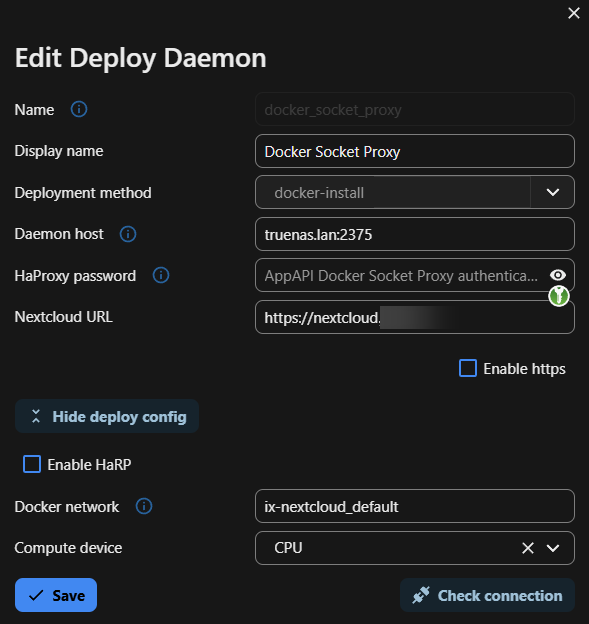
4. Register Daemon in Nextcloud AppAPI

Host: docker-socket-proxy:2375.

Network: ix-nextcloud_default.

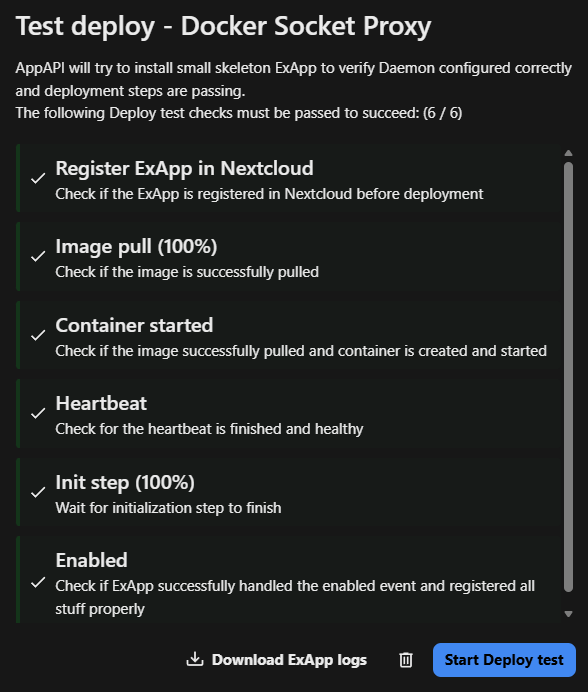
5. Deploy Backend Go to Nextcloud Apps and click “Deploy and Enable” on Context Chat Backend. Wait a few minutes for the model to load into RAM.

6. Force Indexing If the Vector DB stays at 0, run the worker manually in the Nextcloud container shell: docker exec -u 33 -it ix-nextcloud-nextcloud-1 sh -lc 'php -f /var/www/html/occ background-job:worker -t 900'
1 Like

Hey, thanks for the guide! This gets rid of the nasty Deploy Daemon error in Overview.

I followed your instructions, but I tried to skip the manual network connection step. Seemed like too much trouble just for the sake of the hostname. This works for me as well:

1 Like

That setup works because it talks to Docker over the TCP API (port 2375), which exposes the Docker daemon directly on the network. It feels simpler since there’s no socket permission handling or proxy layer.

The trade-off is that port 2375 effectively grants full control over Docker to anything that can reach it. From Docker’s perspective, that’s equivalent to root-level access to container management on the host.

Nextcloud’s AppAPI documentation recommends using a Docker Socket Proxy instead of exposing the daemon directly. The goal isn’t complexity for its own sake — it’s about reducing the attack surface and restricting which API calls external apps are allowed to make.

Both approaches work:

  • TCP Docker API → simpler to wire up

  • Socket proxy → controlled, safer, and easier to keep long-term

We chose the proxy route because this is a long-lived system and we prefer a setup that survives updates without reopening Docker to the LAN.

References (copy & fix spaces):
Note: links are written with spaces on purpose so the forum doesn’t auto-convert them into clickable URLs. Just remove the spaces when copying.

docs . nextcloud . com / server / latest / admin_manual / exapps_management / AppAPIAndExternalApps . html
docs . docker . com / engine / security / #docker-daemon-attack-surface
github . com / nextcloud / docker-socket-proxy

Docker over the TCP API is not exposed on TrueNAS Scale. It’s still tecnativa/docker-socket-proxy custom app, but I’ve just realized it depends on how you set 2375 port binding, if it’s exposed to host, it’s avaiable as a service to all apps.

Your command makes sense when port bind mode is inter-container communication, which probably is better choice I didn’t make :smiley:

You’re basically right, and I think we’re just looking at it from two slightly different angles.

So in short:

• You’re right about the default state on TrueNAS SCALE
• We’re right about the architecture and security choice for this kind of setup

TrueNAS SCALE does not expose the Docker TCP API by default, and that’s a good thing.
But once you start binding port 2375 or exposing it via a service, it effectively becomes a network service available to anything that can reach it.

For our setup, we intentionally avoided that and stayed with socket / socket-proxy style access.

Why we consider this the more “enterprise-safe” route:

• Docker daemon is never exposed over the network
• Follows least-privilege principle (proxy can restrict allowed API calls)
• Matches how AppAPI is designed to be used long-term
• More update-proof (no need to modify dockerd startup config or maintain custom daemon flags)

Both approaches work technically.
TCP API is simpler to set up.
Socket / proxy is usually safer and more future-proof for long-lived systems.

Since this box is meant to run long-term and survive upgrades, we preferred the proxy approach.

And yeah — if someone binds 2375 only for inter-container communication and keeps it off LAN, that’s already a big improvement compared to exposing it to the whole network.