Help Needed: Stuck RAIDZ3 Expansion

Hello TrueNAS Community,

I’m seeking urgent help with a RAIDZ3 pool that has become stuck in an inconsistent state after multiple interruptions during a vdev expansion. I have run through several recovery steps but am now at a point where I cannot get a solution.

System Setup:

  • OS: TrueNAS SCALE 25.04.2.1
  • Pool: RAIDZ3
  • Action: Expanding a 5x 4TB vdev to a 6x 4TB vdev.
    Background:
    The expansion process was interrupted 2x times by server crashes/restarts due to freezing issues. This left the pool online, but with several problems:
  • The expansion was incomplete. Showing 6 drives in the pool but only available space of a 5 drives in raidz3. At first restart the expansion automatically resumed (sudo zpool status showed it was resumed, and went from 20% to 85%). At second restart the expansion also resumed, but like 8h after, it stopped showing that was fineshed, but it did not fineshed. The same issue showing 6 drives in the pool but now a little bigger, increased something like 500GB
  • zpool status reported 4 CKSUM errors on one disk after 2nd restart, and were automatically resolved. A SMART showed no issues with the drive.

Troubleshooting Steps I’ve Already Taken:

  • S.M.A.R.T. Check: An extended S.M.A.R.T. test on the affected disk (/dev/sdj) passed, suggesting the CKSUM errors were transient and not a hardware failure.
  • zpool clear / offline: All attempts to clear the errors or offline the disk failed with the same contradictory error, even though the disk was listed as ONLINE in zpool status: Error: cannot clear errors for …: no such device in pool. All 6 drives are online. But if I try to clean error of some drives with sudo /sbin/zpool clear EOS_Gemini wwn-0x50014ee60795bf6a, 2 drives show the error: cannot clear… No such device in pool.
  • zpool export / import: As a last resort to fix the state inconsistency, I ran an export/import cycle. Did not helped to solve the expansion problem.
  • I tried to force the expansion to resume with the following command, but like I sad before; 2 drives showed that were no such device in the pool. And for the drives the command line worked it did not resumed the expansion

sudo /sbin/zpool online -e EOS_Gemini 19513023-8bd2-4f4d-ac30-5180a668255a
sudo /sbin/zpool online -e EOS_Gemini 9ba0dccf-a102-4221-9d33-3389d8994f78
sudo /sbin/zpool online -e EOS_Gemini 502713da-8b26-49ea-9bea-03a3c27b2c1f
sudo /sbin/zpool online -e EOS_Gemini 6181bbcf-4cb0-4d34-8955-7ca86d01caba
sudo /sbin/zpool online -e EOS_Gemini f1bf643c-d29d-427c-abab-0e3053aa05d4
sudo /sbin/zpool online -e EOS_Gemini f88e265e-cd5e-4a6b-a38d-0389ef22ab73

Current Status:

  • I started to scrub this pool, it will take a while to see if it solves the expansion problem.

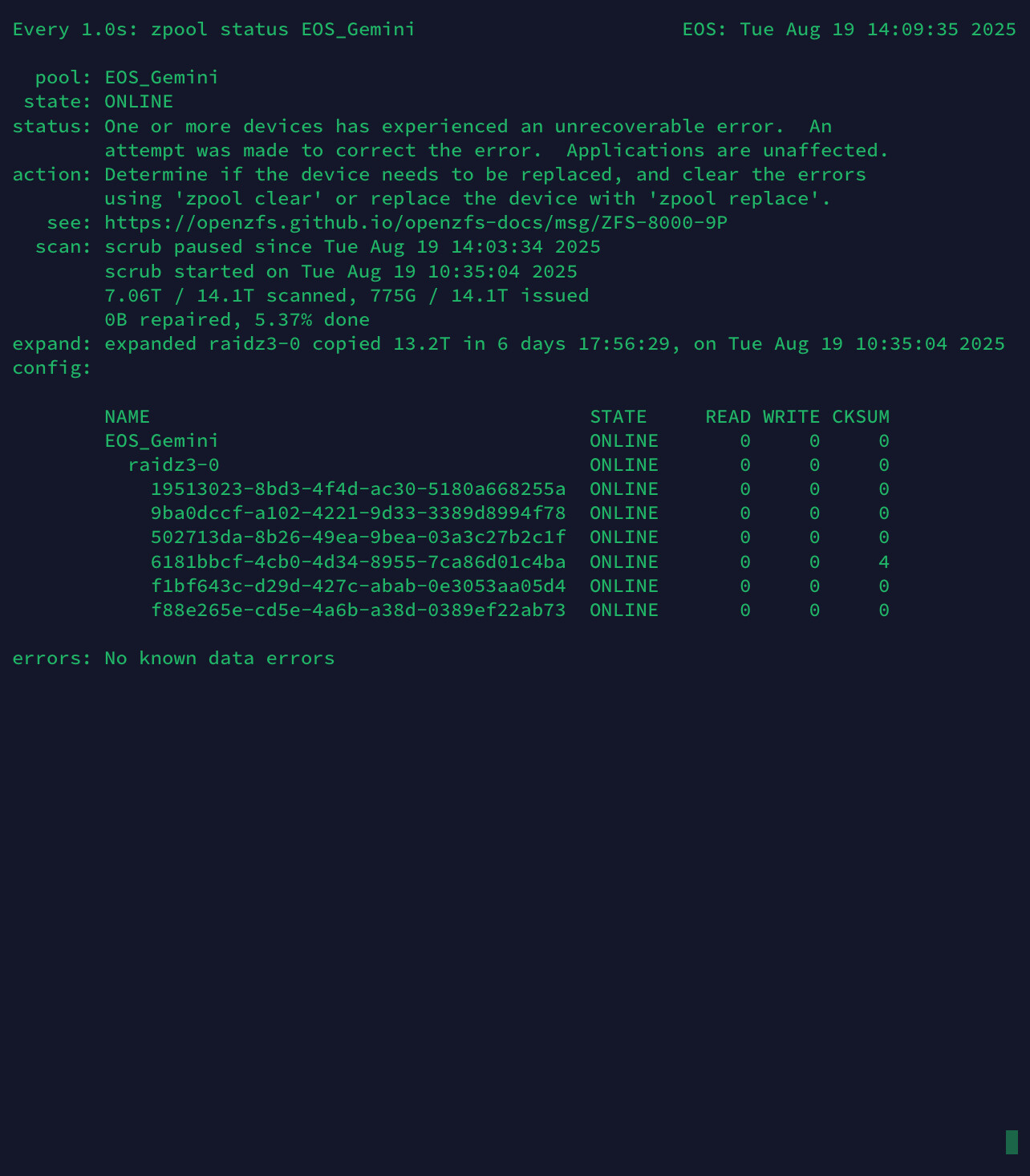
expand: expanded raidz3-0 copied 13.2T in 6 days 17:56:29,
on Tue Aug 19 10:35:04 2025

My Questions:

  • What is the correct and safe sequence of steps from this point to get the expansion completed?

Any advice would be greatly appreciated. I’m new at Truenas Scale. So I’m still learning, although I learn quite fast.
I am stuck and want to ensure I don’t risk data loss.
Thank you!

Ps: and please, may the answers be focused on the solutions of my questions.


Post information from command line, CLI, back using Preformatted Text (</>) on toolbar or Ctrl+e. It help for readability.

Please run these commands and post back the results in a Preformatted Text window for each one. We can see the state of your current pool and the disk info

sudo zpool status -v

sudo ZPOOL_SCRIPTS_AS_ROOT=1 zpool status -vLtsc lsblk,serial,smartx,smart
pool: EOS_Gemini
state: ONLINE
scan: scrub paused since Tue Aug 19 14:54:34 2025
      scrub started on Tue Aug 19 10:35:04 2025
      32K / 14.1T scanned, 16.0E / 14.1T issued
      0B repaired, 119151172.61% done
expand: expanded raidz3-0 copied 13.2T in 6 days 17:56:29, on Tue Aug 19 10:35:04 2025
config:

        NAME                                                READ WRITE CKSUM     STATE
        EOS_Gemini                                             0     0     0     ONLINE
          raidz3-0                                             0     0     0     ONLINE
            19513023-8bd3-4f4d-ac30-5180a668255a                0     0     0     ONLINE
            9ba0dccf-a102-4221-9d33-3389d8994f78                0     0     0     ONLINE
            502713da-8b26-49ea-9bea-03a3c27b2c1f                0     0     0     ONLINE
            6181bbcf-4cb0-4d34-8955-7ca86d01c4ba                0     0     0     ONLINE
            f1bf643c-d29d-427c-abab-0e3053aa05d4                0     0     0     ONLINE
            f88e265e-cd5e-4a6b-a38d-0389ef22ab73                0     0     0     ONLINE

errors: No known data errors
EOS% 


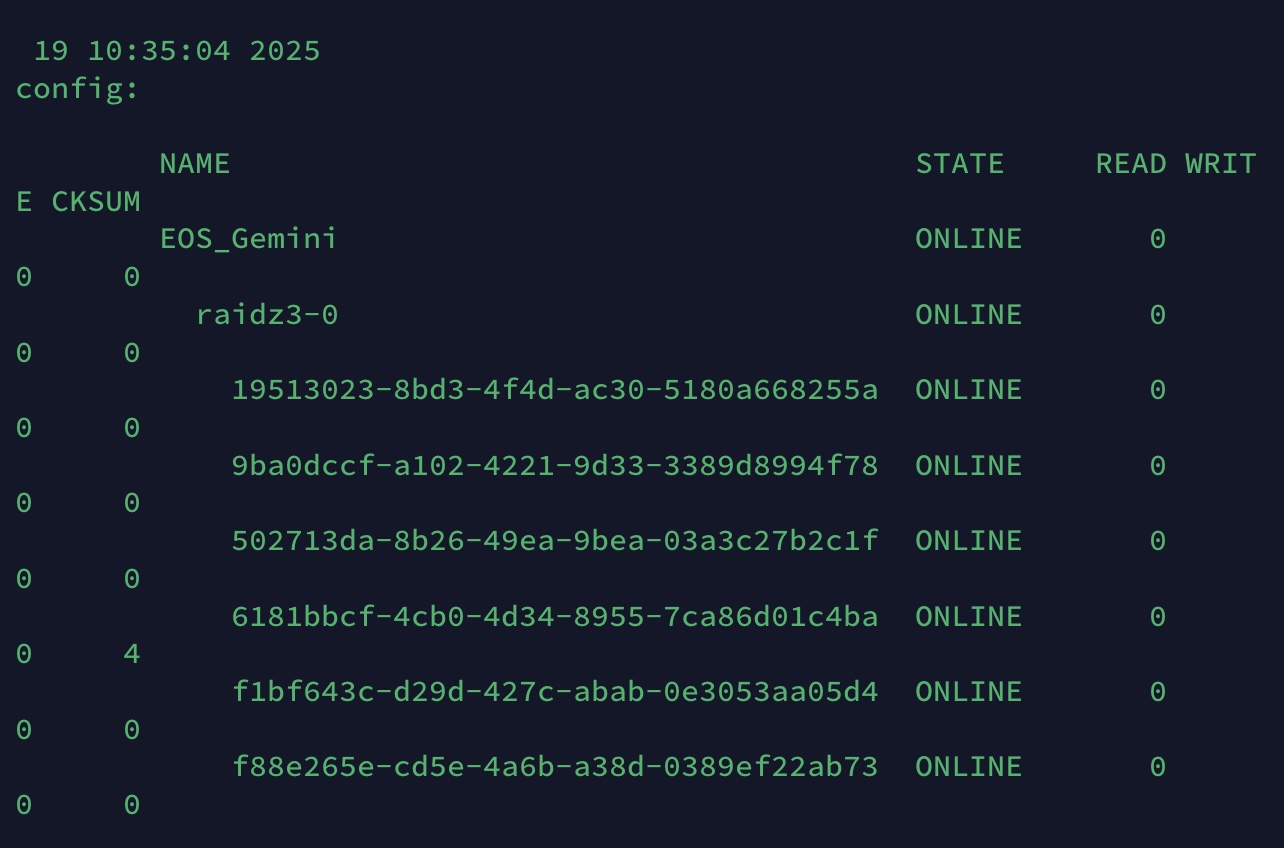
19 10:35:04 2025
config:

        NAME                                STATE      READ WRIT
E CKSUM
        EOS_Gemini                          ONLINE          0
0   0
        raidz3-0                            ONLINE          0
0   0
          19513023-8bd3-4f4d-ac30-5180a668255a ONLINE          0
0   0
          9ba0dccf-a102-4221-9d33-3389d8994f78 ONLINE          0
0   0
          502713da-8b26-49ea-9bea-03a3c27b2c1f ONLINE          0
0   0
          6181bbcf-4cb0-4d34-8955-7ca86d01c4ba ONLINE          0
4   4
          f1bf643c-d29d-427c-abab-0e3053aa05d4 ONLINE          0
0   0
          f88e265e-cd5e-4a6b-a38d-0389ef22ab73 ONLINE          0
0   0


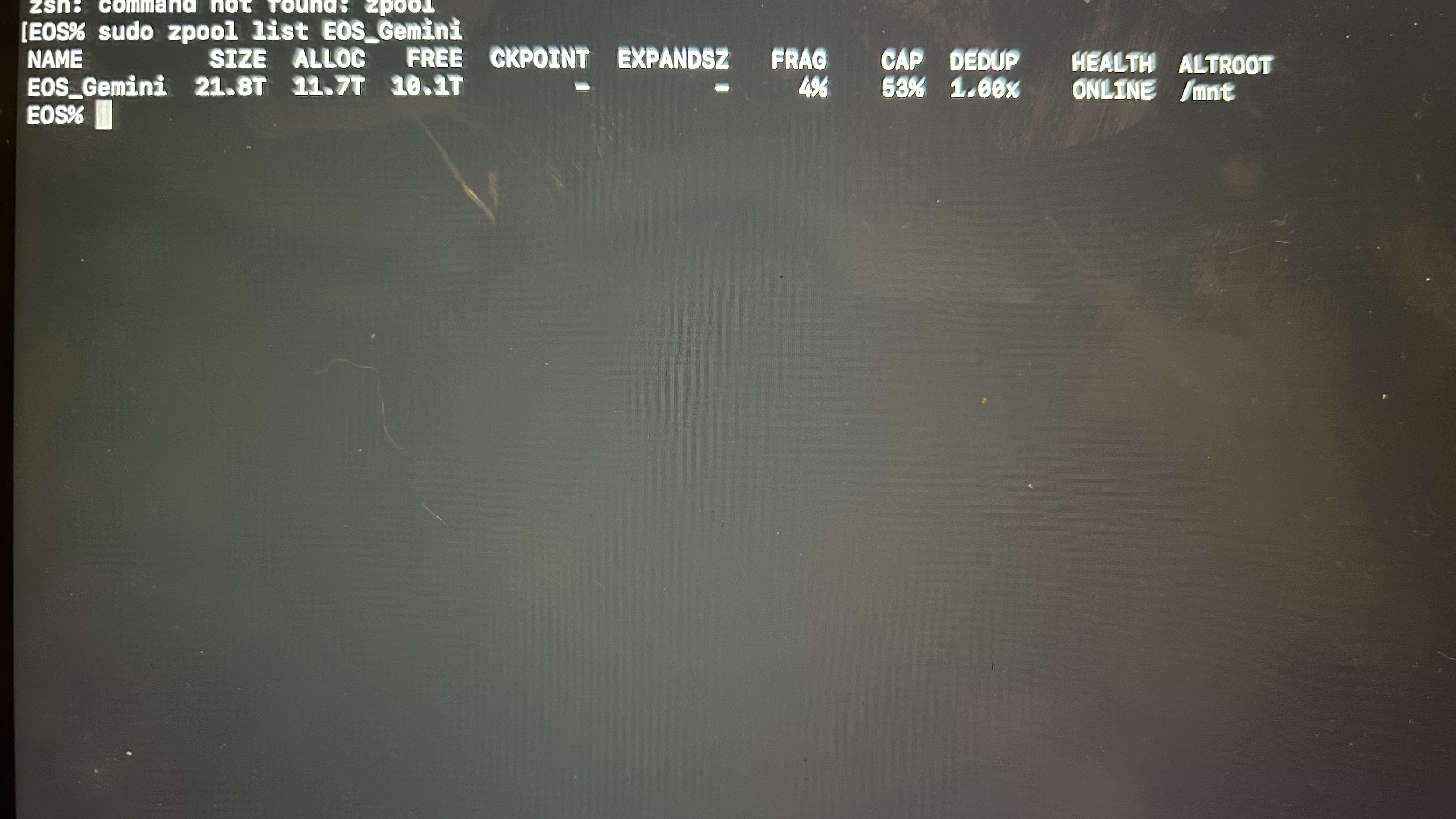
EOS% sudo zpool list EOS_Gemini
NAME     SIZE  ALLOC   FREE  CKPOINT  EXPANDSZ   FRAG    CAP  DEDUP    HEALTH  ALTROOT
GEMINI  21.8T  11.4T  10.4T        -         -     5%    52%  1.00x    ONLINE  /mnt


EOS% sudo zpool list -v EOS_Geminj
NAME                                       SIZE  ALLOC   FREE  CKPOINT  EXPANDSZ   FRAG    CAP  DEDUP    HEALTH  ALTROOT
EOS_Gemini                                    21.8T  11.4T  10.4T        -         -     5%    52%  1.00x    ONLINE  /mnt
  raidz3-0                                21.8T  11.4T  10.4T        -         -     5%  52.2%      -    ONLINE
    19513023-8bd3-4f4d-ac30-5180a668255a  3.64T      -      -        -         -      -      -      -    ONLINE
    9ba0dccf-a102-4221-9d33-3389d8994f78  3.64T      -      -        -         -      -      -      -    ONLINE
    502713da-8b26-49ea-9bea-03a3c27b2c1f  3.64T      -      -        -         -      -      -      -    ONLINE
    6181bbcf-4cb0-4d34-8955-7ca86d01c4ba  3.64T      -      -        -         -      -      -      -    ONLINE
    f1bf643c-d29d-427c-abab-0e3053aa05d4  3.64T      -      -        -         -      -      -      -    ONLINE
    f88e265e-cd5e-4a6b-a38d-0389ef22ab73  3.64T      -      -        -         -      -      -      -    ONLINE
EOS%

This indicates the RAID-Zx expansion is done, and the post expansion scrub was paused for some reason.

Simply restart the scrub:

zpool scrub EOS_Gemini

and let it finish.

ZFS RAID-Zx expansion will pause if their is a disk failure. Whence the disk is replaced, the expansion will continue. Seems something happened to cause the scrub to pause.

Note that the data to parity ratio for space reporting in RAID-Zx expansion is not changed, even though a new data column has been added. It’s a quirk of the current RAID-Zx expansion, which causes some mis-reporting of the new free space.

1 Like