
I think this might be playing a role in why you’re experiencing troubles.
2 Likes
Always possible, but to be fair, it’s been running for almost 2 years without issue.
What I really need to know is, can I just add the new drive to the pool to get operational again?
Gonna quote a myself from a similar situation:
To add on - it isn’t an issue of what won’t work, it is an issue of what has the least amount of headache when something goes wrong. Manually drawing outside the lines of what is recommended/acceptable is always a valid choice - like manually partitioning the boot drive. Original post was more to explain reasoning & provide options.
Lotta folks see recommendations/best practices as a personal affront to how they want to do things & show functional builds as proof that these practices shouldn’t exist; that is a fallacy. Best practices & creative workarounds both have their place as long as risks are understood.
I’d try to move as much of the pool’s as I could directly to the motherboard & go from there, then hope you have enough drives detected to get it into a working state so you can replace the drive.
Then I’d look into getting an HBA; would likely cost less than the sata card you have.
It’s been a while, so my memory is a little rusty, but I recall the reason I got the SATA card was because I couldn’t get everything to work with the onboard SATA connections, there was a specific hardware limitation.
As things stand right now, I can see the data from the SMB share, it’s just super slow. If you see one of my earlier posts, I do have the option to add the new drive to the existing pool. If I can do that and get things to settle down I can back up the data to another location and then think about rebuilding this system with a proper HBA like you mentioned.
1 Like
IMO - if you presently have access to the data, start & finish the backup process first. Resilvering the pool will stress the existing drives & is arguably the highest chance of critical failure if you don’t have any additional redundancy left (if not mistaken, you’re raidz1 - so you don’t).
Once you have a local backup, you can play it in any direction you want at your discretion as rebuilding afterwards will (likely) be fast(er) and with minimal risk (comparatively).
Also I 100% missed the fact that you managed to get any kind of access to the pool; from previous posts I had thought that it was entirely failed - my bad.
Edit: There is also an argument that you don’t have any drives that are actually bad, just ones that were flagged as “failed” due to the port multiplier. Once data is backed-up you have the option to actually test the “failed” drives to confirm if they should be kept in production.
I too don’t think it is a hardware issue, other than a failing drive, but I could be wrong.
Try this:
- in your Pool1 Devices screen, click on the “REMOVED” drive (fist one under SPARE). To the right should open a new set of options.
- Do you see the option to replace the drive? Note what options you have.
- Click on the other drive that is “UNAVAIL” under SPARE.
- Do you see the option to replace the drive? Note what options you have.
- Click on “SPARE” that says “UNAVAIL” (just below sdc).
- Do you see the option to replace? Note it for now.
Decision time:
Let me lead again by saying, I’m not a ZFS expert. But this is what I’d do:
- If step 5 showed the option to replace, I would click on Replace and select the one free drive in your system.
- If step 5 didn’t look promising, then I’d use the step 1 drive if you had any options available, hopefully to remove, disconnect, something.
- And then we are left with the step 3 drive.
- If you are able to remove those two drives that are not in the system and you still have SPARE listed, try to Replace the SPARE drive.
You might also look into removing the “Spare” drive at the bottom of the list since it is not installed.
Good Luck, I think you have some buttons to push. And if you have no luck this way, say so and that you need a command line instruction to replace the drive. You can look that up in the internet, BUT DON’T TRUST AI ANSWERS. Go to the other sire like reddit or even our forums. AI Does get things wrong, more often than I’d like. Why risk your data. And if you just want us to generate a command line, we can do that too.
There is not better way to learn than being thrown into the fire.
No, this option expands the Pool. It adds a drive. What you need is to replace a drive.
So, interestingly, the same drive is listed in two locations. Once as removed and once as unavailable.
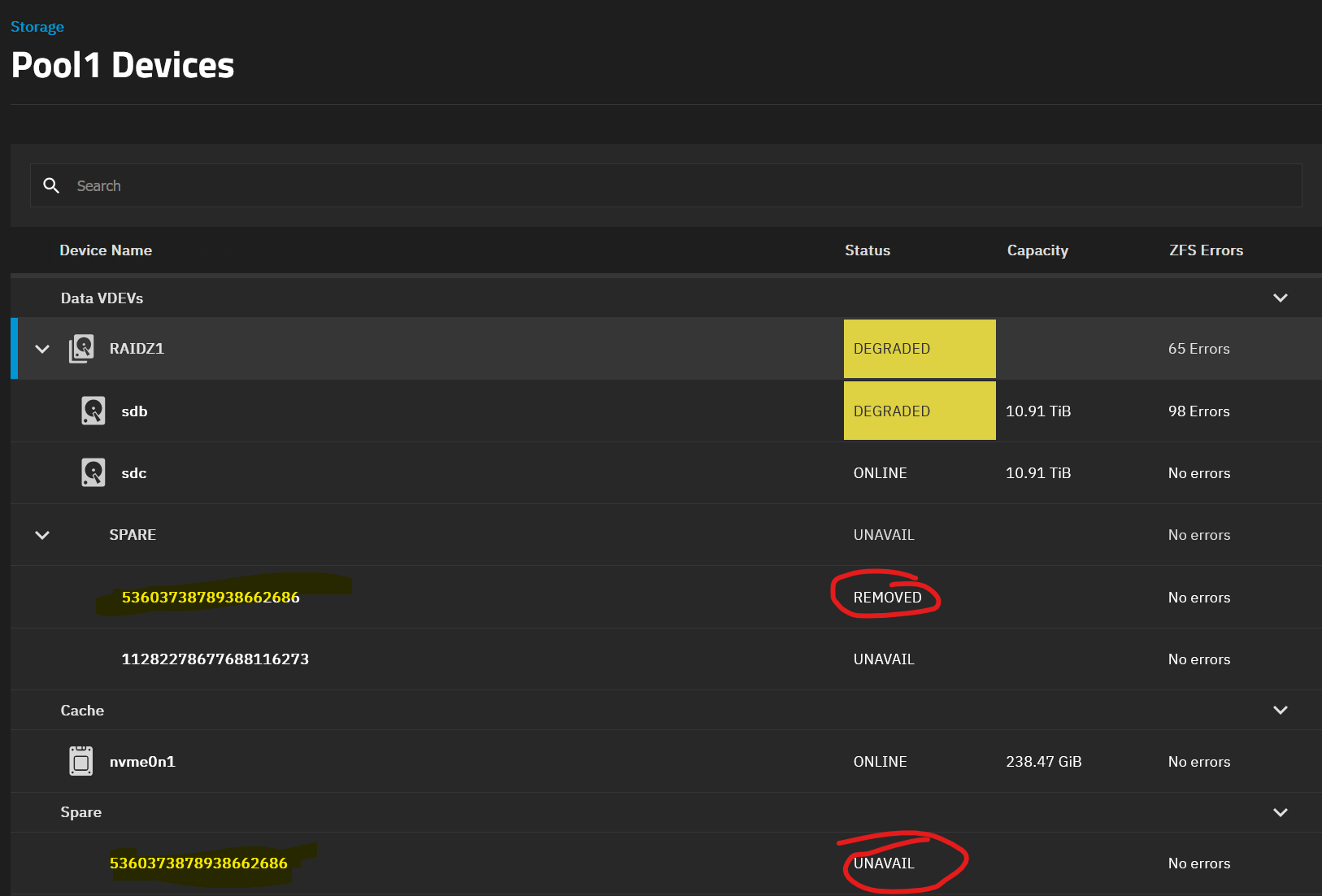
I have the option to replace for both drives. The one highlighted has a few extra options under the ZFS box, but I don’t think they matter much at this point. The 2nd disk only has the detach option.
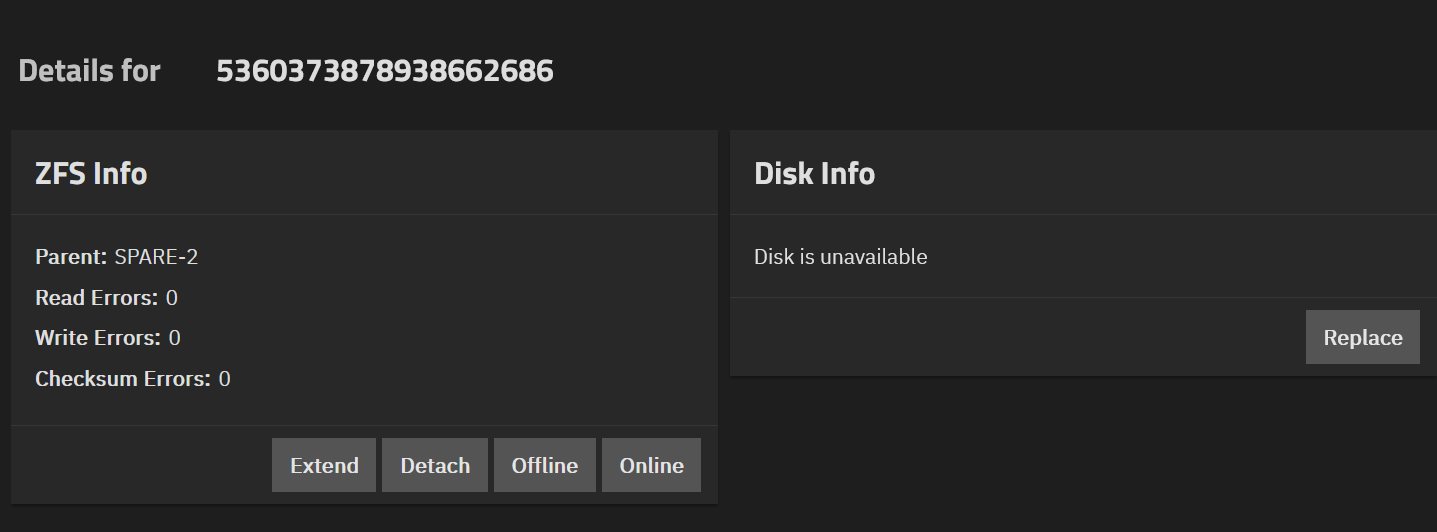
Attempting to replace the disk now. Wish me luck!
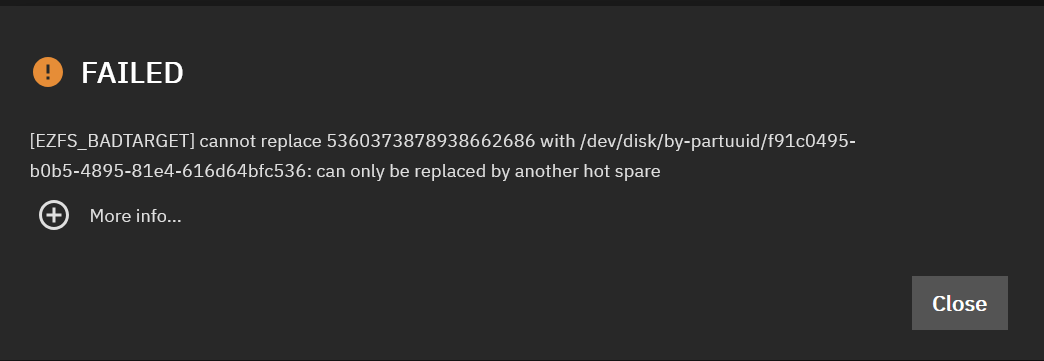
I guess you could try to make the new drive a hot spare. Maybe sleep on it.
I think what happened here is you had a z1 pool with a hot spare, a drive failed, the hot spare took over as it should have. The drive that failed was never replaced. Now the hot spare which became a regular drive either has failed or another drive has failed resulting in a second bad drive. The system is telling you this. In the statement it has no more hot spares to use. So at this point any other hiccup or failure an you will lose all data with no chnce of getting it back. So back up the data now and then read up on the docs about how to fix things when a hot spare is involved. There is a procedure for doing so.
1 Like
Looks like it’s toast. 3rd drive is pretty much dead, I can only copy small files off it successfully. It kinda sucks I can’t recover the data, but there’s nothing on it that I can’t replace. This was an experiment for me that lasted 2 years, on hardware that probably shouldn’t have lasted that long.
Appreciate all the help and advice everyone. Thanks!
Sorry to hear that.
If you continue down this road to use TrueNAS as a storage location, I would recommend you create a RAIDZ2 with 4 drives or a Mirror with 2 drives, no Spares, no Cache. Keep it simple. If you think you need a cache, double check what it does and does not do. Most people feel they need one and often it provides no benefit, and often slows a system down if not done properly (having the right hardware).
Good Luck
2 Likes