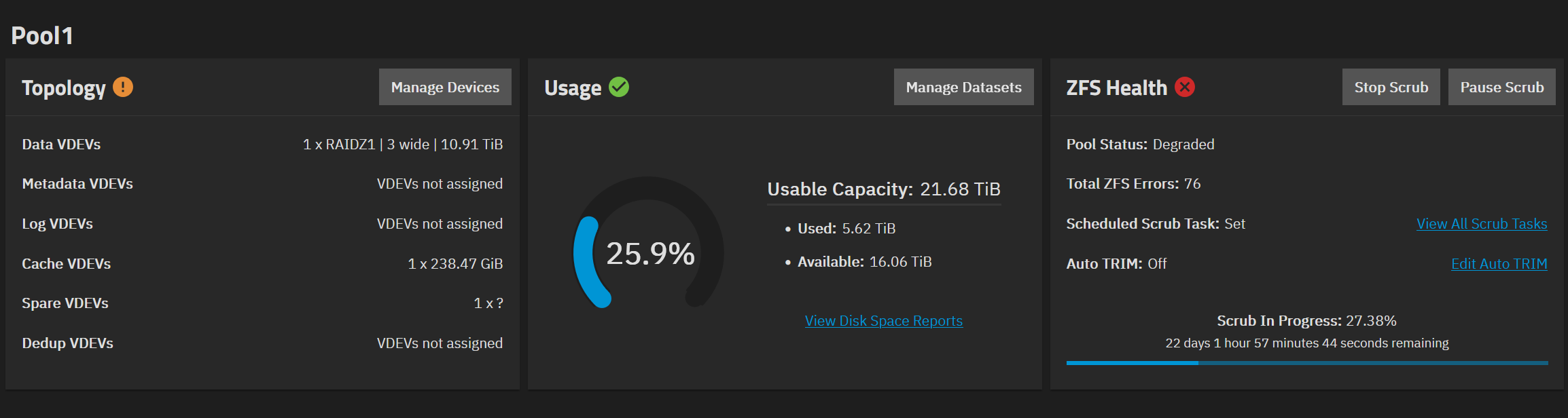
I have a Community Edition on version 25.04.2.6 built from an old Dell Precision workstation. I had a disk fail so I had to shut it down to replace the disk. After starting it back up pool1 is offline and in the storage dashboard I see the new unused disk and the existing disks are showing as “disks with exported pools”. Under Topology it says Pool1 contains offline VDEVs. I’m not really sure what to do from here and I really don’t want to lose the data.
Did you get an introductory email with info on completing a Tutorial by TrueNAS Bot? Do that first to get your forum trust level up so you can post links and screenshots.
Posting your full hardware and pool setup as it should have been may help. Post back using Preformatted text mode (</>) or Ctrl+e for the following commands, each in there own Preformatted text box. sudo zpool import sudo zpool status -v
pool: Pool1
    id: 11798155922245158619
 state: DEGRADED
status: One or more devices contains corrupted data.
action: The pool can be imported despite missing or damaged devices.  The
        fault tolerance of the pool may be compromised if imported.
   see: https://openzfs.github.io/openzfs-docs/msg/ZFS-8000-4J
config:

        Pool1                                       DEGRADED
          raidz1-0                                  DEGRADED
            b274b94f-10ab-4d8a-959c-efc1088cb656    ONLINE
            d7532070-9192-437c-8b29-7d68f6e7d083    ONLINE
            spare-2                                 UNAVAIL  insufficient replicas
              7f02e797-06ce-4887-ac8a-279ca34847be  UNAVAIL
              3485cd6a-3480-4bd2-8b5f-2f563abb8fe4  UNAVAIL
        cache
          4b16759f-7c61-423d-bd60-9401b6907503
        spares
          3485cd6a-3480-4bd2-8b5f-2f563abb8fe4
admin@LFTrueNAS[~]$ sudo zpool status -v
  pool: boot-pool
 state: ONLINE
  scan: scrub repaired 0B in 00:00:57 with 0 errors on Fri Mar 20 03:45:59 2026
config:

        NAME        STATE     READ WRITE CKSUM
        boot-pool   ONLINE       0     0     0
          sda3      ONLINE       0     0     0

errors: No known data errors
Any chance you pulled the wrong disk or knocked a cable loose? Generally (not always), if you have the spare ports & are able to leave faulted disks attached + attach new drive (as long as they aren’t causing additional issues or are completely dead), it can help resilvering.
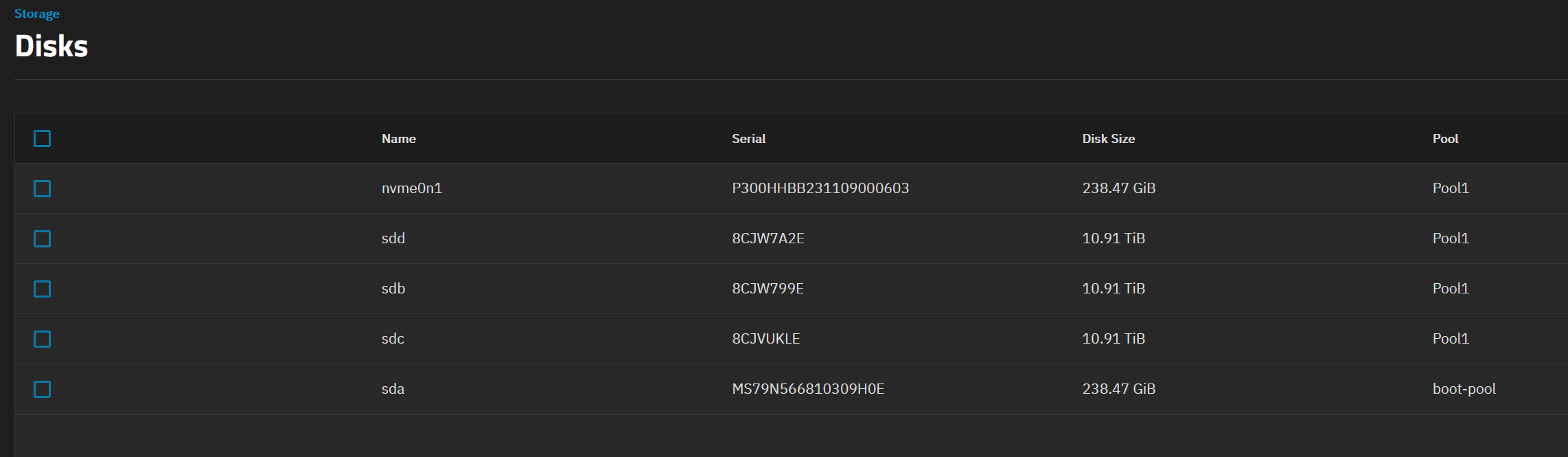
I double checked the connections before I put it back together, so I don’t think anything is loose, and I pulled the drive based on the serial number. This was the list of disks before I shut the system down.
I’m also a touch confused on why the drive was showing as a “spare” - was this actually a hot spare that was never added to the pool, but kicked in & kept it alive previously? How many drives total are there meant to in this pool - I hope three.
admin@LFTrueNAS[~]$ lsblk -o NAME,MODEL,SERIAL,PTTYPE,TYPE,SIZE,PARTTYPENAME,PARTUUID
NAME        MODEL                     SERIAL               PTTYPE TYPE   SIZE PARTTYPENAME             PARTUUID
loop1                                                             loop 366.8M
sda         ST12000NT001-3MD101       ZZ006XEL                    disk  10.9T
sdb         SK hynix SC311 SATA 256GB MS79N566810309H0E    gpt    disk 238.5G
├─sdb1                                                     gpt    part     1M BIOS boot                939209a7-abe3-4068-a6b4-287d97302b07
├─sdb2                                                     gpt    part   512M EFI System               1e5aec6c-f821-4be3-af34-64d6ec0c5f96
├─sdb3                                                     gpt    part   222G Solaris /usr & Apple ZFS c77c4669-2a80-4aab-872b-35aa6481b7f3
└─sdb4                                                     gpt    part    16G Linux swap               30fa62b1-8ccb-482f-ac36-cf345bb864d2
sdc         WDC WD121KRYZ-01W0RB0     8CJW7A2E             gpt    disk  10.9T
└─sdc1                                                     gpt    part  10.9T Solaris /usr & Apple ZFS b274b94f-10ab-4d8a-959c-efc1088cb656
sdd         WDC WD121KRYZ-01W0RB0     8CJW799E             gpt    disk  10.9T
└─sdd1                                                     gpt    part  10.9T Solaris /usr & Apple ZFS d7532070-9192-437c-8b29-7d68f6e7d083
nvme0n1     Patriot M.2 P300 256GB    P300HHBB231109000603 gpt    disk 238.5G
└─nvme0n1p1                                                gpt    part 238.5G Solaris /usr & Apple ZFS 4b16759f-7c61-423d-bd60-9401b6907503
After shutting down, reseating cables, and powering up again, The storage dashboard looks like this:
Now I’m not the ZFS expert however @Lunatic when you say you replaced the drive, can you be a bit clearer on exactly the steps you took. What I’m looking for is, did you use the GUI to replace the drive?
Also, it looks like you only have three physical HDDs, two are part of your pool (sdc and sdd) but sda is not part of your pool. I don’t know where you started from, did you have 4 HDDs installed and then removed 2?
Again, I’m not the ZFS expert but it looks like you need to REPLACE “spare-2” with the one available drive sda/sdb? It looks like your drive idents changed? Either way, use the unassigned 10TB drive.
Let someone else tell you what to do, but I think I’m on the right track. Maybe you did use the GUI?
No, the dead drive didn’t appear in the GUI at all.
There are 4 HDDs, before I replaced the dead one, the GUI showed 3.
I didn’t, it did that on it’s own. Though that message did seem to go away after the 2nd restart post drive change.
Currently waiting on it to stabilize after moving the missing drive to a different SATA connector. It’s almost unresponsive, so it’s taken a while to even be able to run shell commands.
admin@LFTrueNAS[~]$ sudo zpool status -v
[sudo] password for admin:
  pool: Pool1
 state: DEGRADED
status: One or more devices could not be used because the label is missing or
        invalid.  Sufficient replicas exist for the pool to continue
        functioning in a degraded state.
action: Replace the device using 'zpool replace'.
   see: https://openzfs.github.io/openzfs-docs/msg/ZFS-8000-4J
  scan: scrub in progress since Sun Mar 15 00:00:15 2026
        2.72T / 8.43T scanned at 74.4M/s, 2.30T / 8.43T issued
        1.16M repaired, 27.28% done, no estimated completion time
config:

        NAME                                        STATE     READ WRITE CKSUM
        Pool1                                       DEGRADED     0     0     0
          raidz1-0                                  DEGRADED    65     0     0
            b274b94f-10ab-4d8a-959c-efc1088cb656    DEGRADED    98     0     0  too many errors
            d7532070-9192-437c-8b29-7d68f6e7d083    ONLINE       0     0     0  (repairing)
            spare-2                                 UNAVAIL      0     0     0  insufficient replicas
              11282278677688116273                  UNAVAIL      0     0     0  was /dev/disk/by-partuuid/7f02e797-06ce-4887-ac8a-279ca34847be
              3485cd6a-3480-4bd2-8b5f-2f563abb8fe4  REMOVED      0     0     0
        cache
          4b16759f-7c61-423d-bd60-9401b6907503      ONLINE       0     0     0
        spares
          3485cd6a-3480-4bd2-8b5f-2f563abb8fe4      UNAVAIL

errors: No known data errors

  pool: boot-pool
 state: ONLINE
  scan: scrub repaired 0B in 00:00:57 with 0 errors on Fri Mar 20 03:45:59 2026
config:

        NAME        STATE     READ WRITE CKSUM
        boot-pool   ONLINE       0     0     0
          sda3      ONLINE       0     0     0

errors: No known data errors
Still looks like it isn’t seeing the drive.
admin@LFTrueNAS[~]$ lsblk -o NAME,MODEL,SERIAL,PTTYPE,TYPE,SIZE,PARTTYPENAME,PARTUUID
NAME        MODEL                     SERIAL               PTTYPE TYPE   SIZE PARTTYPENAME             PARTUUID
loop1                                                             loop 366.8M
sda         SK hynix SC311 SATA 256GB MS79N566810309H0E    gpt    disk 238.5G
├─sda1                                                     gpt    part     1M BIOS boot                939209a7-abe3-4068-a6b4-287d97302b07
├─sda2                                                     gpt    part   512M EFI System               1e5aec6c-f821-4be3-af34-64d6ec0c5f96
├─sda3                                                     gpt    part   222G Solaris /usr & Apple ZFS c77c4669-2a80-4aab-872b-35aa6481b7f3
└─sda4                                                     gpt    part    16G Linux swap               30fa62b1-8ccb-482f-ac36-cf345bb864d2
sdb         WDC WD121KRYZ-01W0RB0     8CJW7A2E             gpt    disk  10.9T
└─sdb1                                                     gpt    part  10.9T Solaris /usr & Apple ZFS b274b94f-10ab-4d8a-959c-efc1088cb656
sdc         WDC WD121KRYZ-01W0RB0     8CJW799E             gpt    disk  10.9T
└─sdc1                                                     gpt    part  10.9T Solaris /usr & Apple ZFS d7532070-9192-437c-8b29-7d68f6e7d083
sdd         ST12000NT001-3MD101       ZZ006XEL                    disk  10.9T
nvme0n1     Patriot M.2 P300 256GB    P300HHBB231109000603 gpt    disk 238.5G
└─nvme0n1p1                                                gpt    part 238.5G Solaris /usr & Apple ZFS 4b16759f-7c61-423d-bd60-9401b6907503
It look like neither one of the drives listed as “spare” are there, according to the lsblk data, and drive sdd now is not assigned to any pool.
You need to REPLACE the spare2 drive.
Try this: (all based on your last lsblk output)
In the TrueNAS GUI Select → Storage → Manage Devices → Click on the dropdown to expand the list of assigned drives.
What does this show?
If you see more than drives sdb, sdc, nvme0n1 (based on your last lsblk output) then those extra drives I think you should click on it, then select REPLACE if it is available. Then select your new drive sdd.
If this doesn’t work, post the screen capture of this so we can see. What I fear is you will need to manually replace the drive via CLI. It isn’t difficult, I just prefer the GUI if it works.
Let us know.
P.S. Do you have a backup of any important data? I’ve been all over the place this morning so I don’t recall if you stated this.
Thankfully this NAS isn’t hosting anything critical. I won’t be happy if I lose it, but it’s also not the end of the world. I set this up because I was given a bunch of free hardware and I wanted to play around with TrueNAS.