Help with ZFS errors

Had a corrupt boot cause issues a few days ago. Resulted in me almost losing the entirety of a pool (WD). I was able to eventually mount it in a read only state and pull most my data off. Formatted and put the 2 drives back in as a new pool with the same name. Now as I am moving stuff around, I get the warning in the first screenshot. This is very similar to what happened when I first had the boot drive fail (but in my zpool status, the boot pool currently has no errors this time). Can anyone tell me what i should do to figure out what is causing this instability? Or am I building a mountain out of a molehill?
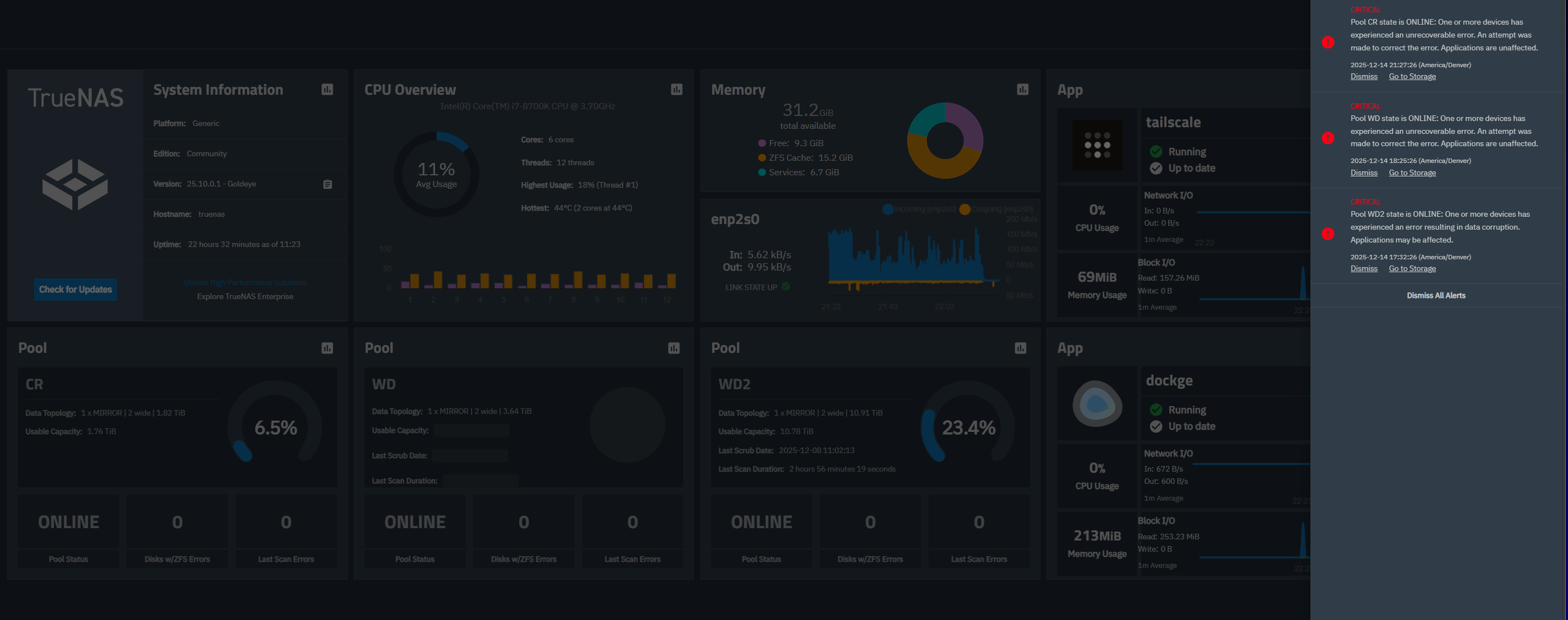
truenas% sudo zpool status -v
[sudo] password for admin:

pool: CR
state: ONLINE
status: One or more devices has experienced an unrecoverable error.  An
attempt was made to correct the error.  Applications are unaffected.
action: Determine if the device needs to be replaced, and clear the errors
using ‘zpool clear’ or replace the device with ‘zpool replace’.
see: https://openzfs.github.io/openzfs-docs/msg/ZFS-8000-9P
scan: scrub repaired 8K in 00:06:43 with 0 errors on Sun Dec 14 23:24:52 2025
config:

    NAME                                      STATE     READ WRITE CKSUM
    CR                                        ONLINE       0     0     0
      mirror-0                                ONLINE       0     0     0
        7e904bf2-f8a3-4953-8c4e-e93afebe0a70  ONLINE       0     0     0
        41075690-7836-4d9f-8529-54d2cd987330  ONLINE       0     0     2


errors: No known data errors

pool: WD
state: ONLINE
status: One or more devices has experienced an unrecoverable error.  An
attempt was made to correct the error.  Applications are unaffected.
action: Determine if the device needs to be replaced, and clear the errors
using ‘zpool clear’ or replace the device with ‘zpool replace’.
see: https://openzfs.github.io/openzfs-docs/msg/ZFS-8000-9P
config:

    NAME                                      STATE     READ WRITE CKSUM
    WD                                        ONLINE       0     0     0
      mirror-0                                ONLINE       0     0     0
        91a9fd05-5e24-4382-8358-08edb2665532  ONLINE       0     0     1
        c0c3d4f7-260f-44f3-b371-d23a5cabd39c  ONLINE       0     0     1

errors: No known data errors

pool: WD2
state: ONLINE
status: One or more devices has experienced an error resulting in data
corruption.  Applications may be affected.
action: Restore the file in question if possible.  Otherwise restore the
entire pool from backup.
see: https://openzfs.github.io/openzfs-docs/msg/ZFS-8000-8A
scan: scrub repaired 0B in 02:56:19 with 0 errors on Mon Dec  8 12:02:13 2025
config:


    NAME                                      STATE     READ WRITE CKSUM
    WD2                                       ONLINE       0     0     0
      mirror-0                                ONLINE       0     0     0
        2d1ed786-7f02-4830-8b14-3302b6da3738  ONLINE       0     0    15
        f10747ca-d7c6-482b-9ffc-7f6ddf8ae271  ONLINE       0     0    14

errors: Permanent errors have been detected in the following files:

    /mnt/WD2/WD2/Data/Media/TV Shows/1
    /mnt/WD2/WD2/Data/Media/TV Shows/2
    /mnt/WD2/WD2/Data/Media/Movies/1
    /mnt/WD2/WD2/Data/Media/Movies/2


pool: boot-pool
state: ONLINE
config:

    NAME         STATE     READ WRITE CKSUM
    boot-pool    ONLINE       0     0     0
      nvme0n1p3  ONLINE       0     0     0

errors: No known data errors
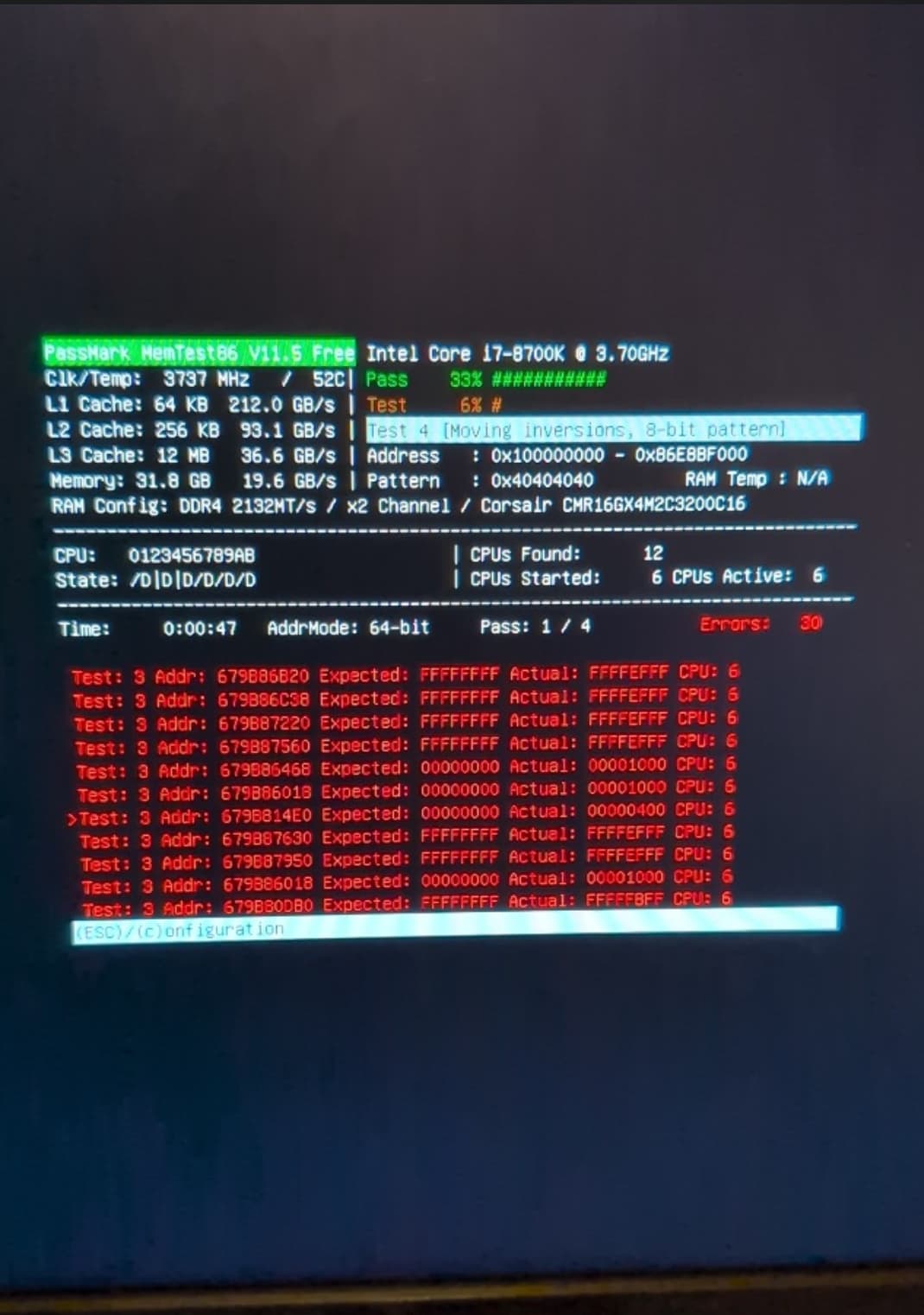
I find it pretty strange that you have 5 drives that expirience checksum errors, since I doubt this is the drives acting up.

That is why I would check PSU, HBA, RAM.

Why did you almost lost the pool because of that? When I upgraded from CORE to SCALE, I wiped the boot pool (just a single disk), installed SCALE.
Then I reimported my settings. After that I just reimported my pools.
ZFS pools are mobile and you should be able to import them everywhere, even a totally new system.

My vote here is just a simple question: Are your drives SMR? That makes sense to me with having so many issues.

1 Like

I could be falling into a correlation vs causation trap, but everything was totally fine until 2 things were changed.

  1. I added in the two 12tb drives
  2. After adding the drives, truenas gave me a warning about my m.2 nvme boot drive experiencing an error.

Shortly after that, I experienced this nearly exact sequence of events where all my pools started showing as unhealthy and filled with errors. After a few reboots where I tried to pull as much data as I could, eventually truenas stopped rebooting and I had to reinstall truenas onto that nvme drive. Once that was done I was still unable to boot and I figured out the WD pool was causing a kernal panic.

My gaming pc uses the exact same power supply so I switched them. Too early to tell if that “fixed” anything but my gaming pc has a brand new rx 9700 xt and the psu from my NAS is handling it just fine. I don’t have an HBA. These drives are plugged directly into the sata ports on my Z370 mobo.

Any tips on the best way to evaluate if my ram is contributing to this issue? I think that may be a logical answer as my other suspicion is these errors are only occurring during data transfers and my very limited knowledge tells me that all these files pass through the ram first before arriving at their destination.

Would the SMR vs CMR issue explain why my SSD pool is saying “pool is not healthy”?

No - not unless you added the SMR drive to the SSD pool by mistake. Might be a good idea to get the smartctl readout for the sdd pool…

I’m guessing the corruption is spreading? All my docker files are on the ssd pool and when I got home I noticed jellyfin was exited. Trying to spin it back up I get this:

[+] Running 0/1
⠋ Container jellyfin Starting 0.0s
Error response from daemon: failed to create task for container: failed to start shim: start failed: panic: runtime error: invalid memory address or nil pointer dereference
[signal SIGSEGV: segmentation violation code=0x1 addr=0x0 pc=0x477d0c]

goroutine 1 [running]:
google.golang.org/protobuf/internal/impl.fieldInfoForScalar({0xbe6ba8, 0xc000198808}, {{0xa4ab68, 0x0}, {0x0, 0x0}, {0xbe7380, 0xa86740}, {0xa4ab77, 0x7e}, …}, …)
/go/src/github.com/containerd/containerd/vendor/google.golang.org/protobuf/internal/impl/message_reflect_field.go:273 +0x1cf
google.golang.org/protobuf/internal/impl.(*MessageInfo).makeKnownFieldsFunc(0xc0000dda48, {0x8, {0xbe7380, 0x9d8900}, 0xffffffffffffffff, {0x0, 0x0}, 0x10, {0xbe7380, 0x9ccc40}, …})
/go/src/github.com/containerd/containerd/vendor/google.golang.org/protobuf/internal/impl/message_reflect.go:80 +0x78a
google.golang.org/protobuf/internal/impl.(*MessageInfo).makeReflectFuncs(0xc0000dda48, {0xbe7380, 0xaa9fe0}, {0x8, {0xbe7380, 0x9d8900}, 0xffffffffffffffff, {0x0, 0x0}, 0x10, …})
/go/src/github.com/containerd/containerd/vendor/google.golang.org/protobuf/internal/impl/message_reflect.go:42 +0x58

google.golang.org/protobuf/internal/impl.(*MessageInfo).initOnce(0xc0000dda48)

/go/src/github.com/containerd/containerd/vendor/google.golang.org/protobuf/internal/impl/message.go:90 +0x1b0

google.golang.org/protobuf/internal/impl.(*MessageInfo).init(...)

/go/src/github.com/containerd/containerd/vendor/google.golang.org/protobuf/internal/impl/message.go:72

google.golang.org/protobuf/internal/impl.(*messageState).ProtoMethods(0xbd7c60?)

/go/src/github.com/containerd/containerd/vendor/google.golang.org/protobuf/internal/impl/message_reflect_gen.go:31 +0x2e

google.golang.org/protobuf/proto.protoMethods(...)

/go/src/github.com/containerd/containerd/vendor/google.golang.org/protobuf/proto/proto_methods.go:19
google.golang.org/protobuf/proto.UnmarshalOptions.unmarshal({{}, 0x1, 0x1, 0x0, {0xbda070, 0xc0000967e0}, 0x2710}, {0xff59c0, 0x63, 0x63}, …)
/go/src/github.com/containerd/containerd/vendor/google.golang.org/protobuf/proto/decode.go:95 +0xe2
google.golang.org/protobuf/proto.Unmarshal({0xff59c0, 0x63, 0x63}, {0xbd7c60?, 0x1055b80?})
/go/src/github.com/containerd/containerd/vendor/google.golang.org/protobuf/proto/decode.go:57 +0x5d

google.golang.org/protobuf/reflect/protodesc.init.0()

/go/src/github.com/containerd/containerd/vendor/google.golang.org/protobuf/reflect/protodesc/editions.go:25 +0x3a
: exit status 2

Pumped that into google gemini and it suspects I have corrupted containerd metadata and moby is corrupt. (I wish I was knowledgeable enough to know whether or not that is helpful or true.)

smartctl 7.4 2023-08-01 r5530 [x86_64-linux-6.12.33-production+truenas] (local build)
Copyright (C) 2002-23, Bruce Allen, Christian Franke, www.smartmontools.org

=== START OF INFORMATION SECTION ===
Model Family: Crucial/Micron Client SSDs
Device Model: CT2000MX500SSD1
Serial Number: 2406E895E211
LU WWN Device Id: 5 00a075 1e895e211
Firmware Version: M3CR046
User Capacity: 2,000,398,934,016 bytes \[2.00 TB\]
Sector Sizes: 512 bytes logical, 4096 bytes physical
Rotation Rate: Solid State Device
Form Factor: 2.5 inches
TRIM Command: Available
Device is: In smartctl database 7.3/5528
ATA Version is: ACS-3 T13/2161-D revision 5
SATA Version is: SATA 3.3, 6.0 Gb/s (current: 6.0 Gb/s)
Local Time is: Mon Dec 15 20:49:52 2025 MST
SMART support is: Available - device has SMART capability.
SMART support is: Enabled

=== START OF READ SMART DATA SECTION ===
SMART overall-health self-assessment test result: PASSED

General SMART Values:
Offline data collection status: (0x80) Offline data collection activity
was never started.
Auto Offline Data Collection: Enabled.
Self-test execution status: ( 0) The previous self-test routine completed
without error or no self-test has ever
been run.
Total time to complete Offline
data collection: ( 0) seconds.
Offline data collection
capabilities: (0x7b) SMART execute Offline immediate.
Auto Offline data collection on/off support.
Suspend Offline collection upon new
command.
Offline surface scan supported.
Self-test supported.
Conveyance Self-test supported.
Selective Self-test supported.
SMART capabilities: (0x0003) Saves SMART data before entering
power-saving mode.
Supports SMART auto save timer.
Error logging capability: (0x01) Error logging supported.
General Purpose Logging supported.
Short self-test routine
recommended polling time: ( 2) minutes.
Extended self-test routine
recommended polling time: ( 30) minutes.
Conveyance self-test routine
recommended polling time: ( 2) minutes.
SCT capabilities: (0x0031) SCT Status supported.
SCT Feature Control supported.
SCT Data Table supported.

SMART Attributes Data Structure revision number: 16
Vendor Specific SMART Attributes with Thresholds:
ID# ATTRIBUTE_NAME FLAG VALUE WORST THRESH TYPE UPDATED WHEN_FAILED RAW_VALUE
1 Raw_Read_Error_Rate 0x002f 100 100 000 Pre-fail Always - 0
5 Reallocate_NAND_Blk_Cnt 0x0032 100 100 010 Old_age Always - 0
9 Power_On_Hours 0x0032 100 100 000 Old_age Always - 15737
12 Power_Cycle_Count 0x0032 100 100 000 Old_age Always - 229
171 Program_Fail_Count 0x0032 100 100 000 Old_age Always - 0
172 Erase_Fail_Count 0x0032 100 100 000 Old_age Always - 0
173 Ave_Block-Erase_Count 0x0032 087 087 000 Old_age Always - 135
174 Unexpect_Power_Loss_Ct 0x0032 100 100 000 Old_age Always - 54
180 Unused_Reserve_NAND_Blk 0x0033 000 000 000 Pre-fail Always - 101
183 SATA_Interfac_Downshift 0x0032 100 100 000 Old_age Always - 0
184 Error_Correction_Count 0x0032 100 100 000 Old_age Always - 0
187 Reported_Uncorrect 0x0032 100 100 000 Old_age Always - 0
194 Temperature_Celsius 0x0022 066 043 000 Old_age Always - 34 (Min/Max 13/57)
196 Reallocated_Event_Count 0x0032 100 100 000 Old_age Always - 0
197 Current_Pending_ECC_Cnt 0x0032 100 100 000 Old_age Always - 0
198 Offline_Uncorrectable 0x0030 100 100 000 Old_age Offline - 0
199 UDMA_CRC_Error_Count 0x0032 100 100 000 Old_age Always - 2
202 Percent_Lifetime_Remain 0x0030 087 087 001 Old_age Offline - 13
206 Write_Error_Rate 0x000e 100 100 000 Old_age Always - 0
210 Success_RAIN_Recov_Cnt 0x0032 100 100 000 Old_age Always - 0
246 Total_LBAs_Written 0x0032 100 100 000 Old_age Always - 57550471336
247 Host_Program_Page_Count 0x0032 100 100 000 Old_age Always - 648639074
248 FTL_Program_Page_Count 0x0032 100 100 000 Old_age Always - 3107222189

SMART Error Log Version: 1
No Errors Logged

SMART Self-test log structure revision number 1
No self-tests have been logged. \[To run self-tests, use: smartctl -t\]

SMART Selective self-test log data structure revision number 1
SPAN MIN_LBA MAX_LBA CURRENT_TEST_STATUS
1 0 0 Not_testing
2 0 0 Not_testing
3 0 0 Not_testing
4 0 0 Not_testing
5 0 0 Completed \[00% left\] (0-65535)
Selective self-test flags (0x0):
After scanning selected spans, do NOT read-scan remainder of disk.
If Selective self-test is pending on power-up, resume after 0 minute delay.

The above only provides legacy SMART information - try ‘smartctl -x’ for more

truenas% sudo smartctl -a /dev/sde
smartctl 7.4 2023-08-01 r5530 [x86_64-linux-6.12.33-production+truenas] (local build)
Copyright (C) 2002-23, Bruce Allen, Christian Franke, www.smartmontools.org

=== START OF INFORMATION SECTION ===
Model Family: Crucial/Micron Client SSDs
Device Model: CT2000MX500SSD1
Serial Number: 2406E895E0F3
LU WWN Device Id: 5 00a075 1e895e0f3
Firmware Version: M3CR046
User Capacity: 2,000,398,934,016 bytes \[2.00 TB\]
Sector Sizes: 512 bytes logical, 4096 bytes physical
Rotation Rate: Solid State Device
Form Factor: 2.5 inches
TRIM Command: Available
Device is: In smartctl database 7.3/5528
ATA Version is: ACS-3 T13/2161-D revision 5
SATA Version is: SATA 3.3, 6.0 Gb/s (current: 6.0 Gb/s)
Local Time is: Mon Dec 15 20:50:19 2025 MST
SMART support is: Available - device has SMART capability.
SMART support is: Enabled

=== START OF READ SMART DATA SECTION ===
SMART overall-health self-assessment test result: PASSED

General SMART Values:
Offline data collection status: (0x80) Offline data collection activity
was never started.
Auto Offline Data Collection: Enabled.
Self-test execution status: ( 0) The previous self-test routine completed
without error or no self-test has ever
been run.
Total time to complete Offline
data collection: ( 0) seconds.
Offline data collection
capabilities: (0x7b) SMART execute Offline immediate.
Auto Offline data collection on/off support.
Suspend Offline collection upon new
command.
Offline surface scan supported.
Self-test supported.
Conveyance Self-test supported.
Selective Self-test supported.
SMART capabilities: (0x0003) Saves SMART data before entering
power-saving mode.
Supports SMART auto save timer.
Error logging capability: (0x01) Error logging supported.
General Purpose Logging supported.
Short self-test routine
recommended polling time: ( 2) minutes.
Extended self-test routine
recommended polling time: ( 30) minutes.
Conveyance self-test routine
recommended polling time: ( 2) minutes.
SCT capabilities: (0x0031) SCT Status supported.
SCT Feature Control supported.
SCT Data Table supported.

SMART Attributes Data Structure revision number: 16
Vendor Specific SMART Attributes with Thresholds:
ID# ATTRIBUTE_NAME FLAG VALUE WORST THRESH TYPE UPDATED WHEN_FAILED RAW_VALUE
1 Raw_Read_Error_Rate 0x002f 100 100 000 Pre-fail Always - 0
5 Reallocate_NAND_Blk_Cnt 0x0032 100 100 010 Old_age Always - 0
9 Power_On_Hours 0x0032 100 100 000 Old_age Always - 15656
12 Power_Cycle_Count 0x0032 100 100 000 Old_age Always - 229
171 Program_Fail_Count 0x0032 100 100 000 Old_age Always - 0
172 Erase_Fail_Count 0x0032 100 100 000 Old_age Always - 0
173 Ave_Block-Erase_Count 0x0032 088 088 000 Old_age Always - 129
174 Unexpect_Power_Loss_Ct 0x0032 100 100 000 Old_age Always - 53
180 Unused_Reserve_NAND_Blk 0x0033 000 000 000 Pre-fail Always - 137
183 SATA_Interfac_Downshift 0x0032 100 100 000 Old_age Always - 0
184 Error_Correction_Count 0x0032 100 100 000 Old_age Always - 0
187 Reported_Uncorrect 0x0032 100 100 000 Old_age Always - 0
194 Temperature_Celsius 0x0022 068 047 000 Old_age Always - 32 (Min/Max 13/53)
196 Reallocated_Event_Count 0x0032 100 100 000 Old_age Always - 0
197 Current_Pending_ECC_Cnt 0x0032 100 100 000 Old_age Always - 0
198 Offline_Uncorrectable 0x0030 100 100 000 Old_age Offline - 0
199 UDMA_CRC_Error_Count 0x0032 100 100 000 Old_age Always - 1
202 Percent_Lifetime_Remain 0x0030 088 088 001 Old_age Offline - 12
206 Write_Error_Rate 0x000e 100 100 000 Old_age Always - 0
210 Success_RAIN_Recov_Cnt 0x0032 100 100 000 Old_age Always - 0
246 Total_LBAs_Written 0x0032 100 100 000 Old_age Always - 57550490203
247 Host_Program_Page_Count 0x0032 100 100 000 Old_age Always - 648623222
248 FTL_Program_Page_Count 0x0032 100 100 000 Old_age Always - 3027358864

SMART Error Log Version: 1
No Errors Logged

SMART Self-test log structure revision number 1
No self-tests have been logged. \[To run self-tests, use: smartctl -t\]

SMART Selective self-test log data structure revision number 1
SPAN MIN_LBA MAX_LBA CURRENT_TEST_STATUS
1 0 0 Not_testing
2 0 0 Not_testing
3 0 0 Not_testing
4 0 0 Not_testing
5 0 0 Completed \[00% left\] (0-65535)
Selective self-test flags (0x0):
After scanning selected spans, do NOT read-scan remainder of disk.
If Selective self-test is pending on power-up, resume after 0 minute delay.

The above only provides legacy SMART information - try ‘smartctl -x’ for more

Some CRC errors… Have you checked/reseated the sata & power connections? If you’re lucky it is that simple (sometimes swap sata data cable for something shorter/better quality).

Drives are connected directly to motherboard… Gonna guess TrueNAS is bare metal & not on a hypervisor.

Given the age of Z370 any chance chipset is overheating? Thats where my mind is going given how many drives having issues at same time.

memtest86+ or something like that form a Linux boot iso.
I would get an Ubuntu live iso, set BIOS to legacy, disable secure boot, and then boot from the iso, select memtest86+ as start option.

3 Likes

My quick take on the overall issues I see:

  1. You are not running any SMART tests on your drives. I recommend you run a SMART Long test on each drive, verify it passes on all drives.

  2. As @Sara stated, run Memtest86+, run it for 5 complete passes. Some errors take a while to show up, and hopefully by the 5th pass it does if you have a questionable RAM issue. Then run a CPU Stress Test like Prime95 for 4 hours or longer. You must ensure your system is stable, this kind of thing can cause serious problems.

  3. While the SMR drives may not be directly impacting your other pools, it could be causing slowdowns as the computer tries to write data to the pool but has to wait. I don’t think it is causing the SSD pool issues however stranger things have happened so I would not rule it out as a possibility, I just think it is a slim possibility.

2 Likes

Joeschmuck, Sara, Fleshmauler. Thank you. I will report back after I perform these tests. Thank you for all the help and advice rendered.

1 Like

If you have questions, please ask, but if they seem sort of generic, try a Google search for “truenas scale” and add in any error message you get or something related to your question. There is a lot of help out there. But also, you can feel free to just ask us, we help people but if we can teach you to fish…

Good luck on the stability testing.

If you find that your RAM is failing, you can try to underclock it a tiny bit, if you are comfortable doing that, then retest. If you find a place that passes, write down the BIOS changes you made as you may need to restore it in the future. Also, run Memtest86+ for a long time to ensure the RAM failure is gone. Long time to me is 1 week. That is a lot of testing but it is your data. While ZFS is a great file system and will protect your data from corruption while it is stored on the pool, it can’t help the data if it was written to the drive corrupt. So, a good stable system is required.


Pulled out 2 ram sticks and I’m running memtest again. 2 hours in and no errors so far. Now I need another ram kit to test those slots to see if the ram was bad or if it is the slots.

May be it could be some dust at the slots as well. I have seen this kind of issue before. Try cleaning the ram slots with clean air (mild air pump - like the ones used with camera lenses).

Hope this helps, and you get to start a real happy new year…!

You cannot reconfigure your RAM? You said 2 sticks pulled, does that mean you have two sticks installed?

Recommended testing:

  1. After your current RAM have passed 5 complete test cycles (looks like you may think 4 is enough), then remove your RAM sticks that are installed, remember which slots each one was in.
  2. Install the two sticks you pulled in the same slots where you pull the current sticks from.
  3. Retest 5 times, or unless an error occurs.
  4. If an error occurs then you can expect one of the sitch installed to be bad.
  5. If you can run your motherboard on a single stick, remove the one stick you don’t need in the system and test.
  6. If it passes 5 complete test cycles, remove it and install the other suspect stick and retest.

Doing this will help you diagnose the issue without purchasing another stick of RAM.