I’ve recently acquired two Microserver G8 and upgraded them with Xeon 1265 and 16GB of RAM (the max they can have).
I’ve created a pretty large NAS - 4 x 14TB - which I appreciate is beyond the recommended RAM/Storage ratio. My Network is only 1Gbps and they are going to be used as basic, single-user storage NAS though so I am being optimistic.
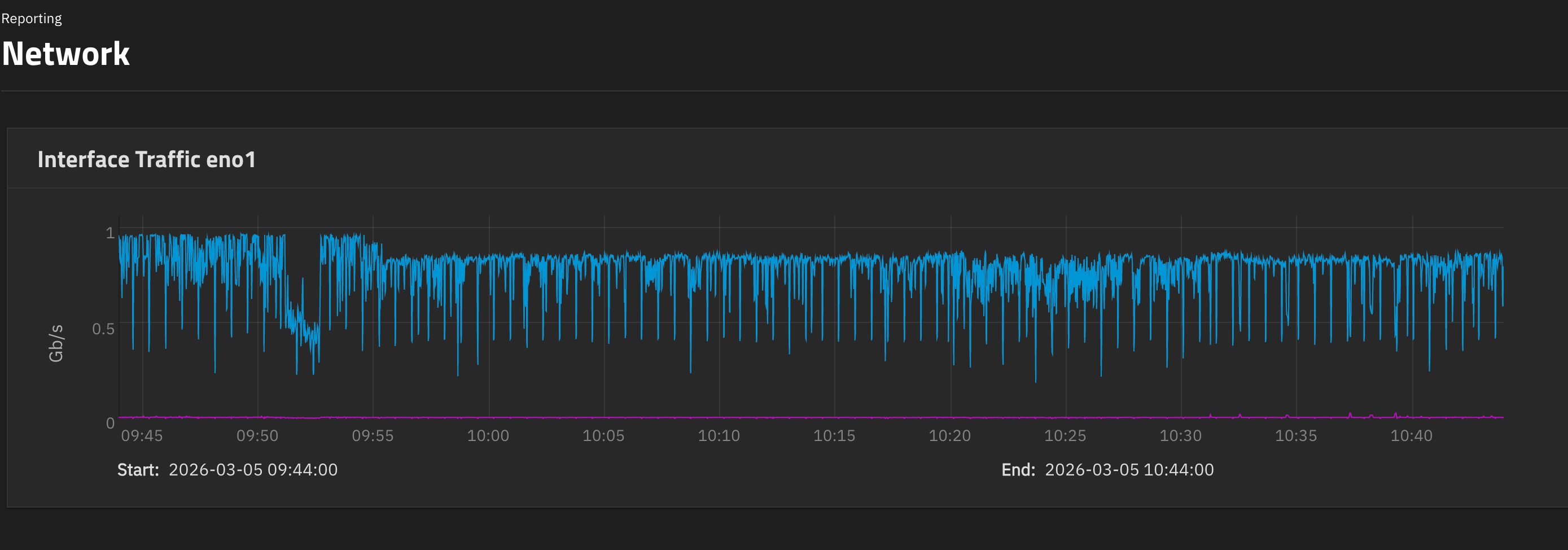
After RSync’ing my old NAS to the new one, I’ve copied some content from an external SSD this morning and I see this little step in incoming speed.
It seems to be consistent, that is, it stays there and won’t go up anymore.
The CPU on the G8 is running at 10% on average. The files are coming from macOS. Files are mostly all video files so pretty large ones. I might have something else using the network but not 200Mbit/s. Also, it was able to saturate the bandwidth at the beginning of the transfer.
Drives don’t seem to show a change in their behaviour. The little drop at 9:52 was probably me using the network for something else for a few minutes.
Any pointers on how to troubleshoot this sudden drop in speed?
What do you mean by external SSD ? How was this SSD connected to Truenas ? Or was it connected to the Mac ?
Whats your Pool layout for the 4 drives ?
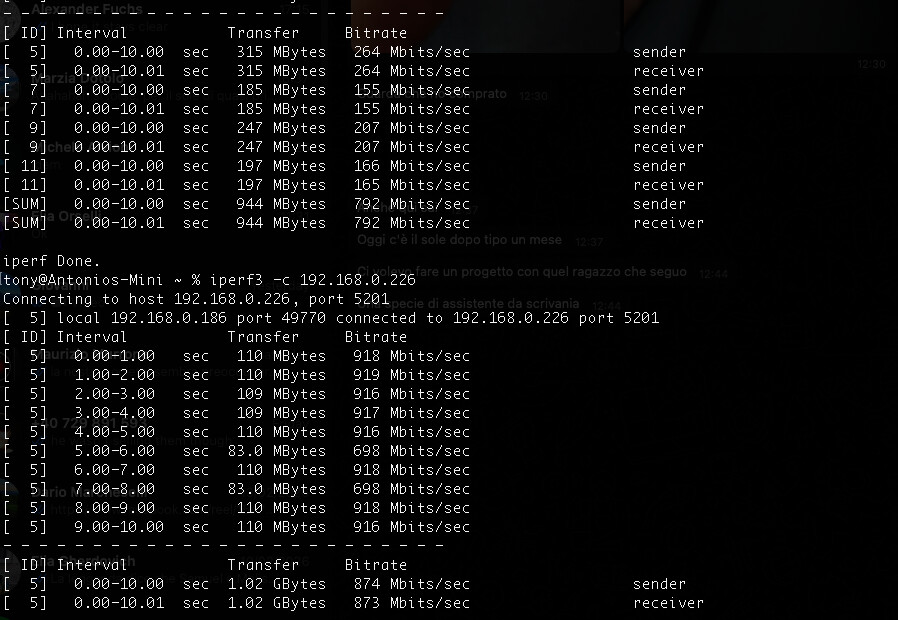
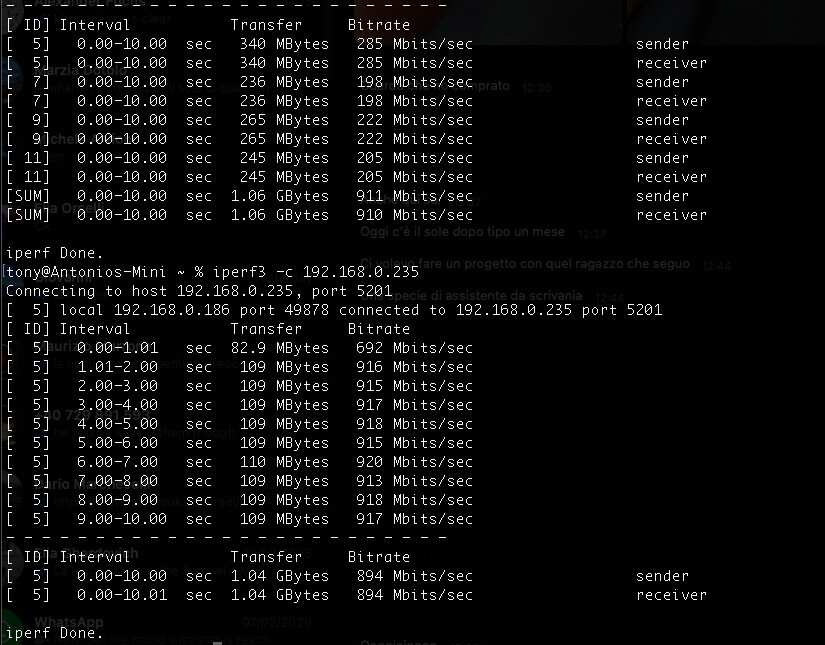
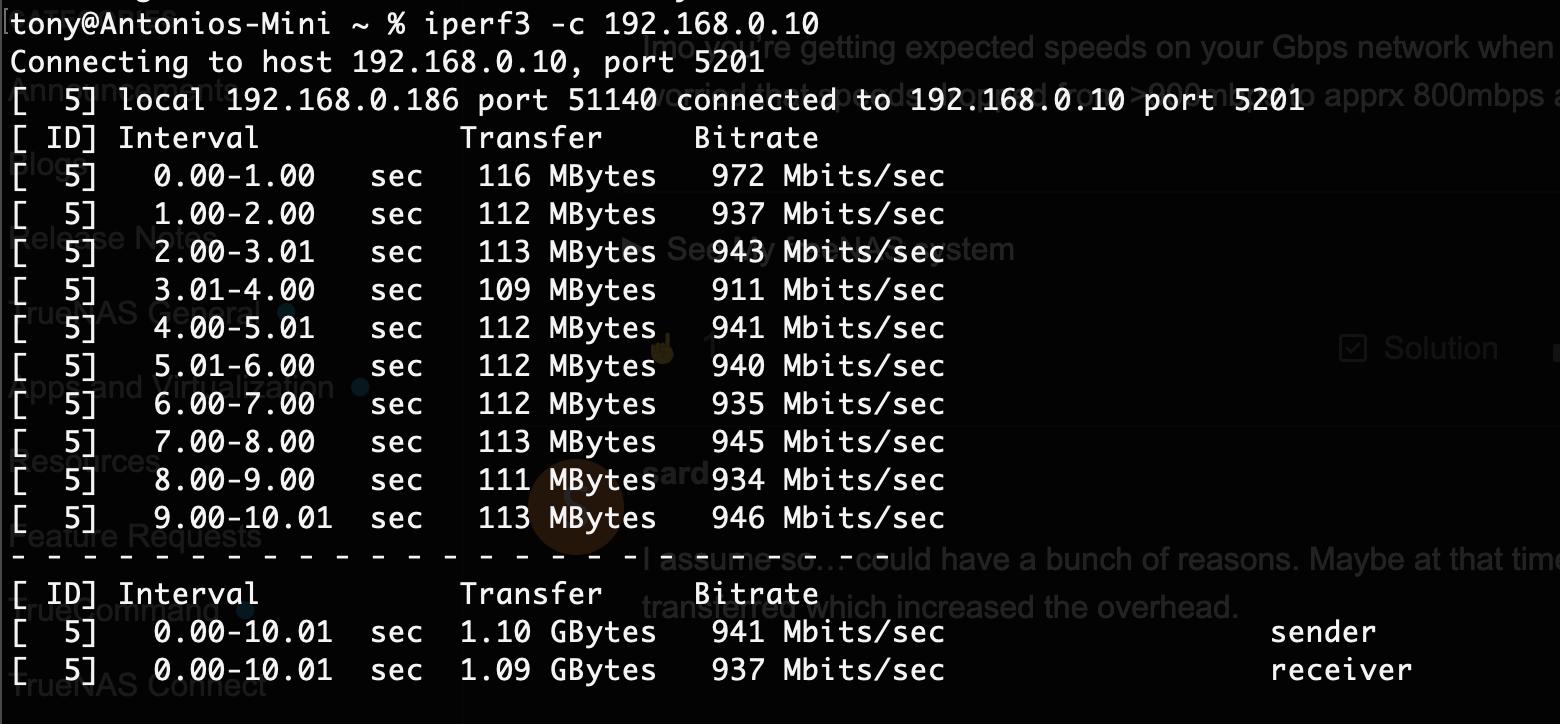
I would first use iperf3 to test the max possible networt speed. Iperf3 is available though the command line and there exists afaik also a macos version.
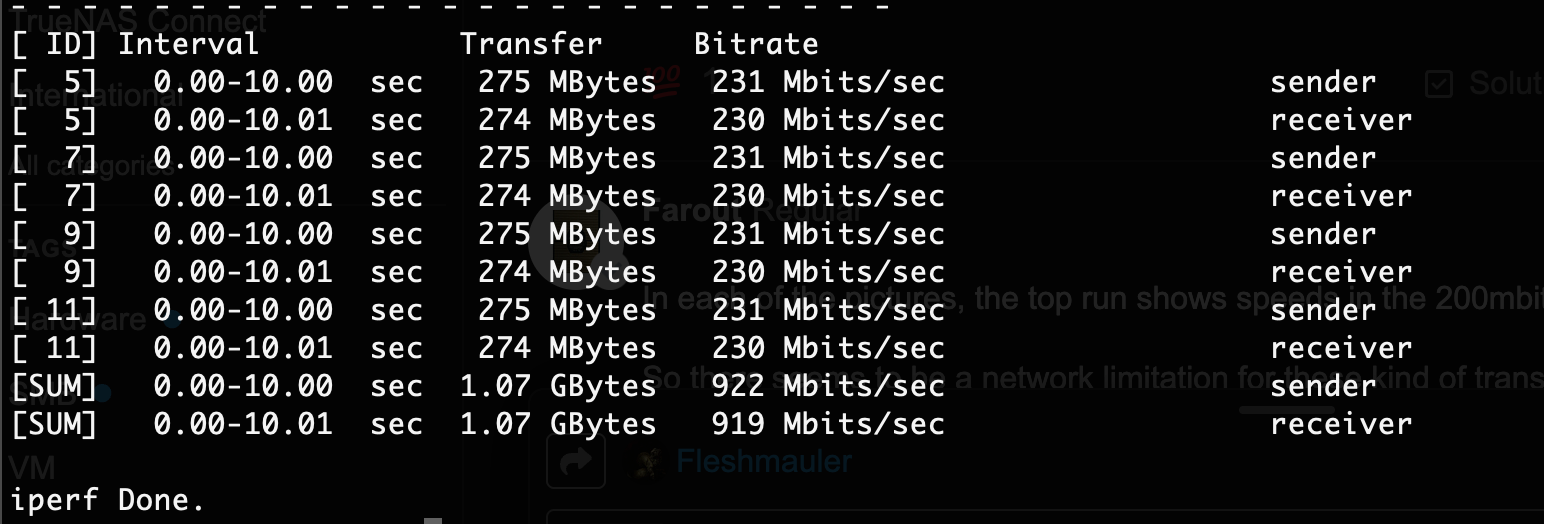
Seems to be at close to 900mbps, looking good from a purely networking perspective imo if you’re using 1gig.
I’m confused on what the issue is - interface is in Gigabits per second & it is reasonably close to 1. Then you have disk io for sda at ~100 Mebibytes/s, which is roughly ~800Mb/s. Which is reasonably close to a gig link.
Imo you’re getting expected speeds on your Gbps network when you factor in overhead. Are you worried that speeds dropped from >900mbps to apprx 800mbps after 9:55pm?
Are you worried that speeds dropped from >900mbps to apprx 800mbps after 9:55pm?
Yes and it didn’t recover from there
Maybe at that time a lot of small files were transferred which increased the overhead.
That was a video footage archive, 99% of the files were pretty large. And it seems that the box has been at max 800Mbps since that time
n each of the pictures, the top run shows speeds in the 200mbit/s range.
The servers are in an outbuilding and I know I had issues with network there before. Some adaptors can run 1Gbps perfectly, others will jump up and down a bit.
iperf3 seems to confirm that whatever issue there is, it’s a network issue and it’s nothing to do with TrueNAS
I’ve just checked on a different box which is sitting on a “more reliable” section of my network and speeds are more consistent. I’ll move the TrueNAS server there and see if things change - I suppose so.
I wired the outbuilding some time ago, I inadvertently went with an 35m UTP outdoor-rated cable but it’s always been a bit dodgy. It works, but some adaptors will go flat-out 1Gbps, some others will jump up and down a bit.
Back some time ago I tested whatever device was giving me issue and tested it with a good, long cable directly to my main switch in the house and it liked that. Since then, I changed some bits and it seemed to be more stable.
I’d imagine the signal is borderline. I have ordered a cat6a S/FTP which I hope will take care of the issue.
iperf3 is definitely the tool for diagnosing this issue - thanks for now!
you’re saying those periodic drops are not to be expected?
Temps are good, the boxes are in a cold-ish place. I’ve recently replaced all the thermal compound everywhere, the boxes are basically idle
Here are the last few days, not much I think. Do you see anything?
Mar  2 21:00:08 Truenas-Main netdata[2791]: CONFIG: cannot load cloud config '/var/lib/netdata/cloud.d/cloud.conf'. Running with internal defaults.
Mar  2 21:28:10 Truenas-Main kernel: usb 2-1: USB disconnect, device number 2
Mar  2 22:02:47 Truenas-Main kernel: usb 3-1.3: USB disconnect, device number 3
Mar  2 22:03:15 Truenas-Main kernel: usb 3-1.3: new high-speed USB device number 4 using ehci-pci
Mar  2 22:03:15 Truenas-Main kernel: usb 3-1.3: New USB device found, idVendor=0424, idProduct=2660, bcdDevice= 8.01
Mar  2 22:03:15 Truenas-Main kernel: usb 3-1.3: New USB device strings: Mfr=0, Product=0, SerialNumber=0
Mar  2 22:03:15 Truenas-Main kernel: hub 3-1.3:1.0: USB hub found
Mar  2 22:03:15 Truenas-Main kernel: hub 3-1.3:1.0: 2 ports detected
Mar  3 01:53:57 Truenas-Main kernel: perf: interrupt took too long (2507 > 2500), lowering kernel.perf_event_max_sample_rate to 79750
Mar  3 03:32:19 Truenas-Main kernel: perf: interrupt took too long (3142 > 3133), lowering kernel.perf_event_max_sample_rate to 63500
Mar  3 05:49:13 Truenas-Main kernel: perf: interrupt took too long (3968 > 3927), lowering kernel.perf_event_max_sample_rate to 50250
Mar  3 15:13:02 Truenas-Main kernel: perf: interrupt took too long (4974 > 4960), lowering kernel.perf_event_max_sample_rate to 40000
Mar  5 03:19:33 Truenas-Main kernel: perf: interrupt took too long (7412 > 6217), lowering kernel.perf_event_max_sample_rate to 26750
Mar  6 15:20:56 Truenas-Main kernel: tg3 0000:03:00.0 eno1: Link is down
Mar  6 15:21:06 Truenas-Main kernel: tg3 0000:03:00.0 eno1: Link is up at 1000 Mbps, full duplex
Mar  6 15:21:06 Truenas-Main kernel: tg3 0000:03:00.0 eno1: Flow control is on for TX and on for RX
Mar  6 15:21:06 Truenas-Main kernel: tg3 0000:03:00.0 eno1: EEE is enabled
Mar  6 15:27:17 Truenas-Main kernel: tg3 0000:03:00.0 eno1: Link is down
Mar  6 15:27:26 Truenas-Main kernel: tg3 0000:03:00.0 eno1: Link is up at 1000 Mbps, full duplex
Mar  6 15:27:26 Truenas-Main kernel: tg3 0000:03:00.0 eno1: Flow control is on for TX and on for RX
Mar  6 15:27:26 Truenas-Main kernel: tg3 0000:03:00.0 eno1: EEE is enabled
Mar  6 15:29:45 Truenas-Main kernel: tg3 0000:03:00.0 eno1: Link is down
Mar  6 15:29:54 Truenas-Main kernel: tg3 0000:03:00.0 eno1: Link is up at 1000 Mbps, full duplex
Mar  6 15:29:54 Truenas-Main kernel: tg3 0000:03:00.0 eno1: Flow control is on for TX and on for RX
Mar  6 15:29:54 Truenas-Main kernel: tg3 0000:03:00.0 eno1: EEE is enabled
Why is your link down for some seconds and then up again? Did you unplug and re-plug your network cable at that time? Also, depending on the NIC, EEE [1] might be an issue. It shouldn’t but it sometimes is. You can disable this way:
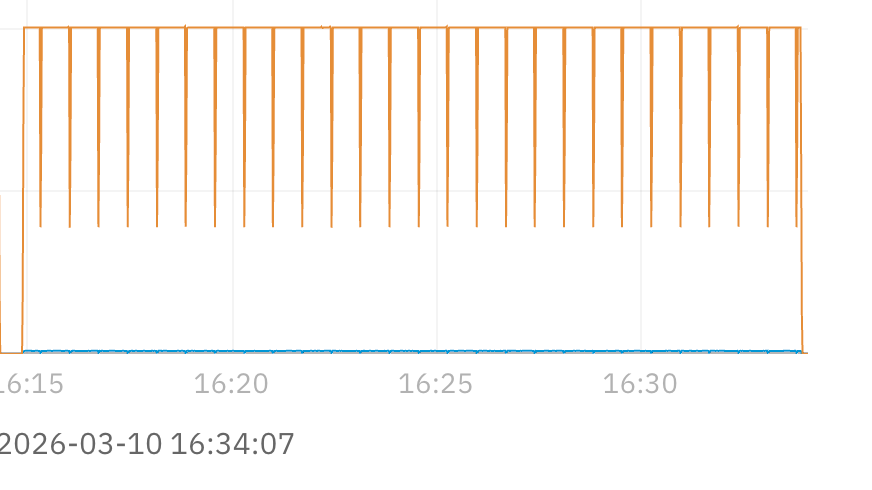
Yeah other than some usb disconnect, and the link bouncing on March 6th, I can’t say I see anything crazy. It is weird that it keeps lowering so beautifully 5-7 times per 5 minute interval. Unless you have identical file sizes I can’t really explain it.
I thought maybe the Replication task would divide the load in big chunks. Not sure myself, I’ve seen network speed doing that before on different systems and I thought it was normal. I’ll diagnose more but what matters is that besides those small pauses, the interfaces are running flat out at 1Gbps with no further hesitations. It’s an improvement on where we started from
I’m wondering whether having HP iLO on the same main Network Interface could be the issue here. There is an option to have it on a dedicated port but I chose the “shared” network instead.
I’d generally advise putting iLO in a dedicated NIC if possible. For security reasons but also for performance. Besides that, I can imagine it could have an impact since iLO is of course creating some traffic. While this alone wouldn’t matter much, it could theoretically interrupt stuff or cause issues switching MTU and so on. Depending on the NIC and possibly many other factors. But I never looked into that as deep since I always segment iLO from the storage network.
Let me know if you find anything out. Curious now.
I set iLO on its own port - which is currently unplugged. Restarted.
Same behaviour (plus some extra slowdowns but I’d imagine it’s normal in real world. Though the only difference on this replication is a new 500GB Time Machine backup so a single file. I’ll try the power saving next.
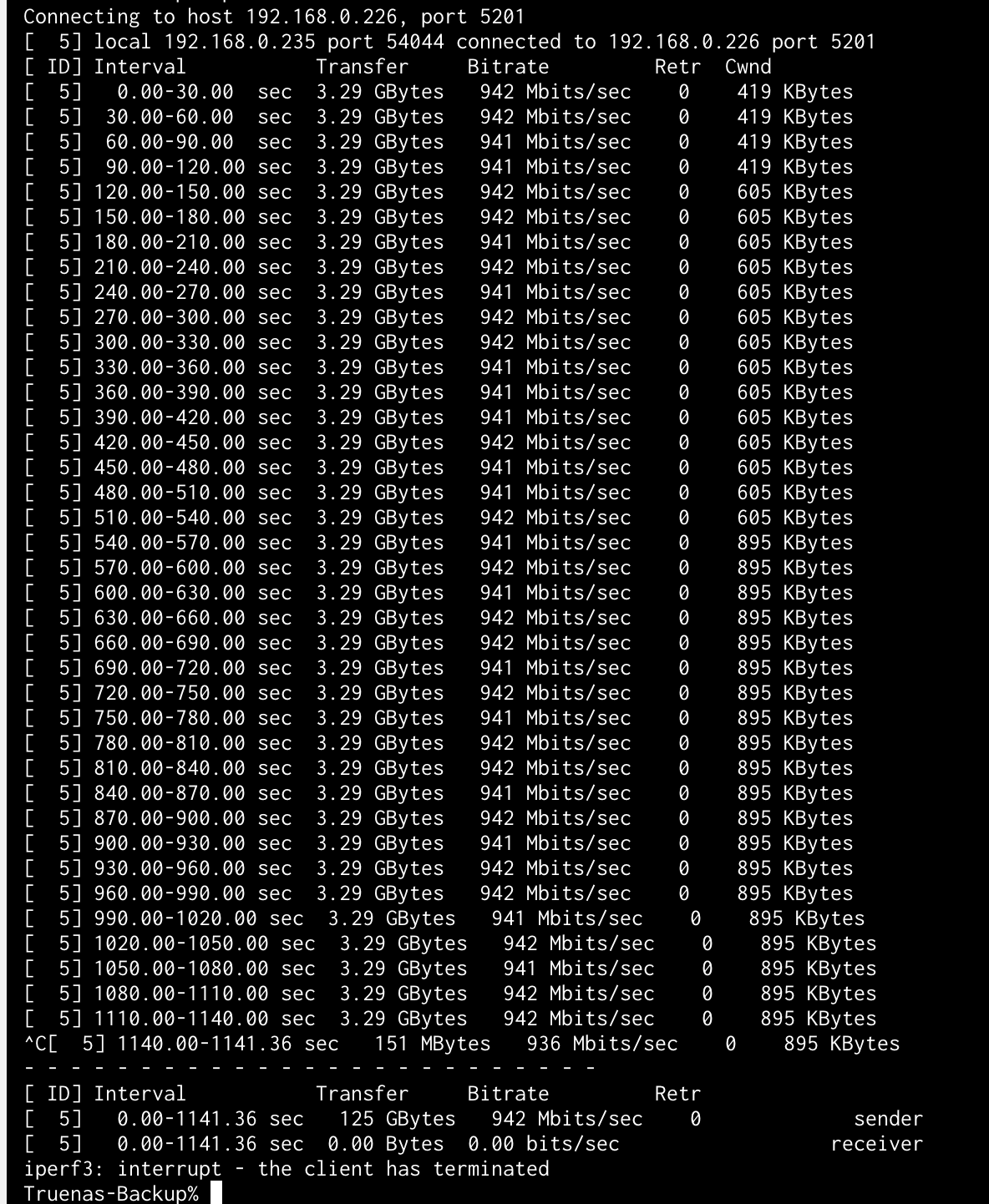
Before I disable power saving, I ran another test with iperf3 between the two boxes this time.
The machines are wired to the same switch.
I’d say the links are healthy, but I see the same brief drops - which are not really shown in the iperf3 from what I see (those are 30s segments though) so maybe I am chasing ghosts here. Though I am curious myself now.