
Will also need to see new outputs for zpool status and gmultipath list after power up.
Now there is only 1 cable connected between HBA/JBOD
2nd_gmultipath_list.txt (14.1 KB)
2nd_zpool_status.txt (4.2 KB)
Still looks odd I would have expected to see each multipath lose one of its paths. I presume you powered down the system before removing one cable from each HBA? (system needs a reboot to update multipaths)
Can I see a picture of the system in the rack front and back so I can better visualise.
Are you sure the JBODs are not connected to each other in anyway?
Somewhere in your system setup the server is seeing these drives twice and we need to identify in the cabling exactly where this is happening and stop it before we take any further steps. This could be happening via the HBAs hence we have tried to lose a cable but could also be happening by the JBODs being interconnected allowing paths to be cascaded down.
Checking cables right now - Pictures will be added in a few minutes… including the whole server-case/-chassis
1 Like
The first JBOD appears fine so try and focus on the differences between how that is cabled to the server vs JBOD2 and 3.
Here are the images from the back and the front of the server. It seems, that we found the problem… on the front backpanel of the front jbods there are 4 connectors… it seems they are all interconnected to each other. After removing 3/4 cables all multipaths are degraded now, but pool is still online and accessible.
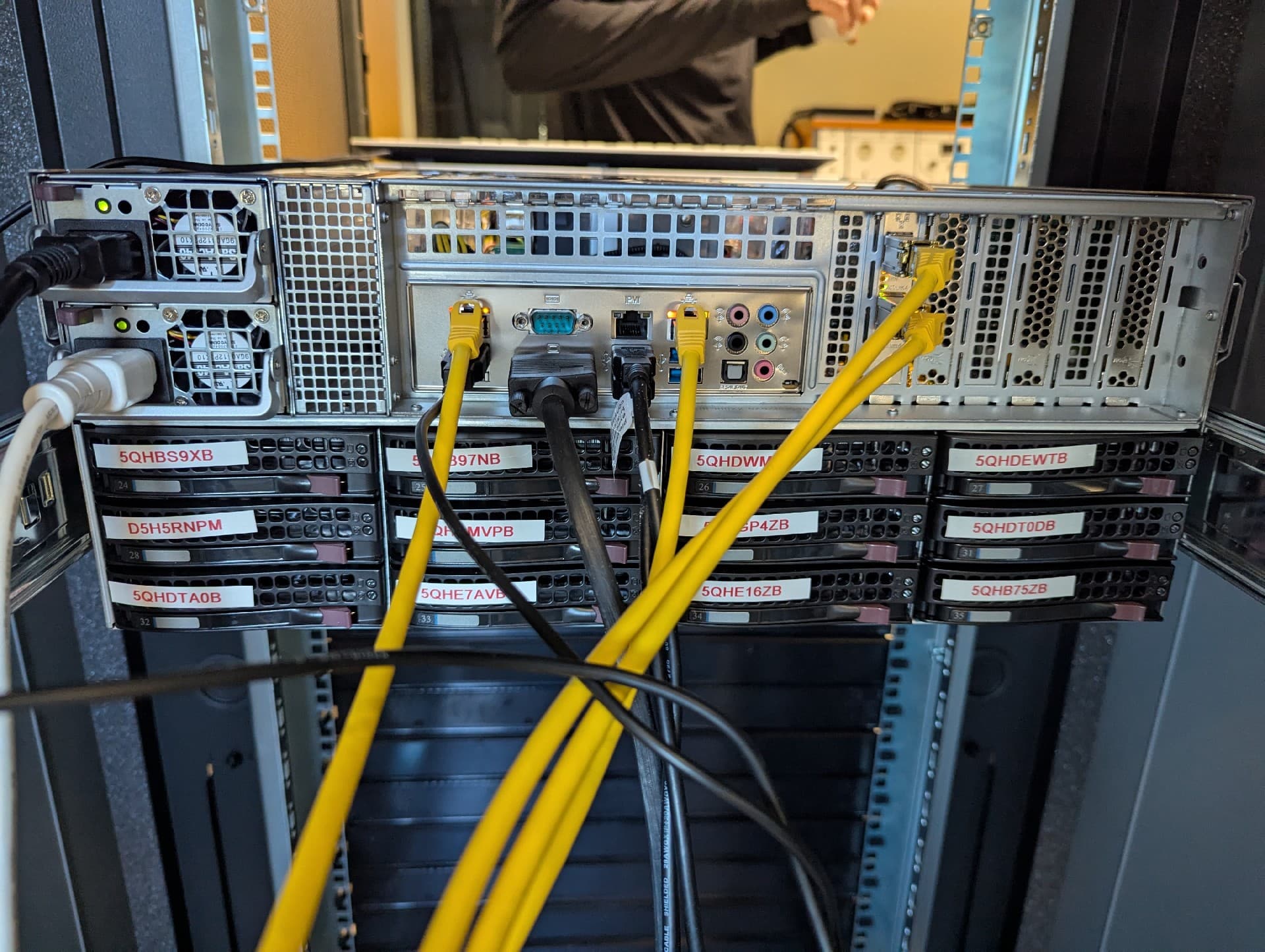

New zpool status and gmultipath list will arrive in a few seconds
1 Like
These are the results with 1 cable to the rear-jbod and 1 cable to the front jbod… 1 hba is now unused…
I think we are getting closer…  at least the multipath-miracle is no miracle anymore…
3rd_gmultipath_list.txt (10.6 KB)
3rd_zpool_status.txt (4.2 KB)
Great we are getting there.
So next steps are somewhat risky so I would strongly recommend you make a backup (if you havent already) of your important data before proceeding.
I think you should try this on just one drive first and we MUST avoid vdev3 otherwise we could lose the pool if it goes wrong.
Currently multipath/disk1 is the first member of vdev2 so lets pick on that one.
- Export the pool from the TrueNAS UI but do NOT tick mark disks as new otherwise it will destroy the pool and all data on the drives. Leave config alone also so just export the pool. Please be careful doing this it’s so easy to tick the wrong thing.
- Once the pool is exported from the shell enter
gmultipath destroy disk1 - Then reboot the server and share the output again of zpool status, gmultipath list and the storage pool shown in the UI.
You may need to reimport the pool via the UI after reboot.
There are three options shown when we click on export. How should we configure them - just to be sure?
Destroy Data in this pool - we assume NO
Delete configuration of the shares, that used this pool - we also assume NO
Confirm export/disconnect - we assume YES
The option you mentioned (label disks as new) is not yet showing up…
1 Like
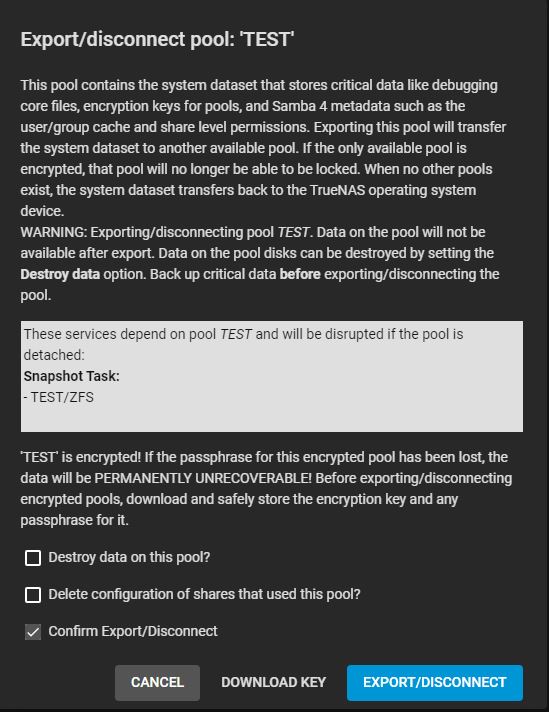
exporting pool done
destroying multipath/disk1 done
rebooting now…
new log files incoming in a couple of minutes
1 Like
Importing pool right now…
First result here - rest follows when pool is imported
4th_gmultipath_list.txt (10.2 KB)
Importing - done
4th_zpool_status.txt (4.3 KB)
gui pool status.txt (1.5 KB)
Looks like a success to me.
So now as fast or slowly as you dare you need to rinse and repeat the process making sure the pool is exported first and gmultipath destroy disk2 the rest of your multipath devices.
Then reboot the server, import the pool and things should look a lot better.
Then you need to deal with those UNAVAILBLE drives.
Okay - so I destroy every multipath disk that is listed…
do I have to export again one time, or can the system use the export i´ve done before, when destroying disk1? I assume it has to be a new export, right?
Yeah destroy all the multipaths you can keep checking how you are doing with gmultipath list to make sure you catch them all till that list is empty. Make sure the pool is exported first before you start destroying the multipaths.
No need to export or reboot one at a time we just did that to make sure the process worked as expected.
You will need to export the pool again so do that now and then start destroying the multipaths. Reboot and re-import the pool and share outputs.
1 Like
Exporting again… takes about 5-10 mins… then destroying… then rebooting… then i´ll be back…
exported - done
destroyed - done
reboot - done
importing pool right now
by the way… thanks a lot brother ! your help is appreciated…
1 Like
I think we did it - AND - the pool is no more degraded. I think killing the multipath configuration did the trick…
gmultipath_list.txt (50 Bytes)
gui pool status.txt (1.2 KB)
zpool_status.txt (3.8 KB)
Is there anything left to do / check for us now?
If you ever visit GERMANY - message me - the first 10 Beers and a pretty good SCHNITZEL is on me…
1 Like
Excellent, you look in good shape now.