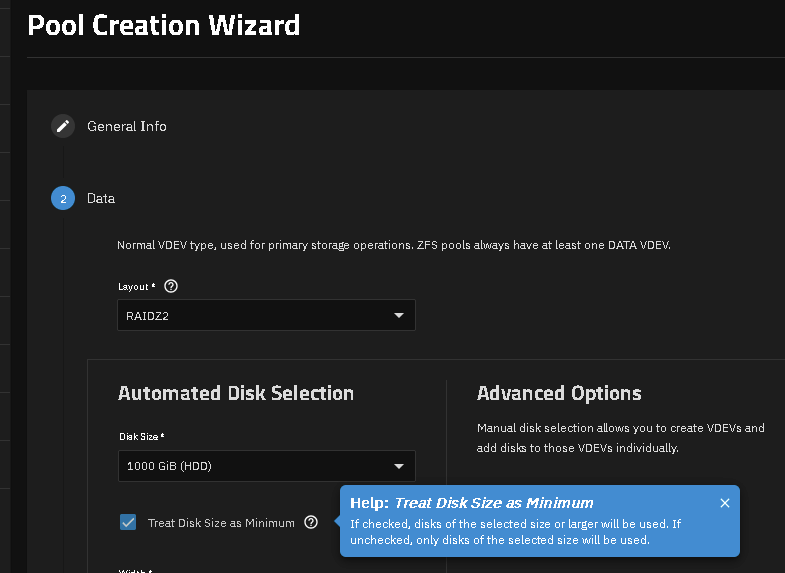
I am creating the first pool in my TrueNAS on my Proxmox server. I have the same model drives and serial numbers are stupid close. It gives me the error
[efault] could not create a partition of 2998445015040 bytes on disk sdc because the disk is too small. if you are replacing a disk in a pool, please ensure that the new disk is not smaller than the disk being replaced. could not create partition 1 from 5856339968 to 11712677887 error encountered; not saving changes.
You need to post full hardware, OS version and Proxmox details. We are not there to see what you are doing.
The only way you should deploy Proxmox with TrueNAS as a VM is as ‘production’. That means passing through an entire controller and blacklisting so Proxmox can not touch (interfere) with it.
Did you select the following checkbox upon pool creation?
I have not tried your suggestion. I will do that now. In the interim, here are the specs.
Dell PowerEdge T320
1x e5-1410 (E5-2470 V2 on the way)
8GB Ram (more ram on the way. Maxing out the board at 192 GB)
3x 500 GB SAS
4x 3TB SAS
Perc H310 controller
This is for a Homelab/Server for our home network. It will have a Windows Server for AD, JellyFin, TrueNAS, and A webserver for some internal web sites I can play with.
I may have found my issue. I seem to have miscopied the device ID when adding the drives directly to the VM. I had the same drive listed for both with different serial numbers.
I don’t think this card is suitable for use with TrueNAS / ZFS. You want a plain HBA or one that can be flashed to ‘IT Mode’. TrueNAS has a mininum of 8GB of RAM per the online documentation so I would hold off until you get RAM sorted out.
What’s all the noise about HBA’s, and why can’t I use a RAID controller?
That is not the way to add drives under Proxmox unless you are just testing TrueNAS and you don’t care about losing all your data. TrueNAS (ZFS) needs direct access to the disks and controller. It may work the way you did it for a while but you also could make your data unrecoverable in case of any errors.
If Proxmox can see the drives, that sounds like you have not blacklisted the passed through controller and the attached drives to the TrueNAS VM. When Proxmox touches those drives, it will cause corruption and you will, most likely, loose the pool and all data.
Search the forums for Proxmox problems with TrueNAS VMs.