
Thanks. I’ll see if I get some time to play with it tomorrow. I’ll try taking shift out and see what I get.
So with shift: true I can successfully write to a local host path, but attempting to delete the file results in permission denied.
Container:
root@docker1:/mnt/media/plex# id
uid=0(root) gid=0(root) groups=0(root)

root@docker1:/mnt/media/plex# touch docker1

stat docker1
  File: docker1
  Size: 0         	Blocks: 1          IO Block: 131072 regular empty file
Device: 0,73	Inode: 1650        Links: 1
Access: (0644/-rw-r--r--)  Uid: (    0/    root)   Gid: ( 1000/  docker)
Access: 2025-03-04 16:40:58.314274577 -0500
Modify: 2025-03-04 16:40:58.314274577 -0500
Change: 2025-03-04 16:40:58.314274577 -0500
 Birth: 2025-03-04 16:40:58.314274577 -0500

root@docker1:/mnt/media/plex# rm docker1
rm: cannot remove 'docker1': Permission denied
TNS:
root@tns[/mnt/pool/data/cloud-init]# id
uid=0(root) gid=0(root) groups=0(root),544(builtin_administrators)

root@tns[/mnt/pool/data/cloud-init]# stat /mnt/pool/media/plex/docker1

  File: /mnt/pool/media/plex/docker1
  Size: 0         	Blocks: 1          IO Block: 131072 regular empty file
Device: 0,73	Inode: 1650        Links: 1
Access: (0644/-rw-r--r--)  Uid: (    0/    root)   Gid: ( 1000/ user)
Access: 2025-03-04 16:40:58.314274577 -0500
Modify: 2025-03-04 16:40:58.314274577 -0500
Change: 2025-03-04 16:40:58.314274577 -0500
 Birth: 2025-03-04 16:40:58.314274577 -0500

root@tns[/mnt/pool/data/cloud-init]# cat /etc/{subgid,subuid}
0:2147000001:458752
0:2147000001:458752

root@tns[/mnt/pool/data/cloud-init]# incus config show docker1|grep idmap
  volatile.idmap.base: "0"
  volatile.idmap.current: '[{"Isuid":true,"Isgid":false,"Hostid":2147000001,"Nsid":0,"Maprange":1000},{"Isuid":true,"Isgid":false,"Hostid":1000,"Nsid":1000,"Maprange":1},{"Isuid":true,"Isgid":false,"Hostid":2147001002,"Nsid":1001,"Maprange":457751},{"Isuid":false,"Isgid":true,"Hostid":2147000001,"Nsid":0,"Maprange":1000},{"Isuid":false,"Isgid":true,"Hostid":1000,"Nsid":1000,"Maprange":1},{"Isuid":false,"Isgid":true,"Hostid":2147001002,"Nsid":1001,"Maprange":457751}]'
  volatile.idmap.next: '[{"Isuid":true,"Isgid":false,"Hostid":2147000001,"Nsid":0,"Maprange":458752},{"Isuid":false,"Isgid":true,"Hostid":2147000001,"Nsid":0,"Maprange":458752}]'
  volatile.last_state.idmap: '[]'
I was for sure that I had this working during the nightlies, but now it’s failing me miserably. Of course there is no issue deleting the file directly from TNS. I need to dive in more and fiddle with raw.idmap even though I’m suspecting I shouldn’t need to. It’s odd that shift isn’t working properly here.
You can’t use shift: true with root / uid 0 without security.privileged: true. This same thing occurs though with non-root users as seen below.
Container:
readarr@readarr:/var/lib/readarr$ id
uid=301(readarr) gid=301(readarr) groups=301(readarr),1002(media)
readarr@readarr:/var/lib/readarr$ touch write-test
readarr@readarr:/var/lib/readarr$ rm write-test
rm: cannot remove 'write-test': Permission denied

readarr@readarr:/var/lib/readarr$ stat .
  File: .
  Size: 16              Blocks: 17         IO Block: 1536   directory
Device: 0,68    Inode: 34          Links: 8
Access: (0775/drwxrwxr-x)  Uid: (  301/ readarr)   Gid: (  301/ readarr)
Access: 2022-12-05 17:26:12.385374473 -0700
Modify: 2025-03-04 23:50:47.891322732 -0700
Change: 2025-03-04 23:50:47.891322732 -0700
 Birth: 2022-12-05 17:26:12.385374473 -0700

readarr@readarr:/var/lib/readarr$ stat write-test
  File: write-test
  Size: 0               Blocks: 1          IO Block: 131072 regular empty file
Device: 0,68    Inode: 2310        Links: 1
Access: (0664/-rw-rw-r--)  Uid: (  301/ readarr)   Gid: (  301/ readarr)
Access: 2025-03-04 23:51:11.031259942 -0700
Modify: 2025-03-04 23:51:11.031259942 -0700
Change: 2025-03-04 23:51:11.031259942 -0700
 Birth: 2025-03-04 23:46:56.463950743 -0700
Host:
root@truenas:/mnt/jails1/apps/readarr# stat .
  File: .
  Size: 20              Blocks: 17         IO Block: 1536   directory
Device: 0,68    Inode: 34          Links: 8
Access: (0775/drwxrwxr-x)  Uid: (  301/incus-media)   Gid: (  301/incus-media)
Access: 2022-12-05 17:26:12.385374473 -0700
Modify: 2025-03-04 23:54:28.302724653 -0700
Change: 2025-03-04 23:54:28.302724653 -0700
 Birth: 2022-12-05 17:26:12.385374473 -0700

root@truenas:/mnt/jails1/apps/readarr# stat write-test
  File: write-test
  Size: 0               Blocks: 1          IO Block: 131072 regular empty file
Device: 0,68    Inode: 2310        Links: 1
Access: (0664/-rw-rw-r--)  Uid: (  301/incus-media)   Gid: (  301/incus-media)
Access: 2025-03-04 23:46:56.463950743 -0700
Modify: 2025-03-04 23:46:56.463950743 -0700
Change: 2025-03-04 23:46:56.463950743 -0700
 Birth: 2025-03-04 23:46:56.463950743 -0700
The only way I can get shift: true mounts to work is with security.privileged: true regardless if the directory or file is owned by a root or non-root user. From my understanding of the documentation though with shift: true on a non-root user without security.privileged: true I should be able to write to a host mounted path but it doesn’t work.
For now I’m will to take the risk and run privileged containers but I’m curious to see how it looks with the direct idmap soon.
1 Like
Right, that’s my understanding as well, it shouldn’t need security.privileged. We’ll see how RC1 handled things. We’re so close!
Security.privilleged means there’s no shift required as uid 0 = 0, and will actually disable shifting, or even unshift a shifted filesystem.
1 Like
Yup, that’s why I don’t want to ever enable it… Unprivileged is the way to go.
Docs say:
Incus can also run privileged containers. Note, however, that those aren’t root safe, and a user with root access in such a container will be able to DoS the host as well as find ways to escape confinement.
Once see if things work as expected in RC1 I’ll switch it off. Given I know what I’m running in those and they aren’t running as root, I’ll run it that way for now since I have no desire to switch back to CORE at this point now that everything is working. Once the permissions or shifting issue can be figured out I can go back to unprivileged.
RC1 is here 
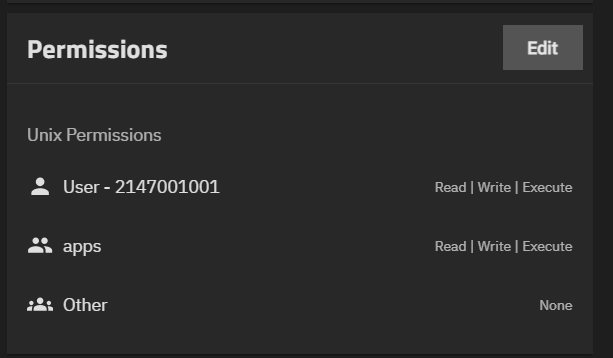
Could you explain how is this supposed to work? I set group apps to have write access to a dataset that is bind mapped to a container. Container still see that group as nobody.

1 Like
Try stopping / starting the container from the UI. The maps are written when middleware starts the container (not when initialized through systemd). There will be some rough edges during beta testing that won’t be present for people coming into the production release.
1 Like
No issues with my testing incus containers surviving reboots. I’ll start doing some more testing with storage.
Shame on me , should of though about that myslef. Still
group 568 enters a container, but basicaly represents nothing in the container until user 568 is created in the container.

I think you are doing that wrong way.
The way I see it, you should allow to create users and groups in Truenas GUI with GUD/UID above 2147000001. Then whatever gui/uid in the container can be used to set rights to a dataset.
Because I am not really sure what locking uid568 in the container can do. What if I need to use any different uid? Like I use UID/GID1000( admin) that translates in User - 2147001001 in Truenas.
I can be getting all that wrong, if I am, please explain to me how all that supposed to work.
Note that, as @awalkerix explained up thread, this is essentially a bandaid for full IDMAP support that is not available in the UI until 25.04.0.
https://www.truenas.com/docs/scale/25.04/gettingstarted/scalereleasenotes/#known-issues
- Full IDMAP support is currently unavailable in the TrueNAS UI (NAS-134447). Users testing instances in 25.04-RC.1 can use the apps user and group (568:568) to set permissions with consistent mapping in the TrueNAS host and containers.
No. We won’t allow creating groups or uses about that value. That range is reserved explicitly for containers. There’s no reason to set a UID from a container as owner of a dataset mountpoint. Just create a group with GID 568 in the container, make your user in the container a member of it, and assign rights as you normally would for the group.
Alternatively, you can use midclt or API in 25.04.0-RC1 to set the mapping for the container user. There will be UI support in 25.04.0.
So I created a uid/gid in the container with 568 and touched a file and still can’t remove said file from the host path.
id apps
uid=568(apps) gid=568(apps) groups=568(apps)

root@docker1:/mnt/media/plex# ls -la docker1
-rw-r--r-- 1 apps apps 0 Mar 11 13:15 docker1

debian@docker1:/mnt/media/plex$ rm docker1
rm: remove write-protected regular empty file 'docker1'? y
rm: cannot remove 'docker1': Permission denied

$ id
uid=568(apps) gid=568(apps) groups=568(apps)

$ rm docker1
rm: cannot remove 'docker1': Operation not permitted
EDIT: let me remove shift…
With shift disabled, now the permissions are the same, but still can’t be deleted.
-rw-r--r-- 1 apps apps 0 Mar 11 13:15 docker1
Other files are 1000:1000 on the host but are mapped to nobody:nogroup:
drwx------ 136 nobody nogroup 136 Mar 8 02:08 movies
Set up a clean instance / VM where you haven’t been altering incus config from shell.
1 Like
Ok, let me give it a shot and see what I get. I’ll compare the configs if it works…
Without recursive: true, I can’t see the datasets as folders. I have this funky test folder and I’m not sure where it’s coming from.
root@docker-ui:/mnt/media/plex# ls
test
root@docker-ui:/mnt/media/plex# rm -f test
rm: cannot remove 'test': Permission denied
root@docker-ui:/mnt/media/plex# ls -la
total 2
drwxr-xr-x 2 nobody nogroup 3 Feb 21 20:56 .
drwxr-xr-x 4 nobody nogroup 4 Nov 22 18:19 ..
-rw-r--r-- 1 nobody nogroup 0 Feb 21 20:56 test
bob@fff:/FOO$ id
uid=1000(bob) gid=1000(bob) groups=1000(bob),568(apps)
My local user in container is member of group 568 (apps)
bob@fff:/FOO$ ls -al .
total 10
drwxrwxrwx  3    568 apps  3 Mar 11 17:57 .
drwxr-xr-x 18 root   root 22 Mar 11 17:51 ..
drwxrwx---  2 nobody apps  2 Mar 11 17:57 testdir
testdir is owned by 3000:568 in host, but appears as “nobody:apps” in container because UID is not mapped
bob@fff:/FOO$ touch testdir/testfile
bob@fff:/FOO$ rm testdir/testfile
bob@fff:/FOO$ rmdir testdir
bob@fff:/FOO$ ls -al
total 9
drwxrwxrwx  2  568 apps  2 Mar 11 17:58 .
drwxr-xr-x 18 root root 22 Mar 11 17:51 ..
Ops succeed.
Same result:
id apps
uid=568(apps) gid=568(apps) groups=568(apps)
root@docker-ui:~# su apps
$ pwd
/root
$ cd /mnt/media
$ ls
immich	plex
$ cd plex
$ ls -la
total 6733
drwxr-xr-x  12 nobody nogroup      17 Mar 11 17:15  .
drwxr-xr-x   4 nobody nogroup       4 Nov 22 18:19  ..
drwxr-xr-x   5 nobody nogroup       5 Nov 30 17:50  books
-rw-r--r--   1 apps   apps          0 Mar 11 17:15  docker1
drwxr-xr-x   6 nobody nogroup       6 Nov 25 16:06  downloads
drwx------   5 nobody nogroup       5 Apr 27  2024  dvr
drwx------   6 nobody nogroup       6 Aug 18  2024  fitness
----------   1 nobody nogroup    4708 Jan  2  2024 '(H.264).json'
----------   1 nobody nogroup    4704 Jan  2  2024 '(H.265).json'
-rw-r--r--   1 nobody nogroup     982 Nov 19 04:40  mem-usage.sh
drwx------ 136 nobody nogroup     136 Mar  8 07:08  movies
drwx------  48 nobody nogroup      48 Nov 19 17:18  music
drwx------   2 nobody nogroup       2 Jan  1  2023  photos
drwxr-xr-x   2 nobody nogroup       2 Nov 30 16:05  podcasts
drwxr-xr-x   6 nobody nogroup       6 Nov 22 18:07  recycle
----------   1 nobody nogroup 6706343 Dec 27  2023 'The all you need firmware pack.zip'
drwx------  10 nobody nogroup      10 Dec 24 04:11  tv
$ rm docker1
rm: cannot remove 'docker1': Operation not permitted
Same result on my cloud-init and ui configured instance.
Also tested with default user:
id
uid=1000(debian) gid=1001(debian) groups=1001(debian),568(apps),4(adm),20(dialout),24(cdrom),25(floppy),27(sudo),29(audio),30(dip),44(video),46(plugdev),1000(netdev)

ls -la
total 6733
drwxr-xr-x  12 nobody nogroup      17 Mar 11 17:15  .
drwxr-xr-x   4 nobody nogroup       4 Nov 22 18:19  ..
drwxr-xr-x   5 nobody nogroup       5 Nov 30 17:50  books
-rw-r--r--   1 apps   apps          0 Mar 11 17:15  docker1
drwxr-xr-x   6 nobody nogroup       6 Nov 25 16:06  downloads
drwx------   5 nobody nogroup       5 Apr 27  2024  dvr
drwx------   6 nobody nogroup       6 Aug 18  2024  fitness
----------   1 nobody nogroup    4708 Jan  2  2024 '(H.264).json'
----------   1 nobody nogroup    4704 Jan  2  2024 '(H.265).json'
-rw-r--r--   1 nobody nogroup     982 Nov 19 04:40  mem-usage.sh
drwx------ 136 nobody nogroup     136 Mar  8 07:08  movies
drwx------  48 nobody nogroup      48 Nov 19 17:18  music
drwx------   2 nobody nogroup       2 Jan  1  2023  photos
drwxr-xr-x   2 nobody nogroup       2 Nov 30 16:05  podcasts
drwxr-xr-x   6 nobody nogroup       6 Nov 22 18:07  recycle
----------   1 nobody nogroup 6706343 Dec 27  2023 'The all you need firmware pack.zip'
drwx------  10 nobody nogroup      10 Dec 24 04:11  tv

debian@docker-ui:/mnt/media/plex$ rm docker1
rm: remove write-protected regular empty file 'docker1'? y
rm: cannot remove 'docker1': Operation not permitted
Is “docker1” a ZFS dataset mountpoint?