Not sure how I pasted this, it’s fine i.e. w/o one on my config - it’s stilo not working.
I am at loss herę, I might just revert to a backup before I started playing with jlmkr and start over again, maybe it’s not working cause I’ve broken smth on a host.
I had a similar issue trying to passthrough my Coral USB to FrigateNVR. I tried to force the mapping in the jlmkr config for the Docker jail, etc. Then I noticed that the jail already showed the device even without adding the bind in the config, but I still couldn’t get the FrigateNVR Docker container to see it. What actually worked in the end was not mapping the Coral USB in the compose for FrigateNVR but telling it to use the device and suddenly it was found and used by the container. I’m not sure why it worked, since it’s counter to what I know about containers and hardware passthough but it’s been working without issues for several weeks now.
Here’s the Frigate compose. When I tried adding /dev/bus/usb:/dev/bus/usb to the devices section of the compose it never found the device. Once I removed that part Frigate had no issues finding it. I’m currently running 14 beta, but it was fine with the latest release version too.
I’m a bit stuck again… I re-created the jail and moved it to it’s own network adapter (dmz). Networking is working fine however dockge is failing when it tries to run the container as such, any idea what I might have messed up?
root@dockerdmz:/opt/dockge# docker compose up -d
[+] Running 0/1
 ⠙ Container dockge-dockge-1  Starting                                                                                                                                    0.2s
Error response from daemon: failed to create task for container: failed to create shim task: OCI runtime create failed: runc create failed: unable to start container process: error during container init: unable to join session keyring: unable to create session key: operation not permitted: unknown
root@dockerdmz:/opt/dockge#
I’ve been following the docs and this video. Unfortunately i get stuck here after creating a test jail using the template for docker .
admin@truenas[/mnt/tank/jailmaker]$ jlmkr shell test
Failed to get shell PTY: There is no system bus in container test.
I’m running my network via br1 and i basically copied and pasted the template without any changes. I’m sure i’m missing something but i’m struggling with it. Any help is much appreciated. For any more config feel free to ask!
Jun 17 10:51:35 truenas systemd[1]: Starting jlmkr-test.service - My nspawn jail test [created with jailmaker]...
Jun 17 10:51:35 truenas .ExecStartPre[2978816]: PRE_START_HOOK
Jun 17 10:51:36 truenas systemd-nspawn[2978818]: systemd 252.22-1~deb12u1 running in system mode (+PAM +AUDIT +SELINUX +APPARMOR +IMA +SMACK +SECCOMP +GCRYPT -GNUTLS +OPENSSL +ACL +BLKID +CURL +ELFUTILS +FIDO2 +IDN2 -IDN +IPTC +KMOD +LIBCRYPTSETUP +LIBFDISK +PCRE2 -PWQUALITY +P11K>
Jun 17 10:51:36 truenas systemd-nspawn[2978818]: Detected virtualization systemd-nspawn.
Jun 17 10:51:36 truenas systemd-nspawn[2978818]: Detected architecture x86-64.
Jun 17 10:51:36 truenas systemd-nspawn[2978818]: Detected first boot.
Jun 17 10:51:36 truenas systemd-nspawn[2978818]:
Jun 17 10:51:36 truenas systemd-nspawn[2978818]: Welcome to Debian GNU/Linux 12 (bookworm)!
Jun 17 10:51:36 truenas systemd-nspawn[2978818]:
Jun 17 10:51:36 truenas systemd-nspawn[2978818]: Initializing machine ID from container UUID.
Jun 17 10:51:36 truenas systemd-nspawn[2978818]: Failed to create timezone change event source: Too many open files
Jun 17 10:51:36 truenas systemd-nspawn[2978818]: Populated /etc with preset unit settings.
Jun 17 10:51:36 truenas systemd-nspawn[2978818]: Failed to acquire watch file descriptor: Too many open files
Jun 17 10:51:36 truenas systemd-nspawn[2978818]: -.mount: Deactivated successfully.
Jun 17 10:51:36 truenas systemd-nspawn[2978818]: Queued start job for default target graphical.target.
Jun 17 10:51:36 truenas systemd-nspawn[2978818]: Failed to create inotify object: Too many open files
Jun 17 10:51:36 truenas systemd-nspawn[2978818]: [  OK  ] Created slice system-getty.slice - Slice /system/getty.
Jun 17 10:51:36 truenas systemd-nspawn[2978818]: Failed to create inotify object: Too many open files
Jun 17 10:51:36 truenas systemd-nspawn[2978818]: [  OK  ] Created slice system-modprobe.slice - Slice /system/modprobe.
Jun 17 10:51:36 truenas systemd-nspawn[2978818]: Failed to create inotify object: Too many open files
Jun 17 10:51:36 truenas systemd-nspawn[2978818]: [  OK  ] Created slice user.slice - User and Session Slice.
Jun 17 10:51:36 truenas systemd-nspawn[2978818]: Failed to allocate inotify fd: Too many open files
Jun 17 10:51:36 truenas systemd-nspawn[2978818]: systemd-ask-password-console.path: Failed to enter waiting state: Too many open files
Jun 17 10:51:36 truenas systemd-nspawn[2978818]: systemd-ask-password-console.path: Failed with result 'resources'.
Jun 17 10:51:36 truenas systemd-nspawn[2978818]: Failed to create inotify object: Too many open files
Jun 17 10:51:36 truenas systemd-nspawn[2978818]: [FAILED] Failed to start systemd-ask-passwor…quests to Console Directory Watch.
Jun 17 10:51:36 truenas systemd-nspawn[2978818]: Failed to create inotify object: Too many open files
Jun 17 10:51:36 truenas systemd-nspawn[2978818]: See 'systemctl status systemd-ask-password-console.path' for details.
Jun 17 10:51:36 truenas systemd-nspawn[2978818]: Failed to allocate inotify fd: Too many open files
Jun 17 10:51:36 truenas systemd-nspawn[2978818]: systemd-ask-password-wall.path: Failed to enter waiting state: Too many open files
Jun 17 10:51:36 truenas systemd-nspawn[2978818]: systemd-ask-password-wall.path: Failed with result 'resources'.
Jun 17 10:51:36 truenas systemd-nspawn[2978818]: Failed to create inotify object: Too many open files
Jun 17 10:51:36 truenas systemd-nspawn[2978818]: [FAILED] Failed to start systemd-ask-passwor… Requests to Wall Directory Watch.
Jun 17 10:51:36 truenas systemd-nspawn[2978818]: Failed to create inotify object: Too many open files
Jun 17 10:51:36 truenas systemd-nspawn[2978818]: See 'systemctl status systemd-ask-password-wall.path' for details.
Jun 17 10:51:36 truenas systemd-nspawn[2978818]: Failed to create inotify object: Too many open files
Jun 17 10:51:36 truenas systemd-nspawn[2978818]: [  OK  ] Reached target cryptsetup.target - Local Encrypted Volumes.
Jun 17 10:51:36 truenas systemd-nspawn[2978818]: Failed to create inotify object: Too many open files
Jun 17 10:51:36 truenas systemd-nspawn[2978818]: [  OK  ] Reached target integritysetup.targe…Local Integrity Protected Volumes.
Jun 17 10:51:36 truenas systemd-nspawn[2978818]: Failed to create inotify object: Too many open files
Jun 17 10:51:36 truenas systemd-nspawn[2978818]: [  OK  ] Reached target paths.target - Path Units.
Jun 17 10:51:36 truenas systemd-nspawn[2978818]: Failed to create inotify object: Too many open files
Jun 17 10:51:36 truenas systemd-nspawn[2978818]: [  OK  ] Reached target remote-cryptsetup.target - Remote Encrypted Volumes.
Jun 17 10:51:36 truenas systemd-nspawn[2978818]: Failed to create inotify object: Too many open files
Jun 17 10:51:36 truenas systemd-nspawn[2978818]: [  OK  ] Reached target remote-fs.target - Remote File Systems.
Jun 17 10:51:36 truenas systemd-nspawn[2978818]: Failed to create inotify object: Too many open files
Jun 17 10:51:36 truenas systemd-nspawn[2978818]: [  OK  ] Reached target remote-veritysetup.t…- Remote Verity Protected Volumes.
Jun 17 10:51:36 truenas systemd-nspawn[2978818]: Failed to create inotify object: Too many open files
Jun 17 10:51:36 truenas systemd-nspawn[2978818]: [  OK  ] Reached target slices.target - Slice Units.
Jun 17 10:51:36 truenas systemd-nspawn[2978818]: Failed to create inotify object: Too many open files
Jun 17 10:51:36 truenas systemd-nspawn[2978818]: [  OK  ] Reached target swap.target - Swaps.
Jun 17 10:51:36 truenas systemd-nspawn[2978818]: Failed to create inotify object: Too many open files
Jun 17 10:51:36 truenas systemd-nspawn[2978818]: [  OK  ] Reached target veritysetup.target - Local Verity Protected Volumes.
Jun 17 10:51:36 truenas systemd-nspawn[2978818]: Failed to create inotify object: Too many open files
Jun 17 10:51:36 truenas systemd-nspawn[2978818]: [  OK  ] Listening on systemd-initctl.socket… initctl Compatibility Named Pipe.
Jun 17 10:51:36 truenas systemd-nspawn[2978818]: Failed to create inotify object: Too many open files
Jun 17 10:51:36 truenas systemd-nspawn[2978818]: [  OK  ] Listening on systemd-journald-dev-l…ocket - Journal Socket (/dev/log).
Jun 17 10:51:36 truenas systemd-nspawn[2978818]: Failed to create inotify object: Too many open files
Jun 17 10:51:36 truenas systemd-nspawn[2978818]: [  OK  ] Listening on systemd-journald.socket - Journal Socket.
Jun 17 10:51:36 truenas systemd-nspawn[2978818]: Failed to create inotify object: Too many open files
Jun 17 10:51:36 truenas systemd-nspawn[2978818]: [  OK  ] Listening on systemd-networkd.socket - Network Service Netlink Socket.
Jun 17 10:51:36 truenas systemd-nspawn[2978818]: Failed to create inotify object: Too many open files
Jun 17 10:51:36 truenas systemd-nspawn[2978818]:          Starting systemd-journald.service - Journal Service...
Jun 17 10:51:36 truenas systemd-nspawn[2978818]: Failed to create inotify object: Too many open files
Jun 17 10:51:36 truenas systemd-nspawn[2978818]:          Starting systemd-network-generator.… units from Kernel command line...
Jun 17 10:51:36 truenas systemd-nspawn[2978818]: Failed to create inotify object: Too many open files
Jun 17 10:51:36 truenas systemd-nspawn[2978818]:          Starting systemd-remount-fs.service…nt Root and Kernel File Systems...
Jun 17 10:51:36 truenas systemd-nspawn[2978818]: Failed to create inotify object: Too many open files
Jun 17 10:51:36 truenas systemd-nspawn[2978818]:          Starting systemd-sysctl.service - Apply Kernel Variables...
Jun 17 10:51:36 truenas systemd-nspawn[2978818]: Failed to create inotify object: Too many open files
Jun 17 10:51:36 truenas systemd-nspawn[2978818]: [  OK  ] Finished systemd-network-generator.…rk units from Kernel command line.
admin@truenas[/mnt/tank/jailmaker]$ jlmkr list
NAME RUNNING STARTUP GPU_INTEL GPU_NVIDIA OS     VERSION ADDRESSES
test True    False   False     False      debian 12      192.168.1.197…

There you go, thanks!
Regarding running your docker container privileged:
privileged: determines if any container in a pod can enable privileged mode. By default a container is not allowed to access any devices on the host, but a “privileged” container is given access to all devices on the host. This allows the container nearly all the same access as processes running on the host.
Did you learn anything from the logs? I advise to search for the error message. I think the solution is already mentioned here, on the old forum or on GitHub.
Thanks. It’s currently a temporary workaround until I can get the container to run properly without it. For some reason this particular container will not function properly when setting user and group ID environment variables. I’m hoping to sort it out this week.
I apologise if i haven’t found it so far. Could you please point me to the right thread so i can do my own reading? This is my first experience with docker as i was used to the old FreeBSD jails. Thanks in advance!
It’s only a very minor thing, but I’m guessing that with Nextcloud AIO’s backup feature which uses BorgBackup, the reason I’m getting failures with it is because I’m running it in an unprivileged nspawn container right? It errors out since BorgBackup mounts backup archives as FUSE devices which require root.
In practice it’s not a big deal since I use ZFS replication to backup my Nextcloud AIO instance and have tested out restoring it a few times and that works.
I think it should be possible to make that work too:
Filesystem in Userspace (FUSE) is a software interface for Unix and Unix-like computer operating systems that lets non-privileged users create their own…
Looks like there’s an open issue about it already:
I’ll just continue to do backups of Nextcloud the way I’ve already done - put NC into maintenance mode and then run ZFS replication to my backup dataset.
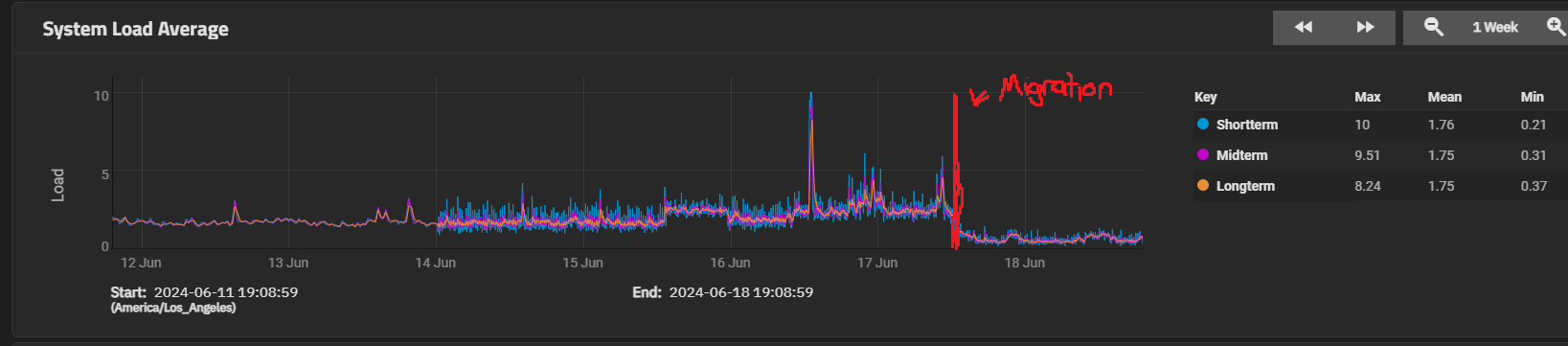
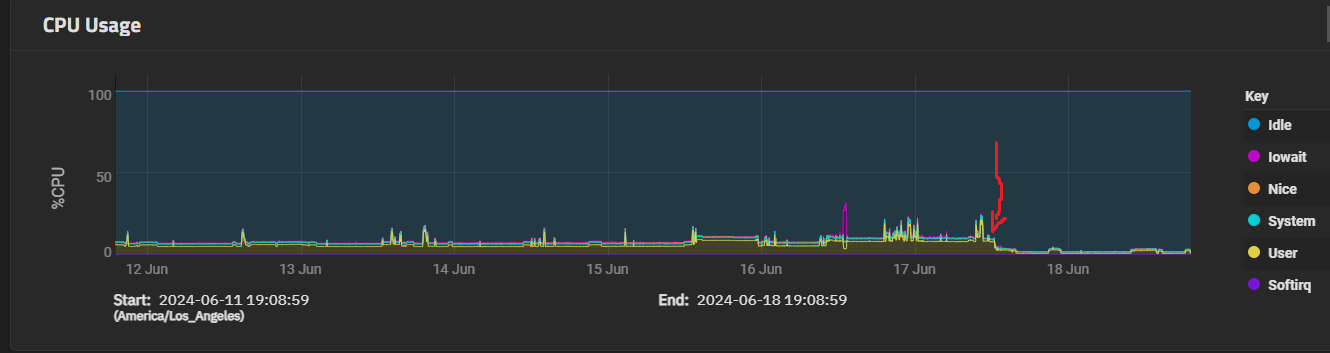
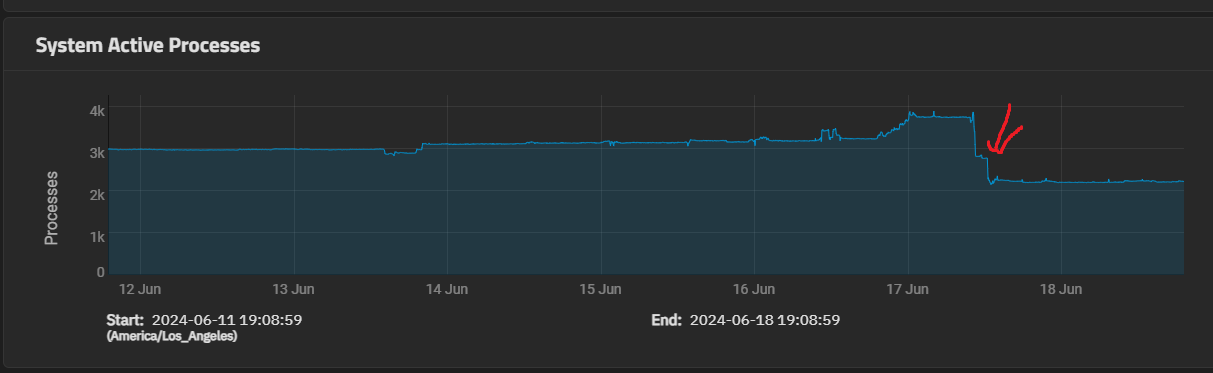
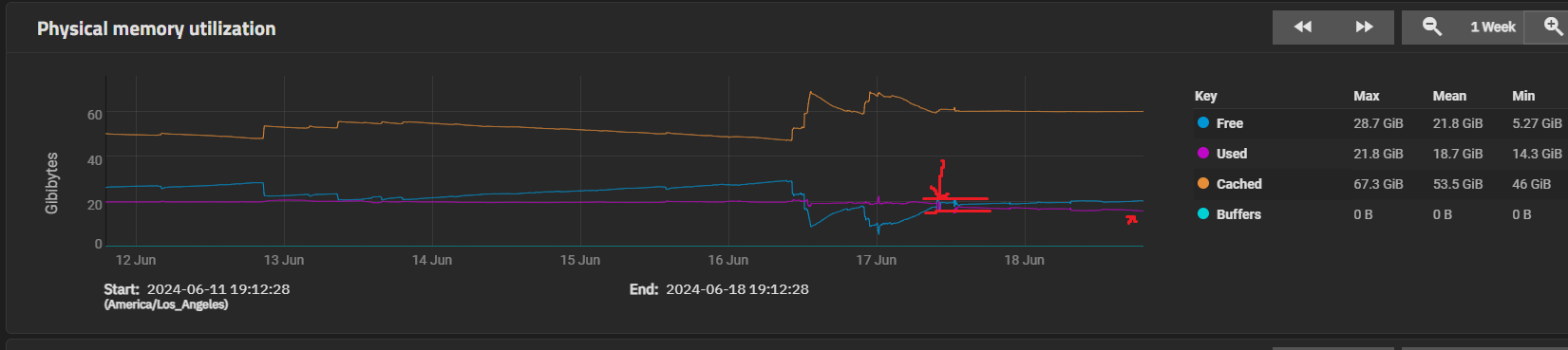
Just finished migrating over from TrueCharts to sandboxes using jlmkr, dockge, and docker compose; and wow! Everything is so much better!
Traefik and Authelia took a bit to get all setup; given that was the most “abstracted away” elements, and my immich database took some effort to get restored to the new database instance, but in all, it took only about 8 hours and I got all 28 of my apps migrated over and they’re all running perfectly now in my sandbox.
Since I didn’t see anyone showing any metrics from TrueNas itself showing the CPU/RAM drop after migrating, I thought I’d throw in some images here!
Extremely happy to be able to own my own destiny with respect to application updates, have easy access to all of the great docker compose scripts, and see a nice drop in resource overhead.
Thanks so much @Stux for the video guide! I started my migration by watching your youtube video. It was an incredible starting point (and the bridge network setup video as well!). Really looking forward to watching the snapshots one if you get around to making it; that’s the only thing I don’t have in parity yet (the nightly backups of config diffs with 1 week retention, and nightly pg dumps); that’d be nice to have, and perhaps I can figure it out myself (all the data is just in normal old datasets, so it’s likely there’s a truenas solution here also).
Anyway, thanks again, and really looking forward to having this feature improved and potentially made more of a first-party member in future releases.