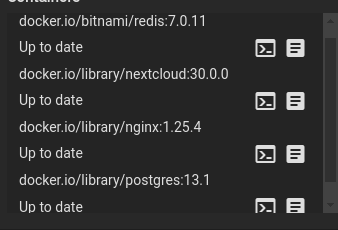
My NextCloud got stuck on maintenance mode after trying to upgrade to version 30.
I run the command su -s /bin/bash www-data -c ‘php maintenance:mode --off’ to enable NextCloud
However, I have this message now (Update Needed).
The problem is that everything is updated in the Scale GUI for the Apps.
I speculate that the PostgreSQL version 13 currently installed is too old.
Any idea?
Thanks in advance
I am using Scale Dragonfish-24.04.2.2.
My NextCloud is built on TrueNas charts and using nginx.
I have four folders for NextCloud, including one for the Database (PostgreSQL)
I encountered the same issue here but a slight nuance is that when I disabled maintenance mode, there was an option to continue the upgrade in the browser but that failed. When I ran through the command line that succeeded.
Also here’s the commands you need to run (formatted so you can paste into shell)
su -s /bin/bash -c "php occ maintenance:mode --off" www-data
su -s /bin/bash -c "php occ upgrade" www-data
then the image the truenas app uses hasn’t been updated yet. You have to wait for the maintainer to push the new image. Then the truenas webui will inform you that an update is available.
Edit:
May have spoken to fast, according to the apps catalogue nextcloud is already on 32.0.3
I downloaded the nextcloud 31.0.12 archive to my download folder on my PC (not server). When using the command: “su -m www-data -c ‘php occ app:update --all’ ”
do I first have to tell the Nextcloud system where the new archive is stored?
That should only be true if nextcloud is not running as a dockerized version. The docker version gets updated if the image used to deploy nextcloud gets replaced by an image with the newer version. The app updates, restarts an is then on the newer version.
I can’t imagine that this is the only way to keep Nextcloud up to date on TrueNAS Scale.
Under Apps, my installed version 31.0.9 is shown as up to date.
I think something is wrong here.