[Not Accepted] Include intel_idle Kernel Driver in TrueNAS SCALE to Improve Idle Power Efficiency on Intel CPUs

I’m now seeing intel_idle as the active driver on my i7-13700K with SCALE 25.04.2:

cat /sys/devices/system/cpu/cpuidle/current_driver
intel_idle

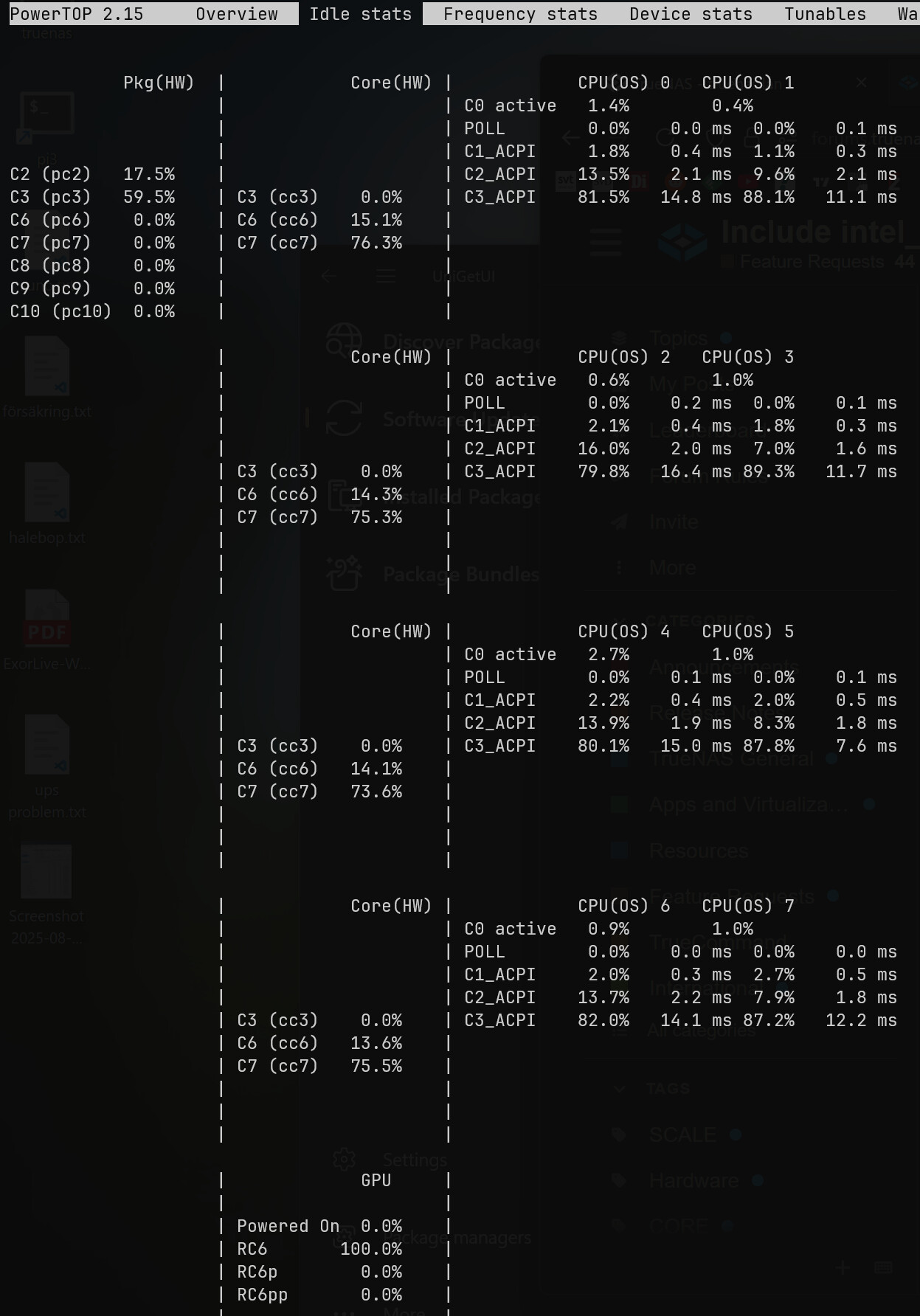
Powertop still shows *_ACPI states, but that’s just labeling—turbostat confirms deep C-states are being used and my idle power draw has dropped significantly.

Example turbostat snapshot shows many cores at 60–95% C3 residency, temps around 40°C, and package power around 30W. That’s a huge win.

Still no activity in Pkg%pc6/pc8 yet, but I’ll dig into that later. Looks like something changed in 25.04.2 and Raptor Lake is now behaving properly. If iX made this happen intentionally, thank you. If not—don’t touch anything.

These are my stats on my Intel i3-14100 with powertop 2.15 (thank you Salaman):

cat /sys/devices/system/cpu/cpuidle/current_driver
intel_idle

turbostat:

turbostat version 2022.10.04 - Len Brown <lenb@kernel.org>
Kernel command line: BOOT_IMAGE=/ROOT/25.04.2@/boot/vmlinuz-6.12.15-production+truenas root=ZFS=boot-pool/ROOT/25.04.2 ro libata.allow_tpm=1 amd_iommu=on iommu=pt kvm_amd.npt=1 kvm_amd.avic=1 intel_iommu=on zfsforce=1 nvme_core.multipath=N
CPUID(0): GenuineIntel 0x20 CPUID levels
CPUID(1): family:model:stepping 0x6:bf:5 (6:191:5) microcode 0x37
CPUID(0x80000000): max_extended_levels: 0x80000008
CPUID(1): SSE3 MONITOR - EIST TM2 TSC MSR ACPI-TM HT TM
CPUID(6): APERF, TURBO, DTS, PTM, HWP, HWPnotify, HWPwindow, HWPepp, HWPpkg, EPB
cpu7: MSR_IA32_MISC_ENABLE: 0x00850089 (TCC EIST MWAIT PREFETCH TURBO)
CPUID(7): No-SGX No-Hybrid
CPUID(0x15): eax_crystal: 2 ebx_tsc: 182 ecx_crystal_hz: 38400000
TSC: 3494 MHz (38400000 Hz * 182 / 2 / 1000000)
CPUID(0x16): base_mhz: 3500 max_mhz: 4700 bus_mhz: 100
cpu7: MSR_MISC_PWR_MGMT: 0x000030c2 (ENable-EIST_Coordination ENable-EPB DISable-OOB)
RAPL: 4369 sec. Joule Counter Range, at 60 Watts
cpu7: MSR_PLATFORM_INFO: 0x80838f0812300
8 * 100.0 = 800.0 MHz max efficiency frequency
35 * 100.0 = 3500.0 MHz base frequency
cpu7: MSR_IA32_POWER_CTL: 0x00fc005b (C1E auto-promotion: ENabled)
cpu7: MSR_TURBO_RATIO_LIMIT: 0x2d2d2d2d2d2d2f2f
45 * 100.0 = 4500.0 MHz max turbo 8 active cores
45 * 100.0 = 4500.0 MHz max turbo 7 active cores
45 * 100.0 = 4500.0 MHz max turbo 6 active cores
45 * 100.0 = 4500.0 MHz max turbo 5 active cores
45 * 100.0 = 4500.0 MHz max turbo 4 active cores
45 * 100.0 = 4500.0 MHz max turbo 3 active cores
47 * 100.0 = 4700.0 MHz max turbo 2 active cores
47 * 100.0 = 4700.0 MHz max turbo 1 active cores
cpu7: MSR_CONFIG_TDP_NOMINAL: 0x00000023 (base_ratio=35)
cpu7: MSR_CONFIG_TDP_LEVEL_1: 0x00000000 ()
cpu7: MSR_CONFIG_TDP_LEVEL_2: 0x00000000 ()
cpu7: MSR_CONFIG_TDP_CONTROL: 0x80000000 ( lock=1)
cpu7: MSR_TURBO_ACTIVATION_RATIO: 0x00000000 (MAX_NON_TURBO_RATIO=0 lock=0)
cpu7: MSR_PKG_CST_CONFIG_CONTROL: 0x74008008 (UNdemote-C1, demote-C1, locked, pkg-cstate-limit=8 (unlimited))
Uncore Frequency pkg0 die0: 800 - 4300 MHz (800 - 4300 MHz)
/dev/cpu_dma_latency: 2000000000 usec (default)
current_driver: intel_idle
current_governor: menu
current_governor_ro: menu
cpu7: POLL: CPUIDLE CORE POLL IDLE
cpu7: C1ACPI: ACPI FFH MWAIT 0x0
cpu7: C2ACPI: ACPI FFH MWAIT 0x20
cpu7: C3ACPI: ACPI FFH MWAIT 0x60
cpu7: cpufreq driver: intel_pstate
cpu7: cpufreq governor: powersave
cpufreq intel_pstate no_turbo: 0
cpu7: MSR_MISC_FEATURE_CONTROL: 0x00000000 (L2-Prefetch L2-Prefetch-pair L1-Prefetch L1-IP-Prefetch)
cpu0: MSR_PM_ENABLE: 0x00000001 (HWP)
cpu0: MSR_HWP_CAPABILITIES: 0x01102d3c (high 60 guar 45 eff 16 low 1)
cpu0: MSR_HWP_REQUEST: 0x80003c0b (min 11 max 60 des 0 epp 0x80 window 0x0 pkg 0x0)
cpu0: MSR_HWP_REQUEST_PKG: 0x8000ff01 (min 1 max 255 des 0 epp 0x80 window 0x0)
cpu0: MSR_HWP_INTERRUPT: 0x00000005 (EN_Guaranteed_Perf_Change, Dis_Excursion_Min)
cpu0: MSR_HWP_STATUS: 0x00000000 (No-Guaranteed_Perf_Change, No-Excursion_Min)
cpu0: EPB: 6 (balanced)
cpu0: MSR_RAPL_POWER_UNIT: 0x000a0e03 (0.125000 Watts, 0.000061 Joules, 0.000977 sec.)
cpu0: MSR_PKG_POWER_INFO: 0x000001e0 (60 W TDP, RAPL 0 - 0 W, 0.000000 sec.)
cpu0: MSR_PKG_POWER_LIMIT: 0x4287e800dd83e8 (UNlocked)
cpu0: PKG Limit #1: ENabled (125.000 Watts, 28.000000 sec, clamp ENabled)
cpu0: PKG Limit #2: ENabled (253.000 Watts, 0.002441* sec, clamp DISabled)
cpu0: MSR_VR_CURRENT_CONFIG: 0x00000a00
cpu0: PKG Limit #4: 320.000000 Watts (UNlocked)
cpu0: MSR_DRAM_POWER_LIMIT: 0x00000000 (UNlocked)
cpu0: DRAM Limit: DISabled (0.000 Watts, 0.000977 sec, clamp DISabled)
cpu0: MSR_PP0_POLICY: 0
cpu0: MSR_PP0_POWER_LIMIT: 0x00000000 (UNlocked)
cpu0: Cores Limit: DISabled (0.000 Watts, 0.000977 sec, clamp DISabled)
cpu0: MSR_PP1_POLICY: 0
cpu0: MSR_PP1_POWER_LIMIT: 0x00000000 (UNlocked)
cpu0: GFX Limit: DISabled (0.000 Watts, 0.000977 sec, clamp DISabled)
cpu0: MSR_IA32_TEMPERATURE_TARGET: 0x00641400 (100 C)
cpu0: MSR_IA32_PACKAGE_THERM_STATUS: 0x88420000 (34 C)
cpu0: MSR_IA32_PACKAGE_THERM_INTERRUPT: 0x02000003 (100 C, 100 C)
cpu7: MSR_PKGC3_IRTL: 0x00000000 (NOTvalid, 0 ns)
cpu7: MSR_PKGC6_IRTL: 0x00000000 (NOTvalid, 0 ns)
cpu7: MSR_PKGC7_IRTL: 0x00000000 (NOTvalid, 0 ns)
cpu7: MSR_PKGC8_IRTL: 0x00000000 (NOTvalid, 0 ns)
cpu7: MSR_PKGC9_IRTL: 0x00000000 (NOTvalid, 0 ns)
cpu7: MSR_PKGC10_IRTL: 0x00000000 (NOTvalid, 0 ns)
Core    CPU     Avg_MHz Busy%   Bzy_MHz TSC_MHz IPC     IRQ     SMI     POLL    C1ACPI  C2ACPI  C3ACPI  POLL%   C1ACPI% C2ACPI% C3ACPI% CPU%c1  CPU%c6  CPU%c7  CoreTmp CoreThr PkgTmp  GFX%rc6 Totl%C0 Any%C0  GFX%C0  CPUGFX% Pkg%pc2 Pkg%pc3 Pkg%pc6 Pkg%pc7 Pkg%pc8 Pkg%pc9       Pk%pc10 CPU%LPI SYS%LPI PkgWatt CorWatt GFXWatt RAMWatt PKG_%   RAM_%   UncMHz
-       -       25      2.11    1194    3494    1.83    3612    0       7       2064    2310    2837    0.00    1.81    12.15   84.00   8.21    16.25   73.43   34      0       34      99.92   16.98   12.62   0.00    0.00    19.15   59.23   0.00    0.00    0.00    0.00 0.00     0.00    0.00    4.21    0.75    0.00    0.00    0.00    0.00    800
0       0       23      2.74    831     3494    1.09    613     0       0       326     341     282     0.00    4.14    15.95   77.24   8.11    16.79   72.36   34      0       34      99.92   16.98   12.62   0.00    0.00    19.15   59.23   0.00    0.00    0.00    0.00 0.00     0.00    0.00    4.21    0.75    0.00    0.00    0.00    0.00    800
0       1       8       0.89    878     3494    0.69    389     0       0       57      171     512     0.00    0.29    8.69    90.20   9.96
1       2       50      3.86    1302    3494    2.18    573     0       1       286     408     233     0.00    2.74    16.84   76.63   6.06    17.82   72.26   31      0
1       3       36      1.59    2275    3494    2.52    228     0       0       31      161     461     0.00    0.14    7.36    90.98   8.33
2       4       23      2.64    863     3494    1.03    742     0       0       543     402     301     0.00    2.61    15.61   79.22   8.00    13.63   75.72   32      0
2       5       7       0.88    847     3494    0.75    289     0       5       256     180     467     0.03    1.71    6.59    90.89   9.77
3       6       48      3.59    1323    3494    2.18    574     0       1       500     439     191     0.00    2.06    17.82   76.59   6.26    16.77   73.38   32      0
3       7       7       0.67    976     3494    0.66    204     0       0       65      208     390     0.00    0.77    8.33    90.28   9.18

It enters deep power-saving states (C3, C6, C7 at the core level, and PC3 at the package level), but do not utilize the deepest states (PC7, PC8, PC9, PC10), as these are 0 in my readings.

Going into core idle but not package idle is likely a result of some other hardware preventing the package state, or a BIOS configuration issue. Frequently I’ve seen it be NIC devices. You should glance at every page in your BIOS and ensure that anything related to extended idle, ASPM, stepping etc is enabled, and pull out/disable hardware one by one (if you can) until you see C6. Sometimes motherboard vendors are also just bad and the hardware can’t reach the states, either intentionally or not.

According to the RPL datasheet, the supported package states are C0/C2/C3/C6/C8/C10.

I see C8 reliably–I cannot reach C10 and assume I won’t be able to on my hardware, but I’ve read it’s quite finicky down there. I’m very happy with C8 and my idle power consumption.

Hey folks — quick question for those of you showing PowerTOP 2.15 in your output:

How did you get that version running on TrueNAS SCALE?

I’m running SCALE 25.04.2 (with kernel 6.12.15) and trying to avoid 2.14 from the Debian repos. I’ve tried building from source in a Docker container, but it still reports as 2.14 (even after stripping the apt version).

Would love to know if you’re:

  • Running a developer build of SCALE?
  • Running PowerTOP in a separate Debian VM or container?
  • Or did you somehow upgrade it directly on SCALE without breaking the appliance model?

Thanks in advance — trying to fully enable intel_idle and tune Raptor Lake power draw.

You compile it on another machine, such as a Debian virtual machine. Then copy over the powertop executable and run it from a directory not locked down with noexec. /mnt/pool/dataset for example.

I built it from git source in a Debian bookworm container (and then ran the binary outside the container).

apt install -y build-essential autoconf-archive ncurses-dev libnl-3-dev libpci-dev pkg-config libtool-bin autopoint gettext libnl-genl-3-dev
git clone https://git.kernel.org/pub/scm/libs/libtrace/libtraceevent.git
cd libtraceevent; make; make install; cd ..
git clone https://git.kernel.org/pub/scm/libs/libtrace/libtracefs.git
cd libtracefs; make; make install; cd ..
git clone https://github.com/fenrus75/powertop.git
cd powertop
./autogen.sh
./configure
make
# now built: src/powertop

You should also use lspci to verify that all your devices have ASPM L1 enabled:

sudo lspci -vv | awk '/ASPM/{print $0}' RS= | grep --color -P '(^[a-z0-9:.]+|ASPM )'
4 Likes

Since this request was mentioned on T3, I wanted to follow up with results from my own lab now that I’ve got intel_idle working properly on TrueNAS SCALE.


** Setup**

  • Motherboard: ASUS Z790
  • CPU: Intel i7-13700K
  • Drives: 15 × HDDs, 6 × SSDs, 3 × NVMe
  • Fans: 7 case + 2 CPU + 2 HBA (40mm)
  • GPU: RTX 4070 SUPER
  • OS: TrueNAS SCALE 25.04.2
  • PowerTOP: Compiled from source (v2.15)
  • Driver: intel_idle now active
  • ASPM: L1 enabled on all relevant devices
  • Note: A zfs send was running during all power measurements

** Power Comparison**

Before (acpi_idle): ~145W idle
After  (intel_idle): ~127W idle

This 18W drop was measured during a ZFS send.

Important context: These readings reflect a system currently running with 7 HDDs (1 temporarily removed), plus all 6 SSDs and 3 NVMe drives. Final drive count will increase.

Deepest idle state:

Before: C3_ACPI
After : PC10 (C10) with up to 85% residency per core

Package sleep state:

Before: Pkg(OS) 0.0%
After : Pkg(HW) active in C10

** Notes**

I compiled PowerTOP from source in a Bookworm LXC, copied it to /mnt/tank/tools/powertop , and created a systemd service for auto-tune on boot. No post-init task needed.

Why PowerTOP 2.15 Matters

TrueNAS SCALE ships with PowerTOP v2.14, which was released before September 2022.This outdated version:

❌ Cannot detect C10 residency properly  
❌ Fail to auto-tune ASPM or PCIe L1 reliably  
❌ Miss hybrid-core optimizations on 12th–14th Gen Intel CPUs  

Meanwhile, PowerTOP v2.15 was released on September 29, 2022, and it’s the first version that supports: chough cough 3 years ago?

✅ Alder Lake and Raptor Lake CPUs  
✅ Accurate ASPM detection on Z690/Z790 chipsets  
✅ Reliable tuning on Linux 6.x kernels (like SCALE 25.04.2)  
✅ Deep C-State visibility (C10, Pkg(HW), etc.)

Bottom line: PowerTOP 2.14 is too old to be useful for modern platforms. If you’re on TrueNAS SCALE with Intel 12th+ Gen, compiling v2.15 from source is mandatory for accurate tuning.

The key fix is that intel_idle is available in SCALE if your system supports it:

cat /sys/devices/system/cpu/cpuidle/current_driver
intel_idle

And ASPM is working across all bridges:

lspci -vv | grep -i ASPM

Special thanks to @rs443 and @Salaman for the help.

This change alone shaved ~18W off idle power, and I expect that to improve further once idle stabilizes post-transfer.


** Estimated Power Savings**

After consolidating drives and powering off the Proxmox box (83W draw):

Total saved: 83W (Proxmox box) + 18W (intel_idle gain) = 101W
Annual usage: 101W × 24h × 365 = 884.76 kWh
At $0.13/kWh: 884.76 × 0.13 = $115.02/year

** Annual savings: ~$115.02**


** Additional Power Draw Estimate**

Adding 6 more HDDs to reach the full 15 will likely increase idle power by 24W, or **$27.33/year** at $0.13/kWh.

However, that will be offset by eliminating the second server (Proxmox box) and its 83W draw. Once I finish consolidating everything into my HL15, I’ll update the numbers with live readings.

3 Likes

Good to know that it seems like this might have been down to a package revision and a new release of TrueNAS brings support for new hardware, or “already supported, but now is reported”

I’ll still see if I can get a solid answer regarding testing, and potentially be able to share more information about any kind of update cadence for inclusion. I did notice that my Mini-R is using intel_idle but because I haven’t transferred powertop 2.15 over I don’t know if it’s actually going down to the deeper sleep states.

1 Like

Hi @Rocketplanner83,
I’ve been following the discussion with great interest for some time, as my system is also affected.

Today, I tried to follow your steps. Unfortunately, I am unable to do so because I do not fully understand how to configure the container storage in order to use the powertop binary in TrueNAS, respectively create a service. Would it be possible to explain the necessary steps in more detail?

@serial You need to spin up a bookworm container and get powertop in there, then you scp the powertop to a folder on your pool not owned by the system.

This is the part you paste into the container for getting powertop

apt install -y build-essential autoconf-archive ncurses-dev libnl-3-dev libpci-dev pkg-config libtool-bin autopoint gettext libnl-genl-3-dev
git clone https://git.kernel.org/pub/scm/libs/libtrace/libtraceevent.git
cd libtraceevent; make; make install; cd ..
git clone https://git.kernel.org/pub/scm/libs/libtrace/libtracefs.git
cd libtracefs; make; make install; cd ..
git clone https://github.com/fenrus75/powertop.git
cd powertop
./autogen.sh
./configure
make
# now built: src/powertop1```
1 Like

Thanks for the hint to use scp. Nevertheless I’m still stuck to an idle power consumption of 30 W with disks spun down. With around 6 x 1 W for each disk the system still consumes ~24 W. I expected this to come down to 10 W.

cat /sys/devices/system/cpu/cpuidle/current_driver
intel_idle

sudo lspci -vv | awk '/ASPM/{print $0}' RS= | grep --color -P '(^[a-z0-9:.]+|ASPM )'

00:1a.0 PCI bridge: Intel Corporation Raptor Lake PCI Express Root Port (rev 11) (prog-if 00 [Normal decode])
                LnkCap: Port #25, Speed 16GT/s, Width x4, ASPM L1, Exit Latency L1 <64us
                LnkCtl: ASPM L1 Enabled; RCB 64 bytes, Disabled- CommClk+
00:1b.0 PCI bridge: Intel Corporation Raptor Lake PCI Express Root Port (rev 11) (prog-if 00 [Normal decode])
                LnkCap: Port #17, Speed 8GT/s, Width x1, ASPM L0s L1, Exit Latency L0s <1us, L1 <4us
                LnkCtl: ASPM L0s L1 Enabled; RCB 64 bytes, Disabled- CommClk-
00:1c.0 PCI bridge: Intel Corporation Raptor Lake PCI Express Root Port (rev 11) (prog-if 00 [Normal decode])
                LnkCap: Port #1, Speed 8GT/s, Width x1, ASPM L0s L1, Exit Latency L0s <1us, L1 <4us
                LnkCtl: ASPM L0s L1 Enabled; RCB 64 bytes, Disabled- CommClk-
00:1c.2 PCI bridge: Intel Corporation Raptor Point-S PCH - PCI Express Root Port 3 (rev 11) (prog-if 00 [Normal decode])
                LnkCap: Port #3, Speed 8GT/s, Width x1, ASPM L1, Exit Latency L1 <64us
                LnkCtl: ASPM L1 Enabled; RCB 64 bytes, Disabled- CommClk+
00:1c.4 PCI bridge: Intel Corporation Device 7a3c (rev 11) (prog-if 00 [Normal decode])
                LnkCap: Port #5, Speed 16GT/s, Width x4, ASPM L1, Exit Latency L1 <64us
                LnkCtl: ASPM L1 Enabled; RCB 64 bytes, Disabled- CommClk+
00:1d.0 PCI bridge: Intel Corporation Device 7a34 (rev 11) (prog-if 00 [Normal decode])
                LnkCap: Port #13, Speed 16GT/s, Width x4, ASPM L1, Exit Latency L1 <64us
                LnkCtl: ASPM L1 Enabled; RCB 64 bytes, Disabled- CommClk+
pcilib: sysfs_read_vpd: read failed: No such device
01:00.0 Non-Volatile memory controller: Samsung Electronics Co Ltd NVMe SSD Controller PM9C1a (DRAM-less) (prog-if 02 [NVM Express])
                LnkCap: Port #0, Speed 16GT/s, Width x4, ASPM L1, Exit Latency L1 <64us
                LnkCtl: ASPM L1 Enabled; RCB 64 bytes, Disabled- CommClk+
04:00.0 Ethernet controller: Realtek Semiconductor Co., Ltd. RTL8125 2.5GbE Controller (rev 05)
                LnkCap: Port #0, Speed 5GT/s, Width x1, ASPM L0s L1, Exit Latency L0s unlimited, L1 <64us
                LnkCtl: ASPM L1 Enabled; RCB 64 bytes, Disabled- CommClk+
05:00.0 SATA controller: ASMedia Technology Inc. ASM1166 Serial ATA Controller (rev 02) (prog-if 01 [AHCI 1.0])
                LnkCap: Port #0, Speed 8GT/s, Width x2, ASPM L0s L1, Exit Latency L0s <4us, L1 <64us
                LnkCtl: ASPM L1 Enabled; RCB 64 bytes, Disabled- CommClk+
06:00.0 Non-Volatile memory controller: Samsung Electronics Co Ltd NVMe SSD Controller PM9C1a (DRAM-less) (prog-if 02 [NVM Express])
                LnkCap: Port #0, Speed 16GT/s, Width x4, ASPM L1, Exit Latency L1 <64us
                LnkCtl: ASPM L1 Enabled; RCB 64 bytes, Disabled- CommClk+
           Pkg(HW)  |            Core(HW) |            CPU(OS) 0   CPU(OS) 1
                    |                     | C0 active   1.1%        0.2%
                    |                     | POLL        0.0%    0.0 ms  0.0%    0.0 ms
                    |                     | C1_ACPI     0.6%    0.5 ms  0.2%    1.0 ms
C2 (pc2)   11.0%    |                     | C2_ACPI     1.9%    1.3 ms  0.6%    1.3 ms
C3 (pc3)   73.9%    | C3 (cc3)    0.0%    | C3_ACPI    95.4%   27.4 ms 98.8%   20.2 ms
C6 (pc6)    0.0%    | C6 (cc6)    1.9%    |
C7 (pc7)    0.0%    | C7 (cc7)   93.4%    |
C8 (pc8)    0.0%    |                     |
C9 (pc9)    0.0%    |                     |
C10 (pc10)  0.0%    |                     |

                    |            Core(HW) |            CPU(OS) 2   CPU(OS) 3
                    |                     | C0 active   2.3%        0.2%
                    |                     | POLL        0.0%    0.1 ms  0.0%    0.0 ms
                    |                     | C1_ACPI     2.0%    0.6 ms  0.3%    0.4 ms
                    |                     | C2_ACPI     4.9%    1.6 ms  1.0%    1.4 ms
                    | C3 (cc3)    0.0%    | C3_ACPI    91.1%   15.9 ms 98.4%   13.4 ms
                    | C6 (cc6)    4.5%    |
                    | C7 (cc7)   89.1%    |
                    |                     |
                    |                     |
                    |                     |

                    |            Core(HW) |            CPU(OS) 4   CPU(OS) 5
                    |                     | C0 active   0.7%        0.2%
                    |                     | POLL        0.0%    0.1 ms  0.0%    0.0 ms
                    |                     | C1_ACPI     1.2%    0.3 ms  0.2%    1.0 ms
                    |                     | C2_ACPI     3.2%    1.3 ms  0.6%    1.6 ms
                    | C3 (cc3)    0.0%    | C3_ACPI    94.5%   21.0 ms 99.0%   17.3 ms
                    | C6 (cc6)    2.9%    |
                    | C7 (cc7)   92.5%    |
                    |                     |
                    |                     |
                    |                     |

                    |            Core(HW) |            CPU(OS) 6   CPU(OS) 7
                    |                     | C0 active   0.7%        0.2%
                    |                     | POLL        0.0%    0.1 ms  0.0%    0.2 ms
                    |                     | C1_ACPI     1.9%    0.8 ms  0.2%    1.0 ms
                    |                     | C2_ACPI     3.5%    1.4 ms  0.7%    1.7 ms
                    | C3 (cc3)    0.0%    | C3_ACPI    93.5%   17.6 ms 98.8%   15.9 ms
                    | C6 (cc6)    2.8%    |
                    | C7 (cc7)   91.5%    |
                    |                     |
                    |                     |
                    |                     |

                    |            Core(HW) |            CPU(OS) 8   CPU(OS) 9
                    |                     | C0 active   0.9%        0.4%
                    |                     | POLL        0.0%    0.0 ms  0.0%    0.0 ms
                    |                     | C1_ACPI     1.5%    0.3 ms  0.6%    1.0 ms
                    |                     | C2_ACPI     3.0%    1.1 ms  0.9%    1.1 ms
                    | C3 (cc3)    0.0%    | C3_ACPI    94.0%   15.4 ms 97.8%   14.1 ms
                    | C6 (cc6)    2.8%    |
                    | C7 (cc7)   89.9%    |
                    |                     |
                    |                     |
                    |                     |

                    |            Core(HW) |            CPU(OS) 10  CPU(OS) 11
                    |                     | C0 active   0.5%        0.3%
                    |                     | POLL        0.0%    0.0 ms  0.0%    0.0 ms
                    |                     | C1_ACPI     0.3%    0.8 ms  1.0%    0.2 ms
                    |                     | C2_ACPI     0.8%    1.4 ms  0.5%    0.5 ms
                    | C3 (cc3)    0.0%    | C3_ACPI    98.0%   22.0 ms 97.9%   20.9 ms
                    | C6 (cc6)    1.2%    |
                    | C7 (cc7)   93.8%    |
                    |                     |
                    |                     |
                    |                     |

                    |            Core(HW) |            CPU(OS) 12
                    |                     | C0 active   0.2%
                    |                     | POLL        0.0%    0.2 ms
                    |                     | C1_ACPI     0.3%    0.1 ms
                    |                     | C2_ACPI     0.7%    1.5 ms
                    | C3 (cc3)    0.0%    | C3_ACPI    98.6%   19.2 ms
                    | C6 (cc6)   96.2%    |
                    | C7 (cc7)    0.0%    |
                    |                     |
                    |                     |
                    |                     |

                    |            Core(HW) |            CPU(OS) 13
                    |                     | C0 active   0.1%
                    |                     | POLL        0.0%    0.0 ms
                    |                     | C1_ACPI     0.1%    0.7 ms
                    |                     | C2_ACPI     0.2%    1.5 ms
                    | C3 (cc3)    0.0%    | C3_ACPI    99.6%   99.4 ms
                    | C6 (cc6)   99.5%    |
                    | C7 (cc7)    0.0%    |
                    |                     |
                    |                     |
                    |                     |

                    |            Core(HW) |            CPU(OS) 14
                    |                     | C0 active   0.1%
                    |                     | POLL        0.0%    0.0 ms
                    |                     | C1_ACPI     0.2%    1.0 ms
                    |                     | C2_ACPI     0.5%    1.7 ms
                    | C3 (cc3)    0.0%    | C3_ACPI    99.1%   69.9 ms
                    | C6 (cc6)   99.4%    |
                    | C7 (cc7)    0.0%    |
                    |                     |
                    |                     |
                    |                     |

                    |            Core(HW) |            CPU(OS) 15
                    |                     | C0 active   0.0%
                    |                     | POLL        0.0%    0.0 ms
                    |                     | C1_ACPI     0.1%    0.5 ms
                    |                     | C2_ACPI     0.1%    1.4 ms
                    | C3 (cc3)    0.0%    | C3_ACPI    99.8%  189.6 ms
                    | C6 (cc6)   99.6%    |
                    | C7 (cc7)    0.0%    |
                    |                     |
                    |                     |
                    |                     |

                    |             GPU     |
                    |                     |
                    | Powered On  0.0%    |
                    | RC6       100.0%    |
                    | RC6p        0.0%    |
                    | RC6pp       0.0%    |

It correlates with the results from rs443, as the deep states at package level are not used.

I cant tell which powertop you are using, I know that mine was not showing anything better than C3 with powertop 2.14, I had to get powertop 2.15 to show anything better than C3.

Now It seems like I am getting to C7 which is much better.

In my case, the issue is that I have two NVMe drives that don’t support ASPM, which prevents the system from reaching the lower package power states. You don’t appear to have that problem, you should double-check your BIOS settings. I’d also recommend going through this page in detail:

It is 2.15, with 2.14 I wasn’t able to get anything better than C3 as well.

I’m very familiar with that guide and tried to follow it as much as possible. I’m using the DDR5 version of the MB and 14th gen CPU, but the BIOS options are the same.

As soon as I have time, I will remove unnecessary components to see if I can achieve better states.

Possibly related, I got an Odroid H4 Plus with the intention of using it for TrueNAS. This single board machine is advertised to be able to reach as low as 2.4W idle power, assuming all the stars align.

I tested it with a Kingston SA400 128GB m.2 SATA, and a Kingston E100 128GB SATA drive both connected since those are all my spare drives, plus a 16GB RAM stick. Only a HDMI cable and a USB keyboard was connected to the Odroid H4 Plus.
ASPM was enabled on all the PCIe slots (set to Auto in the BIOS) and SATA DevSlp was enabled as well, though it makes little difference for solid state drives. All serial devices/outputs/controllers were disabled, including the eMMC port. The two network ports were left enabled as I plan on using those.
Power was measured from the wall, I’m using a 19V 7A 133W power brick because it will have to handle HDDs later on.
All OS were installed from USB stick using a ISO installer, and then left sitting idle after booting. No settings were changed.

With TrueNAS-SCALE-25.04.2.4, I got a power usage of 13W with HDMI + keyboard, and 7W running headless. Most of that comes from the HDMI connection, the keyboard only saved 1 watts.

With TrueNAS-13.0-U6.8 (the old, FreeBSD version), I got… the exact same figures.

With debian-13.1.0-amd64-DVD, I got ~8W with HDMI + keyboard, and 3W running headless. I’m assuming it doesn’t reach the advertised 2.4W due to using the 19V power brick (measurements showing 2.4W used a 12V power supply).

One may argue that this 4W difference is nothing (indeed, it amounts to around 3 kWh a month). But looking at it from another side you can also say that TrueNAS uses over 2x as much power in idle than another linux installation.

For now I’ll most likely run it with TrueNAS Core 13.0 U6 since it can set devices directly as iSCSI Extents, an option removed in SCALE for some reason. I’d consider switching to SCALE if the power usage could get fixed, since I do also have a ZFS array.

1 Like

Not sure about Intel; on my EPYC 7D12 I enabled amd_pstate myself with

midclt call system.advanced.update '{"kernel_extra_options": "amd_pstate=active amd_prefcore=enable"}'  

cpupower frequency-info then shows 400 MHz – 3.02 GHz.

analyzing CPU 55:
  driver: amd-pstate-epp
  CPUs which run at the same hardware frequency: 55
  CPUs which need to have their frequency coordinated by software: 55
  maximum transition latency:  Cannot determine or is not supported.
  hardware limits: 400 MHz - 3.02 GHz
  available cpufreq governors: performance powersave
  current policy: frequency should be within 400 MHz and 3.02 GHz.
                  The governor "performance" may decide which speed to use
                  within this range.
  current CPU frequency: Unable to call hardware
  current CPU frequency: 2.98 GHz (asserted by call to kernel)
  boost state support:
    Supported: yes
    Active: yes
    AMD PSTATE Highest Performance: 255. Maximum Frequency: 3.02 GHz.
    AMD PSTATE Nominal Performance: 93. Nominal Frequency: 1.10 GHz.
    AMD PSTATE Lowest Non-linear Performance: 86. Lowest Non-linear Frequency: 1.02 GHz.
    AMD PSTATE Lowest Performance: 35. Lowest Frequency: 400 MHz.

With the ACPI idle driver it was 1000 MHz – 1100 MHz, but it hardly affects my power draw—probably because of the early AMD IOD issue.

After review, we’ve decided not to move forward with this due to the technical risk of regressions. The potential impact on existing functionality is too high for us to safely implement this change.

We appreciate your feedback and understanding. Closing and votes will be released.

3 Likes