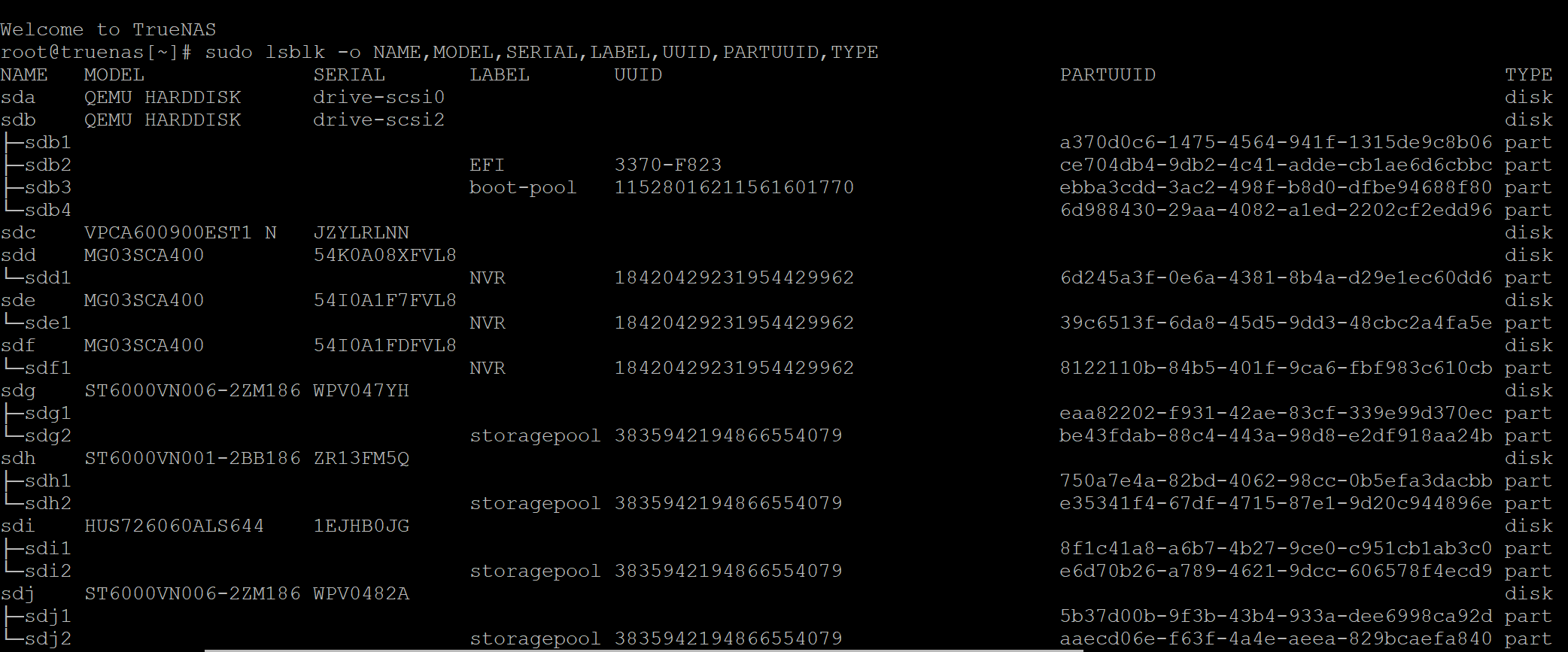
Hi folks, looking for some guidance, unfortunately had a power outage for an extended period ~2hours and no UPS. I’ve powered up my physical server, it starts fine but once Truenas start up within Proxmox I have an issue where one of my vdev’s is offline. I’ve attempted to restart the server and also reseated the hard drive in question but still have the vdev offline.
All my other vdevs are online without issues. Through the GUI, when I go to Import Pool there is nothing to select. If I also try from the cli zpool import -f vmpooli I get “no such pool available”.
Within the GUI, I can see the disk via Disks and there it has pool as N/A. I do have other storage that I can move to if needed but I need to try and get this pool online so that I can move the storage.
Is it an option to export the pool and then import it again or can I look at doing similar to this thread from post 10 onwards Vdev Offline - Disks with exported pools
There are special precautions to take when using ZFS under a hypervisor, like Proxmox. If not taken, data loss or even entire pool loss is possible.
First, please describe how you pass through the disks to TrueNAS.
Next, please try these 3 commands, (using SUDO if not using as root). Then post the output in CODE tags.
zpool status -L
zpool import -d /dev/sdc
zdb -l /dev/sdc
The first will show which disks are part of which pool. So we can confirm sdc is not in another pool.
The second will likely show nothing or simple error. You have indicated that importing by name did not work. But, its harmless to try. (Because it is possible you had a typo or upper / lower case issue with the pool name.)
A bit of clarity. ZFS uses pools of disk(s), which must be in a vDev of some sort, (even single disks are an 1 disk Mirror vDev, sort of).
So what I think you mean is that one of your single disk pools is offline.
For reference, here is some background of ZFS & power loss:
@Arwen Sorry for the delayed response, I’ve been able to jump on it and run the commands as you mentioned.
root@:~# zpool status -L
no pools available
root@:~# zpool status -L
no pools available
root@:~# zpool import -d /dev/sdc
no pools available to import
root@:~# zdb -l /dev/sdc
cannot open '/dev/sdc': No such file or directory
With regards to passthrough the HBA that is already flashed to IT mode is passed the PCI card through to Truenas VM. The two other datasets / vdevs that I have setup can both be seen within Truenas and can browse the data
Glad you seem to have the disk controller properly passed through. That should have prevented on layer of potential corruption.
This last part seems to indicate that the SDC disk has become unavailable since you ran the previous lsblk.
Non-redundant pools, like single disk pools, are subject to total and complete data loss, any time any of the disks decides to die.
You need to get the SDC / failing disk back to some degree of functionality. Depends on what it is, SSD or HDD. Some SSDs just become unavailable when dying. Other SSDs go into read only mode when failing.
In this regard I can’t help too much more. Some things to try:
Power cycling
Checking power & data cables to the disk
Seeing if the disk returns SMART data, smartctl -x /dev/sdc
I’ve already tried powercycling, checked cables and also reseated the disk. I also ran the smartctl and it returned the below
smartctl -x /dev/sdc
smartctl 7.4 2023-08-01 r5530 [x86_64-linux-6.6.44-production+truenas] (local bu            ild)
Copyright (C) 2002-23, Bruce Allen, Christian Franke, www.smartmontools.org

=== START OF INFORMATION SECTION ===
Vendor:               IBM-ESXS
Product:              VPCA600900EST1 N
Revision:             A3C0
Compliance:           SPC-4
Rotation Rate:        15000 rpm
Form Factor:          3.5 inches
Logical Unit id:      0x5000cca018cb2824
Serial number:        JZYLRLNN
Device type:          disk
Transport protocol:   SAS (SPL-4)
Local Time is:        Sat Nov 29 14:39:19 2025 AEST
device is NOT READY (e.g. spun down, busy)
A mandatory SMART command failed: exiting. To continue, add one or more '-T perm            issive' options.
Is it worth exporting / disconnected the vdev and then attempting to import?
First off, exporting simply won’t work because it is not imported.
You can’t disconnect a vDev of a pool, without it being imported.
Next, there are special options SMART uses for SAS disks. I don’t have them memorized, so either you would have to research them. Or perhaps someone else will know.
As for the problem, I am beyond my depth in trouble shooting. This looks like an overwritten partition table, possibly caused by either Proxmox or examination of the disk under MS-Windows. Ether of which has been known to corrupt ZFS pool disks.
With SAS drives, it really can happen that SMART compatibility isn’t great — it always depends on the specific model and firmware.
For example, I’m also using SAS drives myself (TrueNAS Core on bare metal), and the command smartctl -x /dev/XXX works fine for me.
I looked up the drive model VPCA600900EST1 N online.
Unless I’m mistaken, these are very old (End of Life around 2010–2012) 15,000 RPM enterprise drives with a capacity of 600 GB.
They’re reported to consume up to 13 watts in idle …
If you absolutely need the data on it (no backup?), then maybe further effort is justified.
To rule out issues caused by all the “passthrough / Proxmox mess,” you could try connecting the drive to a quickly assembled bare-metal TrueNAS system, if that’s an option for you.
If you do have a backup, or the data isn’t that important, I’d strongly recommend retiring this drive (and possibly any others of the same model).
From my point of view, drives like this, with such low capacity and such high power consumption, really have no place in a modern setup anymore.
Sorry been absolutely flat out with work and hadn’t had a chance to reply. Thanks for all your help, I was able to work out that it was only the EFI partitions of the VM’s that were still on that dataset, so I removed the EFI partitions, created them on different storage and was able to bring them online. I’ll be pulling this drive out and will put in an additional disk to add to on of the other vdevs.
Thanks for the response, yeah I know it is an old SAS drive pretty much running on borrowed time. When I originally setup Truenas it was a we’ll see how it goes approach and the 600gb disk just ended up staying there. I’ll def be retiring this disk and throwing in another larger capacity disk to go in one of my other vdevs.