One of my Pools Has Heen Unexpectedly 'Exported' and I Cannot Import it Again

Hello,
I started to get glitches when trying to stream movies from my pool_1, so I logged into my TrueNAS to see what’s going on. pool_1 has diasappeared from the Storage tab. (Pools 2 & 3 are still present) If I go to Storage>Disks all my disks are listed but those in pool_1 have (exported) next to them. If I click on Import Pool, pool_1 is listed, but the import always fails.

In the shell, if I try it says pool_1 is online and all 4 disks are online with no obvious indication of errors. If I try <sudo zpool import pool_1 -f> it says cannot import ‘pool_1’ : I/O error.

I think this means my data is still safe and my exported disks are not faulty, but how can I get pool_1 back?

All 4 disks in pool_1 are attached directly to the motherboard via SATA cables and there don’t appears to be any obvious hardware faults.

When I attempt to import via the GUI I get the following text:-

concurrent.futures.process.RemoteTraceback:
“”"
Traceback (most recent call last):
File "/usr/lib/python3/dist-packages/middlewared/plugins/zfs
/pool_actions.py", line 233, in import_pool
zfs.import_pool(found, pool_name, properties, missing_log=missing_log, any_host=any_host)
File “libzfs.pyx”, line 1374, in libzfs.ZFS.import_pool
File “libzfs.pyx”, line 1402, in libzfs.ZFS.__import_pool
libzfs.ZFSException: cannot import ‘pool_1’ as ‘pool_1’: I/O error

During handling of the above exception, another exception occurred:

Traceback (most recent call last):
File “/usr/lib/python3.11/concurrent/futures/process.py”, line 261, in _process_worker
r = call_item.fn(*call_item.args, **call_item.kwargs)
^^^^^^^^^^^^^^^^^^^^^^^^^^^^^^^^^^^^^^^^^^^^^^^^^
File “/usr/lib/python3/dist-packages/middlewared/worker.py”, line 116, in main_worker
res = MIDDLEWARE._run(*call_args)
^^^^^^^^^^^^^^^^^^^^^^^^^^^
File “/usr/lib/python3/dist-packages/middlewared/worker.py”, line 47, in _run
return self.call(name, serviceobj, methodobj, args, job=job)
^^^^^^^^^^^^^^^^^^^^^^^^^^^^^^^^^^^^^^^^^^^^^^^^^^^^^^
File “/usr/lib/python3/dist-packages/middlewared/worker.py”, line 41, in call
return methodobj(*params)
^^^^^^^^^^^^^^^^^^
File “/usr/lib/python3/dist-packages/middlewared/schema/processor.py”, line 178, in nf
return func(*args, **kwargs)
^^^^^^^^^^^^^^^^^^^^^
File "/usr/lib/python3/dist-packages/middlewared/plugins/zfs
/pool_actions.py", line 213, in import_pool
with libzfs.ZFS() as zfs:
File “libzfs.pyx”, line 534, in libzfs.ZFS.exit
File “/usr/lib/python3/dist-packages/middlewared/plugins/zfs/pool_actions.py”, line 237, in import_pool
raise CallError(f’Failed to import {pool_name!r} pool: {e}', e.code)
middlewared.service_exception.CallError: [EZFS_IO] Failed to import ‘pool_1’ pool: cannot import ‘pool_1’ as ‘pool_1’: I/O error
“”"

The above exception was the direct cause of the following exception:

Traceback (most recent call last):
File “/usr/lib/python3/dist-packages/middlewared/job.py”, line 515, in run
await self.future
File “/usr/lib/python3/dist-packages/middlewared/job.py”, line 560, in _run_body
rv = await self.method(*args)
^^^^^^^^^^^^^^^^^^^^^^^^
File “/usr/lib/python3/dist-packages/middlewared/schema/processor.py”, line 174, in nf
return await func(*args, **kwargs)
^^^^^^^^^^^^^^^^^^^^^^^^^^^
File “/usr/lib/python3/dist-packages/middlewared/schema/processor.py”, line 48, in nf
res = await f(*args, **kwargs)
^^^^^^^^^^^^^^^^^^^^^^^^
File "/usr/lib/python3/dist-packages/middlewared/plugins/pool
/import_pool.py", line 118, in import_pool
await self.middleware.call(‘zfs.pool.import_pool’, guid, opts, any_host, use_cachefile, new_name)
File “/usr/lib/python3/dist-packages/middlewared/main.py”, line 1005, in call
return await self._call(
^^^^^^^^^^^^^^^^^
File “/usr/lib/python3/dist-packages/middlewared/main.py”, line 728, in _call
return await self._call_worker(name, *prepared_call.args)
^^^^^^^^^^^^^^^^^^^^^^^^^^^^^^^^^^^^^^^^^^^^^^^^^^
File “/usr/lib/python3/dist-packages/middlewared/main.py”, line 734, in _call_worker
return await self.run_in_proc(main_worker, name, args, job)
^^^^^^^^^^^^^^^^^^^^^^^^^^^^^^^^^^^^^^^^^^^^^^^^^^^^
File “/usr/lib/python3/dist-packages/middlewared/main.py”, line 640, in run_in_proc
return await self.run_in_executor(self.__procpool, method, *args, **kwargs)
^^^^^^^^^^^^^^^^^^^^^^^^^^^^^^^^^^^^^^^^^^^^^^^^^^^^^^^^^^^^^^^^^^^^
File “/usr/lib/python3/dist-packages/middlewared/main.py”, line 624, in run_in_executor
return await loop.run_in_executor(pool, functools.partial(method, *args, **kwargs))
^^^^^^^^^^^^^^^^^^^^^^^^^^^^^^^^^^^^^^^^^^^^^^^^^^^^^^^^^^^^^^^^^^^^^^^^^^^^
middlewared.service_exception.CallError: [EZFS_IO] Failed to import ‘pool_1’ pool: cannot import ‘pool_1’ as ‘pool_1’: I/O error

Help!!!
This screams to me that this is a hardware level issue, or at least TrueNAS is struggling to speak with it.

If you’re sure the drives haven’t pooped themselves, check:
SATA Connection, HBA PCI Connection (however you’ve got these connected)
Check your 12v rail from the PSU, are you overloading it? Loose cable etc
And worse of it: Failing MB/HBA SATA port, PSU or drive!

Run a SMART test on those drives as you mentioned coming online for you, see if anything comes back.

After reseating the cables and running the SMART test if it comes back clean, try import again.

orr…. there is one trick I had when I had a weird similar issue on an older build, I just restored to a config backup and it worked fine after that! It was just an issue I had on the OS itself after a (I assume) bad update, restoring back fixed it for me.

Hello Harry,

Thanks for responding. I tried to run SMART tests on the exported but online HDDs but they all ‘aborted’ – due to previous error (AE_NOT_FOUND).

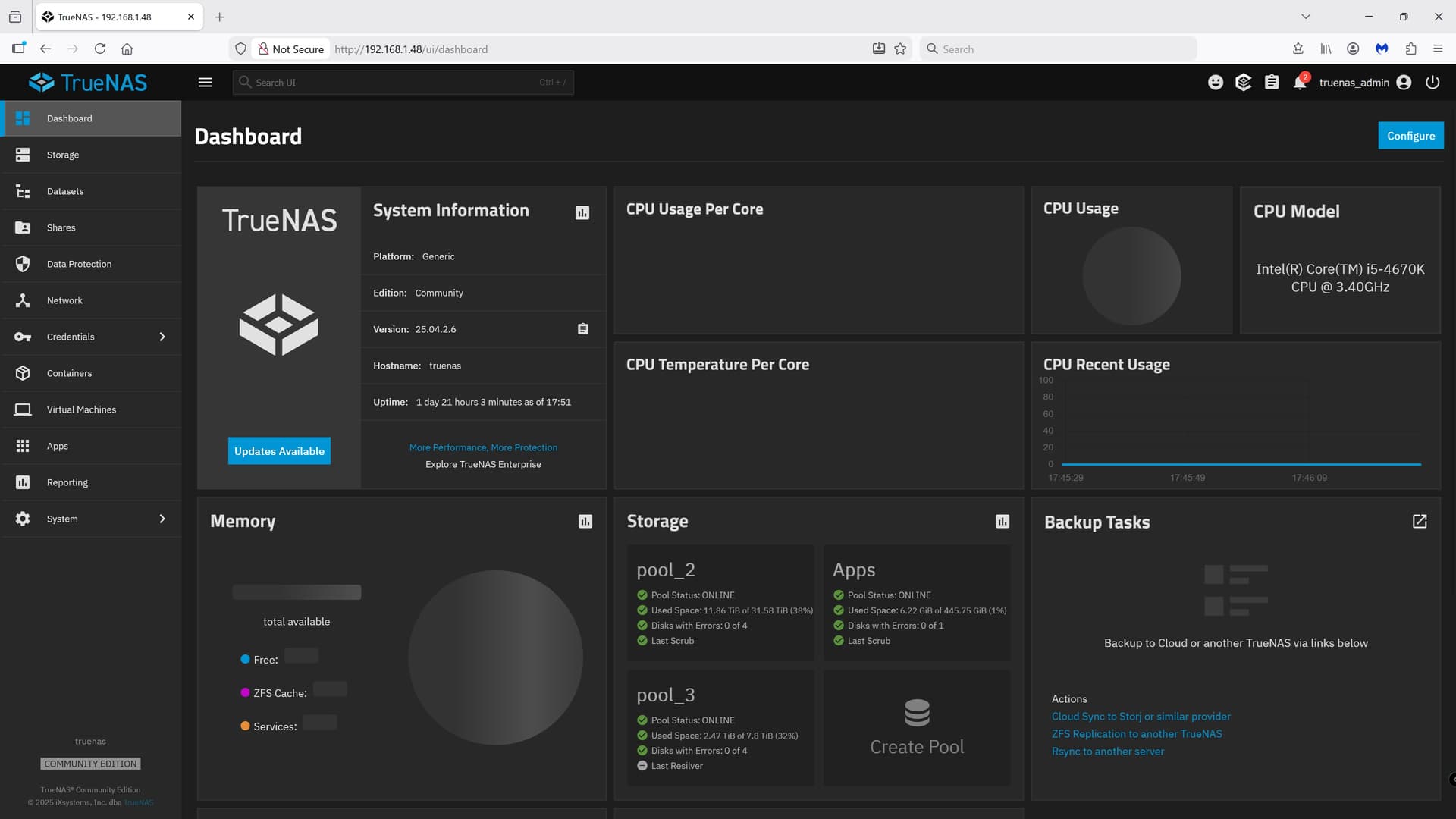
But I think it’s TrueNAS rather than a hardware issue as there have been no preliminary ‘Alerts’ about any of the 4 HDDs that I discovered had been exported. I’ve checked all the connections as you suggest and found nothing loose or suspect. But what’s more worrying is that the TrueNAS Desktop is not fully populated. I attach a screengrab to show you what’s missing.

I’m a bit reluctant to try an older config in case my pool_1 simply disappears altogether as it contains a lot of data I don’t want to risk losing. With TrueNAS looking dodgy I’m not sure that creating a config before trying to restore to an earlier config would be safe, but I bow to your greater knowledge and experience.

To protect my data could I remove the 4 HDDs in pool_1 before restoring to the older config, or would that be likely to cause even further problems?

Thanks,

Peter

Make a config backup of the existing truenas as safe current copy

Reinstall TrueNAS completely from a brand new ISO (go download it, don’t reuse an old one!) > when booted into the fresh TrueNAS > Go Restore to the config you just did > see if it’s happy

If not > Reinstall again > restore from previous config

The config doesn’t delete anything from the pool, just restores the settings and truenas config to how it was, assuming your pool existed in the exact same setup, should have no issue for data safety - for context, when I was testing in the past, I have safely restored to multiple previous configs without the pool failing, I just restore and bam it’s back like nothing happened.

Removing the drives and then restoring? I think TrueNAS might actually have a fit if you do that, never tried it, wouldn’t want to try it with data I care about because no idea how it will act.

1 Like

Thanks for that. UnfortunatelyI’m back to sqaure one with the most recent version of TrueNAS installed and a ‘pre-export of pool_1’ config uploaded. I had a fully populated Desktop until uploading the config but now there are the same blanks as previously.

I’m now in the process of backing up copies of my data from pool_2 and pool_3 onto a JBOD, which is going to take a few days. Once completed I’ll be in a better position to start seeing what can be done with my TrueNAS HDDs without fear of losing data and be able to start testing the motherboard in case SATA port have failed etc. It’s going to take time.

Finally solved it Harry,

No matter what I tried I ended up with a corrupted/incomplete TrueNAS dashboard and/or my Pool-1 disks shown as ‘Exported’ and unable to be imported, whether using the GUI or Shell and irrespective of all of the suggested forced import commands I found through google searches. All the time the disks continued to be shown as Online and Exported.

I did a reinstall of TrueNAS, which brought back the correct Dashboard, then found the following Shell command suggestion online:- <sudo zpool import -fFX pool_1> (See Problem with import pool | TrueNAS Community ) Until running this command every other command had resulted in a Failure with an I/O error message. But this command ran. It took overnight and in the morning my Pool_1 was still missing and couldn’t be imported because there was nothing found to import when I tried. But my 4 Pool_1 disks were listed in Storage, no longer marked as Exported and showing pool_1 against them all. Then I uploaded a pre-problem config .tar file and everything has been restored as it used to be. Phew!

No matter what I search for I’ve been unable to find what the -fFX shell extension is actually supposed to do. But it’s the only one that got past the I/O error Failures and enabled Pool-1 to be recovered.

man zpool-import is your friend…
-f force import, even if deemed in use by another client
-F force import at risk of data loss
-X extreme recovery measures

2 Likes