For close to 10 years I ran Omv as my Nas OS,
with a few drives in software raid. I decided I wanted to use zfs, installed it, but then an Omv update broke zfs. i realized I need to switch to something more suited for zfs, Truenas.
So I have a 6 x 16tb hdd pool, that I initially created in Omv, then imported into Truenas. Omv lacks all the sophisticated features of Truenas, such as properly creating datasets.
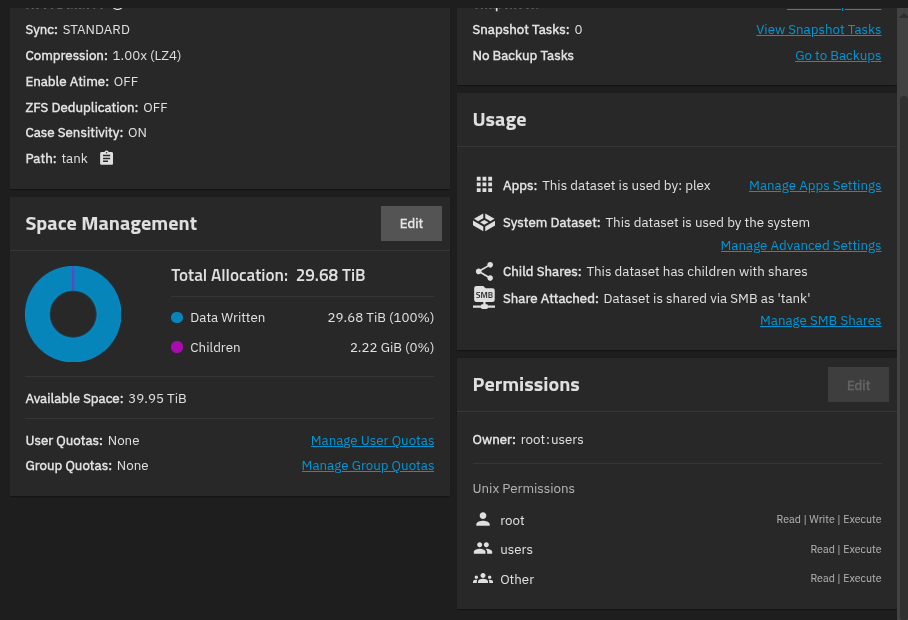
So I have 40tb in the root dataset of the pool, not the proper way, because there was no way to in Omv.
Because of this, I cannot change the Acl’s.
The only app I run on this nas is Plex.
I previously ran it the apt bare metal way, I’m new to docker really.
Heres my problem:
In Plex I cannot Optimize (convert) any files because Plex cannot write to my disk, a permissions and user problem.
So in my old OS, to give Plex the permissions I’d ssh into my server.
sudo chmod 0777 file.mkv
To give full permissions.
sudo chown plex:plex file.mkv
So that Plex is the user and group.
Running via docker is different than I’m used to, there actually is no Plex user on my Truenas system. So how can I give Plex permissions to write to disk??
One thing I thought was, if I’m having this issue because of it being the dataset at the root of the pool, if I just migrate everything to a properly created dataset with rsync, that could fix this,
but in the shell I can’t even get rsync just permissions errors.
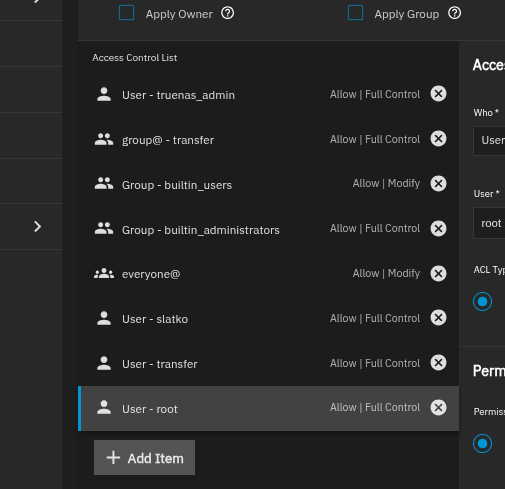
Just to get the files copied over here’s the acl’s of pool that gives the rsync errors.
One other recommendation for running Plex in a container in TrueNAS: Check the option “Host Network” in the “Network Configuration” section:
Otherwise Plex might use a relay server, even for traffic in your own local network, because it doesn’t know the local ip address that it can be reached under. Setting the “Host Network” option and restarting the container fixes that problem.
As far as i can remember there’s a setting in the plex gui to tell it which subnets it should consider local. But it’s been a hot minute since i switched from plex to jellyfin so it may have been removed…
Those settings are there indeed and the private range of ip addresses (RFC 1918) were added to my container by default, but that didn’t stop Plex from using a relay server, when I didn’t have the “Host Network” set.
From what I understand, setting a network as “local” just means that different bandwidth restrictions are applied compared to “remote” networks. The use of a relay server appears to be a different animal altogether. In fact when looked at my (OPNsense) firewall logs (before checking the “Host Network” option), I noticed that the client tried to contact the Plex server by its container-internal IP address, which it must have gotten from the relay server. Obviously that contact attempt failed and the client kept using the Plex server through the relay server, instead of directly.