Pool suspended after disk errors – how to safely recover data?

Hello everyone,

I am running TrueNAS SCALE on a single-disk pool (unfortunately without redundancy). The disk is a WDC_WD40EFAX-68JH4N0 (4TB, ~5 years old).

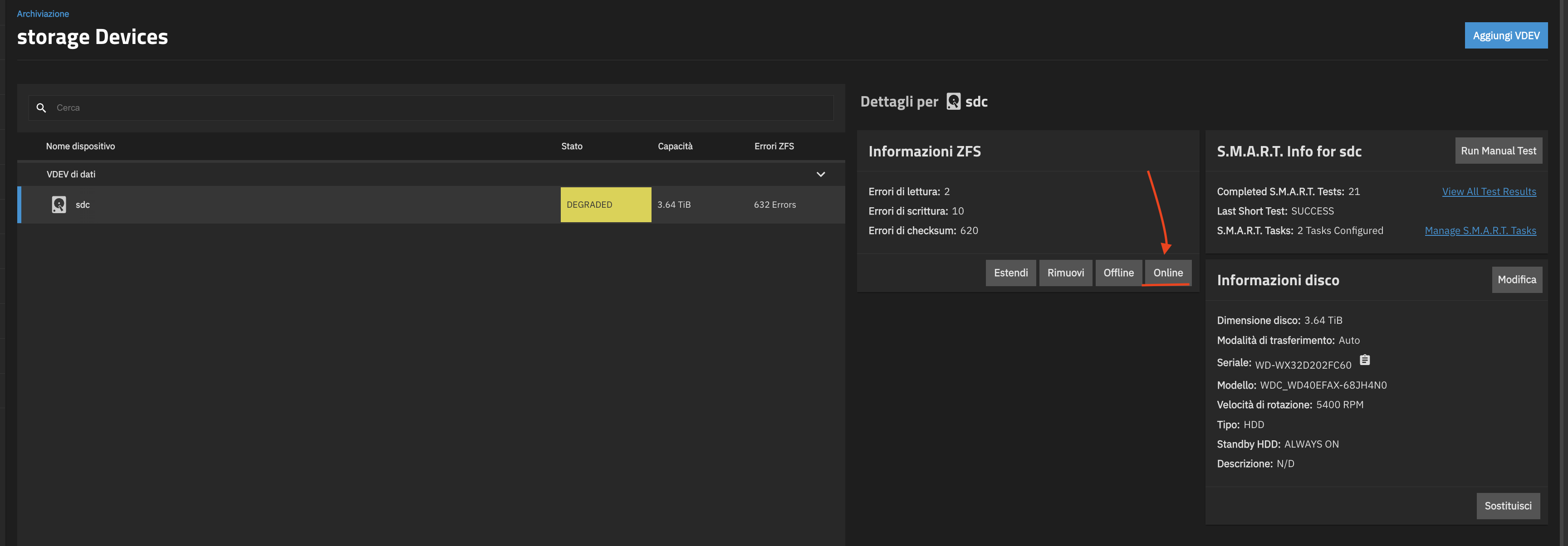
Recently I received alerts about the pool being DEGRADED, and now it shows:

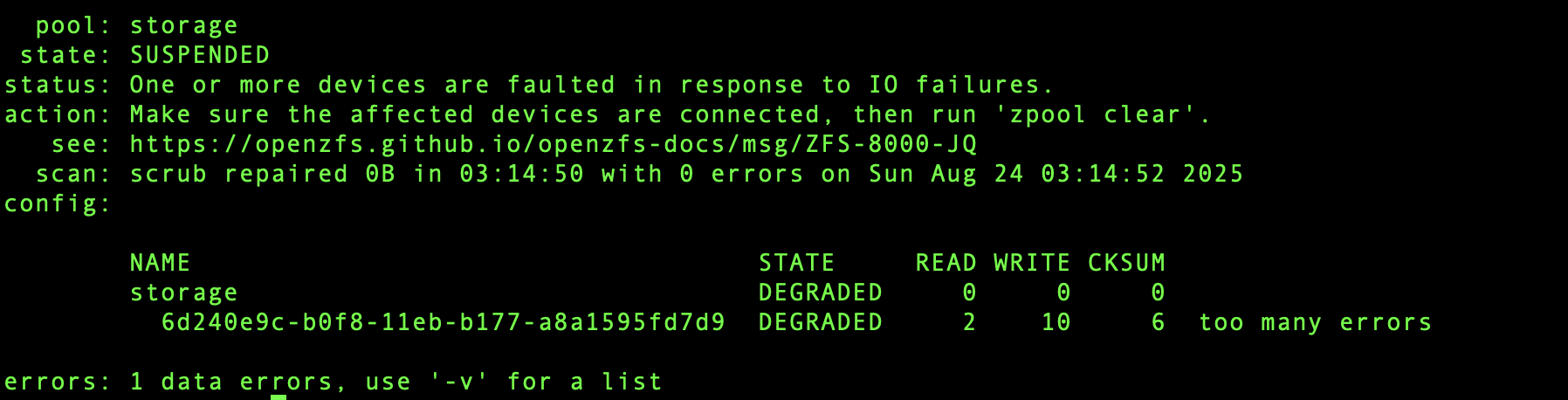
  • Pool state: SUSPENDED – “One or more devices are faulted in response to I/O failures.”
  • Disk is marked as DEGRADED.
  • ATA error count has rapidly increased (currently 112).
  • ZFS reports:
    • Read errors: 2
    • Write errors: 10
    • Checksum errors: 6

I already stopped all apps and services that were writing to the disk. A replacement disk (Seagate IronWolf 4TB) is arriving tomorrow.

My questions:

  1. Is there a safe way to import the pool in read-only mode to copy as much data as possible before replacing the drive?
  2. Can I still use the “Replace” function in the UI after inserting the new disk, or should I first attempt a manual data recovery?
  3. Are there any recommended steps to avoid making the situation worse (e.g., scrub, resilver, etc.)?

At this point, my main goal is data recovery – I understand the risk of data loss with a single disk.

Thanks in advance for any guidance!


1 Like

It seems kind of funny, not in a good way, but I’m seeing a lot of people reporting single stripe vDevs having corrupt data. I would not say this is TrueNAS but rather many people who have been using TrueNAS without redundancy and the drives are starting to fail. Many people think the data is okay to fail and go away, until it happens to them, then they want the data back.

You didn’t have previous error messages?

ATA error messages can be caused by the SATA cable, power down, unseat and reseat the cable, power back online. to find out if the drive is actually failing, take a look at my link below to the Drive Troubleshooting Guide. It will help you know if your drive is failed/failing or something else.

ZFS errors does not mean physical drive failure, however it could be that, but never assume it is.

There are a few threads here dealing with similar situations, take a look for them.

2 Likes

Quick question, if it turned out to be a broken disk, would the simplest way not be to just create a mirror, resilver, remove the broken drive?

Or even better, get two good drives, make 3 way mirror and then remove the broken disk?

2 Likes

You are right, I made a mistake by starting with only a single drive. At first, I was just testing, then everything worked fine, and I never thought of adding another drive. For the most important data, I do keep a backup on Backblaze, so at least that part is safe.

I followed your link and the troubleshooting flowchart, and here are the results of the SMART test for my drive (WDC WD40EFAX-68JH4N0, 4TB, ~45k hours):

  • No reallocated or pending sectors.
  • SMART overall health says PASSED.
  • But there are more than 1100 errors in the extended log (READ DMA ABRT).
  • Over 1000 hardware resets and 400+ ASR events.
  • 4 reported uncorrectable errors.
smartctl -x /dev/sdc
smartctl 7.4 2023-08-01 r5530 [x86_64-linux-6.12.15-production+truenas] (local build)
Copyright (C) 2002-23, Bruce Allen, Christian Franke, www.smartmontools.org

=== START OF INFORMATION SECTION ===
Model Family:     Western Digital Red (SMR)
Device Model:     WDC WD40EFAX-68JH4N0
Serial Number:    WD-WX32D202FC60
LU WWN Device Id: 5 0014ee 21272c7ad
Firmware Version: 82.00A82
User Capacity:    4,000,787,030,016 bytes [4.00 TB]
Sector Sizes:     512 bytes logical, 4096 bytes physical
Rotation Rate:    5400 rpm
Form Factor:      3.5 inches
TRIM Command:     Available, deterministic, zeroed
Device is:        In smartctl database 7.3/5816
ATA Version is:   ACS-3 T13/2161-D revision 5
SATA Version is:  SATA 3.1, 6.0 Gb/s (current: 1.5 Gb/s)
Local Time is:    Tue Sep  2 14:20:04 2025 CEST
SMART support is: Available - device has SMART capability.
SMART support is: Enabled
AAM feature is:   Unavailable
APM feature is:   Unavailable
Rd look-ahead is: Enabled
Write cache is:   Enabled
DSN feature is:   Unavailable
ATA Security is:  Disabled, NOT FROZEN [SEC1]
Wt Cache Reorder: Enabled

=== START OF READ SMART DATA SECTION ===
SMART overall-health self-assessment test result: PASSED

General SMART Values:
Offline data collection status:  (0x00) Offline data collection activity
                                        was never started.
                                        Auto Offline Data Collection: Disabled.
Self-test execution status:      (   0) The previous self-test routine completed
                                        without error or no self-test has ever 
                                        been run.
Total time to complete Offline 
data collection:                ( 1844) seconds.
Offline data collection
capabilities:                    (0x7b) SMART execute Offline immediate.
                                        Auto Offline data collection on/off support.
                                        Suspend Offline collection upon new
                                        command.
                                        Offline surface scan supported.
                                        Self-test supported.
                                        Conveyance Self-test supported.
                                        Selective Self-test supported.
SMART capabilities:            (0x0003) Saves SMART data before entering
                                        power-saving mode.
                                        Supports SMART auto save timer.
Error logging capability:        (0x01) Error logging supported.
                                        General Purpose Logging supported.
Short self-test routine 
recommended polling time:        (   2) minutes.
Extended self-test routine
recommended polling time:        ( 412) minutes.
Conveyance self-test routine
recommended polling time:        (   3) minutes.
SCT capabilities:              (0x3039) SCT Status supported.
                                        SCT Error Recovery Control supported.
                                        SCT Feature Control supported.
                                        SCT Data Table supported.

SMART Attributes Data Structure revision number: 16
Vendor Specific SMART Attributes with Thresholds:
ID# ATTRIBUTE_NAME          FLAGS    VALUE WORST THRESH FAIL RAW_VALUE
  1 Raw_Read_Error_Rate     POSR-K   200   200   051    -    0
  3 Spin_Up_Time            POS--K   228   205   021    -    1600
  4 Start_Stop_Count        -O--CK   100   100   000    -    365
  5 Reallocated_Sector_Ct   PO--CK   200   200   140    -    0
  7 Seek_Error_Rate         -OSR-K   200   200   000    -    0
  9 Power_On_Hours          -O--CK   038   038   000    -    45379
 10 Spin_Retry_Count        -O--CK   100   100   000    -    0
 11 Calibration_Retry_Count -O--CK   100   100   000    -    0
 12 Power_Cycle_Count       -O--CK   100   100   000    -    356
192 Power-Off_Retract_Count -O--CK   200   200   000    -    285
193 Load_Cycle_Count        -O--CK   190   190   000    -    31985
194 Temperature_Celsius     -O---K   114   107   000    -    33
196 Reallocated_Event_Count -O--CK   200   200   000    -    0
197 Current_Pending_Sector  -O--CK   200   200   000    -    0
198 Offline_Uncorrectable   ----CK   100   253   000    -    0
199 UDMA_CRC_Error_Count    -O--CK   200   200   000    -    0
200 Multi_Zone_Error_Rate   ---R--   200   200   000    -    0
                            ||||||_ K auto-keep
                            |||||__ C event count
                            ||||___ R error rate
                            |||____ S speed/performance
                            ||_____ O updated online
                            |______ P prefailure warning

General Purpose Log Directory Version 1
SMART           Log Directory Version 1 [multi-sector log support]
Address    Access  R/W   Size  Description
0x00       GPL,SL  R/O      1  Log Directory
0x01           SL  R/O      1  Summary SMART error log
0x02           SL  R/O      5  Comprehensive SMART error log
0x03       GPL     R/O      6  Ext. Comprehensive SMART error log
0x04       GPL     R/O    256  Device Statistics log
0x04       SL      R/O      8  Device Statistics log
0x06           SL  R/O      1  SMART self-test log
0x07       GPL     R/O      1  Extended self-test log
0x09           SL  R/W      1  Selective self-test log
0x0c       GPL     R/O   2048  Pending Defects log
0x10       GPL     R/O      1  NCQ Command Error log
0x11       GPL     R/O      1  SATA Phy Event Counters log
0x24       GPL     R/O    294  Current Device Internal Status Data log
0x30       GPL,SL  R/O      9  IDENTIFY DEVICE data log
0x80-0x9f  GPL,SL  R/W     16  Host vendor specific log
0xa0-0xa7  GPL,SL  VS      16  Device vendor specific log
0xa8-0xb6  GPL,SL  VS       1  Device vendor specific log
0xb7       GPL,SL  VS      78  Device vendor specific log
0xb9       GPL,SL  VS       4  Device vendor specific log
0xbd       GPL,SL  VS       1  Device vendor specific log
0xc0       GPL,SL  VS       1  Device vendor specific log
0xc1       GPL     VS      93  Device vendor specific log
0xe0       GPL,SL  R/W      1  SCT Command/Status
0xe1       GPL,SL  R/W      1  SCT Data Transfer

SMART Extended Comprehensive Error Log Version: 1 (6 sectors)
Device Error Count: 1133 (device log contains only the most recent 24 errors)
        CR     = Command Register
        FEATR  = Features Register
        COUNT  = Count (was: Sector Count) Register
        LBA_48 = Upper bytes of LBA High/Mid/Low Registers ]  ATA-8
        LH     = LBA High (was: Cylinder High) Register    ]   LBA
        LM     = LBA Mid (was: Cylinder Low) Register      ] Register
        LL     = LBA Low (was: Sector Number) Register     ]
        DV     = Device (was: Device/Head) Register
        DC     = Device Control Register
        ER     = Error register
        ST     = Status register
Powered_Up_Time is measured from power on, and printed as
DDd+hh:mm:SS.sss where DD=days, hh=hours, mm=minutes,
SS=sec, and sss=millisec. It "wraps" after 49.710 days.

Error 1133 [4] occurred at disk power-on lifetime: 45379 hours (1890 days + 19 hours)
  When the command that caused the error occurred, the device was active or idle.

  After command completion occurred, registers were:
  ER -- ST COUNT  LBA_48  LH LM LL DV DC
  -- -- -- == -- == == == -- -- -- -- --
  04 -- 61 00 e0 00 01 d1 c0 bc a0 e0 00  Device Fault; Error: ABRT 224 sectors at LBA = 0x1d1c0bca0 = 7814036640

  Commands leading to the command that caused the error were:
  CR FEATR COUNT  LBA_48  LH LM LL DV DC  Powered_Up_Time  Command/Feature_Name
  -- == -- == -- == == == -- -- -- -- --  ---------------  --------------------
  25 00 00 00 e0 00 01 d1 c0 bc a0 e0 08     20:31:36.326  READ DMA EXT
  25 00 00 00 e0 00 01 d1 c0 ba a0 e0 08     20:31:36.326  READ DMA EXT
  c8 00 00 00 e0 00 00 00 40 02 a0 e0 08     20:31:36.325  READ DMA
  c8 00 00 00 e0 00 00 00 40 00 a0 e0 08     20:31:36.325  READ DMA
  c8 00 00 00 e0 00 00 00 3f fe a0 e0 08     20:31:36.325  READ DMA

Error 1132 [3] occurred at disk power-on lifetime: 45379 hours (1890 days + 19 hours)
  When the command that caused the error occurred, the device was active or idle.

  After command completion occurred, registers were:
  ER -- ST COUNT  LBA_48  LH LM LL DV DC
  -- -- -- == -- == == == -- -- -- -- --
  04 -- 61 00 e0 00 01 d1 c0 ba a0 e0 00  Device Fault; Error: ABRT 224 sectors at LBA = 0x1d1c0baa0 = 7814036128

  Commands leading to the command that caused the error were:
  CR FEATR COUNT  LBA_48  LH LM LL DV DC  Powered_Up_Time  Command/Feature_Name
  -- == -- == -- == == == -- -- -- -- --  ---------------  --------------------
  25 00 00 00 e0 00 01 d1 c0 ba a0 e0 08     20:31:36.326  READ DMA EXT
  c8 00 00 00 e0 00 00 00 40 02 a0 e0 08     20:31:36.325  READ DMA
  c8 00 00 00 e0 00 00 00 40 00 a0 e0 08     20:31:36.325  READ DMA
  c8 00 00 00 e0 00 00 00 3f fe a0 e0 08     20:31:36.325  READ DMA
  c8 00 00 00 e0 00 00 00 3f fc a0 e0 08     20:31:36.325  READ DMA

Error 1131 [2] occurred at disk power-on lifetime: 45379 hours (1890 days + 19 hours)
  When the command that caused the error occurred, the device was active or idle.

  After command completion occurred, registers were:
  ER -- ST COUNT  LBA_48  LH LM LL DV DC
  -- -- -- == -- == == == -- -- -- -- --
  04 -- 61 00 e0 00 00 00 40 02 a0 e0 00  Device Fault; Error: ABRT 224 sectors at LBA = 0x004002a0 = 4194976

  Commands leading to the command that caused the error were:
  CR FEATR COUNT  LBA_48  LH LM LL DV DC  Powered_Up_Time  Command/Feature_Name
  -- == -- == -- == == == -- -- -- -- --  ---------------  --------------------
  c8 00 00 00 e0 00 00 00 40 02 a0 e0 08     20:31:36.325  READ DMA
  c8 00 00 00 e0 00 00 00 40 00 a0 e0 08     20:31:36.325  READ DMA
  c8 00 00 00 e0 00 00 00 3f fe a0 e0 08     20:31:36.325  READ DMA
  c8 00 00 00 e0 00 00 00 3f fc a0 e0 08     20:31:36.325  READ DMA
  c8 00 00 00 e0 00 00 00 00 02 a0 e0 08     20:31:36.325  READ DMA

Error 1130 [1] occurred at disk power-on lifetime: 45379 hours (1890 days + 19 hours)
  When the command that caused the error occurred, the device was active or idle.

  After command completion occurred, registers were:
  ER -- ST COUNT  LBA_48  LH LM LL DV DC
  -- -- -- == -- == == == -- -- -- -- --
  04 -- 61 00 e0 00 00 00 40 00 a0 e0 00  Device Fault; Error: ABRT 224 sectors at LBA = 0x004000a0 = 4194464

  Commands leading to the command that caused the error were:
  CR FEATR COUNT  LBA_48  LH LM LL DV DC  Powered_Up_Time  Command/Feature_Name
  -- == -- == -- == == == -- -- -- -- --  ---------------  --------------------
  c8 00 00 00 e0 00 00 00 40 00 a0 e0 08     20:31:36.325  READ DMA
  c8 00 00 00 e0 00 00 00 3f fe a0 e0 08     20:31:36.325  READ DMA
  c8 00 00 00 e0 00 00 00 3f fc a0 e0 08     20:31:36.325  READ DMA
  c8 00 00 00 e0 00 00 00 00 02 a0 e0 08     20:31:36.325  READ DMA
  c8 00 00 00 e0 00 00 00 00 00 a0 e0 08     20:31:36.325  READ DMA

Error 1129 [0] occurred at disk power-on lifetime: 45379 hours (1890 days + 19 hours)
  When the command that caused the error occurred, the device was active or idle.

  After command completion occurred, registers were:
  ER -- ST COUNT  LBA_48  LH LM LL DV DC
  -- -- -- == -- == == == -- -- -- -- --
  04 -- 61 00 e0 00 00 00 3f fe a0 e0 00  Device Fault; Error: ABRT 224 sectors at LBA = 0x003ffea0 = 4193952

  Commands leading to the command that caused the error were:
  CR FEATR COUNT  LBA_48  LH LM LL DV DC  Powered_Up_Time  Command/Feature_Name
  -- == -- == -- == == == -- -- -- -- --  ---------------  --------------------
  c8 00 00 00 e0 00 00 00 3f fe a0 e0 08     20:31:36.325  READ DMA
  c8 00 00 00 e0 00 00 00 3f fc a0 e0 08     20:31:36.325  READ DMA
  c8 00 00 00 e0 00 00 00 00 02 a0 e0 08     20:31:36.325  READ DMA
  c8 00 00 00 e0 00 00 00 00 00 a0 e0 08     20:31:36.325  READ DMA
  25 00 00 00 e0 00 01 d1 c0 bc 20 e0 08     20:31:36.325  READ DMA EXT

Error 1128 [23] occurred at disk power-on lifetime: 45379 hours (1890 days + 19 hours)
  When the command that caused the error occurred, the device was active or idle.

  After command completion occurred, registers were:
  ER -- ST COUNT  LBA_48  LH LM LL DV DC
  -- -- -- == -- == == == -- -- -- -- --
  04 -- 61 00 e0 00 00 00 3f fc a0 e0 00  Device Fault; Error: ABRT 224 sectors at LBA = 0x003ffca0 = 4193440

  Commands leading to the command that caused the error were:
  CR FEATR COUNT  LBA_48  LH LM LL DV DC  Powered_Up_Time  Command/Feature_Name
  -- == -- == -- == == == -- -- -- -- --  ---------------  --------------------
  c8 00 00 00 e0 00 00 00 3f fc a0 e0 08     20:31:36.325  READ DMA
  c8 00 00 00 e0 00 00 00 00 02 a0 e0 08     20:31:36.325  READ DMA
  c8 00 00 00 e0 00 00 00 00 00 a0 e0 08     20:31:36.325  READ DMA
  25 00 00 00 e0 00 01 d1 c0 bc 20 e0 08     20:31:36.325  READ DMA EXT
  25 00 00 00 e0 00 01 d1 c0 ba 20 e0 08     20:31:36.324  READ DMA EXT

Error 1127 [22] occurred at disk power-on lifetime: 45379 hours (1890 days + 19 hours)
  When the command that caused the error occurred, the device was active or idle.

  After command completion occurred, registers were:
  ER -- ST COUNT  LBA_48  LH LM LL DV DC
  -- -- -- == -- == == == -- -- -- -- --
  04 -- 61 00 e0 00 00 00 00 02 a0 e0 00  Device Fault; Error: ABRT 224 sectors at LBA = 0x000002a0 = 672

  Commands leading to the command that caused the error were:
  CR FEATR COUNT  LBA_48  LH LM LL DV DC  Powered_Up_Time  Command/Feature_Name
  -- == -- == -- == == == -- -- -- -- --  ---------------  --------------------
  c8 00 00 00 e0 00 00 00 00 02 a0 e0 08     20:31:36.325  READ DMA
  c8 00 00 00 e0 00 00 00 00 00 a0 e0 08     20:31:36.325  READ DMA
  25 00 00 00 e0 00 01 d1 c0 bc 20 e0 08     20:31:36.325  READ DMA EXT
  25 00 00 00 e0 00 01 d1 c0 ba 20 e0 08     20:31:36.324  READ DMA EXT
  c8 00 00 00 e0 00 00 00 00 02 20 e0 08     20:31:36.324  READ DMA

Error 1126 [21] occurred at disk power-on lifetime: 45379 hours (1890 days + 19 hours)
  When the command that caused the error occurred, the device was active or idle.

  After command completion occurred, registers were:
  ER -- ST COUNT  LBA_48  LH LM LL DV DC
  -- -- -- == -- == == == -- -- -- -- --
  04 -- 61 00 e0 00 00 00 00 00 a0 e0 00  Device Fault; Error: ABRT 224 sectors at LBA = 0x000000a0 = 160

  Commands leading to the command that caused the error were:
  CR FEATR COUNT  LBA_48  LH LM LL DV DC  Powered_Up_Time  Command/Feature_Name
  -- == -- == -- == == == -- -- -- -- --  ---------------  --------------------
  c8 00 00 00 e0 00 00 00 00 00 a0 e0 08     20:31:36.325  READ DMA
  25 00 00 00 e0 00 01 d1 c0 bc 20 e0 08     20:31:36.325  READ DMA EXT
  25 00 00 00 e0 00 01 d1 c0 ba 20 e0 08     20:31:36.324  READ DMA EXT
  c8 00 00 00 e0 00 00 00 00 02 20 e0 08     20:31:36.324  READ DMA
  c8 00 00 00 e0 00 00 00 00 00 20 e0 08     20:31:36.324  READ DMA

SMART Extended Self-test Log Version: 1 (1 sectors)
Num  Test_Description    Status                  Remaining  LifeTime(hours)  LBA_of_first_error
# 1  Short offline       Completed without error       00%     45369         -
# 2  Short offline       Completed without error       00%     45348         -
# 3  Short offline       Completed without error       00%     45324         -
# 4  Short offline       Completed without error       00%     45300         -
# 5  Short offline       Completed without error       00%     45276         -
# 6  Short offline       Completed without error       00%     45252         -
# 7  Short offline       Completed without error       00%     45228         -
# 8  Short offline       Completed without error       00%     45204         -
# 9  Short offline       Completed without error       00%     45180         -
#10  Short offline       Completed without error       00%     45156         -
#11  Short offline       Completed without error       00%     45132         -
#12  Short offline       Completed without error       00%     45108         -
#13  Short offline       Completed without error       00%     45084         -
#14  Short offline       Completed without error       00%     45060         -
#15  Short offline       Completed without error       00%     45036         -
#16  Short offline       Completed without error       00%     45012         -
#17  Short offline       Completed without error       00%     44988         -
#18  Short offline       Completed without error       00%     44964         -

SMART Selective self-test log data structure revision number 1
 SPAN  MIN_LBA  MAX_LBA  CURRENT_TEST_STATUS
    1        0        0  Not_testing
    2        0        0  Not_testing
    3        0        0  Not_testing
    4        0        0  Not_testing
    5        0        0  Not_testing
Selective self-test flags (0x0):
  After scanning selected spans, do NOT read-scan remainder of disk.
If Selective self-test is pending on power-up, resume after 0 minute delay.

SCT Status Version:                  3
SCT Version (vendor specific):       258 (0x0102)
Device State:                        Active (0)
Current Temperature:                    33 Celsius
Power Cycle Min/Max Temperature:     29/35 Celsius
Lifetime    Min/Max Temperature:     14/40 Celsius
Under/Over Temperature Limit Count:   0/0
Vendor specific:
01 00 00 00 00 00 00 00 00 00 00 00 00 00 00 00
00 00 00 00 00 00 00 00 00 00 00 00 00 00 00 00

SCT Temperature History Version:     2
Temperature Sampling Period:         1 minute
Temperature Logging Interval:        1 minute
Min/Max recommended Temperature:      0/65 Celsius
Min/Max Temperature Limit:           -41/85 Celsius
Temperature History Size (Index):    478 (167)

Index    Estimated Time   Temperature Celsius
 168    2025-09-02 06:23    33  **************
 ...    ..( 19 skipped).    ..  **************
 188    2025-09-02 06:43    33  **************
 189    2025-09-02 06:44    32  *************
 190    2025-09-02 06:45    33  **************
 ...    ..( 77 skipped).    ..  **************
 268    2025-09-02 08:03    33  **************
 269    2025-09-02 08:04    34  ***************
 ...    ..(  4 skipped).    ..  ***************
 274    2025-09-02 08:09    34  ***************
 275    2025-09-02 08:10    33  **************
 ...    ..( 29 skipped).    ..  **************
 305    2025-09-02 08:40    33  **************
 306    2025-09-02 08:41    32  *************
 ...    ..(160 skipped).    ..  *************
 467    2025-09-02 11:22    32  *************
 468    2025-09-02 11:23    31  ************
 469    2025-09-02 11:24    32  *************
 470    2025-09-02 11:25    32  *************
 471    2025-09-02 11:26    32  *************
 472    2025-09-02 11:27    31  ************
 473    2025-09-02 11:28    32  *************
 ...    ..(140 skipped).    ..  *************
 136    2025-09-02 13:49    32  *************
 137    2025-09-02 13:50    33  **************
 138    2025-09-02 13:51    32  *************
 ...    ..(  3 skipped).    ..  *************
 142    2025-09-02 13:55    32  *************
 143    2025-09-02 13:56    33  **************
 144    2025-09-02 13:57    32  *************
 145    2025-09-02 13:58    33  **************
 146    2025-09-02 13:59    32  *************
 147    2025-09-02 14:00    33  **************
 ...    ..(  4 skipped).    ..  **************
 152    2025-09-02 14:05    33  **************
 153    2025-09-02 14:06    32  *************
 154    2025-09-02 14:07    33  **************
 ...    ..( 12 skipped).    ..  **************
 167    2025-09-02 14:20    33  **************

SCT Error Recovery Control:
           Read:     70 (7.0 seconds)
          Write:     70 (7.0 seconds)

Device Statistics (GP Log 0x04)
Page  Offset Size        Value Flags Description
0x01  =====  =               =  ===  == General Statistics (rev 1) ==
0x01  0x008  4             356  ---  Lifetime Power-On Resets
0x01  0x010  4           45379  ---  Power-on Hours
0x01  0x018  6     15271464707  ---  Logical Sectors Written
0x01  0x020  6       247519793  ---  Number of Write Commands
0x01  0x028  6    165001894448  ---  Logical Sectors Read
0x01  0x030  6       172979105  ---  Number of Read Commands
0x01  0x038  6       155642752  ---  Date and Time TimeStamp
0x03  =====  =               =  ===  == Rotating Media Statistics (rev 1) ==
0x03  0x008  4           45200  ---  Spindle Motor Power-on Hours
0x03  0x010  4           39154  ---  Head Flying Hours
0x03  0x018  4           32271  ---  Head Load Events
0x03  0x020  4               0  ---  Number of Reallocated Logical Sectors
0x03  0x028  4               0  ---  Read Recovery Attempts
0x03  0x030  4               0  ---  Number of Mechanical Start Failures
0x03  0x038  4               0  ---  Number of Realloc. Candidate Logical Sectors
0x03  0x040  4             285  ---  Number of High Priority Unload Events
0x04  =====  =               =  ===  == General Errors Statistics (rev 1) ==
0x04  0x008  4               4  ---  Number of Reported Uncorrectable Errors
0x04  0x010  4               0  ---  Resets Between Cmd Acceptance and Completion
0x05  =====  =               =  ===  == Temperature Statistics (rev 1) ==
0x05  0x008  1              33  ---  Current Temperature
0x05  0x010  1              32  ---  Average Short Term Temperature
0x05  0x018  1              32  ---  Average Long Term Temperature
0x05  0x020  1              40  ---  Highest Temperature
0x05  0x028  1              12  ---  Lowest Temperature
0x05  0x030  1              38  ---  Highest Average Short Term Temperature
0x05  0x038  1              15  ---  Lowest Average Short Term Temperature
0x05  0x040  1              34  ---  Highest Average Long Term Temperature
0x05  0x048  1              17  ---  Lowest Average Long Term Temperature
0x05  0x050  4               0  ---  Time in Over-Temperature
0x05  0x058  1              65  ---  Specified Maximum Operating Temperature
0x05  0x060  4               0  ---  Time in Under-Temperature
0x05  0x068  1               0  ---  Specified Minimum Operating Temperature
0x06  =====  =               =  ===  == Transport Statistics (rev 1) ==
0x06  0x008  4            1006  ---  Number of Hardware Resets
0x06  0x010  4             419  ---  Number of ASR Events
0x06  0x018  4               0  ---  Number of Interface CRC Errors
0xff  =====  =               =  ===  == Vendor Specific Statistics (rev 1) ==
0xff  0x008  7               0  ---  Vendor Specific
0xff  0x010  7               0  ---  Vendor Specific
0xff  0x018  7               0  ---  Vendor Specific
                                |||_ C monitored condition met
                                ||__ D supports DSN
                                |___ N normalized value

Pending Defects log (GP Log 0x0c)
No Defects Logged

SATA Phy Event Counters (GP Log 0x11)
ID      Size     Value  Description
0x0001  2            0  Command failed due to ICRC error
0x0002  2            0  R_ERR response for data FIS
0x0003  2            0  R_ERR response for device-to-host data FIS
0x0004  2            0  R_ERR response for host-to-device data FIS
0x0005  2            0  R_ERR response for non-data FIS
0x0006  2            0  R_ERR response for device-to-host non-data FIS
0x0007  2            0  R_ERR response for host-to-device non-data FIS
0x0008  2            0  Device-to-host non-data FIS retries
0x0009  2            4  Transition from drive PhyRdy to drive PhyNRdy
0x000a  2            5  Device-to-host register FISes sent due to a COMRESET
0x000b  2            0  CRC errors within host-to-device FIS
0x000d  2            0  Non-CRC errors within host-to-device FIS
0x000f  2            0  R_ERR response for host-to-device data FIS, CRC
0x0012  2            0  R_ERR response for host-to-device non-data FIS, CRC
0x8000  4        74416  Vendor specific

So the drive looks “healthy” from a SMART point of view, but clearly it is failing in practice.

What do you suggest I should do now?
My current plan is:

  1. Wait for my new IronWolf drive to arrive and then run a zpool replace to let ZFS copy whatever it can.
  2. Avoid doing more writes on this disk in the meantime, since it might make things worse.

Do you think this is the right approach, or is there anything else I should try before replacing the drive?

1 Like

Right approach, but

  • whenever possible, do it from GUI rather than CLI (so no litteral zpool attach or zpool replace);
  • consider getting more drives for a redundant pool.
1 Like

Your issue is clearly listed above. SMR is the kiss of death.

When was the last time you performed a SMART Long/Extended test? It looks like over a 1000 hours ago. My personal recommendation is a Daily Short and Weekly Long test. After you run the Long test, your test results may change for the worse.

This means very little unfortunately. It means the drive has passed Power On Self Tests (POST). The minimum to get a PASSED indication.

Yes, I have also now realized that I should never have used an SMR drive. This was my first self-built NAS and I made several mistakes out of inexperience.

Regarding SMART tests:

  • I had scheduled a daily Short test at 04:00 and a Long test on the 1st of every month.
  • The last Long test was completed successfully on 01-09-2025 at 05:00 with no errors.
  • The first errors arrived yesterday via email: first “DEGRADED” and then a few hours later “SUSPENDED”.

Now I already have the new HDD ready to install.
Should I add the new disk while the NAS is running (hot swap), or is it safer to power down first?
And once the new drive is connected, what is the recommended procedure in TrueNAS — just follow the GUI and run zpool replace?

@etorix

After this experience, I will definitely buy at least one drive for redundancy.

We all have been there.

Always safer to power down. Hot Swap only if the server is mission critical.

2 Likes

Okay, then once the new one is installed and powered on, do I use “replace”? I was advised to first run zpool import -o readonly=on -f storage and then try to make a backup.

But I’m not very confident and would prefer your advice.

Thank you.

If your priority is data recovery then do that.

You can’t run import on something that’s already imported (but suspended), so unless it’s been exported since then you would need to do that first.

And your import command is missing the altroot flag: zpool import -o readonly=on -R /mnt -f storage
If importing it back works, which is certainly no guarantee, start backing up the most important files and go from there. Also be remember that since you have reported data corruption, you can’t trust your data to be 100% correct anymore.

I had to stop everything because after adding the new HDD, the NAS no longer powered on.

After testing, I found out that the power supply wasn’t delivering any current, so I assume it’s broken.

Could this have been the cause of the issues, and the HDD is actually fine? Maybe the PSU wasn’t providing enough power and that led to the rapid deterioration?

1 Like

Too early to tell.
A bad PSU can affect and possibly damage any number of components.

1 Like

I can only hope, I bought a new power supply, it should arrive tomorrow

1 Like

If you’re using modual PSUs, be careful not to reuse the cables without checking if they are compatible. They may not have the same pinout, even if they physically fit.

3 Likes

You have three failures now in this thread:

  1. ZFS Chsum and very possible file corruption
  2. An SMR drive
  3. Power supply

My bet is you accidentally killed the power supply by shorting it out. It can happen. It could have just failed as well, but I’ve seen how easy it is to kill a power supply.

Regardless, when you get the new power supply, only use the cables provided, just as @neofusion has said. Hopefully it will turn on. Did you know that the motherboard can make it seem like the power supply is dead? I’m hoping the power supply is the culprit.

1 Like

Today I received the new PSU, installed it together with the new HDD, and the system is back online.

I first tried:

zpool import -o readonly=on -R /mnt -f storage

but got this message:

cannot import 'storage': I/O error
        Recovery is possible, but will result in some data loss.
        Returning the pool to its state as of Mon Sep  1 16:05:04 2025
        should correct the problem.  Approximately 22 minutes of data
        must be discarded, irreversibly.  After rewind, at least
        one persistent user-data error will remain.  Recovery can be attempted
        by executing 'zpool import -F storage'.  A scrub of the pool
        is strongly recommended after recovery.

So I ran:

zpool import -F -o readonly=on -R /mnt storage

The pool came back online, and I was able to copy out the most important data.

What’s still left are the Nextcloud dataset (which I also have backed up on B2) and large folders with videos and photos.

Now I’m unsure how to proceed:

  • Should I try “Replace” from the GUI with the new HD,
  • or should I instead initialize the new disk and manually copy the files, losing the original dataset/snapshot structure but at least avoiding a risky resilver?

What would you recommend at this stage?

If zpool status -v shows no errors you may replace.
If there are metadata errors, make a fresh pool.

  pool: storage
 state: ONLINE
  scan: scrub repaired 0B in 03:14:50 with 0 errors on Sun Aug 24 03:14:52 2025
config:

        NAME                                    STATE     READ WRITE CKSUM
        storage                                 ONLINE       0     0     0
          6d240e9c-b0f8-11eb-b177-a8a1595fd7d9  ONLINE       0     0     0

errors: No known data errors
 smartctl -x /dev/sdd                          
smartctl 7.4 2023-08-01 r5530 [x86_64-linux-6.12.15-production+truenas] (local build)
Copyright (C) 2002-23, Bruce Allen, Christian Franke, www.smartmontools.org

=== START OF INFORMATION SECTION ===
Model Family:     Western Digital Red (SMR)
Device Model:     WDC WD40EFAX-68JH4N0
Serial Number:    WD-WX32D202FC60
LU WWN Device Id: 5 0014ee 21272c7ad
Firmware Version: 82.00A82
User Capacity:    4,000,787,030,016 bytes [4.00 TB]
Sector Sizes:     512 bytes logical, 4096 bytes physical
Rotation Rate:    5400 rpm
Form Factor:      3.5 inches
TRIM Command:     Available, deterministic, zeroed
Device is:        In smartctl database 7.3/5816
ATA Version is:   ACS-3 T13/2161-D revision 5
SATA Version is:  SATA 3.1, 6.0 Gb/s (current: 6.0 Gb/s)
Local Time is:    Wed Sep  3 19:32:57 2025 CEST
SMART support is: Available - device has SMART capability.
SMART support is: Enabled
AAM feature is:   Unavailable
APM feature is:   Unavailable
Rd look-ahead is: Enabled
Write cache is:   Enabled
DSN feature is:   Unavailable
ATA Security is:  Disabled, frozen [SEC2]
Wt Cache Reorder: Enabled

=== START OF READ SMART DATA SECTION ===
SMART overall-health self-assessment test result: PASSED

General SMART Values:
Offline data collection status:  (0x00) Offline data collection activity
                                        was never started.
                                        Auto Offline Data Collection: Disabled.
Self-test execution status:      (   0) The previous self-test routine completed
                                        without error or no self-test has ever 
                                        been run.
Total time to complete Offline 
data collection:                ( 1844) seconds.
Offline data collection
capabilities:                    (0x7b) SMART execute Offline immediate.
                                        Auto Offline data collection on/off support.
                                        Suspend Offline collection upon new
                                        command.
                                        Offline surface scan supported.
                                        Self-test supported.
                                        Conveyance Self-test supported.
                                        Selective Self-test supported.
SMART capabilities:            (0x0003) Saves SMART data before entering
                                        power-saving mode.
                                        Supports SMART auto save timer.
Error logging capability:        (0x01) Error logging supported.
                                        General Purpose Logging supported.
Short self-test routine 
recommended polling time:        (   2) minutes.
Extended self-test routine
recommended polling time:        ( 412) minutes.
Conveyance self-test routine
recommended polling time:        (   3) minutes.
SCT capabilities:              (0x3039) SCT Status supported.
                                        SCT Error Recovery Control supported.
                                        SCT Feature Control supported.
                                        SCT Data Table supported.

SMART Attributes Data Structure revision number: 16
Vendor Specific SMART Attributes with Thresholds:
ID# ATTRIBUTE_NAME          FLAGS    VALUE WORST THRESH FAIL RAW_VALUE
  1 Raw_Read_Error_Rate     POSR-K   200   200   051    -    0
  3 Spin_Up_Time            POS--K   222   205   021    -    1858
  4 Start_Stop_Count        -O--CK   100   100   000    -    366
  5 Reallocated_Sector_Ct   PO--CK   200   200   140    -    0
  7 Seek_Error_Rate         -OSR-K   200   200   000    -    0
  9 Power_On_Hours          -O--CK   038   038   000    -    45381
 10 Spin_Retry_Count        -O--CK   100   100   000    -    0
 11 Calibration_Retry_Count -O--CK   100   100   000    -    0
 12 Power_Cycle_Count       -O--CK   100   100   000    -    357
192 Power-Off_Retract_Count -O--CK   200   200   000    -    286
193 Load_Cycle_Count        -O--CK   190   190   000    -    31986
194 Temperature_Celsius     -O---K   118   107   000    -    29
196 Reallocated_Event_Count -O--CK   200   200   000    -    0
197 Current_Pending_Sector  -O--CK   200   200   000    -    0
198 Offline_Uncorrectable   ----CK   100   253   000    -    0
199 UDMA_CRC_Error_Count    -O--CK   200   200   000    -    0
200 Multi_Zone_Error_Rate   ---R--   200   200   000    -    0
                            ||||||_ K auto-keep
                            |||||__ C event count
                            ||||___ R error rate
                            |||____ S speed/performance
                            ||_____ O updated online
                            |______ P prefailure warning

General Purpose Log Directory Version 1
SMART           Log Directory Version 1 [multi-sector log support]
Address    Access  R/W   Size  Description
0x00       GPL,SL  R/O      1  Log Directory
0x01           SL  R/O      1  Summary SMART error log
0x02           SL  R/O      5  Comprehensive SMART error log
0x03       GPL     R/O      6  Ext. Comprehensive SMART error log
0x04       GPL     R/O    256  Device Statistics log
0x04       SL      R/O      8  Device Statistics log
0x06           SL  R/O      1  SMART self-test log
0x07       GPL     R/O      1  Extended self-test log
0x09           SL  R/W      1  Selective self-test log
0x0c       GPL     R/O   2048  Pending Defects log
0x10       GPL     R/O      1  NCQ Command Error log
0x11       GPL     R/O      1  SATA Phy Event Counters log
0x24       GPL     R/O    294  Current Device Internal Status Data log
0x30       GPL,SL  R/O      9  IDENTIFY DEVICE data log
0x80-0x9f  GPL,SL  R/W     16  Host vendor specific log
0xa0-0xa7  GPL,SL  VS      16  Device vendor specific log
0xa8-0xb6  GPL,SL  VS       1  Device vendor specific log
0xb7       GPL,SL  VS      78  Device vendor specific log
0xb9       GPL,SL  VS       4  Device vendor specific log
0xbd       GPL,SL  VS       1  Device vendor specific log
0xc0       GPL,SL  VS       1  Device vendor specific log
0xc1       GPL     VS      93  Device vendor specific log
0xe0       GPL,SL  R/W      1  SCT Command/Status
0xe1       GPL,SL  R/W      1  SCT Data Transfer

SMART Extended Comprehensive Error Log Version: 1 (6 sectors)
Device Error Count: 1153 (device log contains only the most recent 24 errors)
        CR     = Command Register
        FEATR  = Features Register
        COUNT  = Count (was: Sector Count) Register
        LBA_48 = Upper bytes of LBA High/Mid/Low Registers ]  ATA-8
        LH     = LBA High (was: Cylinder High) Register    ]   LBA
        LM     = LBA Mid (was: Cylinder Low) Register      ] Register
        LL     = LBA Low (was: Sector Number) Register     ]
        DV     = Device (was: Device/Head) Register
        DC     = Device Control Register
        ER     = Error register
        ST     = Status register
Powered_Up_Time is measured from power on, and printed as
DDd+hh:mm:SS.sss where DD=days, hh=hours, mm=minutes,
SS=sec, and sss=millisec. It "wraps" after 49.710 days.

Error 1153 [0] occurred at disk power-on lifetime: 45379 hours (1890 days + 19 hours)
  When the command that caused the error occurred, the device was active or idle.

  After command completion occurred, registers were:
  ER -- ST COUNT  LBA_48  LH LM LL DV DC
  -- -- -- == -- == == == -- -- -- -- --
  04 -- 61 00 e0 00 01 d1 c0 bc a0 e0 00  Device Fault; Error: ABRT 224 sectors at LBA = 0x1d1c0bca0 = 7814036640

  Commands leading to the command that caused the error were:
  CR FEATR COUNT  LBA_48  LH LM LL DV DC  Powered_Up_Time  Command/Feature_Name
  -- == -- == -- == == == -- -- -- -- --  ---------------  --------------------
  25 00 00 00 e0 00 01 d1 c0 bc a0 e0 08     20:40:30.631  READ DMA EXT
  25 00 00 00 e0 00 01 d1 c0 ba a0 e0 08     20:40:30.630  READ DMA EXT
  c8 00 00 00 e0 00 00 00 3f fe a0 e0 08     20:40:30.630  READ DMA
  25 00 00 00 e0 00 01 d1 c0 bc 20 e0 08     20:40:30.630  READ DMA EXT
  c8 00 00 00 e0 00 00 00 40 02 a0 e0 08     20:40:30.630  READ DMA

Error 1152 [23] occurred at disk power-on lifetime: 45379 hours (1890 days + 19 hours)
  When the command that caused the error occurred, the device was active or idle.

  After command completion occurred, registers were:
  ER -- ST COUNT  LBA_48  LH LM LL DV DC
  -- -- -- == -- == == == -- -- -- -- --
  04 -- 61 00 e0 00 01 d1 c0 ba a0 e0 00  Device Fault; Error: ABRT 224 sectors at LBA = 0x1d1c0baa0 = 7814036128

  Commands leading to the command that caused the error were:
  CR FEATR COUNT  LBA_48  LH LM LL DV DC  Powered_Up_Time  Command/Feature_Name
  -- == -- == -- == == == -- -- -- -- --  ---------------  --------------------
  25 00 00 00 e0 00 01 d1 c0 ba a0 e0 08     20:40:30.630  READ DMA EXT
  c8 00 00 00 e0 00 00 00 3f fe a0 e0 08     20:40:30.630  READ DMA
  25 00 00 00 e0 00 01 d1 c0 bc 20 e0 08     20:40:30.630  READ DMA EXT
  c8 00 00 00 e0 00 00 00 40 02 a0 e0 08     20:40:30.630  READ DMA
  c8 00 00 00 e0 00 00 00 3f fc a0 e0 08     20:40:30.630  READ DMA

Error 1151 [22] occurred at disk power-on lifetime: 45379 hours (1890 days + 19 hours)
  When the command that caused the error occurred, the device was active or idle.

  After command completion occurred, registers were:
  ER -- ST COUNT  LBA_48  LH LM LL DV DC
  -- -- -- == -- == == == -- -- -- -- --
  04 -- 61 00 e0 00 00 00 3f fe a0 e0 00  Device Fault; Error: ABRT 224 sectors at LBA = 0x003ffea0 = 4193952

  Commands leading to the command that caused the error were:
  CR FEATR COUNT  LBA_48  LH LM LL DV DC  Powered_Up_Time  Command/Feature_Name
  -- == -- == -- == == == -- -- -- -- --  ---------------  --------------------
  c8 00 00 00 e0 00 00 00 3f fe a0 e0 08     20:40:30.630  READ DMA
  25 00 00 00 e0 00 01 d1 c0 bc 20 e0 08     20:40:30.630  READ DMA EXT
  c8 00 00 00 e0 00 00 00 40 02 a0 e0 08     20:40:30.630  READ DMA
  c8 00 00 00 e0 00 00 00 3f fc a0 e0 08     20:40:30.630  READ DMA
  25 00 00 00 e0 00 01 d1 c0 ba 20 e0 08     20:40:30.630  READ DMA EXT

Error 1150 [21] occurred at disk power-on lifetime: 45379 hours (1890 days + 19 hours)
  When the command that caused the error occurred, the device was active or idle.

  After command completion occurred, registers were:
  ER -- ST COUNT  LBA_48  LH LM LL DV DC
  -- -- -- == -- == == == -- -- -- -- --
  04 -- 61 00 e0 00 01 d1 c0 bc 20 e0 00  Device Fault; Error: ABRT 224 sectors at LBA = 0x1d1c0bc20 = 7814036512

  Commands leading to the command that caused the error were:
  CR FEATR COUNT  LBA_48  LH LM LL DV DC  Powered_Up_Time  Command/Feature_Name
  -- == -- == -- == == == -- -- -- -- --  ---------------  --------------------
  25 00 00 00 e0 00 01 d1 c0 bc 20 e0 08     20:40:30.630  READ DMA EXT
  c8 00 00 00 e0 00 00 00 40 02 a0 e0 08     20:40:30.630  READ DMA
  c8 00 00 00 e0 00 00 00 3f fc a0 e0 08     20:40:30.630  READ DMA
  25 00 00 00 e0 00 01 d1 c0 ba 20 e0 08     20:40:30.630  READ DMA EXT
  c8 00 00 00 e0 00 00 00 40 00 a0 e0 08     20:40:30.630  READ DMA

Error 1149 [20] occurred at disk power-on lifetime: 45379 hours (1890 days + 19 hours)
  When the command that caused the error occurred, the device was active or idle.

  After command completion occurred, registers were:
  ER -- ST COUNT  LBA_48  LH LM LL DV DC
  -- -- -- == -- == == == -- -- -- -- --
  04 -- 61 00 e0 00 00 00 40 02 a0 e0 00  Device Fault; Error: ABRT 224 sectors at LBA = 0x004002a0 = 4194976

  Commands leading to the command that caused the error were:
  CR FEATR COUNT  LBA_48  LH LM LL DV DC  Powered_Up_Time  Command/Feature_Name
  -- == -- == -- == == == -- -- -- -- --  ---------------  --------------------
  c8 00 00 00 e0 00 00 00 40 02 a0 e0 08     20:40:30.630  READ DMA
  c8 00 00 00 e0 00 00 00 3f fc a0 e0 08     20:40:30.630  READ DMA
  25 00 00 00 e0 00 01 d1 c0 ba 20 e0 08     20:40:30.630  READ DMA EXT
  c8 00 00 00 e0 00 00 00 40 00 a0 e0 08     20:40:30.630  READ DMA
  c8 00 00 00 e0 00 00 00 00 02 a0 e0 08     20:40:30.630  READ DMA

Error 1148 [19] occurred at disk power-on lifetime: 45379 hours (1890 days + 19 hours)
  When the command that caused the error occurred, the device was active or idle.

  After command completion occurred, registers were:
  ER -- ST COUNT  LBA_48  LH LM LL DV DC
  -- -- -- == -- == == == -- -- -- -- --
  04 -- 61 00 e0 00 00 00 3f fc a0 e0 00  Device Fault; Error: ABRT 224 sectors at LBA = 0x003ffca0 = 4193440

  Commands leading to the command that caused the error were:
  CR FEATR COUNT  LBA_48  LH LM LL DV DC  Powered_Up_Time  Command/Feature_Name
  -- == -- == -- == == == -- -- -- -- --  ---------------  --------------------
  c8 00 00 00 e0 00 00 00 3f fc a0 e0 08     20:40:30.630  READ DMA
  25 00 00 00 e0 00 01 d1 c0 ba 20 e0 08     20:40:30.630  READ DMA EXT
  c8 00 00 00 e0 00 00 00 40 00 a0 e0 08     20:40:30.630  READ DMA
  c8 00 00 00 e0 00 00 00 00 02 a0 e0 08     20:40:30.630  READ DMA
  c8 00 00 00 e0 00 00 00 00 02 20 e0 08     20:40:30.629  READ DMA

Error 1147 [18] occurred at disk power-on lifetime: 45379 hours (1890 days + 19 hours)
  When the command that caused the error occurred, the device was active or idle.

  After command completion occurred, registers were:
  ER -- ST COUNT  LBA_48  LH LM LL DV DC
  -- -- -- == -- == == == -- -- -- -- --
  04 -- 61 00 e0 00 01 d1 c0 ba 20 e0 00  Device Fault; Error: ABRT 224 sectors at LBA = 0x1d1c0ba20 = 7814036000

  Commands leading to the command that caused the error were:
  CR FEATR COUNT  LBA_48  LH LM LL DV DC  Powered_Up_Time  Command/Feature_Name
  -- == -- == -- == == == -- -- -- -- --  ---------------  --------------------
  25 00 00 00 e0 00 01 d1 c0 ba 20 e0 08     20:40:30.630  READ DMA EXT
  c8 00 00 00 e0 00 00 00 40 00 a0 e0 08     20:40:30.630  READ DMA
  c8 00 00 00 e0 00 00 00 00 02 a0 e0 08     20:40:30.630  READ DMA
  c8 00 00 00 e0 00 00 00 00 02 20 e0 08     20:40:30.629  READ DMA
  c8 00 00 00 e0 00 00 00 00 00 a0 e0 08     20:40:30.629  READ DMA

Error 1146 [17] occurred at disk power-on lifetime: 45379 hours (1890 days + 19 hours)
  When the command that caused the error occurred, the device was active or idle.

  After command completion occurred, registers were:
  ER -- ST COUNT  LBA_48  LH LM LL DV DC
  -- -- -- == -- == == == -- -- -- -- --
  04 -- 61 00 e0 00 00 00 40 00 a0 e0 00  Device Fault; Error: ABRT 224 sectors at LBA = 0x004000a0 = 4194464

  Commands leading to the command that caused the error were:
  CR FEATR COUNT  LBA_48  LH LM LL DV DC  Powered_Up_Time  Command/Feature_Name
  -- == -- == -- == == == -- -- -- -- --  ---------------  --------------------
  c8 00 00 00 e0 00 00 00 40 00 a0 e0 08     20:40:30.630  READ DMA
  c8 00 00 00 e0 00 00 00 00 02 a0 e0 08     20:40:30.630  READ DMA
  c8 00 00 00 e0 00 00 00 00 02 20 e0 08     20:40:30.629  READ DMA
  c8 00 00 00 e0 00 00 00 00 00 a0 e0 08     20:40:30.629  READ DMA
  c8 00 00 00 e0 00 00 00 00 00 20 e0 08     20:40:30.629  READ DMA

SMART Extended Self-test Log Version: 1 (1 sectors)
Num  Test_Description    Status                  Remaining  LifeTime(hours)  LBA_of_first_error
# 1  Short offline       Completed without error       00%     45380         -
# 2  Short offline       Completed without error       00%     45369         -
# 3  Short offline       Completed without error       00%     45348         -
# 4  Short offline       Completed without error       00%     45324         -
# 5  Short offline       Completed without error       00%     45300         -
# 6  Short offline       Completed without error       00%     45276         -
# 7  Short offline       Completed without error       00%     45252         -
# 8  Short offline       Completed without error       00%     45228         -
# 9  Short offline       Completed without error       00%     45204         -
#10  Short offline       Completed without error       00%     45180         -
#11  Short offline       Completed without error       00%     45156         -
#12  Short offline       Completed without error       00%     45132         -
#13  Short offline       Completed without error       00%     45108         -
#14  Short offline       Completed without error       00%     45084         -
#15  Short offline       Completed without error       00%     45060         -
#16  Short offline       Completed without error       00%     45036         -
#17  Short offline       Completed without error       00%     45012         -
#18  Short offline       Completed without error       00%     44988         -

SMART Selective self-test log data structure revision number 1
 SPAN  MIN_LBA  MAX_LBA  CURRENT_TEST_STATUS
    1        0        0  Not_testing
    2        0        0  Not_testing
    3        0        0  Not_testing
    4        0        0  Not_testing
    5        0        0  Not_testing
Selective self-test flags (0x0):
  After scanning selected spans, do NOT read-scan remainder of disk.
If Selective self-test is pending on power-up, resume after 0 minute delay.

SCT Status Version:                  3
SCT Version (vendor specific):       258 (0x0102)
Device State:                        Active (0)
Current Temperature:                    29 Celsius
Power Cycle Min/Max Temperature:     28/32 Celsius
Lifetime    Min/Max Temperature:     14/40 Celsius
Under/Over Temperature Limit Count:   0/0
Vendor specific:
01 00 00 00 00 00 00 00 00 00 00 00 00 00 00 00
00 00 00 00 00 00 00 00 00 00 00 00 00 00 00 00

SCT Temperature History Version:     2
Temperature Sampling Period:         1 minute
Temperature Logging Interval:        1 minute
Min/Max recommended Temperature:      0/65 Celsius
Min/Max Temperature Limit:           -41/85 Celsius
Temperature History Size (Index):    478 (269)

Index    Estimated Time   Temperature Celsius
 270    2025-09-03 11:35    34  ***************
 ...    ..(  3 skipped).    ..  ***************
 274    2025-09-03 11:39    34  ***************
 275    2025-09-03 11:40    33  **************
 ...    ..( 34 skipped).    ..  **************
 310    2025-09-03 12:15    33  **************
 311    2025-09-03 12:16     ?  -
 312    2025-09-03 12:17    28  *********
 313    2025-09-03 12:18    28  *********
 314    2025-09-03 12:19    29  **********
 ...    ..(  2 skipped).    ..  **********
 317    2025-09-03 12:22    29  **********
 318    2025-09-03 12:23    30  ***********
 ...    ..(  6 skipped).    ..  ***********
 325    2025-09-03 12:30    30  ***********
 326    2025-09-03 12:31    31  ************
 327    2025-09-03 12:32    30  ***********
 328    2025-09-03 12:33    31  ************
 ...    ..( 16 skipped).    ..  ************
 345    2025-09-03 12:50    31  ************
 346    2025-09-03 12:51    32  *************
 ...    ..(  4 skipped).    ..  *************
 351    2025-09-03 12:56    32  *************
 352    2025-09-03 12:57    31  ************
 ...    ..(  7 skipped).    ..  ************
 360    2025-09-03 13:05    31  ************
 361    2025-09-03 13:06    32  *************
 ...    ..(  2 skipped).    ..  *************
 364    2025-09-03 13:09    32  *************
 365    2025-09-03 13:10    31  ************
 ...    ..( 11 skipped).    ..  ************
 377    2025-09-03 13:22    31  ************
 378    2025-09-03 13:23    30  ***********
 ...    ..( 14 skipped).    ..  ***********
 393    2025-09-03 13:38    30  ***********
 394    2025-09-03 13:39    29  **********
 ...    ..( 12 skipped).    ..  **********
 407    2025-09-03 13:52    29  **********
 408    2025-09-03 13:53    32  *************
 ...    ..( 58 skipped).    ..  *************
 467    2025-09-03 14:52    32  *************
 468    2025-09-03 14:53    31  ************
 469    2025-09-03 14:54    32  *************
 470    2025-09-03 14:55    32  *************
 471    2025-09-03 14:56    32  *************
 472    2025-09-03 14:57    31  ************
 473    2025-09-03 14:58    32  *************
 ...    ..(140 skipped).    ..  *************
 136    2025-09-03 17:19    32  *************
 137    2025-09-03 17:20    33  **************
 138    2025-09-03 17:21    32  *************
 ...    ..(  3 skipped).    ..  *************
 142    2025-09-03 17:25    32  *************
 143    2025-09-03 17:26    33  **************
 144    2025-09-03 17:27    32  *************
 145    2025-09-03 17:28    33  **************
 146    2025-09-03 17:29    32  *************
 147    2025-09-03 17:30    33  **************
 ...    ..(  4 skipped).    ..  **************
 152    2025-09-03 17:35    33  **************
 153    2025-09-03 17:36    32  *************
 154    2025-09-03 17:37    33  **************
 ...    ..( 33 skipped).    ..  **************
 188    2025-09-03 18:11    33  **************
 189    2025-09-03 18:12    32  *************
 190    2025-09-03 18:13    33  **************
 ...    ..( 77 skipped).    ..  **************
 268    2025-09-03 19:31    33  **************
 269    2025-09-03 19:32    34  ***************

SCT Error Recovery Control:
           Read:     70 (7.0 seconds)
          Write:     70 (7.0 seconds)

Device Statistics (GP Log 0x04)
Page  Offset Size        Value Flags Description
0x01  =====  =               =  ===  == General Statistics (rev 1) ==
0x01  0x008  4             357  ---  Lifetime Power-On Resets
0x01  0x010  4           45381  ---  Power-on Hours
0x01  0x018  6     15271464908  ---  Logical Sectors Written
0x01  0x020  6       247519805  ---  Number of Write Commands
0x01  0x028  6    165115181959  ---  Logical Sectors Read
0x01  0x030  6       173163859  ---  Number of Read Commands
0x01  0x038  6       162842752  ---  Date and Time TimeStamp
0x03  =====  =               =  ===  == Rotating Media Statistics (rev 1) ==
0x03  0x008  4           45202  ---  Spindle Motor Power-on Hours
0x03  0x010  4           39156  ---  Head Flying Hours
0x03  0x018  4           32273  ---  Head Load Events
0x03  0x020  4               0  ---  Number of Reallocated Logical Sectors
0x03  0x028  4               0  ---  Read Recovery Attempts
0x03  0x030  4               0  ---  Number of Mechanical Start Failures
0x03  0x038  4               0  ---  Number of Realloc. Candidate Logical Sectors
0x03  0x040  4             286  ---  Number of High Priority Unload Events
0x04  =====  =               =  ===  == General Errors Statistics (rev 1) ==
0x04  0x008  4               4  ---  Number of Reported Uncorrectable Errors
0x04  0x010  4               0  ---  Resets Between Cmd Acceptance and Completion
0x05  =====  =               =  ===  == Temperature Statistics (rev 1) ==
0x05  0x008  1              29  ---  Current Temperature
0x05  0x010  1              32  ---  Average Short Term Temperature
0x05  0x018  1              32  ---  Average Long Term Temperature
0x05  0x020  1              40  ---  Highest Temperature
0x05  0x028  1              12  ---  Lowest Temperature
0x05  0x030  1              38  ---  Highest Average Short Term Temperature
0x05  0x038  1              15  ---  Lowest Average Short Term Temperature
0x05  0x040  1              34  ---  Highest Average Long Term Temperature
0x05  0x048  1              17  ---  Lowest Average Long Term Temperature
0x05  0x050  4               0  ---  Time in Over-Temperature
0x05  0x058  1              65  ---  Specified Maximum Operating Temperature
0x05  0x060  4               0  ---  Time in Under-Temperature
0x05  0x068  1               0  ---  Specified Minimum Operating Temperature
0x06  =====  =               =  ===  == Transport Statistics (rev 1) ==
0x06  0x008  4            1009  ---  Number of Hardware Resets
0x06  0x010  4             421  ---  Number of ASR Events
0x06  0x018  4               0  ---  Number of Interface CRC Errors
0xff  =====  =               =  ===  == Vendor Specific Statistics (rev 1) ==
0xff  0x008  7               0  ---  Vendor Specific
0xff  0x010  7               0  ---  Vendor Specific
0xff  0x018  7               0  ---  Vendor Specific
                                |||_ C monitored condition met
                                ||__ D supports DSN
                                |___ N normalized value

Pending Defects log (GP Log 0x0c)
No Defects Logged

SATA Phy Event Counters (GP Log 0x11)
ID      Size     Value  Description
0x0001  2            0  Command failed due to ICRC error
0x0002  2            0  R_ERR response for data FIS
0x0003  2            0  R_ERR response for device-to-host data FIS
0x0004  2            0  R_ERR response for host-to-device data FIS
0x0005  2            0  R_ERR response for non-data FIS
0x0006  2            0  R_ERR response for device-to-host non-data FIS
0x0007  2            0  R_ERR response for host-to-device non-data FIS
0x0008  2            0  Device-to-host non-data FIS retries
0x0009  2            2  Transition from drive PhyRdy to drive PhyNRdy
0x000a  2            3  Device-to-host register FISes sent due to a COMRESET
0x000b  2            0  CRC errors within host-to-device FIS
0x000d  2            0  Non-CRC errors within host-to-device FIS
0x000f  2            0  R_ERR response for host-to-device data FIS, CRC
0x0012  2            0  R_ERR response for host-to-device non-data FIS, CRC
0x8000  4         5760  Vendor specific

Then it’s really up to you…
If you trust that errors were caused by the failing PSU, you might even “Extend” with the new disk and turn your single drive into a redundant 2-way mirror—although you should still eventually replace this SMR drive by a CMR one.

I have started the replacement, which is currently in progress. Before doing this, I copied the most important data. My plan is to completely retire the WD drive. For now, I have invested in a new hard drive and a new power supply, and as soon as possible I will buy another Seagate drive for redundancy.

Question: If I format the old WD after the resilver, would it be safe to use it temporarily as a backup drive (at least for a few weeks, if it lasts) until I can buy the new one?