Pool VDEV disapeared

Hello,

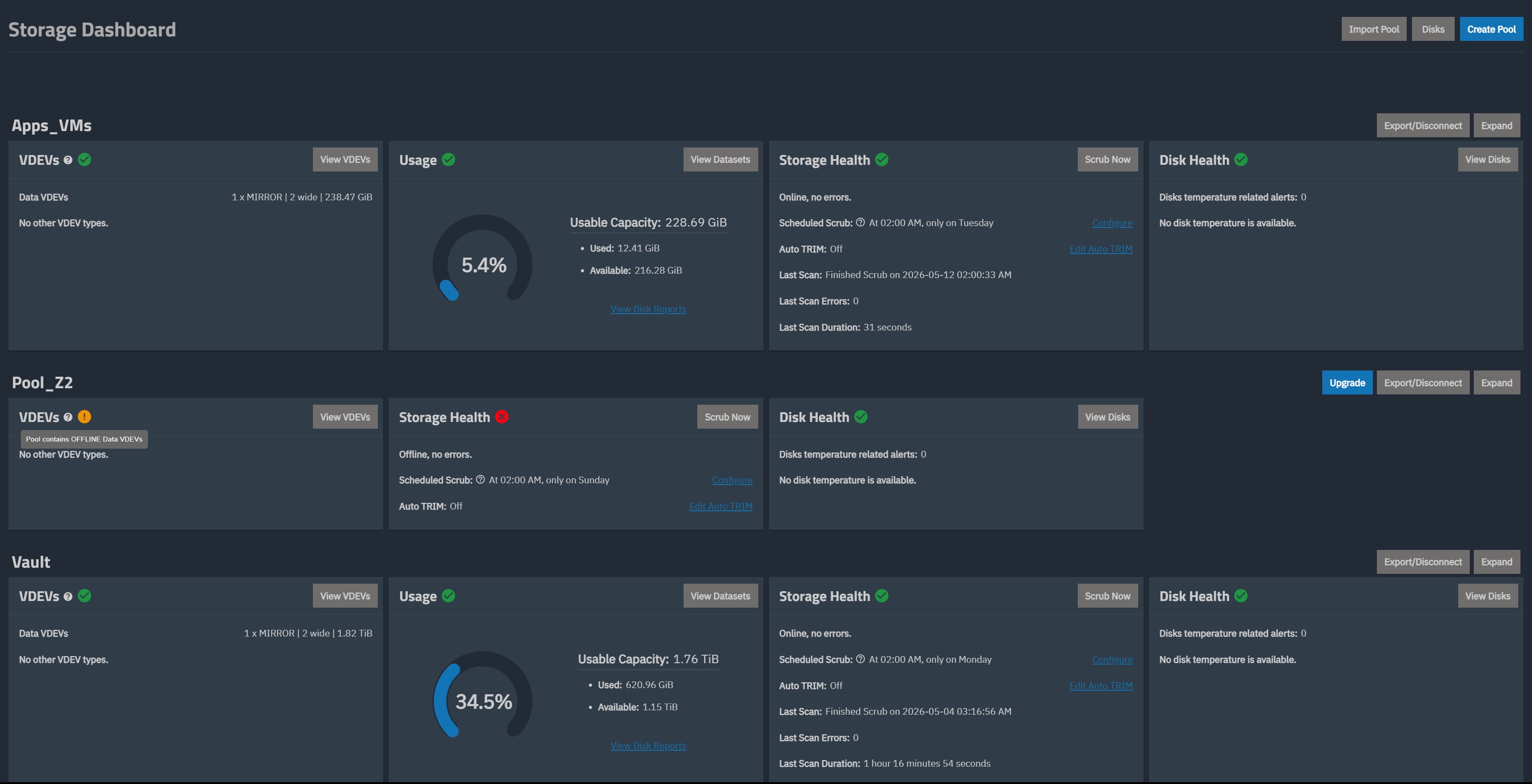
My TuneNAS Scale box has droped it main data pool after upgrading to 25.10.4. It is comprised of 8x drives in a Z2 configuration and all 8 drives are not visible in TrueNAS. During boot, all 8 drives are detected by the HBA Card. I tried to disconect and re-import without deleting the data and configuration and no option to re-import the pool shows up.

Here are the specs of the System:
Intel Xeon(R) E-2136.
Kingston 32 GB ECC RAM.
Supermicro X11SCL-F.
LSI SAS 9207-8i HBA card IT mode (FW 20.00.07.00-IT).
Seasonic SS-400L2U PSU.
Silverstone RM212 Case.
Boot drive is a no-name Amazon (Dogfish) 64gb M.Sata.
4 other drive are connected to the motherboard’s onboard SATA header via a Reverse SAS breakout cable from the backplane. No issues with thoes drives.

So far swithching back to the previous boot (25.10.3.1 or 25.04.2.6) yeilded no results.
Replacing the cables with a working spares yeilds no result.
Swaping the card into other pci slots does nothing.
HBA card is listed in lspci.
Back at the begining of April I upgraded from Core to Scale (Fresh install with imported config).

I dont have much experience in this and do not know where to go from here but I dont think the dives are bad.
Browse some other threads and do the Tutorial by the Bot to get your forum trust level up and post images and links

TrueNAS-Bot
Type this in a new reply and send to bring up the tutorial, if you haven’t done it already.
@TrueNAS-Bot start tutorial

Run the following in the Shell window and post the results back using Preformatted Text. (</>) on tool bar. One preformatted text box per command. How many drives total? Your PSU may be a bit too small. Proper Power Supply Sizing Guidance | TrueNAS Community

sudo zpool import
sudo zpool status -v
sudo sas2flash -list

Hey thank you for the reply

I ran the 2 zpool commands to import

root@Tartarus[~]# sudo zpool import
no pools available to import
root@Tartarus[~]# sudo zpool status -v
pool: Apps_VMs
state: ONLINE
scan: scrub repaired 0B in 00:00:31 with 0 errors on Tue May 12 02:00:33 2026
config:

    NAME                                      STATE     READ WRITE CKSUM
    Apps_VMs                                  ONLINE       0     0     0
      mirror-0                                ONLINE       0     0     0
        2305ea72-e99b-4fa3-a95c-35662d588c9f  ONLINE       0     0     0
        9fa2ad4e-e84a-40f9-8ecc-77075015ec33  ONLINE       0     0     0

errors: No known data errors

pool: Vault
state: ONLINE
scan: scrub repaired 0B in 01:16:54 with 0 errors on Mon May 4 03:16:56 2026
config:

    NAME        STATE     READ WRITE CKSUM
    Vault       ONLINE       0     0     0
      mirror-0  ONLINE       0     0     0
        sdd2    ONLINE       0     0     0
        sdc2    ONLINE       0     0     0

errors: No known data errors

pool: boot-pool
state: ONLINE
scan: scrub repaired 0B in 00:00:33 with 0 errors on Mon Jun 1 03:45:35 2026
config:

    NAME        STATE     READ WRITE CKSUM
    boot-pool   ONLINE       0     0     0
      sde3      ONLINE       0     0     0

errors: No known data errors

A 4th pool called Pool_Z2 is missing from the list. This is the one im trying to recover.

For the sas2flash command, does this mean that I dont have a real LSI card or its a clone/rebadge?

root@Tartarus[~]# sudo sas2flash -list
LSI Corporation SAS2 Flash Utility
Version 20.00.00.00 (2014.09.18)
Copyright (c) 2008-2014 LSI Corporation. All rights reserved

    No LSI SAS adapters found! Limited Command Set Available!
    ERROR: Command Not allowed without an adapter!
    ERROR: Couldn't Create Command -list
    Exiting Program.

For the drives, I have a total of 12 drives.
8x 5400 RPM NAS drive ( a mix of WD red and Seagate Ironwolf)
2x Samsung Sata SSD
2x WD-Gold

For the PSU, I looked up several PSU calculators when building this out. I arrived at about 350w full load and this setup has remained unchanged since I built it back in 2018 other then replacing failed drives over the years. I went with slower 5200RPM drives to keep power usage low and finding a resonable and reputable 2U PSU was chalenging. Looking at the guide it seems to recomend 450w but I never had any system stability issues over the years. Maby over the years of beeing up 24/7 has caused it to degrade. Its mostly a home project with a few apps and very rarely gets heavy use.

These are the three commands that should work, depending on what LSI / Broadcom HBA you have. I gave the first one based on the model number you put in your first post. You can try the other two to see if they return any information. I think you edited your HBA info and included the software version of the command and not the firmware version. You can search the forums for those commands and be able to find examples of the data returned. Only post the results if one of them works but mention if no results are produced for all three. If you do have a LSI 9200 series, it may not be working as ‘sas2flash’ should have produced results.

sudo sas2flash -list
sudo sas3flash -list
sudo storcli show all

Since the drives don’t seem to be detected, these 2 commands probably won’t yield any useful results. But, they can be useful if the first does produce output.

lsblk -o NAME,MODEL,SERIAL,LABEL,UUID,PARTUUID,TYPE

Next, if you do get a result for your Pool_Z2 drives, you can run this command against all of them:

zdb -l /dev/DRV_PART | grep txg | head -1

Replace DRV_ with the drive name, like sda and replace PART with the pool’s partition. Both would be visible from the output of lsblk IF the full drive stack for that HBA is working.

Hello, thank you for your input on this

I ran the lsblk command and none of the drive conected to my HBA card show up.
Im starting to think something is physicaly wrong with my HBA card. I find it odd that during boot up it is detected along with all 8 drives connected to it but is taking unusualty long to detect. Also the option to enter the BIOS of the card by doing Crtl-C does not seem to work via IPMI console. Im going to make a Linux live CD next and boot into it to see if I can see the drives.

@SmallBarky , I looked up what the console return of the sas2 and sas3 would look like and I am getting nothing in return including storcli for controler count. commands and nothing was returned

Likely the best outcome if it is just the HBA; fairly cheap & your data is likely alive & well. Make sure to slap a fan ontop of the next one if you don’t already do so

Well booting in a Live Ubuntu disk Im able to see all 12 drives in my NAS. By conecting a monitor and keyboard to the NAS I was able to get inside the HBA’s config menue and all my drives are there. The issue of the 8 drive connected to the HBA not showing up in TrueNAS persists. The pool that I disconected came back (did not do that after several reboots) but its still in the state where no drives are found and I have the error “Pool contains OFFLINE Data VDEVs”.

Can you try running the HBA command or commands from above on the Live Linux? Looking to get info on firmware, etc. I am hoping the command(s) are included in the Live Linux.

You can try running in on the TrueNAS system. Just make sure to label what OS version the results come from.

The commands are not found in Ubuntu 26.04. Im guessing the binary is not installed for this tool. I did try to mount with zpool import Pool_Z2 and it does see the pool but cant mount it becouse its giving me a warning that it was previously in use on an other system. It can be imported if i use the force flag but I chose no to push this further to protect the data.

Good news is it seems like everything is there but for some reason TrueNAS is behaving oddly. Should I try a fresh install and import the config? I also updated the system spec to include the FW version found on the HBA.

It seems there was a hiccup with this HBA. You can force-import the pool, immediately export it afterwards to clear the in-use flag, and then reimport it normally.

Some new development.
I booted back into the initial install, 25.04.2.6 from back in April and everything is there. All pools are green and healthy.
When I boot into 25.10.3.1, Pool_Z2 is present in the dashboard but no drives are detected.
In 25.10.4, Pool_Z2 does not exist and no drives are detected.

Do you have good backups of your current pools? I would try to do that while you have it operational. You might consider making multiple copies of your system configuration on the different boot environments in case you need to do a fresh reinstall over your boot-pool. Different copies of the versions can help if anything gets corrupted with one of them or a specific OS version. You will want one from 25.04.2.6 in case you need to stick to that version for now and/or do a fresh install. I don’t think you can apply a newer OS version of the system configuration.

I originally thought it was a failed HBA or old firmware from your description of upgrading TrueNAS. It’s odd that it wasn’t working previously on 25.04.2.6 or 25.10.3.1 in your first post but now it works for the earlier version of 25.04.2.6. I just don’t know what to suggest next. We don’t see any reports of issues with that series of HBA and the 25.10.4 other than yours. Those HBAs are pretty well tested and standard by this point. Power supply could be an issue if it’s borderline or on the edge of failing, but that is a guess.

Try going back to 25.04, deleting the 25.10 boot environment, and retrying the upgrade. The Pool_Z2 is what 25.10 used to import on boot and ran into problems.

Worked on this issue for a few hours today. I ended up using a spare drive and installing 25.10.4 directly and still have the same issue.
I went back to V 25.04.2.6 from a fresh install on the same spare drive and the HBA shows up, all drives accessible and the pool is up and running. Next I tried to upgrade directly to 25.10.4 and the issue is resolved and the system is fully operational.
Its odd that the upgrade from 25.10.3.1 to 25.10.4 broke the HBA conectivity. Im even able to communicate properly in the shell with the HBA.

root@Tartarus[~]# sas2flash -listall
LSI Corporation SAS2 Flash Utility
Version 20.00.00.00 (2014.09.18)
Copyright (c) 2008-2014 LSI Corporation. All rights reserved

    Adapter Selected is a LSI SAS: SAS2308_2(D1) 
Num   Ctlr            FW Ver        NVDATA        x86-BIOS         PCI Addr

0  SAS2308_2(D1)   20.00.07.00    14.01.00.06    07.39.02.00     00:05:00:00
    Finished Processing Commands Successfully.
    Exiting SAS2Flash.

Zpool Status

root@Tartarus[~]# zpool status -v
pool: Apps_VMs
state: ONLINE
scan: scrub repaired 0B in 00:00:31 with 0 errors on Tue May 12 02:00:33 2026
config:

    NAME                                      STATE     READ WRITE CKSUM
    Apps_VMs                                  ONLINE       0     0     0
      mirror-0                                ONLINE       0     0     0
        2305ea72-e99b-4fa3-a95c-35662d588c9f  ONLINE       0     0     0
        9fa2ad4e-e84a-40f9-8ecc-77075015ec33  ONLINE       0     0     0
errors: No known data errors

pool: Pool_Z2
state: ONLINE
scan: scrub repaired 0B in 07:58:48 with 0 errors on Sun May 10 09:58:50 2026
config:
    NAME                                      STATE     READ WRITE CKSUM
    Pool_Z2                                   ONLINE       0     0     0
      raidz2-0                                ONLINE       0     0     0
        99c3d2f5-faa2-11e8-96ba-d8cb8a6faafd  ONLINE       0     0     0
        a06cd45e-faa2-11e8-96ba-d8cb8a6faafd  ONLINE       0     0     0
        8c811ef8-2654-11ed-bc2e-ac1f6bad5dfc  ONLINE       0     0     0
        a96b2de3-faa2-11e8-96ba-d8cb8a6faafd  ONLINE       0     0     0
        725d60c0-2377-11ee-bac5-ac1f6bad5dfc  ONLINE       0     0     0
        b3dfaf99-faa2-11e8-96ba-d8cb8a6faafd  ONLINE       0     0     0
        79212955-2fe7-11ee-aac7-ac1f6bad5dfc  ONLINE       0     0     0
        e066d58d-2cf8-11f1-abbb-ac1f6bad5dfc  ONLINE       0     0     0
errors: No known data errors

pool: Vault
state: ONLINE
scan: scrub repaired 0B in 01:16:54 with 0 errors on Mon May  4 03:16:56 2026
config:
    NAME        STATE     READ WRITE CKSUM
    Vault       ONLINE       0     0     0
      mirror-0  ONLINE       0     0     0
        sdk2    ONLINE       0     0     0
        sdl2    ONLINE       0     0     0
errors: No known data errors

pool: boot-pool
state: ONLINE
scan: scrub repaired 0B in 00:00:51 with 0 errors on Thu Jun  4 21:03:09 2026
config:
    NAME        STATE     READ WRITE CKSUM
    boot-pool   ONLINE       0     0     0
      sdm3      ONLINE       0     0     0

errors: No known data errors

I think I can say my issue has resolved it self by doing a fresh installon a new device, importing the config and upgrading directly to the latest version.
One thing i forgot to mention is that the Update Profile I have selected in the System update tab has been General since I upgraded from Core to Scale and is what I selected before upgrading my fresh install form 25.04.2.6 to 25.10.4. I dont know if this is relevant. I never go with Beta or similar upgrades and usualy wait a while to upgrade the system letting it mature and bugs to get fixed but this time I jumped the gun and upgraded right away to address the CVE vulnerabilities.

I’ve had random issues resolved with a clean install as well - happy to hear it is all working.