Random TrueNAS crashes that don't surface any logs

My hardware is:

  • TrueNAS SCALE 25.04.2.1-2,
  • Ryzen 7 5700X,
  • RAM X-Star Spark Shark DDR4 16GB 3200Mhz X4,
  • ASRock B450 PRO4 R2.0,
  • PSU Endorfy Supremo FM5 750W 80+ Gold.
  • For HDDs it’s a mix of segate stuff and ironwolf. There’s one 128GB ssd for boot and one Kingston KC3000. Both the boot ssd and the kingston nvme were added AFTER the crashes started to see if the previous hardware was the real issue. In total, 5 HDDs, 1 nvme and 1 sata ssd.
  • GPUs: NVIDIA rtx 3060ti
  • HBAs/Storage: LSI 9211-8i flashed to IT, also added AFTER the issues started.
  • NICs: Intel IGC 2.5G (enp5s0) + Realtek r8169 (enp9s0), 2.5G is only used. It’s not getting hit hard at all.

I’ve had my system crash on and off for the past 2-3 months now. It all started happening more constantly after I upgraded to 25.04 and installed 3 LCX containers. One for my website hosting, another for game servers and one more to test stuff inside it. The crashes aren’t normal, they ramp the fans to 100% and the machine reboots after a few seconds. It’s almost if I’d hit the reset switch on the machine. It also doesn’t happen all the time, it can run weeks without any issues, and then start crashing every 2-3 hours for a few days, then it can run stable for some more time and so on. A notable thing I can notice, when running the LCX container for the game servers, I have that wired up to MinIO, whenever I’d hit MinIO with a very large job, a 200gb backup and another for 70gb, or even just one backup job, the whole machine would crash within 2-30 minutes of the tasks starting.

The logs, they don’t surface anything that would say what’s the real cause of the crash. I’ve found this in my logs: pci 0000:01:00.0: VF BAR ... can't assign; no space then later No. 2 try to assign unassigned res and assigned gpio_generic: module verification failed: signature and/or required key missing - tainting kernel. Shutdowns cause systemd-journald: ... system.journal corrupted or uncleanly shut down, renaming and replacing.. I’ve tried extending the oops period to see if that would catch any errors, and those above logs are the only thing that would surface. Temps are not an issue, they are stable, with the hottest disk being at about 48-54C.

As for what I tried to fix this:

  • Got a new HBA to test if it was the SATA links on the motherboard or the controller, didn’t change anything.
  • Updated BIOS to latest version, didn’t change anything.
  • Slowed down SATA links to 3gb to see if it’s stability related, didn’t do anything.
  • Disabled the LCX containers and over half of my containers to see if that would stop it, it didn’t.
  • Removed one drive from my raidz1 pool to see if that is a power spike related issue, didn’t do anything. Still crashes.
  • Limited ZFS arc to 10gb so my RAM doesn’t fill up, didn’t change anything.
    I’ve done these commands too to see if anything would improve, nothing changed:
  • sudo sysctl -w vm.compaction_proactiveness=0
  • sudo sysctl -w vm.watermark_boost_factor=0
  • sudo sysctl -w vm.min_free_kbytes=524288
  • echo 10737418240 | sudo tee /sys/module/zfs/parameters/zfs_arc_max
  • echo never | sudo tee /sys/kernel/mm/transparent_hugepage/enabled

None of these commands did anything. I’m puzzled by what’s causing this. The very next logical step would be to check RAM with memtest, though I had never experienced RAM failing in this way if it really is RAM. I’d need some advice on how to proceed with this and what to test. I found some posts from some time ago that had crashes coming from RAM, but the weirdest thing is, the system can be stable for weeks, then randomly one day it will crash and from there it will crash every 1-2 hours, slowly extending that window. Currently the crash happens every 8-16 hours.

Despite i can understand what you mean, i would proceed with the memtest anyway (not because there Is a special coupon :smile: ). There Is the possibility that they are not failing cuz bad, but maybe for some miss-setting on latency-frequency-voltage.
Download the last free release from the official website, flash an USB stick with Rufus, plug off everything from the Nas that Is not strictly necessary and boot from the USB. The test consists on 4 cycle, they will took some time to finish, but in my experience if something Is wrong they will be throw errors fast (but complete anyway at least the 4 cycle to be sure).
If no errors come up, i would start test the rest of the Hw adding 1 a variable at time, maybe try another os too. Instead if errors arise you have your culprit

1 Like

Who would’ve guessed :rofl:

I’ll run them one by one, see which module is failing or slot or if one CPU pin is dropped

3 Likes

This has nothing to do with RAM, the CPU, the motherboard, or RAM settings in the BIOS.

The test failed because you don’t have a “proper case” protecting your server from a supernova explosion in the Andromeda Galaxy.

3 Likes

You should see what settings are being used in the BIOS. Are you using any “XMP” presets, voltage tweaks, or overclock overrides for the RAM or CPU? A common fix is to set the RAM settings to stock defaults or limit the speeds to the motherboard’s supported specs.

If that doesn’t work while all modules are installed, then you can try to figure out which stick or slot is bad through the process of elimination.

I was running XMP for a few months, I turned it off for the past 2 weeks and it still crashed, so I’m sure it’s not that. The BIOS defaults were running. There’s also no overclocks on the CPU, at most, I run it in “ECO” mode, so it actually runs a bit slower/cooler.

On it, I could just take ram out one by one, but I don’t want Ryzen to influence the tests in weird ways when there will be only 3 sticks in etc.

1 Like

I just decided to speed up things. I rushed the sticks, testing only within 1-2 minutes, the very second stick I threw in, after 30 seconds it had 10000 errors. It’s not the CPU, it’s not the slot. It was the one RAM stick all along… most likely. I’ll run the tests on the rest of the sticks and keep the post open untill I get the replacement or confirm after a few days that 3 sticks are running just fine.

1 Like

That one stick fails in any slot?

Did the 3 sticks pass at least a full memtest run? If you do test the other 3, have one of them in the slot that the “bad” stick was previously in.

You want rule out any overlaps that might lead you to replacing the wrong thing.

I didn’t test that one ram stick in multiple slots, no.

Here’s what I actually did in order:

  1. Tested the first stick in B2 (Yes I know, not optimal, A2 would be better), it went without errors for 30 minutes.
  2. I turned the machine off, didn’t want to wait the full test just yet
  3. Put the “bad” stick in and ran a test, 30 seconds it aborted. This was in slot B2 too.
  4. Now I put 3 sticks in, slots B1, A2, B2
  5. 15 minutes, no errors for now.

When these 3 pass the full test, I’ll test the stick in another slot, but everything points currently at a bad stick.

When some other errors happen for these 3 sticks, I’ll run them one by one, since that could be just a ryzen fluke.

It’s looking like it.

Too bad that the best deals on RAM come in kits of two. :sweat_smile:

When my PC (not NAS server) had one failed stick, I replaced both of them because I got a deal that made it almost pointless to buy only a single stick.

My NAS is a frankenstein. I wish I made it better, but that was only a “test” or rather exploration of where I could go with tech and learn some more stuff for future, if I end up working in IT somewhere.

I’ve got 3 sets of sticks. All of them are the same firm, cl etc, but they didn’t come in the same batch. Only the last 2 came in a “2 in one” deal. I could get ECC sticks or even matched ones, but currently, when everything else is working besides that one failed stick… It’s hard to justify buying another 64gigs of RAM, especially when the data on it isn’t really mission critical, it’s nice to have, but nothing that would implode my house when it fails

1 Like

Imagine how less pain you could avoid doing this easy test before all the others :nerd_face:
I’m not sayng that to be arrogant, to me your case goes into the “RAM can fails in many fantasious way” stories, 100%.

Btw, another easy things to try before decree the stick as bad Is to try to clean all the contacts on It: isopropilic alcol Is the best, but i have experienced that a common pencil rubber works well too.

Yeah it would be an easy test to tell, but my box has been giving me a lot of issues and there’s been a lot of unlucky moments with it. I decided to go the harder route, in case it’s an issue that wasn’t hardware

Some examples are:

  1. The previous PSU failed to supply enough power for 4HDDs
  2. The new boot drive had corrupted sectors
  3. 3 HDDs failed for me in the last 2 months

So I always assume the worst now. Didn’t assume RAM was an issue, since it was working well before. Usually when RAM fails, it just simply refuses to boot, so it’s a first one for me where the system boots with one failed RAM stick on a stuck bit

I cleaned the contacts, swapped to another slot, the stick failed the test in about 1 minute. It’s dead

Edit, Checked the test for the other 3 sticks, all passed 4 tests with flying colors, 0 errors on all of them

Edit 2: So I’m checking every test run that was made, since the box for some reason tried to do 3 full tests of 4 passes. 4 passes finished without errors, then another 2 without errors. This pass was weird, as I didn’t even touch the box, yet the test aborted:

2025-08-28 10:47:45 - All memory ranges successfully locked
2025-08-28 10:47:45 - Starting pass #1 (of 4)
2025-08-28 10:47:45 - poll_timings_ryzen - [MC0] DramConfiguration=00000524
2025-08-28 10:47:45 - poll_timings_ryzen - [MC0] DebugMisc=000000F8
2025-08-28 10:47:45 - poll_timings_ryzen - [MC0] UMC_DRAMTIMING1=12122712
2025-08-28 10:47:45 - poll_timings_ryzen - [MC0] UMC_DRAMTIMING2=00120039
2025-08-28 10:47:45 - poll_timings_ryzen - [MC0] 18-18-18-39
2025-08-28 10:47:45 - poll_timings_ryzen - [MC1] DramConfiguration=00000524
2025-08-28 10:47:45 - poll_timings_ryzen - [MC1] DebugMisc=000000F8
2025-08-28 10:47:45 - poll_timings_ryzen - [MC1] UMC_DRAMTIMING1=11112711
2025-08-28 10:47:45 - poll_timings_ryzen - [MC1] UMC_DRAMTIMING2=00110038
2025-08-28 10:47:45 - poll_timings_ryzen - [MC1] 17-17-17-39
2025-08-28 10:47:45 - get_mem_ctrl_timings - [0-24-2] 2400 MT/s (17-17-17-39)
2025-08-28 10:47:45 - Current mem timings: 2400 MT/s (17-17-17-39)
2025-08-28 10:47:45 - Current CPU temperature: 51C
2025-08-28 10:47:45 - Running test #0 (Test 0 [Address test, walking ones, 1 CPU])
2025-08-28 10:47:45 - MtSupportRunAllTests - Setting random seed to 0x50415353
2025-08-28 10:47:45 - MtSupportRunAllTests - Start time: 844 ms
2025-08-28 10:47:45 - Start memory range test (0x0 - 0xC40000000)
2025-08-28 10:47:46 - MtSupportRunAllTests - Test execution time: 0.920s (Test 0 cumulative error count: 0, buffer full count: 0)
2025-08-28 10:47:46 - Running test #1 (Test 1 [Address test, own address, 1 CPU])
2025-08-28 10:47:46 - MtSupportRunAllTests - Setting random seed to 0x50415353
2025-08-28 10:47:46 - MtSupportRunAllTests - Start time: 1806 ms
2025-08-28 10:47:46 - Start memory range test (0x0 - 0xC40000000)
2025-08-28 10:47:53 - poll_timings_ryzen - [MC0] DramConfiguration=00000524
2025-08-28 10:47:53 - poll_timings_ryzen - [MC0] DebugMisc=000000F8
2025-08-28 10:47:53 - poll_timings_ryzen - [MC0] UMC_DRAMTIMING1=12122712
2025-08-28 10:47:53 - poll_timings_ryzen - [MC0] UMC_DRAMTIMING2=00120039
2025-08-28 10:47:53 - poll_timings_ryzen - [MC0] 18-18-18-39
2025-08-28 10:47:53 - poll_timings_ryzen - [MC1] DramConfiguration=00000524
2025-08-28 10:47:53 - poll_timings_ryzen - [MC1] DebugMisc=000000F8
2025-08-28 10:47:53 - poll_timings_ryzen - [MC1] UMC_DRAMTIMING1=11112711
2025-08-28 10:47:53 - poll_timings_ryzen - [MC1] UMC_DRAMTIMING2=00110038
2025-08-28 10:47:53 - poll_timings_ryzen - [MC1] 17-17-17-39
2025-08-28 10:47:53 - get_mem_ctrl_timings - [0-24-2] 2400 MT/s (17-17-17-39)
2025-08-28 10:47:53 - MtSupportRunAllTests - Test execution time: 7.010s (Test 1 cumulative error count: 0, buffer full count: 0)
2025-08-28 10:47:53 - Test aborted
2025-08-28 10:47:53 - Cleanup - Unlocking all memory ranges...
2025-08-28 10:47:53 - All memory ranges successfully unlocked
2025-08-28 10:47:55 - Test result: INCOMPLETE PASS (Errors: 0)
2025-08-28 10:47:55 - Display test result summary

and then the final run gave 10000 errors. That’s with the 3 “working” sticks in. What’s the chance another stick died while the tests were running?

2025-08-28 10:58:28 - [MEM ERROR - Data] Test: 2, CPU: 0, Address: 43C810230, Expected: 000000043C810230, Actual: 000000047C810230
2025-08-28 10:58:28 - [MEM ERROR - Data] Test: 2, CPU: 0, Address: 43C810238, Expected: 000000043C810238, Actual: 000000047C810238
2025-08-28 10:58:28 - [MEM ERROR - Data] Test: 2, CPU: 0, Address: 43C8102C8, Expected: 000000043C8102C8, Actual: 000000047C8102C8
2025-08-28 10:58:28 - [MEM ERROR - Data] Test: 2, CPU: 0, Address: 43C8102E0, Expected: 000000043C8102E0, Actual: 000000047C8102E0
2025-08-28 10:58:28 - [MEM ERROR] Truncating due to too many errors (Total errs: 500)
2025-08-28 10:58:28 - MtSupportRunAllTests - Test execution time: 3.776s (Test 2 cumulative error count: 510, buffer full count: 0)
2025-08-28 10:58:28 - Running test #3 (Test 3 [Moving inversions, ones & zeroes])
2025-08-28 10:58:28 - MtSupportRunAllTests - Setting random seed to 0x50415353

Pretty amounts of unlucky :sweat_smile:

Most often yes, system just not boot. But sometimes, failing RAM cause freeze - reboot - instability, or just silently corrupt data

Nothing else worth to try im aware about, but at least other 3 sticks are working well. A bit less RAM for arc but you can use the system the same and hopefully without issue (maybe you can replace only 1 stick with an used one, or sel 1 of your and buy 2 new)

Check the latest edit. I don’t know what to think of the logs anymore.

Asked ChatGPT to do a quick analysis on what was going on with the logs, can confirm myself after re-checking them carefully:

  • Overnight run: 48 GB detected, DRAM at 2400 MT/s (17-17-17-39), 4/4 passes, 0 errors — clean.
  • Morning quick run @ 10:46: same 48 GB and 2400 MT/s, but the test was aborted after ~7 s (“INCOMPLETE PASS”). That’s just a separate, interrupted run — not part of the overnight one.
  • Failing run @ 10:58: MemTest86 now detects only 1 DIMM (Slot 2: “X-STAR 16 GB 2666 MHz”), total test range ~17 GB, and trains memory at 2668 MT/s (20-19-19-43). It starts throwing errors almost immediately and hits the 10,000-error cap in ~92 s (FAIL).

Still, no explanation of what the hell happened that 3 separate test runs ran, instead of one. And why only one stick was detected in the very last run.

Realized now the edit.
This Is bad imho, if the sticks not fails alone but throw errors in dual channel there Is another problem, and can be hard to find because involve mainboard - CPU.

But i have the feel that you should try with 2 and not 3 (if you already tried i have miss :smile: )

According to mainboard manufacturer site, if the sticks are double rank as i expect the max speed should be set at 2666mhz, so you are on specific anyway.
You already update the bios, quite strange what in seeing

I’ll wait for the 4th stick to arrive and test out all 4 at once. Might be that it’s a marginal Ryzen fault of some sorts with only 3 sticks or something. Nothing makes sense in the chain of events at all. That CPU also shouldn’t be dead in any way, as it’s a CPU that I was running in my main work machine for about 2 years before switching over to a 5950X.

For now, I’ll leave the NAS running with 3 sticks, at least I’ll see if it still crashes or if it’s stable.

I’ll update the post if the NAS crashes and memtest finds another dead stick or if the full 4 memory setup fails in memtest

1 Like

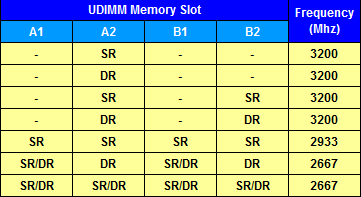
Am I missing something? In the chart posted, you can have 1 stick (A2), 2 sticks (A2,B2) or 4 sticks (A1,2; B1,2) but not 3 sticks as a 3 stick config is not supported. The use of 3 sticks is likely what is causing the issue. Just because it works does not mean the configuration won’t produce errors.

3 sticks running strong for over 6 hours now without any crashes under heavy IO. While it’s not supported according to the chart, it works, god knows for how long, but that error I got with 3 sticks in one of the runs is probably due to this exact reason. Might be some memory training issue, that’s why only one stick got detected in one of the tests.

I’ll stick with 3 sticks for now, since I need all that RAM, and I can’t shut down the box for 5 days (The closest window the replacement will arrive from RMA). If this crashes along the way, I’ll know why