When I built my NAS I stuck a 256 GB NVMe SSD in there for L2ARC use.
At the time, SSDs were affordable, so I figured, why not? Clearly, that was some time ago.
Now I’m thinking I should remove the drive and set it aside for when my laptop (which ONLY has an NVMe slot) wears out its existing NVMe SSD. The way prices are going, a new one will be too expensive. I’m not sure the L2ARC drive is doing much anyway.
Is there any recommended procedure for deactivating and removing an L2ARC drive? Will it break anything?
FWIW, the rest of the storage looks like this:
2 x 20 TB drives used for main datasets (sure miss when those were reasonably-priced too!)
1 x 2 TB SATA SSD used for apps
1 x 240 GB SATA SSD (boot/OS drive)
Is it as simple as clicking “Remove” on the drive in the ZFS VDEVs menu, then shutting down the NAS for physical removal, then back up and running?
Yep. You click on remove and if there are no underlying problems with your pool, cabling, controller, … so far, that will just proceed and you are done.
Power off and remove at your convenience.
If anything prevents the removal, the system should tell you.
I did consider doing that when building, but unfortunately I’m out of SATA ports (board only came with 4, no HBA yet).
Since it seems I can live without L2ARC, I could reinstall TrueNAS on a yet-to-be purchased (like you say, when prices are reasonable again) smallish NVMe drive & use the freed-up SATA port for a 2nd 2TB apps drive.
You can still get the 16/32GB NVMe Optane’s at a reasonable price. Not as good as they were - but still not bad. Personally I would get the 32GB rather than the 16GB which needs more agressive space management as TrueNAS updates occur
Something to keep in mind is that from 26 (and onwards) the hardware guide lists an 20GB SSD boot device as the minimum.
It also lists at least two devices as a minimum for the storage. While certainly prudent, I view that more as a recommendation, unless they plan on removing the option to run a single device STRIPE.
Assuming your 240G boot SATA SSD is not actually fully used (which usually it isn’t) you can also install truenas without using the full disk (link here), and then use the command line to create a partition instead of a drive on the Boot-SSD and use that as L2arc storage. The downside would be if your boot SSD is not high endurance, the use as L2arc might eventually destroy it and destroy the boot pool along with it.
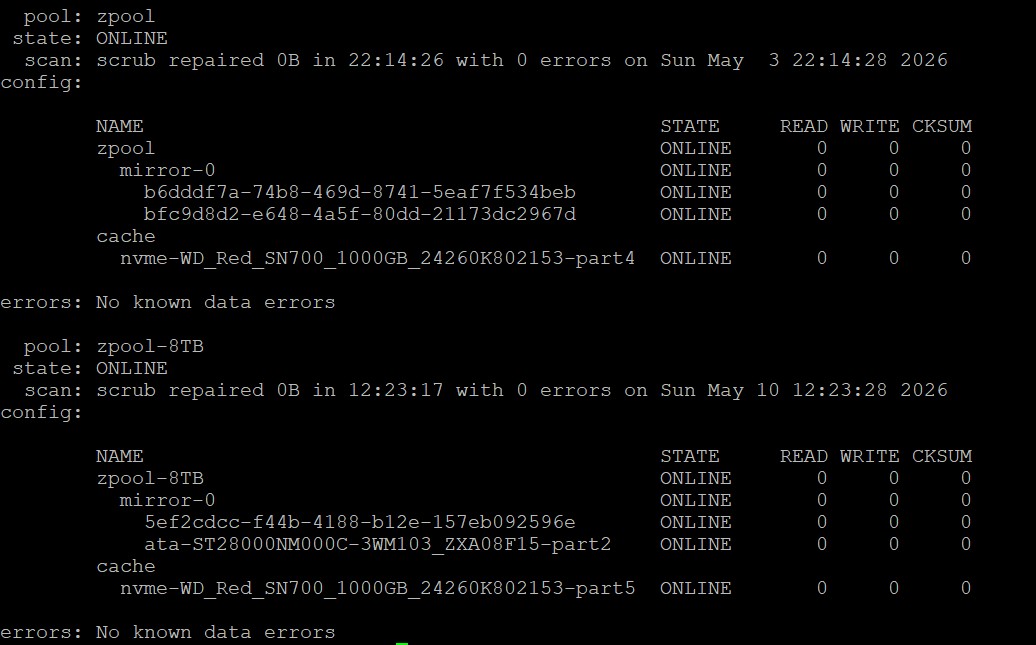
But this can absolutely be done. I have two TrueNAS installations where the boot SSD is a 1TB WD SN700 (TBW endurance: 2000TB) and I have the vast majority of this drive dedicated as L2arc read cache.
Using partitions can of course also not only be used for L2arc, but also for mirrors. Here is the zpool status output of my NAS with a single 28TB drive mirrored as partitions with a 20TB drive and a 8TB drive. This is of course not great for performance since the 28TB drive limits simultaneous r/w on both pools, but I have all the data fully mirrored and don’t need another 28TB drive, for which I would have to expend generational wealth to actually buy. And both pools are cached with L2arc partitions of the SN700 boot SSD.
This is - of course - not possible in the GUI but can easily be done with the normal ZFS commands and while the GUI then doesn’t fully show status anymore it’s not that bad either (for example it shows the cache VDEV as “1 x ?”).