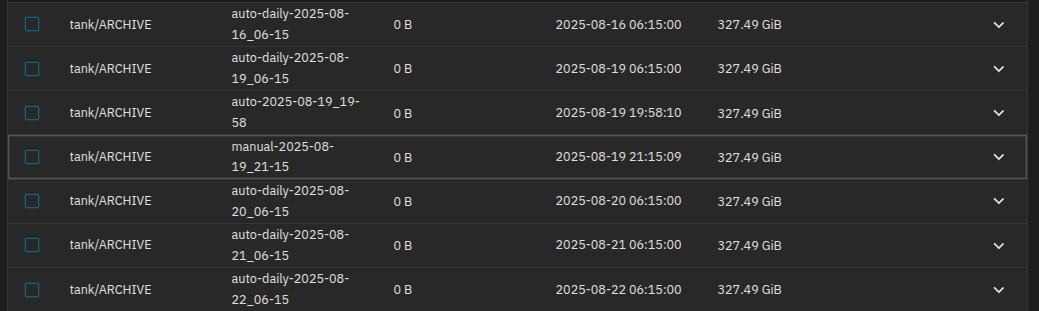
I’m running TrueNAS 25.04 CE.
I wanted to put in place a way to copy my data over to some hard drives to have worst case scenario backups.
I always create a manual snapshot to make sure that nothing changed in archiving datasets since the last time I worked on it (just a peace of mind verification).
So I configured a Replication task to copy over a dataset (ARCHIVE, passphrase encrypted, unlocked) to a local pool.
I’ve disable “Run Automatically” and “Schedule” as I will manual insert the backup drive in the server and run it manually.
In “Periodic Snapshot Tasks” I’ve selected my “auto-daily” snapshot task because I don’t want the replication task to make any new snapshots in my datasets, just copy over what already exist (If I understood correctly the way this works that is).
In the “Also Include Naming Schema” I selected my “auto-daily” and my “manual” snapshot schema.
The Task runs.
I get my copy of my dataset to the backup drive.
The snapshots are there.
But the snapshots on the replicated dataset indicate 8 KiB as “used”, not even on all snapshots, like 3/4 of them.
Does anyone know why that is?
Is there an easier way to perform those sorts of local, manual copies?
Don’t check how much space the snapshots consume. Check how much space the dataset consumes. You can also check how much space the snapshot “references”.
Technically, a snapshot will consume no additional space, even if new files were written. A snapshot’s used space only involves how much “deleted” data it is still holding onto.
“Check how much space the dataset consumes.”: that makes sense but snapshots would give me peace of mind that we are talking about the same data, not just the same data weight.
And yes, snapshots won’t tell me if new files are written but what’s important to me is not to loss files.
My problem is more about why that even happens, its not just this one data set, replication those that for all of them and its always 8 KiB.
I get that but with the “used” value not being 0, and “used” only referencing deleted data, I can’t be sure looking at “referenced” and “used”, that it the same data now can I?
I’m pretty dead certain that it’s all good, it just annoying me that the snapshots can’t just tell me so
Your screenshots show values of 327GB for “referenced”. That’s a lot of data. I bet it’s close to the “usedds” value for the dataset itself.
This means that whatever snapshot shows “referenced” of 327GB, then it is a filesystem with 327GB of data if it is to be browsed or replicated to its own filesystem elsewhere.
You may browse a snapshot’s contents by navigating into the hidden .zfs/snapshot directory at the root of the dataset’s path. This is also possible over an SMB share if you manually type in .zfs/snapshot after the share’s root path.
The only way to know for sure is to compare the files yourself or use zfs diff. Why not trust that the snapshots are working as intended and replicating properly? With ZFS snapshots and replications, it’s all or nothing. There are no “incomplete” snapshots.
I do trust that it works, I tried the snapshots all seems good (short of doing a bit by bit check).
I just wanted to know where that 8 KiB discrepancy comes from as I can’t find anything about it.
I guess the 8 KiB might be some harmless ZFS metadata differences but if anyone knows that would be cool.