Not trying to necro this thread, but I have opened a new bug report on this.
The NIC’s in the UGREEN DX6800 Pro work fine when they are on the 1G line rate, but once they are set for 2.5G or 10G it causes instability under heavy network load.
Thanks for filing another bug. Here’s a direct link: Jira
This bug has been closed, unfortunately.
Thanks for the ticket but this is something we do not have the resources to investigate. The manufacturer and/or upstream will need to take care of this since we rely heavily on them for situations like this.
This is unfortunate, but I can understand their position on this. That said, I think we’d be better off at this point reading an unstated “Intel NICs only” hard system requirement into TrueNAS SCALE’s system requirements.
More and more I regret my purchase of the DXP8800 as a TrueNAS box, but on the other hand it’s very hard to get anything decent prebuilt at an acceptable price that has Intel 10 GbE NICs. I’m not even sure what options for that actually exist.
It’s unfortunate that Acquantia is only doing the bare minimum with their Linux drivers, since they’ve managed to get their hardware into so many systems.
Hardly. Chelsio and Solarflare are also known to work very well.
I’ve been happy with mine, though I have seen some network drops. But there’s always that PCIe slot it has. I actually already have a Chelsio NIC in mine, but haven’t gotten around to reconfiguring the system to use that one instead of the onboard POS Aquantia–the drops I’m seeing are infrequent enough that I just don’t feel it’s worth the trouble.
The recipe to get your controller into many systems is to be cheap and work nicely enough with Windows. Bothering with fine tuning Linux or BSD drivers for heavy server workloads would severely compromise #1 while not achieving anything with respect to #2.
I have already also lots of issues with the atlantic driver (AQC107). I am running Truenas Scale for a couple of years now on my Intel Nuc, but after the 23.10 release this driver is giving issues for me as well.
I have opened up a ticket for this, but TrueNAS has closed it because of the edge case / hardware I am using (Thunderbolt 10GBe Ethernet device). Since this issue is related, would like to give the link to my issue as well.
Since it is related, problably this is also woth to mention. Something strange is happening in the LTS kernel with respect to Marvel AQC devices. Not sure what is happening, but my support is broken since 23.10 (I am also not updating since that time).
Just to let you know.
If I need to compile stuff or test, just let me know. But would like to do this on my Scale setup in 24.10, so I have also an updated appliance again But yeah, doing these things on a production env, is not recommended so everybody is stating
Admittedly, my frustration was making me twitch a bit when I wrote that. Perhaps something like “Aquantia not recommended?” (Granted, my Aquantia NICs work just fine. They just squawk a ton of scary but pointless garbage into dmesg, apparently.
I still need to figure out how to try updating the drivers for the Aquantia NICs on the DXP8800. Not sure if I want to do it, but I’d like to know how at least.
The problem with recommending Chelsio or Solarflare (which I hadn’t even heard of until you mentioned it) is that if you’re putting TrueNAS on prebuilt hardware, you’re stuck with what’s on the board, and unless you’ve got budget enough to get a workstation or server board, it seems like you’re going to end up with Aquantia for 10 GbE, at least in the prebuilt prosumer/small business space.
The DXP8800 was intended to run on a version of OpenWRT that UGREEN has … done things … to. I’d be really interested to see what network drivers it shipped with.
The DXP8800 only has one PCIe slot, which is ameliorated by having the 2x10 GbE on board, so feeling like you have to install a NIC because the onboard NICs aren’t up to the challenge is a real downer. Luckily, I haven’t experienced any real instability, so I think mine are working well.
I’ve got a Mellanox ConnectX-4 coming. Hopefully that works. It was only $20, so.
I’ve also decided to start over with the box and install Proxmox. Proxmox will get the AQC NICs for its use, and TrueNAS will get the Mellanox. Since Proxmox is Debian But More and has a newer kernel, I suspect the Aquantia NICs will be happier there. I’ve never seen a dmesg warning from the Aquantia NIC on my current Proxmox node.
The ConnectX-4 (Lx) is super common in datacentres and supported just about everywhere, including solid support in Linux since a long time back. Although the card is getting quite old, Nvidia still provides firmware updates on their web site and it’s easy to flash them with utils that are already bundled with Debian (and included in TrueNAS). I’ve got a couple and never had any problems. They are also not fussy with transceivers (in my experience). Solid choice.
Not much to add to what @rungekutta said. These are great cards. And if you get an OEM model, they’re super cheap. Mine was $19 or so, before shipping.
You will want to put the NVIDIA firmware on any OEM card you get. HP firmware definitely expects an HP server; I was getting warning lights having it in a Proxmox server I built.
I’ve been using 10GTek SFP+ DAC cables with no issues at all.
I’ve only used mine in TrueNAS, but I’d probably seek one out again for Proxmox; their SR-IOV support is supposed to be excellent.
I’ve only got a 10 GbE network, but it’s perfect for that. As a bonus, it’s newer than cards like the x520-da2, so it uses less power and gets less hot.
I’m not amiliar with the flashing tool @rungekutta mentioned; I downloaded the drivers and NVIDIA flashing tool directly from their website
It works well and is a really cool feature. Motherboard and BIOS needs to support it. Also note if you want to run SR-IOV on top of bonded ports then that needs to be fully offloaded to the NIC as well, which needs ConnectX-5 or later.
I’m still working through setup and haven’t created a pool yet, so not sure if there’s any impact. Haven’t noticed any dropouts yet while working in the TrueNAS web UI.
The performance appeared stable on the Aquantia NIC at 10Gb line rate for ~6 days while I was doing disk burn-in testing. I had several long-running SSH sessions open and they never disconnected. This was on an untagged switch port.
Today I created some VLANs and a bridge and now my SSH session is freezing up after several seconds and UI charts appear choppy.
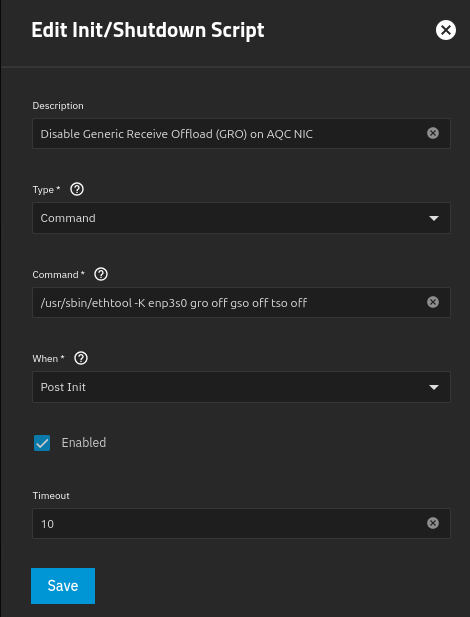
I disabled GRO via a post-init script in “System→Advanced→Init/Shutdown Scripts” like in the screenshot and confirmed it after reboot.
truenas_admin@truenas[~]$ ethtool -k enp3s0 | grep -E ‘gro|gso|tso’ tx-gso-robust: off [fixed] tx-gso-partial: on tx-gso-list: off [fixed] rx-gro-hw: off [fixed] rx-gro-list: off rx-udp-gro-forwarding: off truenas_admin@truenas[~]$ ethtool -k vlan10 | grep -E ‘gro|gso|tso’ tx-gso-robust: off [fixed] tx-gso-partial: off [fixed] tx-gso-list: on rx-gro-hw: off [fixed] rx-gro-list: off rx-udp-gro-forwarding: off truenas_admin@truenas[~]$ ethtool -k br0 | grep -E ‘gro|gso|tso’ tx-gso-robust: off [requested on] tx-gso-partial: on tx-gso-list: on rx-gro-hw: off [fixed] rx-gro-list: off rx-udp-gro-forwarding: off
No luck. The freezes continue.
I’ll try reverting all the networking changes and see if I can get it stable again just with a DHCP lease on the parent interface and no VLANs / bridge. Has anyone confirmed this NIC to be stable with 802.1Q in TrueNAS?
I have a similar-ish card (in the sense that it is Aquantia and kinda crappy) - what happens for me is that only on boot, it’ll enable gro & lro, assign an address to enp37s0 (which shouldn’t have an address since it is assigned to a bridge & the fact that the GUI has no address for it), and then nothing works.
My work around has been to shut the bridge & the link, ethtool disable gro & lro, bring the link & bring back up, delete the IP, then the part that that sucks is I have to go into the GUI & make an arbitrary network change then revert it. I have no clue why the GUI arbitrary change fixes anything, considering it never takes effect since I revert it. I wish I could figure why the gui step has any relevance at all so this could all go into a script on boot, but it just doesn’t work without it.
This nonsense has persisted through clean installs.
…Anyway, I don’t reboot much because it is a pain in the ass. But rock solid performance after I complete my pagan boot rituals - no drops, stable speeds, uptime on system close to a year, vms, apps, & smb work just, etc. etc.
Typing this all out, it makes zero sense - I really hope someone reads this & advises it me that it is user error & I just need to do something specific to have this working without issue on boot. Otherwise I hope my crazed nonsense helps someone else in a similar situation find peace with their Aquantia card on TrueNAS.
I also have a fan pointing at the card in case that is relevant.
So I need to apologize, folks. The NIC wasn’t the issue for the freezing I saw earlier. I thought that bridging in TrueNAS might work the same as Proxmox where we have VLAN-aware bridges, but it’s different here. I think by adding multiple VLANs as bridge members I might have crossed domains. Didn’t realize it until I noticed that my network clients had gotten IPv6 addresses from all the VLANs.
I think I might need one bridge per VLAN that I want VMs to attach to. I’ll get the hang of this
Anyway, the connection is stable again. The “suspect GRO” kernel warning is still there, but at least it’s working.

 But yeah, doing these things on a production env, is not recommended so everybody is stating