
So if you read the forums everyone here will know that MacOS SMB is not good. There are tons of post about how to tweak and make it better, etc. Nothing really works that well for SMB mounts with more than a few 1000 files. I have tried every tweak, measuring the effect of each one.
There is an iPad app, that has a MacOS version called FileBrowser Pro (current version is 2.33). Mounting the same share with the Finder vs using the app, show remarkably different performance. FileBrowser Pro is quite fast. I started to do some looking at the logs to see if there are any differences in the how TrueNAS sees the mounts.
Here is the SMB info from TrueNAS.
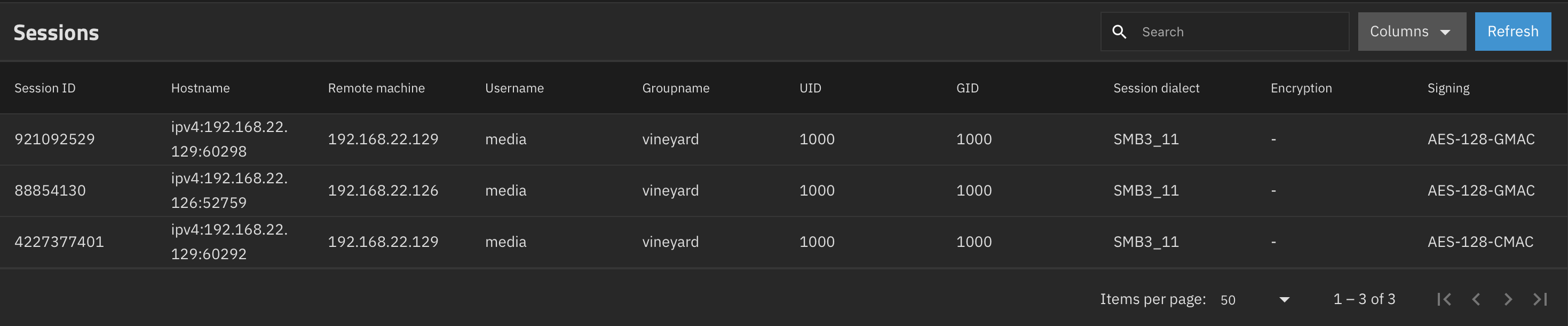
So the 1st session ID is from MacOS Finder. The 2 others are from FileBrowser Pro. They do not look different status wise, however notice there are 2 mounts created by FileBrowser Pro when you make a single mount. No idea why.
The other difference is that FileBrowser Pro creates a Notification connection that the MacOS mount does not.

Also notice the timestamp which is 1970 which seems like a bug?
I do not have a conclusion here. Just sharing to see if anyone that understands SMB can suggest a reason for the different behaviors.
People have suggested in the past that having signing on was the cause of the MacOS issue, however in the latest releases of MacOS it is no longer something you can turn off.