
I will share what i have done with pleasure  But consider that i have already NPM for the reverse proxy, and a domain.
-
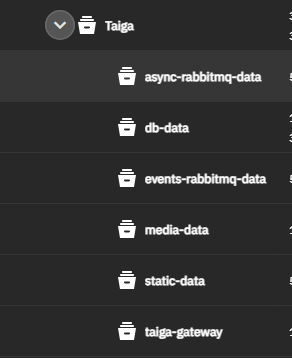
First of all, i have created 5 datasets, to contains the volume’s data
name are just taken from the example yaml volumes. Just care to the permission of thedb-datadataset, user:group must be netdata:docker. -
EDIT Also create manually a
taiga.conffile into the designed dataset for later -
i create my DNS record for taiga and setup the reverse proxy on NPM with the certificate
-
i have done a fast search (from env variable) > replace (into the yaml) for every row, to fill the fields i never used the env file directly, sure cleaner way; every volume is mounted like that
    driver: local
    driver_opts:
      type: none
      device: /mnt/***/static-data
      o: bind
network
networks:
  taiga:
      driver: bridge
the only path that i put directly is the taiga.conf, and i do like that
  taiga-gateway:
    image: nginx:1.19-alpine
    ports:
      - "9020:80"
    volumes:
      - /mnt/**mypath***/taiga-gateway/taiga.conf:/etc/nginx/conf.d/default.conf
      - taiga-static-data:/taiga/static
      - taiga-media-data:/taiga/media
    networks:
      - taiga
    depends_on:
      - taiga-front
      - taiga-back
      - taiga-events
-
be sure to bind correct ports not already used (in my case, 9000 and 5432 were already taken from other containers)
-
if you are not sure about how compile the yaml, go with the default value suggested there
-
compile your app, check if all the containers are healthy (especially the postgres one); if all is ok and no error are raised, compile your
taiga.conf
server {
    server_name taiga.***.cloud;
    listen 80 default_server;
    client_max_body_size 100M;
    charset utf-8;

    # Frontend
    location / {
        proxy_pass http://taiga-taiga-front-1/;
        proxy_pass_header Server;
        proxy_set_header Host $http_host;
        proxy_redirect off;
        proxy_set_header X-Real-IP $remote_addr;
        proxy_set_header X-Scheme $scheme;
    }

    # API
    location /api/ {
        proxy_pass http://taiga-taiga-back-1:8000/api/;
        proxy_pass_header Server;
        proxy_set_header Host $http_host;
        proxy_redirect off;
        proxy_set_header X-Real-IP $remote_addr;
        proxy_set_header X-Scheme $scheme;
    }

    # Admin
    location /admin/ {
        proxy_pass http://taiga-taiga-back-1:8000/admin/;
        proxy_pass_header Server;
        proxy_set_header Host $http_host;
        proxy_redirect off;
        proxy_set_header X-Real-IP $remote_addr;
        proxy_set_header X-Scheme $scheme;
    }

    # Static
    location /static/ {
        alias /taiga/static/;
    }

    # Media
    location /_protected/ {
        internal;
        alias /taiga/media/;
        add_header Content-disposition "attachment";
    }

    # Unprotected section
    location /media/exports/ {
        alias /taiga/media/exports/;
        add_header Content-disposition "attachment";
    }

    location /media/ {
        proxy_set_header Host $http_host;
        proxy_set_header X-Real-IP $remote_addr;
        proxy_set_header X-Scheme $scheme;
        proxy_set_header X-Forwarded-Proto $scheme;
        proxy_set_header X-Forwarded-For $proxy_add_x_forwarded_for;
        proxy_pass http://taiga-taiga-protected-1:8003/;
        proxy_redirect off;
    }
}
be sure to change the value of proxy_pass fields with the correct name of containers!!
Hope this helps you 